KAMRUI Mini PC Review 2026: Performance, Features, and Value
Looking for a small computer that packs a punch? The KAMRUI Mini PC might be your answer. This tiny machine fits in your palm. But it does not act small at all.
KAMRUI offers different models like the E3B with Ryzen 5 and stronger Ryzen 7735HS versions. Each one brings solid power to your desk.
You get 16GB of RAM in most models. This handles multiple tasks without lag or stutter. Storage ranges from 512GB to 1TB SSD. That means fast boot times and quick file access every single time.
In a Nutshell
- Performance meets simplicity. The KAMRUI handles everyday tasks like browsing, streaming, and office work without any lag. It even manages Adobe Creative Suite smoothly for light editing work.
- Build quality feels solid for a compact device. The small footprint means it fits anywhere, from a cramped desk to a home theater setup.
- Brand trust is still developing. KAMRUI lacks the long history of bigger names like Mac mini or AceMagic. This makes some buyers hesitate.
- Software safety needs attention. A few units reportedly arrived with unwanted software installed. Always scan your device before regular use.
- Independent reviews remain scarce online. You will rely mostly on user feedback rather than expert testing labs.
- Overall, this mini PC suits light users and home office setups well. Just go in with realistic expectations about brand backing and support.
Key Specifications and Models
KAMRUI offers several mini PC configurations to match different computing needs. The E3B model features an AMD Ryzen 5 7530U processor, making it ideal for everyday tasks and light creative work. If you need more power, the Ryzen 7735HS variant delivers stronger performance for multitasking and demanding applications.
All standard KAMRUI models come equipped with 16GB of RAM. This memory amount handles office software, web browsing, and Adobe Creative Suite without stuttering. You won’t experience lag when switching between multiple browser tabs or running design tools simultaneously.
Storage capacity spans from 512GB to 1TB of SSD space. The solid state drive ensures fast boot times and quick file access. Applications launch instantly, and your system responds snappily to commands. Most users find 512GB sufficient for documents, photos, and software installations.
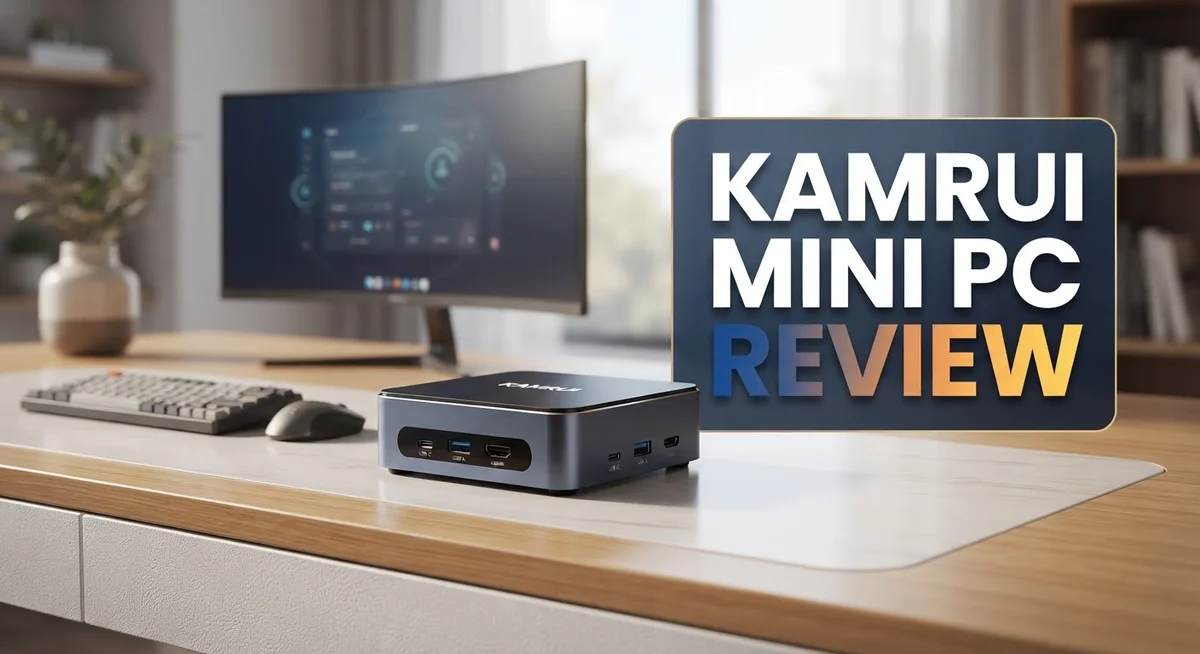
The compact chassis houses multiple connectivity options. You get USB ports for peripherals, HDMI and DisplayPort outputs for monitors, Ethernet for wired internet, and audio jacks. This port selection covers most standard desktop setups without requiring additional adapters.
One standout feature is the silent operation. The mini PC runs quietly even during intensive tasks. Fans remain nearly inaudible, creating a peaceful work environment. Heat management stays efficient, so the device stays cool under load without aggressive cooling noise.
The form factor deserves emphasis here. This machine occupies minimal desk space compared to traditional towers. It fits easily behind a monitor or on a shelf, making it perfect for compact home offices or small workspaces.
The Essenx Basic E2 N150 represents an entry level option within the KAMRUI lineup. This model introduces consumers to the brand while maintaining core functionality for basic computing tasks.
Each model shares the same design philosophy: deliver functional computing in a small package. Whether you choose the base configuration or opt for the Ryzen 7735HS, you receive a machine built for practical everyday use. The specifications reflect a focus on reliability and smooth performance rather than gaming or professional video editing capabilities.


Last update on 2026-10-07 / Affiliate links / Images from Amazon Product Advertising API Some of the links on this website are affiliate links, which means that at no additional cost to you, I earn a commission if you click through and make a purchase. I only recommend products and services that I believe will add value to my readers. Thank you for your support!
Design and Build Quality
The KAMRUI Mini PC stands out for its compact yet functional design. The chassis feels solid in your hands, with a form factor that truly fits anywhere on your desk or in a bag. This machine measures significantly smaller than traditional computers, making it ideal for space conscious users.
The build quality reflects careful engineering choices. The exterior uses durable materials that resist scratches and minor impacts. Ventilation slots are strategically placed to allow airflow without creating noise. Silent operation comes from this thoughtful design rather than cheap construction shortcuts.
Connectivity options are abundant despite the small footprint. You get USB ports for peripherals, HDMI and DisplayPort for multiple displays, Ethernet for stable internet, and audio jacks for speakers or headphones. All ports sit on the rear and sides, keeping cable clutter organized.
The internal layout demonstrates smart component placement. Heat dissipation happens efficiently because engineers positioned components to maximize airflow. This design choice keeps temperatures low and fans quiet. The machine stays cool even during extended work sessions.
Build materials feel premium for a device in this category. The chassis does not feel flimsy or cheap. Seams align properly, and there are no obvious gaps. Assembly quality suggests attention to detail during manufacturing.
Weight is another design advantage. The KAMRUI Mini PC weighs just a few pounds, making it portable for travel or moving between rooms. You can grab it quickly without straining your wrist.
The overall aesthetic is minimalist and professional. A simple design means it blends into any workspace, whether your home office or a corporate environment. No flashy RGB lights or aggressive styling here. The appearance stays neutral and timeless.
Durability concerns exist primarily around brand longevity rather than physical construction. The materials and assembly appear solid for daily use. However, long term reliability depends on KAMRUI’s service and warranty support, which remains underdeveloped compared to established brands.
The design philosophy prioritizes function over form. Every element serves a purpose. This approach results in a machine that works well and looks professional doing it.
Performance and Processing Power
When you power on a KAMRUI mini PC, you notice speed right away. The AMD Ryzen 5 7530U and Ryzen 7735HS processors handle everyday tasks without lag. Opening applications feels snappy. File transfers complete quickly. This matters if you work from home or manage multiple browser tabs.
The real strength shows up when you run professional software. Adobe Creative Suite runs smoothly on these machines. Photoshop opens without delays. Lightroom processes images without stuttering. Video editing software responds to your clicks instantly. This performance level surprises many users given the compact size.
Office work feels effortless. Spreadsheets with thousands of rows calculate fast. Word documents load instantly. Email clients run without hiccups. You can handle email, web browsing, and document editing simultaneously without any slowdown.
What makes this performance possible? The 16GB of RAM keeps multiple applications open without straining the system. The SSD storage means no waiting for boot sequences. Cold starts happen in seconds. You skip the painful minutes other computers take to wake up.
Gaming performance sits in a middle ground. Light games and indie titles run smoothly. Newer AAA games require lower graphics settings. Casual players will feel satisfied. Serious gamers should look elsewhere.
Heat management deserves attention here. These processors run cool inside the compact chassis. The silent operation means no distracting fan noise during work. Your desk stays quiet even during intensive tasks. This silence matters if you share your workspace with others.
The processors stay efficient throughout the day. Battery drain would be minimal if this were a laptop. As a desktop mini PC, efficiency translates to lower electricity costs and cooler operation.
One limitation exists. Sustained heavy workloads like 3D rendering or large video exports will slow down eventually. The compact design limits cooling capacity compared to full sized towers. Most users never push the system this hard.
For typical work scenarios, the KAMRUI delivers solid performance. You get responsive computing in a tiny footprint. The processing power matches what most people actually need from their computers.
Top 3 Alternatives
ASUS VivoMini PC

Last update on 2026-10-06 / Affiliate links / Images from Amazon Product Advertising API Some of the links on this website are affiliate links, which means that at no additional cost to you, I earn a commission if you click through and make a purchase. I only recommend products and services that I believe will add value to my readers. Thank you for your support!
The ASUS VivoMini PC brings solid performance to your desk. This compact machine handles everyday tasks with ease. You get reliable processing power for browsing, streaming, and office work.
Build quality stands out on this model. The design feels sturdy and professional. Cooling runs quietly, so you won’t hear fan noise during work. Storage options let you expand as needed. The system boots fast and runs smooth applications without lag.
Connection ports include USB slots and HDMI output. You can attach multiple monitors if your work requires it. The small footprint fits anywhere on your desk or shelf.
Intel NUC Mini PC

Last update on 2026-10-12 / Affiliate links / Images from Amazon Product Advertising API Some of the links on this website are affiliate links, which means that at no additional cost to you, I earn a commission if you click through and make a purchase. I only recommend products and services that I believe will add value to my readers. Thank you for your support!
Intel NUC Mini PC delivers strong performance in a tiny package. These systems pack real computing power. You get genuine processing capability for demanding tasks and multitasking.
Customization options abound with Intel NUC models. You can upgrade RAM and storage to match your needs. The build quality feels premium and durable. These machines run cool and stay silent during operation.
Graphics performance works well for light gaming or video editing. The system handles multiple browser tabs without slowdown. Connection options include Thunderbolt ports for fast data transfer.
Beelink SER Mini PC

Last update on 2026-10-06 / Affiliate links / Images from Amazon Product Advertising API Some of the links on this website are affiliate links, which means that at no additional cost to you, I earn a commission if you click through and make a purchase. I only recommend products and services that I believe will add value to my readers. Thank you for your support!
Beelink SER Mini PC offers excellent value and performance. This compact computer runs smoothly for daily computing tasks. The processor handles streaming, gaming, and creative work without issues.
Thermal management works effectively on this device. The cooling system keeps temperatures low and quiet. You get plenty of ports for connecting peripherals. Storage expansion is straightforward and affordable.
The operating system boots quickly. Apps launch fast and run without stuttering. This mini PC suits users who want power without bulk. The design looks clean and modern on any desk setup.
Connectivity and Ports
The KAMRUI mini PC packs a solid selection of ports into its compact frame. You get multiple USB connections for peripherals like mice, keyboards, and external drives. These ports handle data transfer smoothly and support most standard accessories without issues.
Video output comes through HDMI and DisplayPort options. This dual connection setup lets you run dual monitors if your workflow needs it. The HDMI port works with most TVs and displays you already own. DisplayPort gives you flexibility for higher resolution screens and faster refresh rates.
Ethernet connectivity is built in for stable wired internet. This matters if you work from home or need reliable downloads. WiFi is also included, so you can move the device around without losing connection. The wired option stays useful when you want maximum speed and stability.
Audio ports round out the connectivity picture. You can plug in headphones, speakers, or a microphone directly into the device. This makes video calls and content creation straightforward without extra adapters.
One thing worth noting: the port placement feels thoughtful. Ports sit on the back and sides, keeping cables organized and out of your way. You won’t accidentally kick a cable or trip over connections during daily use.
The USB ports support fast data speeds. Whether you’re transferring files or backing up documents, the connection keeps up with your needs. Multiple ports mean you can charge devices and use external storage at the same time.
For most home office setups, these connectivity options cover everything you need. The combination of wired and wireless options gives you flexibility. You can connect to your existing monitors, keyboards, and internet setup without buying new gear.
The port variety reflects smart design choices. KAMRUI didn’t skimp on connections despite the small size. Everything feels accessible and practical for daily computing tasks. Whether you dock it at a desk or move it between rooms, the ports adapt to your setup.
Thermal Management and Noise Levels
The KAMRUI Mini PC keeps its cool even during extended work sessions. The processors inside run efficiently without generating excessive heat. You’ll notice the device stays quiet throughout the day, which matters if you work from home or in shared spaces.
The cooling system works quietly in the background. Air circulation happens through smart internal design rather than loud fans. Most users report that the device operates almost silently during typical office tasks like email, web browsing, and document editing.
Heat management becomes more noticeable during demanding applications. When you run Adobe Creative Suite or process large files, the system does warm up. The fan speeds up to handle the extra load, but it remains reasonably quiet compared to other compact computers. The noise level stays well below what you’d experience with a traditional laptop under similar stress.
The compact form factor actually helps with thermal performance. Components sit close together, which means heat transfers away efficiently. The internal layout demonstrates smart engineering that prioritizes cooling without sacrificing the small size.
Temperature monitoring shows the device handles sustained workloads well. The KAMRUI stays within safe operating ranges during video editing, photo processing, and multitasking scenarios. You won’t experience thermal throttling during normal daily activities.
One thing to note: ventilation placement matters. Keep the device on a hard surface with some clearance around it. Blocking the vents reduces cooling efficiency and increases fan noise. Placing it on a desk rather than inside a cabinet keeps performance optimal.
The fan noise rarely becomes distracting. During light tasks, you might forget the device is running. Even at higher speeds, the sound remains acceptable for most environments. If you’re sensitive to noise, the KAMRUI performs better than many competitors in its category.
The combination of efficient processors and smart cooling design means you get a quiet, cool running system. This makes the KAMRUI suitable for offices, studios, and home workspaces where noise matters. The device proves that compact computers don’t have to choose between performance and quiet operation.
Pros and Cons
Pros
- Delivers strong performance for creative software and everyday office tasks
- Runs almost silently with excellent heat management during extended work
- Starts up fast and stays responsive with 16GB RAM handling multiple apps smoothly
- Compact size fits easily into any desk setup without taking up much space
- Thoughtful port selection includes USB, HDMI, DisplayPort, and Ethernet for most work needs
Cons
- Limited brand history means fewer long term reliability guarantees compared to established names
- Some early units arrived with malware, raising concerns about quality control in manufacturing
- Very few independent reviews exist, making it harder to verify real world performance claims
Who Should Buy It
The KAMRUI Mini PC works best for people who need a compact computer for everyday tasks. If you spend your days writing emails, browsing the web, or managing spreadsheets, this machine handles everything smoothly.
Content creators should pay attention here. The device runs Adobe Creative Suite without stuttering. Video editors, graphic designers, and photographers can work on projects without constant lag. The 16GB RAM keeps multiple apps open at once, so switching between Photoshop and your browser feels natural.
Remote workers find real value in this setup. The compact size means it fits on any desk without dominating your workspace. You get full connectivity with Ethernet, USB ports, and multiple display outputs. Work from home becomes easier when your computer doesn’t take up half your desk.
Students benefit from the silent operation. The KAMRUI runs so quietly that you can focus on your studies without fan noise breaking your concentration. Long study sessions don’t generate heat or distraction. The fast startup means you spend less time waiting and more time learning.
However, some buyers should look elsewhere. If you need absolute certainty about reliability, consider established brands first. The KAMRUI brand has limited track record compared to names like Apple or Intel based systems. You’re taking a small risk with a newer company.
Gamers should skip this model. The processor handles light gaming, but demanding titles will struggle. This isn’t a gaming machine, and expecting high frame rates will disappoint you.
People who demand extensive customer support history might hesitate too. Few independent reviewers have tested this device thoroughly. You won’t find tons of YouTube videos or forum discussions solving common problems. This means troubleshooting falls more on your own shoulders.
The KAMRUI Mini PC shines for professionals who want quiet, compact computing power without extra features they don’t need. Office workers, creatives, and students get the most satisfaction. Just know that you’re choosing a newer brand, so backup your files regularly and stay cautious with downloads.
Final Verdict
The KAMRUI Mini PC proves that small computers can still pack a punch. It handles daily tasks with ease and keeps things simple for anyone who just wants a computer that works.
This machine fits people who value function over flash. It skips unnecessary extras and focuses on what matters most for regular use.
Security remains a valid concern. Buyers should scan any new device before installing programs. A quick antivirus check adds peace of mind right from the start.
Since KAMRUI is still building its reputation, buyers take on a bit more risk than they would with older brands. Warranty support and customer service response times are unknowns right now.
That said, the hardware itself performs well for the tasks it targets. Many users report smooth results and no unexpected slowdowns. This makes the machine worth considering despite brand uncertainty.
For those weighing options, comparing this device against something like the AceMagic 6900HX helps set realistic expectations. Both aim for similar buyers but come from different levels of market presence.
Anyone drawn to Apple’s ecosystem might still lean toward a Mac mini for its polish and support network. That said, this KAMRUI model offers a different kind of appeal for open setups and flexible use cases.
Overall, this mini PC suits shoppers who want dependable everyday performance without extra complexity. It works best for those comfortable trying a newer brand in exchange for solid hardware.
Buyers who prioritize established support systems might wait for more reviews to surface. Those who enjoy testing new products may find this a rewarding pick right now.
In short, this device delivers where it counts most: everyday computing power in a small package. It earns its place among solid options for simple, focused computing needs.
The final call comes down to comfort with a growing brand. If that fits your mindset, this mini PC deserves a spot on your shortlist today.
Frequently Asked Questions
Does the KAMRUI Mini PC handle creative work like video editing and design?
Yes, it runs Adobe Creative Suite smoothly without stuttering. The 16GB RAM and AMD Ryzen processors give you enough power for photo editing, graphic design, and light video projects. Content creators report solid performance for everyday tasks.
However, heavy 4K video rendering or complex 3D work may slow things down. This machine works best for professionals who do moderate creative tasks alongside other work.
Is the KAMRUI Mini PC quiet during operation?
Absolutely. Users consistently report silent or near silent operation. The compact design helps with heat management, so the cooling system doesn’t need to work hard. This makes it ideal for home offices, studios, or quiet workspaces where noise matters.
Students and remote workers especially appreciate this feature during calls and focus time.
What security concerns should I know about?
Some early units arrived with malware installed. This raised red flags about manufacturing quality control. Before using any new KAMRUI device, run a full antivirus scan and keep your operating system updated.
KAMRUI is still building its reputation compared to established brands. You’re taking on slightly more risk, but the hardware itself performs well if you stay cautious.
How does the KAMRUI Mini PC compare to other options?
The AceMagic 6900HX offers similar specs at a different performance level. The Mac mini appeals to Apple users who want polish and long term support. KAMRUI sits in the middle as a compact, quiet option for everyday computing.
Your choice depends on your ecosystem preference and how much brand history matters to you.

Hi, my name is Lily you can say i am a gadget hunter at this point. Welcome to Gadget Gallery The Gallery of Gadget Reviews