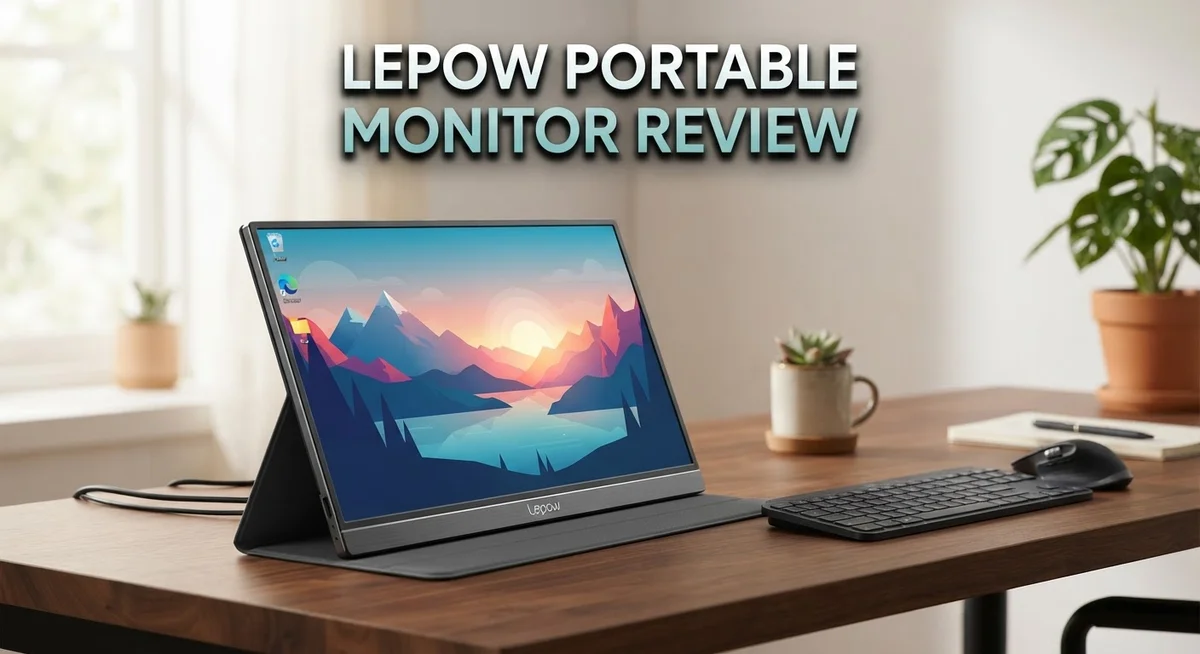
Lepow Portable Monitor Review 2026: Worth the Splurge?
Do you need a second screen that travels with you? The Lepow portable monitor might be your answer. It slips into a bag and sets up in seconds.
This monitor brings a 15.6 inch Full HD display to your desk, hotel room, or coffee shop table. It connects through USB-C. That means most modern laptops and phones can use it right away.
We tested this screen closely. We looked at its brightness, color accuracy, and build quality. We also checked how it handles daily tasks like writing, browsing, and streaming.
The IPS panel shows strong contrast and wide viewing angles. Colors stay accurate even when you tilt the screen. A leather cover protects it during travel and doubles as a stand.
No setup is perfect though. Some quirks pop up, like brightness settings that reset each time you power it on.
This review covers everything you need to know. We share what works well and what could improve. By the end, you will know if this screen fits your work or play setup.
In a Nutshell
Here is the quick rundown of what this monitor offers and where it falls short.
-
Sharp visuals: The 15.6 inch IPS panel delivers crisp Full HD detail. Colors stay accurate even at odd angles.
-
Slim and light: At just 14mm thick and under two pounds, it slides into any bag. You barely notice the extra weight.
-
One cable setup: A single USB-C connection handles power and video. Most phones and laptops work right away.
-
Leather cover included: The included case protects the screen and doubles as a stand. It feels premium, not flimsy.
-
Brightness quirk: The screen resets to 30% brightness every time you power it on. You will adjust this often.
-
Sunlight struggle: Outdoor use in direct sun shows glare. Indoor and shaded spots work much better.
This monitor suits people who need a reliable second screen without added bulk. It competes well against Cocopar and other portable options, though it skips some polish found on pricier picks like the Duex Plus.
Display Quality and Resolution
The Lepow portable monitor packs a 15.6 inch Full HD display that handles everyday tasks with solid performance. The IPS panel technology gives you excellent viewing angles, so you can see the screen clearly from the side without color shifts or washout.
Color accuracy on this screen performs well for general work. Whether you’re editing documents, watching videos, or browsing the web, the display reproduces colors in a natural way. The contrast ratio stands out as a real strength here. Blacks appear deep and whites stay bright, which makes text sharp and images pop off the screen.
Brightness levels reach a comfortable range for indoor use. You can adjust the screen to match your lighting conditions. One quirk worth noting: the monitor resets brightness to 30 percent every time you power it on. This means you’ll need to manually increase brightness after each startup. It’s a minor annoyance rather than a deal breaker.
The 1920 x 1080 resolution delivers crisp detail on the 15.6 inch surface. Text remains readable, and photos show fine detail. This Full HD standard works well for productivity and entertainment on a portable screen.
Direct sunlight creates challenges for this monitor. Outdoor use in bright conditions brings noticeable glare and reduced visibility. The screen works best indoors or in shaded areas. If you plan to work outside frequently, this limitation matters.
The IPS panel excels at showing consistent images from different angles. You can tilt the screen or view it from the side without losing picture quality. This flexibility helps when multiple people need to see the display or when you’re working in tight spaces.
Overall, the display quality strikes a good balance for portable use. You get sharp visuals and strong colors without excessive weight or bulk. The screen performs reliably for work tasks, entertainment, and everyday computing. Just remember the brightness reset quirk and plan your outdoor work accordingly.


Last update on 2026-10-12 / Affiliate links / Images from Amazon Product Advertising API Some of the links on this website are affiliate links, which means that at no additional cost to you, I earn a commission if you click through and make a purchase. I only recommend products and services that I believe will add value to my readers. Thank you for your support!
Design, Portability, and Build
The Lepow portable monitor comes in at 14.5 x 8.8 x 0.34 inches, making it genuinely compact for a 15.6 inch screen. You can slip this device into most laptop bags without any fuss.
Weight matters when you carry gear daily. At 771 grams (1.7 lbs), the Lepow feels light in your hands. This is lighter than most standard laptops, so adding it to your travel setup does not burden you. The 14mm thickness adds almost nothing to your bag’s overall bulk.
The build quality shows attention to detail. The screen uses an aluminum frame that feels solid without being heavy. The bezels stay slim, which helps keep the overall footprint small. You get a genuine sense that this monitor was built for people who move around.
The included leather cover serves double duty. It protects the screen during transport and folds into a stand for desktop use. The stand holds the monitor at a useful angle for most work setups. This means you do not need to buy extra accessories to get started.
Connectivity relies on a single USB-C port. This port handles both power delivery and video input simultaneously. One cable connects to your laptop or phone, and you are ready to go. The design eliminates cable clutter, which appeals to people who value simplicity.
The monitor’s physical design makes it ideal for specific situations. Coffee shop work becomes easier with a second screen. Hotel rooms gain extra screen real estate without taking up much space. Video calls benefit from having reference materials visible on a separate display.
The lightweight construction does come with trade offs. The thin profile means less rigid framing compared to heavier monitors. Some users report minor flex if you apply pressure to the back. This does not affect normal use, but it is worth knowing.
Overall, the Lepow portable monitor succeeds at its core mission. It delivers a second screen that actually travels with you. The design choices prioritize portability without sacrificing basic functionality. For people who work from multiple locations, this balance matters significantly.
Connectivity and Compatibility
The Lepow portable monitor connects through a single USB-C port. This single connection handles both power delivery and video signal at the same time. You only need one cable to get the monitor working.
USB-C compatibility means the monitor works with most modern devices. Laptops with USB-C ports connect instantly. Tablets and phones that support USB-C output can also connect. The setup process takes just seconds. You plug in the cable and the monitor powers on.
Windows laptops offer the smoothest experience. MacBooks with USB-C ports work without any driver installation. Android tablets connect easily if they support video output over USB-C. Some older phones may not support external display output, so check your device specs first.
The monitor supports both power and data transfer through the same port. This eliminates cable clutter on your desk. You get video display and device charging from one connection. This design choice saves space and reduces the number of cables you need to carry.
Compatibility extends beyond just connection. The monitor works as a plug and play device on most systems. Windows recognizes it automatically without software installation. Mac users experience the same instant recognition. Linux systems also support the display with standard drivers.
The USB-C standard ensures future compatibility. As more devices adopt USB-C, this monitor remains relevant. You won’t need adapters for most new gadgets. The connection handles the bandwidth needed for Full HD 1920 x 1080 resolution without issues.
One limitation exists with older devices. If your laptop or tablet lacks USB-C ports, you’ll need an adapter. USB-A to USB-C adapters work, but they add extra hardware to your setup. This applies mainly to devices from several years ago.
The monitor pairs well with modern work setups. Remote workers benefit from easy connectivity with their primary devices. Students can connect their laptops instantly for presentations. Content creators appreciate the simple connection process during on-location shoots. The USB-C design removes barriers between you and an extended display.
Top 3 Alternatives
ASUS ProArt Display

Last update on 2026-10-06 / Affiliate links / Images from Amazon Product Advertising API Some of the links on this website are affiliate links, which means that at no additional cost to you, I earn a commission if you click through and make a purchase. I only recommend products and services that I believe will add value to my readers. Thank you for your support!
The ASUS ProArt Display offers professional-grade color accuracy for creators. This monitor delivers accurate color reproduction with factory calibration. You get wide viewing angles and excellent brightness levels. The build quality feels premium and durable. Connection options include USB-C and HDMI ports. The stand adjusts to multiple angles for comfortable viewing. This monitor works well for photo editing, video work, and graphic design tasks.
ViewSonic VG1655

Last update on 2026-10-06 / Affiliate links / Images from Amazon Product Advertising API Some of the links on this website are affiliate links, which means that at no additional cost to you, I earn a commission if you click through and make a purchase. I only recommend products and services that I believe will add value to my readers. Thank you for your support!
The ViewSonic VG1655 brings portability with solid performance. This screen features a compact design that fits easily in bags. The display produces vibrant colors and maintains good brightness outdoors. You’ll find USB-C connectivity for quick setup and charging. The monitor includes a built-in stand that holds steady. Response times stay fast enough for general work and light gaming. The bezels remain thin, maximizing screen space. This option suits professionals who travel frequently.
EVICIV Portable Monitor
No products found.
The EVICIV Portable Monitor provides an affordable entry point to portable displays. Setup takes just seconds with plug-and-play functionality. The lightweight design makes transport simple and convenient. Colors appear bright and clear for everyday tasks. USB-C and HDMI inputs give you flexibility with devices. The included stand works reliably at various angles. This monitor handles streaming, presentations, and office work effectively. Battery-powered options let you work without constant power sources.
Each alternative serves different needs. Choose based on your primary use case and mobility requirements.
Brightness, Color Accuracy, and Viewing Angles
The Lepow portable monitor delivers solid performance across brightness, color accuracy, and viewing angles. These three factors matter most when you’re using a second screen for work or entertainment.
Brightness levels work well for typical indoor environments. The screen reaches comfortable brightness for desk work, video calls, and content creation. However, you’ll notice a quirk: the brightness resets to 30% every time you power on the monitor. You need to manually adjust it upward each session, which takes just a few seconds but requires remembering this step.
Direct sunlight presents a real challenge for this display. If you work outdoors or near windows with strong sun exposure, you’ll see glare and reduced visibility. The brightness ceiling simply cannot compete with direct rays. This limitation matters most for people who move between indoor and outdoor spaces regularly.
Color accuracy performs well for general work tasks. You get consistent, natural colors for documents, spreadsheets, and web browsing. The display handles photo and video work reasonably, though professional color grading work might benefit from a dedicated monitor. The IPS panel ensures colors remain accurate whether you view the screen straight on or from an angle.
Viewing angles stand out as a genuine strength. The IPS technology means you see the same image quality from the side, above, or below. This matters when multiple people watch the same screen or when you adjust your seating position. Colors don’t shift, and brightness stays consistent across different angles. This feature makes the Lepow practical for presentations and collaborative work.
The contrast ratio performs excellently on this display. Dark blacks look deep, and whites appear bright. This contrast creates sharp, defined images that feel crisp and clear. Combined with the 1920×1080 resolution, the overall picture quality strikes a good balance for portable use.
These display characteristics work together to create a reliable second screen experience. The main trade off involves outdoor usability and that brightness reset quirk. For indoor settings, the Lepow delivers what most users expect from a portable monitor.
Real-World Performance and Usability
The Lepow portable monitor shines when you use it for everyday work tasks. Connecting your laptop or tablet takes seconds with the USB-C cable. You plug it in, and the display activates without any driver installation needed. This simplicity makes it perfect for professionals who move between locations frequently.
Battery life depends on your connected device. The monitor draws power through USB-C, so your laptop’s battery drains slightly faster when running both screens. Most users report getting through a full workday without issues. The setup process feels intuitive even for first-time portable monitor users.
Real-world usage reveals some practical quirks. The brightness automatically resets to 30 percent when you power on the monitor. You’ll need to manually adjust it each time you connect, which becomes annoying during frequent switching. Once set, the brightness stays stable throughout your work session.
Multitasking becomes noticeably easier with this second screen. Spreadsheets open on your main monitor while emails display on the Lepow. Video conferencing software runs smoothly on the portable display. The 15.6 inch screen provides enough space for side-by-side windows without feeling cramped.
Sunlight exposure creates a significant limitation. Using this monitor outdoors or near windows reduces visibility dramatically. The screen’s reflective surface compounds this issue. Indoor environments work best, particularly in offices with standard lighting conditions.
The leather cover deserves mention for practical reasons. It protects the screen during transport and doubles as a stand. You can angle it for comfortable viewing at your desk or prop it up for presentations. This two-in-one function eliminates the need for separate accessories.
Traveling professionals appreciate the lightweight construction. Slipping the monitor into a backpack adds minimal bulk. The slim 14mm thickness means it fits alongside your laptop without creating a heavy package. Weight distribution feels balanced when carrying multiple devices together.
Overall, the Lepow performs reliably for stationary and semi-mobile work environments. Indoor office settings showcase its strengths. The monitor excels when you need an extra screen without adding significant weight to your daily carry.
Pros and Cons
Pros
- Excellent viewing angles make the screen visible from almost any position
- IPS display delivers strong contrast ratio and solid color accuracy for work tasks
- Lightweight at just 1.7 lbs with thin 14mm profile fits easily into bags and backpacks
- Premium leather cover provides protection and doubles as a stand for hands-free viewing
- USB-C connection works seamlessly with modern laptops, tablets, and phones
Cons
- Brightness automatically resets to 30% each time you power on the monitor
- Direct sunlight causes significant glare and makes the screen hard to read outdoors
- Display quality shows some limitations despite good contrast performance overall
Who Should Buy It
The Lepow portable monitor works best for specific user types and situations. If you work from multiple locations during your day, this monitor solves real problems. You get a second screen without the bulk of traditional displays.
Remote workers benefit most from this setup. You can extend your laptop screen in coffee shops, libraries, or client offices. The lightweight design means you carry it easily in any bag. The included leather cover protects the screen and props it up for hands-free viewing.
Content creators find value here too. Designers, video editors, and photographers appreciate the extra screen real estate. The IPS display shows colors accurately enough for general creative work. Viewing angles let you share your screen with clients or colleagues without them straining to see.
Students and researchers should consider this monitor. Taking notes on one screen while reading materials on another speeds up your workflow. The compact size fits dorm rooms and study spaces without taking up much desk room.
Business travelers get practical benefits. You attend video calls with a larger display than your laptop offers. The USB-C connection means one cable handles both power and video. No extra adapters clutter your travel bag.
However, this monitor has clear limitations. If you work primarily outdoors or near windows, skip it. Sunlight creates too much glare, making the screen nearly unreadable. The brightness resets to 30% every time you power on, which gets annoying during frequent use.
Gamers should look elsewhere. The monitor lacks gaming specific features and high refresh rates. Casual gaming works, but serious gamers want better performance.
Home office users with dedicated desks might prefer traditional monitors instead. You lose portability benefits when the screen stays in one place. Standard monitors offer better brightness and larger sizes for similar investments.
The Lepow shines for mobile professionals who move between spaces regularly. You want a second screen without permanent desk space. You appreciate lightweight gear that travels with you. You work mostly indoors in standard lighting conditions. This monitor delivers exactly what these users need.
Final Verdict
The Lepow portable monitor earns its place as a smart choice for anyone who needs a reliable second screen. Its build quality and display performance stand out in this category.
This monitor works best as a companion device. It does not try to replace your main setup. Instead, it adds flexibility when you need it most.
Mobile professionals will find real value here. The combination of portability and solid screen performance makes daily tasks simpler.
If you already compared options like Cocopar or ASUS, you know portable monitors vary widely in quality. Lepow holds its own against these competitors.
The Duex Plus remains a top pick for some buyers. However, Lepow offers a more traditional single screen experience that many people prefer.
We recommend this monitor for anyone who splits time between locations. Freelancers, consultants, and hybrid workers will appreciate the extra screen space.
Students who research and write papers will also benefit. The extra display helps with multitasking during long study sessions.
Gamers and heavy outdoor users should look at other options instead. The brightness reset issue and sunlight glare create real limitations for these groups.
Setup simplicity is where this monitor truly shines. You plug in a USB-C cable and start working within seconds. No extra software or complicated steps get in your way.
The included leather cover adds another layer of value. It protects your screen and doubles as a stand, which saves you from buying separate accessories.
Overall, the Lepow portable monitor delivers what it promises. It gives you a dependable extra screen without unnecessary complexity.
Your final decision should depend on how you plan to use it. If you need flexibility and simple setup, this monitor fits well.
For users who want premium features or heavy outdoor use, other models in our comparison might suit you better. But for everyday portable computing, Lepow remains a solid and trustworthy pick.
Frequently Asked Questions
Does the Lepow monitor work with my smartphone?
Yes, it does. The Lepow connects via USB-C, so any modern phone with USB-C support will work. Android phones and newer iPhones with USB-C compatibility pair instantly. No drivers or software installation needed. Just plug in the cable and your phone recognizes the external display right away.
Can I use this monitor outdoors?
You can try, but results won’t be great. Direct sunlight causes significant glare on the screen. The display becomes hard to read when you’re outside in bright conditions. Indoor and shaded environments work much better. If you spend most time indoors or in offices, this monitor performs well.
Why does my brightness keep resetting?
The monitor resets brightness to 30% each time you power it on. This is a known behavior with the Lepow model. You’ll need to manually adjust brightness after turning it on. It takes just a few seconds, but it’s worth knowing about before you buy.
What makes this monitor different from competitors?
The Lepow offers solid contrast and good viewing angles. The included leather cover doubles as a stand, which is convenient. Setup is simple with any USB-C device. However, competitors like the Duex Plus offer different strengths. The Cocopar appeals to some buyers too. Your choice depends on whether you prioritize portability, display quality, or specific features like stand design.
Who should actually buy this monitor?
Mobile professionals benefit most. Remote workers moving between locations find real value. Students researching and writing papers will appreciate the extra screen space. Business travelers get practical benefits too. However, gamers should look elsewhere. Heavy outdoor users won’t be satisfied either.

Hi, my name is Lily you can say i am a gadget hunter at this point. Welcome to Gadget Gallery The Gallery of Gadget Reviews