Lenovo Chromebook Plus 14 Review: Worth Trying?
Are you searching for a laptop that mixes style with smart performance? The Lenovo Chromebook Plus 14 might be your answer. This device stands out in a crowded market.
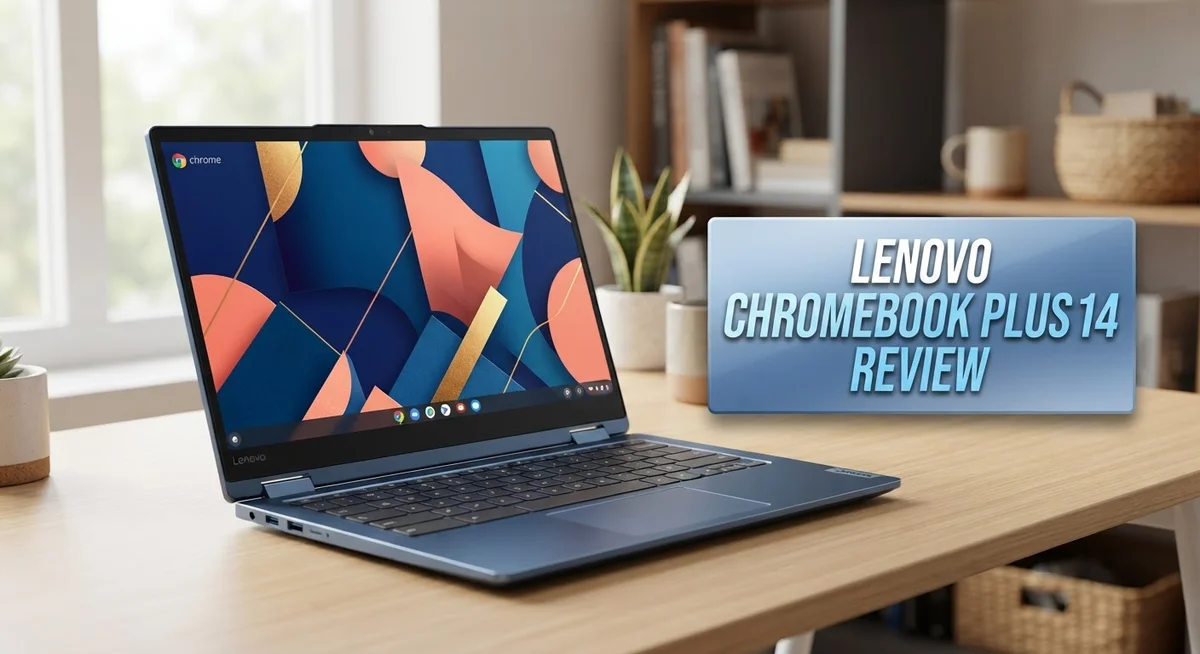
It features a stunning 14 inch OLED touchscreen. Colors pop, and blacks look deep and rich. Your movies and photos will truly shine.
Under the hood, you get a MediaTek Kompanio Ultra processor. It works alongside a 50 TOPS NPU, making this laptop ready for AI tasks. Everyday multitasking feels smooth and fast.
In a Nutshell
- AI Ready Power: The built in 50 TOPS NPU handles smart tasks fast. It boosts photo editing and voice tools without lag.
- Camera and Privacy: A 5MP camera delivers sharp video calls. A built in shutter blocks the lens when you need privacy.
- Secure Login: The fingerprint reader lets you unlock the laptop instantly. No more typing long passwords every time.
- Slim and Portable: This laptop stays ultraslim and lightweight. You can slip it into a bag without feeling extra weight.
- Backlit Keyboard: Typing in dim rooms feels easy. The keys light up so you never miss a letter.
- Build Quality: The chassis feels solid and sturdy. It handles daily bumps without flexing or creaking.
- One Small Catch: The screen resolution could be higher. Some users may notice this on close inspection.
Display and Screen Quality
The OLED display on this Chromebook stands out as one of its strongest features. You get vibrant colors and deep blacks that make everything pop on screen. Whether you’re watching videos, editing photos, or just browsing the web, the picture quality feels premium and engaging.
The 14 inch screen size hits a sweet spot for portability and usability. It’s large enough to work comfortably for hours, yet small enough to slip into a bag without hassle. The touchscreen adds another layer of convenience. You can tap, swipe, and interact directly with content instead of relying only on the trackpad.
Brightness levels on this OLED panel are impressive. You can work outdoors or in bright indoor spaces without squinting or struggling to see the display. Colors remain accurate from different viewing angles, so you won’t lose picture quality if you tilt the screen.
One thing to keep in mind is the screen resolution. Some users wish it offered higher pixel density for sharper text and images. If you spend long hours reading documents or working with fine details, this limitation might catch your attention. For most everyday tasks, though, the display performs well and feels responsive to touch input.
The OLED technology brings real benefits beyond just looks. The screen consumes less power than traditional LCD panels, which helps explain the impressive battery endurance. Each pixel produces its own light, so blacks are truly black rather than just dark gray.
Glare can happen in very bright conditions, but it’s not a major issue for most users. The touchscreen responds quickly and accurately to your fingers. Overall, the display quality makes this Chromebook a pleasure to use throughout your day. The combination of vibrant colors, solid brightness, and responsive touch creates an enjoyable viewing experience for work and entertainment alike.

Last update on 2026-10-06 / Affiliate links / Images from Amazon Product Advertising API Some of the links on this website are affiliate links, which means that at no additional cost to you, I earn a commission if you click through and make a purchase. I only recommend products and services that I believe will add value to my readers. Thank you for your support!
Performance and Processing Power
The MediaTek Kompanio Ultra processor powers this Chromebook with smooth, responsive performance for everyday tasks. Web browsing, video streaming, and document editing all run without lag or stuttering.
Speed matters in real life. Opening multiple browser tabs happens instantly. Switching between apps feels seamless. You won’t experience the slowdowns that plague older Chromebooks.
The 50 TOPS NPU is the real star here. This AI accelerator handles smart features without draining your battery. Tasks that normally require heavy processing happen locally on your device. Your photos get enhanced automatically. Voice commands work faster. Video calls look sharper.
Fanless design keeps everything quiet. No spinning fans means zero distracting noise. Your workspace stays peaceful whether you’re in a library, coffee shop, or office. The silent operation also means better reliability since there are fewer moving parts to fail.
Real world performance shines when you juggle multiple apps. Stream a video while editing a document and chatting online. The processor handles this without breaking a sweat. Chrome OS is optimized to work with this hardware, so everything feels snappy.
Gaming isn’t the focus here. This Chromebook excels at productivity. If you need to edit high resolution videos or run complex software, this isn’t your machine. But for work, school, and entertainment, the performance is more than sufficient.
The combination of fast processing and a silent operating system creates a laptop that stays out of your way. You focus on your work, not on your hardware. Tasks complete quickly. Apps launch instantly. The experience feels fluid and responsive.
Battery efficiency pairs perfectly with processing power. The MediaTek processor sips power while delivering strong performance. That 17 hour battery life becomes possible because the hardware works smart, not hard. You get sustained performance throughout your entire day without throttling or slowdowns.
Design, Build Quality, and Portability
The Lenovo Chromebook Plus 14 feels premium in your hands. The chassis delivers solid construction that can handle daily use without worry. The materials feel durable and don’t flex or creak when you grip the laptop.
This Chromebook weighs very little. You can toss it in a bag and forget it’s there. The ultraslim profile makes it easy to fit in tight spaces like airplane seat pockets or small backpacks. The 14 inch screen size gives you enough room to work comfortably without adding bulk.
The build quality shines in small details. Every edge feels smooth and well finished. The hinges open and close with a satisfying click. The screen stays put at any angle you choose. Nothing feels cheap or flimsy about this machine.
The keyboard and trackpad are genuinely excellent. Keys have just the right amount of travel. Your fingers land softly and respond instantly. The backlit keys help you type in low light rooms. The trackpad is smooth and responsive to your touch. Clicking feels natural and accurate.
The fanless design keeps the laptop completely silent. You won’t hear any noise during work. This matters when you’re in quiet spaces like libraries or meetings. The silent operation also means better reliability. Fans break down. This Chromebook has no fans to fail.
The OLED display is the standout feature here. Colors pop off the screen with stunning clarity. Brightness levels stay high even in sunny rooms. The 14 inch touchscreen works smoothly and responsively. You can tap, swipe, and scroll without lag.
One thing to note: the screen resolution could go higher. The display works well for most tasks. Watching videos and browsing feels great. Some users might want sharper text for detailed work. For most people, this display hits the right balance between clarity and battery life.
Top 3 Alternatives
ASUS Chromebook Plus

Last update on 2026-10-06 / Affiliate links / Images from Amazon Product Advertising API Some of the links on this website are affiliate links, which means that at no additional cost to you, I earn a commission if you click through and make a purchase. I only recommend products and services that I believe will add value to my readers. Thank you for your support!
The ASUS Chromebook Plus stands out as a strong alternative for users seeking a reliable Chrome OS device. This model delivers smooth performance with its capable processor and ample RAM for multitasking. The display offers vibrant colors and sharp visuals, making it ideal for content consumption and productivity work.
The keyboard feels responsive, and the trackpad responds accurately to your inputs. Battery life extends through a full workday without needing a charge. Storage capacity provides enough space for your apps and files. The build quality feels solid, and the device remains lightweight for portability.
HP Chromebook 14

Last update on 2026-10-06 / Affiliate links / Images from Amazon Product Advertising API Some of the links on this website are affiliate links, which means that at no additional cost to you, I earn a commission if you click through and make a purchase. I only recommend products and services that I believe will add value to my readers. Thank you for your support!
The HP Chromebook 14 presents another solid option in the Chrome OS market. This device combines performance with practicality for everyday computing tasks. The screen size gives you plenty of real estate for working on documents and browsing the web simultaneously.
The processing power handles most applications without lag. Your typing experience benefits from a well-designed keyboard layout. The trackpad responds smoothly to gestures and clicks. Battery performance keeps pace with a full day of typical use. The device weighs little, making it convenient to carry between locations.
Acer Chromebook 14
No products found.
The Acer Chromebook 14 offers solid value for Chrome OS users. This model features a capable processor that handles everyday tasks efficiently. The 14-inch display provides a comfortable viewing experience for work and entertainment.
Build quality feels sturdy, and the device maintains a slim profile. Keyboard comfort improves your typing sessions. The trackpad delivers responsive performance. Battery life supports extended use without frequent charging. Storage options accommodate your essential files and applications. The overall design balances performance with portability effectively.
Keyboard, Trackpad, and Input Experience
The keyboard on this Chromebook feels responsive and satisfying to use. Keys have smooth travel that makes typing feel natural, whether you’re drafting emails or writing long documents. The backlit keys shine through in low light situations, so you can work comfortably in dim rooms without straining your eyes.
The trackpad delivers a premium experience. It’s spacious and responsive, making cursor movements feel precise. Clicking feels natural, and the surface is smooth enough for quick gestures. The trackpad responds instantly to your touch, which matters when you’re doing detailed work.
Together, the keyboard and trackpad create an input experience that feels polished. You won’t find yourself fighting with the hardware or wishing for better responsiveness. This matters because you spend most of your time interacting with these components.
The touchscreen adds another layer to your input options. Since this Chromebook has a 14 inch OLED touchscreen, you can tap directly on the display when it feels natural. Some tasks feel faster with touch, while others work better with the trackpad. Having both options gives you flexibility.
The fingerprint reader integrates smoothly into the overall input experience. Unlocking your device happens instantly without fumbling for passwords. This small addition makes daily use feel more seamless.
Build quality shows in how these components feel under your hands. The keys don’t feel cheap or plasticky. The trackpad surface maintains its smoothness over time. Everything feels like it was built to last through regular use.
The fanless design means no distracting noise interrupts your focus. Your hands never feel hot air coming from vents during intensive typing sessions. This quiet operation pairs well with the excellent keyboard and trackpad, creating a distraction free typing environment.
Overall, the input experience on this Chromebook ranks among its strongest features. Whether you prefer keyboard shortcuts or touchscreen interaction, this device adapts to your working style.
Battery Life and Power Efficiency
The Lenovo Chromebook Plus 14 delivers impressive battery endurance for a device in this category. You get 17 hours of battery life on a single charge, which means you can work through a full day and into the next without hunting for an outlet.
This extended battery performance comes from smart hardware choices. The MediaTek Kompanio Ultra processor is built for efficiency. It handles your everyday tasks without draining power unnecessarily. Chrome OS itself runs lean, using fewer resources than traditional operating systems. The combination keeps your battery meter dropping slowly throughout the day.
Real world usage shows consistent results. Streaming videos, browsing the web, and working in Google Docs all happen without rapid battery drain. You won’t feel the anxiety of watching your battery percentage plummet during important work sessions.
The fanless design contributes to power efficiency too. Without a cooling fan running constantly, the system conserves energy. This also means no battery drain from motor noise and spinning components. Everything runs silently while preserving charge.
Charging speed matters as much as battery life. The Chromebook Plus 14 charges reasonably fast when you do need to plug in. You can go from low battery to usable charge in a practical timeframe. This flexibility makes the device work well for people with busy schedules.
The OLED display, while power efficient by design, offers brightness levels you can adjust. Lowering screen brightness extends battery life even further if you’re in a dimly lit environment. This gives you control over the power balance between display quality and endurance.
For professionals and students who spend hours away from outlets, this battery performance removes a major source of stress. You work confidently knowing your device will last through your commitments. The 17 hour rating isn’t just a spec. It translates to genuine freedom and reliability in daily use.
Security Features and Privacy
The Lenovo Chromebook Plus 14 puts security front and center. Your data stays protected through multiple layers of defense built into the hardware and operating system.
Chrome OS itself handles security automatically. The operating system updates silently in the background. You don’t need to manage patches or worry about viruses the way you would on Windows. Google’s security team constantly monitors threats and pushes updates without interrupting your work.
The fingerprint reader adds a physical security gate to your device. Only your fingerprint unlocks the Chromebook, which keeps casual users from accessing your account. This feature integrates seamlessly into the login process and feels natural to use.
Privacy gets serious attention here too. The camera includes a physical privacy shutter. You can close it completely when the webcam isn’t in use. This hardware solution means you control when the camera can possibly capture anything. No software setting can override a closed shutter.
Encryption protects your files automatically. All your data syncs to Google Drive with end-to-end protection. If your Chromebook gets lost or stolen, you can remotely wipe everything from another device. Your personal information stays secure even if someone else gets their hands on your laptop.
The fanless design also supports security indirectly. Silent operation means you notice when something seems off. No cooling fans mask unusual sounds that might indicate hardware problems.
Chrome OS limits what apps can access on your system. Applications run in sandboxed environments, which means malicious code can’t spread across your entire device. This architecture keeps one compromised app from ruining your whole experience.
Guest mode offers another privacy option. You can let someone use your Chromebook without them seeing your personal files or accounts. Everything they do stays separate from your profile.
The combination of hardware safeguards and software security creates genuine peace of mind. You can focus on your work instead of worrying about threats.
Pros and Cons
Pros
- The 14″ OLED touchscreen delivers stunning brightness and vibrant colors that make content pop
- You get exceptional battery life lasting up to 17 hours on a single charge
- The MediaTek Kompanio Ultra processor handles everyday tasks smoothly and efficiently
- Silent operation thanks to the fanless design means zero distracting noise during work or study
- Security features like the fingerprint reader and camera privacy shutter keep your device and data protected
Cons
- The screen resolution falls short of what you might expect for a premium OLED display
- Battery life, while solid, doesn’t quite reach the absolute top tier compared to some competing models
- The 5MP camera limits your options for video calls and content creation
Who Should Buy It
The Lenovo Chromebook Plus 14 works best for specific types of users. If you spend most of your time in web browsers and Google apps, this device fits perfectly. Students benefit from the excellent keyboard and bright OLED screen for long study sessions.
Content creators find real value here. The 5MP camera with privacy shutter helps for video calls and online presentations. The touchscreen makes editing photos and sketching easier than a traditional trackpad setup.
Professionals who work remotely should consider this model. The 17 hour battery means you can work through an entire day without hunting for a charger. The fanless design keeps things silent during video meetings and focused work time.
Teachers appreciate Chromebooks for classroom management. The built in security features and Chrome OS simplicity make device management straightforward. Multiple student accounts stay separate and protected automatically.
Business travelers get a portable solution that weighs almost nothing. The slim design fits easily into any bag. You get real computing power without the bulk of traditional laptops.
This Chromebook works less well if you need specific software. Windows only programs won’t run here. Heavy video editing or 3D design work demands more processing power than this device offers.
Gamers should look elsewhere. Chrome OS games exist but remain limited compared to Windows or Mac options. The GPU focuses on efficiency rather than gaming performance.
People who prefer offline work might feel restricted. Chromebooks work best with internet connectivity. Offline functionality exists but feels secondary to the cloud focused design.
You should skip this device if you need a traditional operating system. Mac or Windows users switching to Chrome OS need an adjustment period. The learning curve isn’t steep but it exists.
The Lenovo Chromebook Plus 14 shines for users who live in Google’s ecosystem. If your work centers on cloud apps, email, and web browsing, this machine delivers everything you need in a beautiful, fast package.
Final Verdict
The Lenovo Chromebook Plus 14 stands out as a strong choice for anyone who values comfort and performance. Its keyboard and trackpad feel smooth and responsive, letting you type for hours without strain.
The built in 50 TOPS NPU means this laptop is ready for AI powered tasks. This puts it ahead of many typical Chromebooks in raw computing power.
Build quality feels solid throughout the chassis. The ultraslim and lightweight design makes it easy to carry from home to office or classroom.
The 5MP camera captures clear video for calls and meetings. Combined with the privacy shutter, you get both quality and control over your camera use.
The backlit keyboard adds a nice touch for low light typing. Small details like this show Lenovo paid attention to daily comfort.
Overall, this Chromebook delivers a well rounded package. It blends a stunning display, fast processing, and thoughtful design into one machine.
Should you buy it? If you want a Chromebook that handles everyday tasks with style and speed, yes. This model rewards users who want more than a basic browsing machine.
This laptop earns its place among the better Chromebooks available today. It combines strong hardware with practical extras that make daily use pleasant.
For anyone tied to Google’s tools and apps, this device fits naturally into that workflow. It offers enough power and polish to satisfy demanding daily use.
In short, the Lenovo Chromebook Plus 14 proves that Chromebooks can compete with pricier laptops in design and function. It stands as a smart pick for users who want quality without compromise on features that matter most.
Frequently Asked Questions
Does the OLED screen really make a difference?
Yes, it does. The 14″ OLED touchscreen delivers bright, vibrant colors that standard LCD panels cannot match. Blacks appear deeper. Colors pop more. If you watch videos, edit photos, or create content, you’ll notice the improvement immediately.
One trade off exists though. The screen resolution could be higher for a premium display. You get excellent color accuracy, but pixel density isn’t quite at the absolute top.
How long does the battery last?
The Lenovo Chromebook Plus 14 delivers 17 hours on a single charge. This means you can work through a full day without hunting for an outlet. You can take it on a plane, through meetings, and across campus without worry.
Some competing models claim slightly longer battery life. However, 17 hours remains solid for real world use. Most people find this more than adequate.
Is the keyboard comfortable for long typing sessions?
Absolutely. The backlit keyboard features smooth key travel that feels responsive and satisfying. The trackpad matches that quality. You won’t experience hand fatigue during extended writing or coding sessions.
The backlit design also helps when you work in dim lighting. Keys remain visible and easy to find.
Can I use this for video calls and streaming?
Yes. The 5MP camera captures clear video for meetings and calls. The fanless design means your device stays silent during presentations. You won’t hear distracting fan noise interrupting your conversations.
The OLED screen also enhances video streaming. You’ll see crisp, vibrant picture quality.
What makes this Chromebook different from others?
The 50 TOPS NPU (neural processing unit) sets this model apart. It prepares your laptop for AI powered tasks. This means faster performance when using AI tools and features.
The fanless, silent operation also distinguishes it. No mechanical noise means distraction free work.

Hi, my name is Lily you can say i am a gadget hunter at this point. Welcome to Gadget Gallery The Gallery of Gadget Reviews