Anker Vertical Mouse Review 2026: Ergonomic Design and Performance
Do you feel wrist pain after long hours on your computer? A regular mouse can strain your wrist over time. This happens because of its flat, horizontal shape.
The Anker Vertical Mouse offers a simple fix. It uses a handshake grip design. Your hand rests in a natural position. This can reduce wrist strain during long work sessions.
This mouse comes with a 2.4G wireless connection. A wired option is also available for steady use. It uses an optical sensor for accurate tracking on most surfaces.
In a Nutshell
- Handshake grip design lets your hand rest naturally. This reduces pressure on your wrist and forearm during long work sessions.
- The optical sensor tracks movement smoothly. It works well on most desk surfaces without needing a special mouse pad.
- You get both wireless and wired connection options. This gives you flexibility based on your setup or battery preference.
- Compared to premium vertical mice, this one feels simpler. It skips some sculpted curves found in higher end models.
- It lacks advanced features like customizable software or extra programmable buttons. Basic users won’t miss these, but power users might.
- Overall, it suits anyone switching from a regular mouse for the first time. Beginners and office workers will find it easy to adjust to.
Design and Ergonomic Build
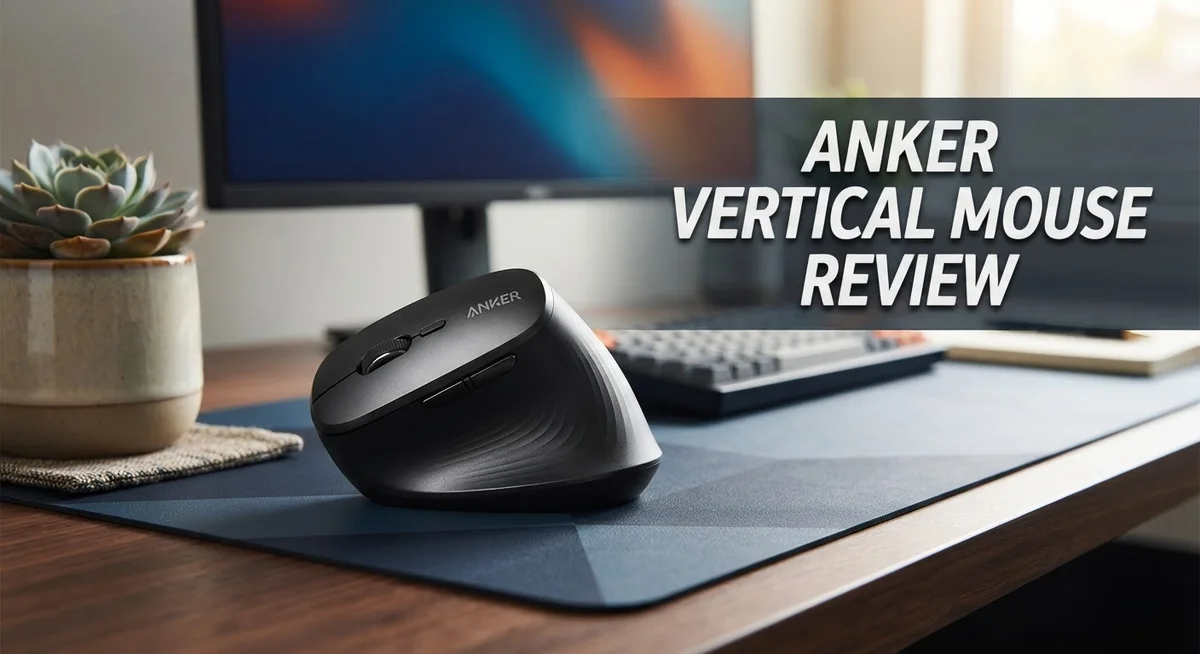
The vertical shape of the Anker Vertical Mouse changes how your hand sits on your desk. Instead of lying flat, your palm faces inward in a handshake position. This angle reduces the twist in your forearm and wrist that happens with traditional mice.
Your thumb rests in a dedicated groove along the side. Two buttons sit right where your thumb naturally falls. You don’t need to stretch or contort your fingers to reach them. This placement keeps your hand relaxed during long work sessions.
The mouse body feels lightweight but sturdy. The grip texture prevents your hand from sliding around. The curved sides support your palm without feeling cramped or oversized. Most people find it comfortable within the first few minutes of use.
The optical sensor sits underneath and tracks your movements across any surface. You won’t need a special mousepad. The sensor responds quickly to small adjustments and large sweeping motions alike.
The Anker design keeps things simple compared to high end vertical mice. You get the core ergonomic benefit without extra sculpting or advanced contouring. Premium competitors add more curves and padding, but this model delivers the essential support at a straightforward level.
Wrist alignment improves noticeably when you switch from a flat mouse. Your wrist stays straighter during typing and clicking. The handshake grip naturally reduces the pressure on your median nerve. People with mild wrist discomfort often notice relief within a few days.
The mouse works with both right handed and left handed users, though the button placement favors right hand use. The wireless connection means no cable tangles on your desk. A wired option exists if you prefer a direct USB link.
The overall build quality feels solid. No creaking or loose parts appear during normal use. The buttons click consistently and don’t stick. The scroll wheel moves smoothly without catching.
This mouse suits anyone making the jump from a standard flat mouse to an ergonomic vertical design. It delivers genuine wrist relief through its simple, effective shape.


Last update on 2026-10-07 / Affiliate links / Images from Amazon Product Advertising API Some of the links on this website are affiliate links, which means that at no additional cost to you, I earn a commission if you click through and make a purchase. I only recommend products and services that I believe will add value to my readers. Thank you for your support!
Key Features and Specifications
The Anker Vertical Mouse delivers solid specifications built for users seeking ergonomic relief. The 2.4G wireless connection provides reliable connectivity without cable clutter, while a wired option exists for those who prefer a direct link to their computer.
Sensitivity control comes through three adjustable DPI levels: 800, 1200, and 1600. You can switch between these settings instantly using the dedicated button. This flexibility helps you find the sweet spot for your work style, whether you need precision for detailed tasks or speed for general browsing.
The optical sensor underneath tracks movement smoothly across different surfaces. You won’t experience lag or stuttering during regular use. The sensor responds quickly to hand movements, making cursor control feel natural and responsive.
The handshake grip design positions your hand at a 70 degree angle, mimicking how your arm rests when shaking someone’s hand. This angle reduces the rotational strain that traditional flat mice create. Your wrist stays in a more neutral position throughout the day.
The thumb groove features two easily accessible buttons. These buttons sit right where your thumb naturally rests, eliminating the need to adjust your grip to click them. Button placement matters more than people realize when you’re using a mouse for eight hours straight.
Build quality feels solid without unnecessary bulk. The mouse weighs little enough to move around your desk easily, yet sturdy enough to withstand daily use. The plastic construction resists wear from regular handling.
The device works with both right and left handed users, though the button configuration favors right handed operation. If you’re left handed, button accessibility might feel slightly awkward, though the core vertical design still benefits your wrist.
Connection options give you flexibility. The wireless mode frees your desk from cables, while the wired alternative eliminates battery concerns. Most users choose wireless for the convenience factor.
These specifications combine into a straightforward vertical mouse that prioritizes ergonomic positioning over advanced features. The focus stays on reducing wrist strain through smart design rather than adding complicated software or extra programmable buttons.
Performance and Precision
When you use the Anker Vertical Mouse, your hand moves into a handshake position that feels natural from the moment you grip it. This positioning reduces the twisting motion your forearm makes during regular mouse use, which means less strain builds up over long work sessions.
The optical sensor performs reliably across different desk surfaces. It picks up your movements without lag, so your cursor follows your hand smoothly. You won’t experience the stuttering or jumping that sometimes happens with lower quality sensors.
Precision comes from three adjustable DPI settings: 800, 1200, and 1600. You switch between these levels with a single button press. Lower DPI works great for detailed design work or photo editing. Higher DPI moves your cursor faster across the screen, perfect for everyday browsing and document work.
The thumb groove keeps your hand stable while you move the mouse. Two buttons sit within easy reach of your thumb, so you don’t need to stretch or shift your grip to access them. This design means your fingers stay relaxed throughout the day.
Your wrist stays in a neutral position rather than bent at an angle like traditional mice force. This alignment matters because it reduces tension in the tendons and muscles that run through your wrist. Many users notice less fatigue after switching to this vertical style.
The mouse tracks consistently whether you’re moving it fast or slow. The response feels immediate, so your clicks register right when you press the button. This reliability makes it suitable for both everyday tasks and occasional gaming sessions.
Compared to premium vertical mice, the Anker keeps things straightforward. It doesn’t include programmable buttons or software customization. What you get instead is a simple, effective tool that does one job well: moving your cursor with precision while keeping your arm in a healthier position.
The lightweight build means your hand doesn’t tire from supporting extra weight. You move the mouse easily across your desk without effort, and the solid construction ensures it responds consistently to every movement you make.
Top 3 Alternatives
Logitech MX Vertical

Last update on 2026-10-07 / Affiliate links / Images from Amazon Product Advertising API Some of the links on this website are affiliate links, which means that at no additional cost to you, I earn a commission if you click through and make a purchase. I only recommend products and services that I believe will add value to my readers. Thank you for your support!
The Logitech MX Vertical offers a premium vertical grip that reduces strain on your wrist and forearm. This mouse features a 57-degree angle that positions your hand in a more natural posture during long work sessions. Advanced tracking technology ensures smooth cursor movement across multiple monitors. The mouse includes programmable buttons for quick access to your favorite functions. Battery life extends up to four months on a single charge, making it convenient for professionals who work extended hours.
Razer Pro Click

Last update on 2026-10-07 / Affiliate links / Images from Amazon Product Advertising API Some of the links on this website are affiliate links, which means that at no additional cost to you, I earn a commission if you click through and make a purchase. I only recommend products and services that I believe will add value to my readers. Thank you for your support!
The Razer Pro Click delivers precision and comfort for office environments. This vertical mouse uses an ergonomic design that keeps your hand aligned with your forearm, reducing tension over time. Focus Pro technology minimizes hand fatigue during repetitive clicking tasks. The mouse connects via a reliable 2.4GHz wireless connection with minimal latency. Side buttons provide easy navigation, and the device supports multiple devices through simple switching. Users appreciate the balanced weight and responsive buttons for everyday productivity work.
Evoluent VerticalMouse

Last update on 2026-10-07 / Affiliate links / Images from Amazon Product Advertising API Some of the links on this website are affiliate links, which means that at no additional cost to you, I earn a commission if you click through and make a purchase. I only recommend products and services that I believe will add value to my readers. Thank you for your support!
The Evoluent VerticalMouse stands out with its distinctive vertical orientation that encourages a handshake grip. This design philosophy reduces pronation, which is the twisting motion that causes wrist strain. Precision optical tracking delivers consistent accuracy for detailed work. The mouse accommodates both right and left-handed users, making it inclusive for any workspace. Adjustable sensitivity settings let you customize the tracking speed to match your workflow. The lightweight construction feels comfortable during extended use, and the durable build quality ensures long-term reliability.
Comfort and Wrist Health Benefits
Your wrist experiences significant relief when you switch to a vertical mouse. The Anker Vertical Mouse positions your hand at a 70 degree angle, which matches the natural handshake position your arm assumes when relaxed. This reduces repetitive strain on your wrist joint during long work sessions.
Traditional flat mice force your wrist into an unnatural bent position. This constant twisting creates tension in the tendons and muscles around your wrist. Over months and years, this strain accumulates and can lead to conditions like carpal tunnel syndrome. The vertical design eliminates this problem entirely.
Your forearm stays in a neutral alignment when using the Anker. The thumb groove keeps your hand stable while the ergonomic shape supports your palm naturally. Wrist pain decreases noticeably within the first week of regular use for most people. Your hand no longer rotates inward, which removes pressure from the median nerve.
The handshake grip design does more than feel comfortable. It actually changes how your muscles work during mouse movements. Your shoulder, elbow, and wrist all line up properly. This alignment means less compensation from other parts of your arm. Your body doesn’t need to overwork secondary muscles to make up for poor positioning.
Extended computer sessions become less taxing on your body. The optical sensor tracks smoothly across surfaces, so you move the mouse with minimal effort. Your hand stays relaxed rather than tense. This reduced tension throughout your arm means fewer headaches and neck problems too.
People with existing wrist issues often see improvement within days. Those without pain benefit from prevention. Using the Anker means you’re actively protecting your long term hand health. Your wrist stays in its optimal position hour after hour.
The lightweight build also helps. Your hand doesn’t tire from supporting extra weight. Combined with the neutral wrist position, this means genuine comfort during marathon work sessions. Your joints experience less cumulative stress, which translates to better health outcomes over time.
Button Accessibility and Ease of Use
The button placement on the Anker Vertical Mouse makes clicking feel natural and intuitive. Your thumb rests in the groove, and two buttons sit right where your thumb naturally wants to press. You don’t need to stretch or adjust your grip to access them.
The primary left and right click buttons respond instantly to your touch. They use standard mechanical switches that deliver reliable feedback with every press. You’ll know when you’ve clicked something because the button gives you clear tactile response. This matters when you’re working through long documents or spreadsheets where precision counts.
The side buttons function smoothly for forward and back navigation in browsers and applications. You can reach them without moving your hand away from the mouse. This keeps your workflow uninterrupted when you’re jumping between web pages or files. The buttons feel responsive without requiring excessive force to activate.
One key advantage of the vertical design is that your thumb sits in a relaxed position. Traditional flat mice force your thumb to bend awkwardly to reach side buttons. With the Anker, your thumb stays straighter and less fatigued. This matters during extended work sessions where repetitive clicking adds up over hours.
The button layout favors right handed users primarily, though the mouse remains usable for left handed people with some adjustment. The grip feels secure in your palm, so accidental clicks are rare. Your fingers land naturally on the main buttons without conscious effort.
The switches themselves don’t require heavy pressure to activate. Light touches register immediately, which reduces the strain on your fingers and hand. This gentle activation makes the mouse accessible for people with reduced grip strength or finger sensitivity.
Overall, the button accessibility on the Anker Vertical Mouse removes friction from your daily clicking tasks. You spend less energy reaching buttons and more time focusing on your actual work. The straightforward design means you can pick up this mouse and use it effectively without any learning curve or adjustment period.
Pros and Cons
Pros
- Vertical positioning keeps your wrist in a neutral angle instead of bent like traditional mice
- Three DPI settings (800, 1200, 1600) let you adjust sensitivity for different tasks
- Thumb groove and side buttons sit within easy reach for natural clicking
- Lightweight design prevents hand fatigue during long work sessions
- Optical sensor performs reliably across different desk surfaces without stuttering
Cons
- The vertical shape is less sculpted than premium competitors, so it feels more basic in hand
- Missing advanced features you’ll find on high end vertical mice like programmable buttons or wireless charging
- Right handed design means left handed users can still operate it but with less comfort
Who Should Buy It
The Anker Vertical Mouse works best for people who spend hours at their desk every day. If your job involves constant typing and clicking, this mouse can make a real difference in how your hands feel by day’s end.
Office workers and content creators benefit most from the vertical design. You’ll notice reduced strain during long editing sessions or data entry tasks. The neutral wrist position keeps your hand aligned properly, which matters when you’re working eight hours straight.
People with existing hand or wrist concerns find this mouse helpful. If you’ve experienced pain from traditional mice or want to prevent problems before they start, the vertical positioning gives you a practical solution. Many users report feeling better within their first week of use.
Remote workers and students appreciate the lightweight build. You can move between your desk and other spaces without fatigue setting in. The mouse won’t tire out your hand during marathon study sessions or back to back video calls.
Right handed users get the most from this model. The thumb buttons and grip design align naturally with how right handed people hold a mouse. Left handed users can still use it, but the button placement favors the right handed majority.
Professionals who don’t need advanced customization find the Anker a solid choice. You get reliable performance without unnecessary complexity. The three DPI settings handle most work scenarios, from detailed design work to general browsing.
People looking for a straightforward solution appreciate the simplicity here. You won’t find programmable buttons or wireless charging, but you also won’t deal with complicated software or confusing features. Everything just works out of the box.
Casual users and gamers should consider their needs carefully. The basic vertical positioning works for everyday tasks, but serious gamers might want more responsive features. The DPI settings are functional rather than extensive.
Anyone switching from a traditional flat mouse should expect a brief adjustment period. Your hand needs a few days to adapt to the new grip position. After that, most people prefer the vertical design and don’t want to go back.
Final Verdict
The Anker Vertical Mouse delivers on its core promise. It gives your hand a more natural resting position and takes pressure off your wrist.
This mouse shines as a practical daily tool. It does not try to be a feature-packed powerhouse like the Logitech MX Vertical or Razer Pro Click.
Instead, it focuses on the basics and does them well. The comfort factor stands out as the main reason to choose this mouse.
If you want a simple switch from a flat mouse to a vertical one, this product fits the bill. It offers a gentle introduction to vertical ergonomics without overwhelming you with settings.
Compared to the Microsoft Sculpt Ergonomic Mouse or Perixx models, the Anker keeps things straightforward. You get solid performance without extra complexity.
This mouse works well as an everyday companion for typing and clicking tasks. It handles browsing, document work, and general computer use with ease.
We recommend this mouse for anyone new to vertical ergonomics. It serves as a great starting point before you decide if you need a more advanced model.
Current users of flat mice who deal with wrist discomfort should give this a try. The vertical shape can make a real difference in how your hand feels after long hours.
Gamers and users who need precision for detailed design work might want to look elsewhere. The limited DPI range and basic shape may not meet those specific demands.
For everyone else, the Anker Vertical Mouse provides a reliable solution. It solves the main problem of wrist strain without asking you to learn complicated features.
This mouse earns its place as a dependable choice. It delivers comfort and function in a simple package that works for most everyday computer tasks.
Frequently Asked Questions
Does the Anker Vertical Mouse work with both left and right handed users?
The Anker Vertical Mouse is designed specifically for right handed users. The thumb groove and side buttons sit on the right side only, so left handed users won’t find this mouse comfortable. If you’re left handed, check out other vertical mouse options that offer ambidextrous designs.
How long does the battery last on the wireless version?
Anker doesn’t publish exact battery life figures in their standard specs. The 2.4G wireless connection uses standard AA batteries, which typically last several months depending on daily usage. We recommend keeping spare batteries on hand for uninterrupted work sessions.
Can I adjust the DPI settings while I’m working?
Yes, you can switch between three DPI levels: 800, 1200, and 1600. This lets you change sensitivity on the fly for different tasks. A dedicated button makes it simple to cycle through your preferred settings without opening software menus.
Is there a wired version available?
Anker offers both wireless and wired options for the vertical mouse. The wired version eliminates battery concerns and provides a direct connection to your computer. Choose based on your desk setup and whether you prefer cable free movement or constant power.
Will I need time to adjust after switching from a flat mouse?
Most people need a brief adjustment period when moving from a traditional flat mouse to vertical positioning. Your hand and wrist will adapt as they learn the new angle. Within a few days of regular use, the vertical grip starts to feel natural and comfortable.

Hi, my name is Lily you can say i am a gadget hunter at this point. Welcome to Gadget Gallery The Gallery of Gadget Reviews