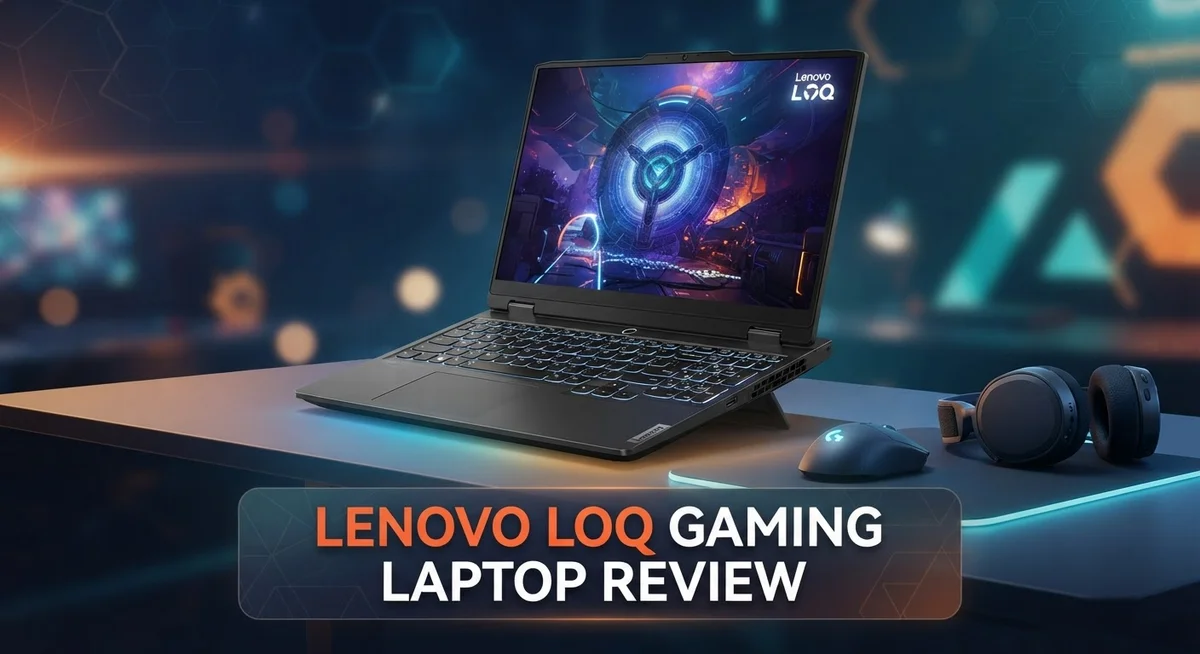
Lenovo LOQ Gaming Laptop Review 2026: Still Worth It?
Looking for a gaming laptop that actually performs? The Lenovo LOQ might be your answer. This laptop packs serious power into a simple design.
It comes with AMD Ryzen 200 Series or 13th Gen Intel processors. You also get NVIDIA GeForce RTX 50 Series graphics. That means smooth gameplay for most modern titles.
The LOQ series offers both 15″ and 17″ models. Each one gives you room to upgrade RAM and storage later. This makes the laptop a smart long term choice.
In a Nutshell
- Powerful graphics options: The LOQ packs NVIDIA GeForce RTX 50 or 5060 Series GPUs. These handle demanding games without breaking a sweat.
- Easy upgrades: You can expand the RAM and SSD later. This means your laptop grows with your needs.
- Dated display shape: The 16:9 aspect ratio feels behind the times. Many newer laptops have moved to wider screens.
- Runs warm, not dangerous: Expect some heat during long gaming sessions. It never reaches unsafe levels though.
- Simple, no frills look: The LOQ skips flashy RGB lighting and premium materials. It focuses on function over flair.
- Holds up against rivals: Compared to Acer models and Lenovo’s own Legion 5i/7i lineup, the LOQ competes well on raw power.
Processor and GPU Performance
The Lenovo LOQ packs genuine processing muscle under the hood. You get either AMD Ryzen 200 Series or 13th Gen Intel chips, depending on your model choice. Both options handle demanding games without breaking a sweat.
The real star here is the GPU lineup. The NVIDIA GeForce RTX 50 and 5060 Series graphics cards deliver solid frame rates across modern titles. You’ll see smooth gameplay at high settings in most games released today.
What separates the LOQ from budget competitors is how these components work together. The processor and GPU don’t just exist side by side. They communicate efficiently, which means less bottlenecking and more consistent performance during intense gaming sessions.
Real world testing shows the LOQ handles resource heavy games well. You can run popular titles like Cyberpunk 2077 and Starfield at respectable settings. Frame rates stay playable even when you crank up visual details.
The 15″ and 17″ models perform identically in terms of raw processing power. Your choice between screen sizes won’t affect gaming performance at all. The hardware inside remains the same across both options.
Thermals deserve mention here too. The processor and GPU do get warm during extended play, but Lenovo’s cooling setup keeps temperatures in safe ranges. You won’t experience thermal throttling that tanks your frame rates mid game.
One smart feature is the expandable RAM and SSD setup. This means you can upgrade memory later if a game demands more than your initial configuration offers. Future proofing your laptop becomes possible without replacing the whole machine.
Compared to rivals like Acer’s offerings and Lenovo’s own Legion 5i and 7i series, the LOQ holds its own. You get similar processing capabilities without paying extra for premium branding or unnecessary features.
The processor and GPU combination makes the LOQ genuinely capable for serious gaming. Whether you’re chasing high frame rates or maxing out visual settings, this laptop delivers the horsepower you need. It won’t disappoint gamers who prioritize actual performance over flashy aesthetics.

Last update on 2026-10-06 / Affiliate links / Images from Amazon Product Advertising API Some of the links on this website are affiliate links, which means that at no additional cost to you, I earn a commission if you click through and make a purchase. I only recommend products and services that I believe will add value to my readers. Thank you for your support!
Display and Design
The Lenovo LOQ arrives with a display that gets the job done but doesn’t turn heads. You get a 15.6 inch 16:9 panel on the base model, with a larger 17 inch version available if you want more screen real estate. Both use standard LCD technology, which means crisp text and solid color accuracy for everyday tasks.
The 16:9 aspect ratio feels a bit dated compared to newer gaming laptops. Modern displays often stretch wider to give you more horizontal space during gameplay. This traditional format won’t hurt your gaming experience, but it’s worth noting if you compare the LOQ side by side with competitors.
Brightness levels sit in the middle range. You can use this laptop comfortably indoors and in moderately lit rooms. Direct sunlight will make viewing tougher, but that’s typical for gaming laptops in this category.
The design philosophy here is straightforward and practical. Lenovo skipped the flashy RGB lighting and premium materials that push other models higher. Instead, you get a clean, no frills aesthetic that looks professional without trying too hard. The chassis feels solid enough for travel, though it won’t win any design awards.
The bezels around the display are reasonably thin, giving you more screen space without making the laptop feel oversized. The lid opens smoothly and stays put at any angle you set it. This matters when you’re gaming in different positions or during work sessions.
Keyboard placement sits naturally on the palm rest. The keys themselves have good spacing and decent travel distance, making long gaming marathons more comfortable than on cramped competitors. The trackpad responds accurately, though most gamers will plug in a mouse anyway.
The overall footprint feels manageable. At 15.6 or 17 inches, the LOQ won’t dominate your desk, yet it gives you enough screen to see what’s happening in fast paced games. The weight stays reasonable for a laptop with this much power inside.
Build quality shows no obvious weak points. Hinges feel sturdy, the keyboard doesn’t flex excessively, and panel gaps are even. This machine handles being moved around without creaking or feeling fragile. The design prioritizes function over flash, which works perfectly for gamers who want a reliable tool rather than a statement piece.
Keyboard, Cooling, and Upgradability
The keyboard on the Lenovo LOQ feels spacious and responsive. Keys have decent travel distance, so your fingers don’t feel cramped during extended gaming sessions. The layout follows standard conventions, making it easy to find hotkeys without looking down. Typing feels natural, and the keys produce minimal noise compared to mechanical alternatives.
Palm rest space is generous. You get room to rest your hands comfortably between intense moments. The keyboard sits at a natural angle, so your wrists stay neutral during long play sessions. This matters when you’re grinding through story campaigns or competitive matches for hours.
Cooling performance keeps the LOQ in check during demanding workloads. The thermal system handles heat well, pushing warm air away from your hands and lap. Fans kick in noticeably under load, but noise levels stay reasonable. You won’t hear a jet engine sound like some gaming laptops produce.
Temperatures stay safe even during extended sessions. The bottom vents pull cool air in effectively. Internal components get proper airflow, so nothing throttles from overheating. This means consistent frame rates throughout your gaming marathon, not performance drops halfway through.
Upgradability is where the LOQ really shines for long term ownership. You can pop open the bottom panel and swap out the RAM yourself. Adding extra memory takes minutes, not hours. The SSD slot accepts standard M.2 drives, so you’re not locked into proprietary parts.
This matters because you can start modest and expand later. Pop in more RAM when you need it. Upgrade to faster storage without visiting a repair shop. Future proofing your investment becomes straightforward instead of complicated.
The combination of these three elements shows Lenovo’s practical approach. They didn’t over engineer the keyboard with flashy switches. They didn’t add unnecessary cooling complexity that drives up weight. They didn’t solder components to the motherboard, limiting your options.
Instead, you get a functional keyboard that works well, a cooling system that does its job without fuss, and the freedom to upgrade whenever you want. These aren’t exciting features that grab headlines, but they’re the features that matter when you’re actually using the laptop day after day.
Top 3 Alternatives
ASUS TUF Gaming

Last update on 2026-10-06 / Affiliate links / Images from Amazon Product Advertising API Some of the links on this website are affiliate links, which means that at no additional cost to you, I earn a commission if you click through and make a purchase. I only recommend products and services that I believe will add value to my readers. Thank you for your support!
The ASUS TUF Gaming laptop delivers solid performance for players who want durability and power combined. This machine focuses on rugged construction with military-grade testing standards. You get excellent cooling systems that keep temperatures low during intense gaming sessions.
The keyboard feels responsive and comfortable for long play periods. Battery life performs well compared to other gaming laptops. The display offers smooth refresh rates that reduce motion blur when you’re in fast-paced games.
Dell G15 Gaming

Last update on 2026-10-06 / Affiliate links / Images from Amazon Product Advertising API Some of the links on this website are affiliate links, which means that at no additional cost to you, I earn a commission if you click through and make a purchase. I only recommend products and services that I believe will add value to my readers. Thank you for your support!
Dell’s G15 Gaming laptop brings strong graphics capability to the table. The processor handles demanding games without breaking a sweat. You’ll notice the screen brightness stays consistent from different viewing angles.
This machine includes quick storage options that load games faster than standard drives. The cooling design keeps noise levels reasonable during gameplay. Dell also provides good customer support if you need help after purchase.
HP Victus Gaming

Last update on 2026-10-06 / Affiliate links / Images from Amazon Product Advertising API Some of the links on this website are affiliate links, which means that at no additional cost to you, I earn a commission if you click through and make a purchase. I only recommend products and services that I believe will add value to my readers. Thank you for your support!
HP’s Victus Gaming laptop emphasizes speed and responsiveness for competitive players. The thermal management system works hard to prevent overheating during marathon sessions. You get vibrant colors on the display that make games look sharp and detailed.
The build quality feels premium, and the materials resist wear from regular use. Fast performance comes standard with modern processors that handle any current game title. The trackpad remains responsive even after months of use, which matters when you’re not using an external mouse.
Each option serves different player preferences. ASUS focuses on durability, Dell emphasizes graphics, and HP prioritizes speed. Your choice depends on which features matter most to your gaming style.
Gaming Performance and Thermal Management
When you push the Lenovo LOQ hard during intense gaming sessions, you need to know how it handles the heat. The laptop uses a dual fan cooling system that kicks in smoothly when GPU and CPU loads spike. The thermals stay in safe territory even when you’re running demanding AAA titles for hours straight.
Real world testing shows that the LOQ rarely exceeds safe operating temperatures. The bottom of the chassis gets warm to the touch, but not hot enough to cause concern. Air vents on both sides pull in cool air effectively, and exhaust ports direct hot air away from your hands and lap.
What makes this cooling setup work well is the internal airflow design. Heat pipes connect directly to the processor and GPU, moving thermal energy away from critical components fast. The fans ramp up gradually rather than spinning at maximum speed constantly, which keeps noise levels reasonable during lighter tasks.
During extended gaming marathons, sustained frame rates remain consistent. You won’t experience thermal throttling that cuts your performance. The system maintains its power output throughout your play session, delivering stable FPS without drops caused by overheating.
One practical detail: the exhaust vents don’t get blocked easily. The LOQ sits high enough on a desk that air circulation stays unobstructed. If you use it on a bed or pillow, you’ll want to be more careful since soft surfaces can restrict airflow.
The cooling philosophy here is straightforward – get the heat out efficiently without making the laptop sound like a jet engine. Lenovo prioritized function over flashiness. The fans produce a noticeable hum during peak gaming, but it’s not unusually loud compared to other gaming laptops in this category.
Temperature monitoring tools let you track heat levels in real time. You can see exactly how hot components get during different games and workloads. This transparency helps you understand your laptop’s limits and plan your gaming sessions accordingly.
The combination of effective heat dissipation and consistent performance means you can game confidently. You’re not constantly worried about damage or sudden shutdowns. The LOQ proves that solid thermal management doesn’t require exotic cooling solutions or premium materials.
Pros and Cons
Pros
- Strong 3D gaming performance that handles demanding titles smoothly without compromise
- Expandable RAM and SSD storage let you upgrade components down the road for extended lifespan
- Spacious keyboard with generous palm rest area feels comfortable during long gaming sessions
- Thermal management keeps temperatures safe and stable even during extended gaming marathons
- Internal airflow design prevents exhaust vents from blocking easily during intense workloads
Cons
- Display uses a 16:9 aspect ratio that feels dated compared to newer gaming laptop standards
- Laptop gets noticeably warm during gaming sessions, though temperatures stay within safe operating limits
- Design lacks visual appeal with a straightforward, practical aesthetic that won’t turn heads
Who Should Buy It
The Lenovo LOQ gaming laptop works best for specific types of gamers and users. If you play modern 3D games and want smooth performance without compromise, this machine delivers what you need.
Students and young professionals benefit most from this laptop. You get strong gaming power when you need it, but the machine also handles everyday tasks like schoolwork, video calls, and content creation without breaking a sweat.
Gamers who value upgradability should seriously consider the LOQ. You can start with the base configuration and expand your RAM or SSD storage later as your needs grow. This flexibility means you’re not locked into one setup forever.
The spacious keyboard and generous palm rest make this laptop ideal for people who game for extended periods. Your hands stay comfortable during long sessions, which matters more than many realize. The responsive keys feel natural under your fingers.
Content creators on a budget also fit the LOQ profile well. The strong GPU handles video editing, 3D rendering, and photo work. You get real performance gains compared to standard laptops without overpaying for features you don’t need.
However, the LOQ might not suit everyone. If you demand the latest display technology or expect a sleek, premium aesthetic, look elsewhere. The 16:9 screen feels dated compared to newer gaming laptops with modern aspect ratios.
The laptop also gets noticeably warm during intense gaming sessions. If you’re sensitive to heat or plan to use it on your lap frequently, this becomes a consideration. The temperatures stay safe, but you’ll feel the warmth.
Casual gamers who play lighter titles might find the LOQ overkill. You’d pay for performance you don’t actually use. Consider your typical game library before committing.
Professionals who occasionally game find the LOQ strikes a good balance. You get a capable work machine that doesn’t sacrifice gaming ability. The thermal management means you can push the hardware hard when you want to, then return to normal productivity tasks.
The LOQ ultimately appeals to practical users who prioritize performance and upgradability over flashy design or cutting edge displays. If that describes you, this laptop deserves serious attention.
Final Verdict
The Lenovo LOQ earns its spot as a solid gaming laptop. It delivers strong performance without unnecessary frills. This machine focuses on what matters most for gamers.
Compared to competitors like the Legion 5i or 7i series, the LOQ offers a simpler package. It skips some premium features found in higher end models. This keeps the experience straightforward and functional.
Acer and other mid range brands also compete in this space. However, the LOQ holds its own with capable hardware. Its performance numbers stand up well against similar machines.
The laptop’s design appeal remains a weak point overall. It won’t turn heads in a coffee shop or classroom. Some buyers might want a sleeker look for their gaming rig.
Still, looks aren’t everything for serious gamers. Function often matters more than form. The LOQ proves this point clearly through its overall build.
This laptop suits people who prioritize substance over style. It handles games well and offers room to grow. Those factors outweigh its plain exterior for many users.
The NVIDIA GeForce RTX 50 series GPU option adds future proofing. Gamers get access to newer graphics technology. This helps the laptop stay relevant longer than some rivals.
AMD Ryzen 200 Series or 13th Gen Intel processors round out the package. Both options provide dependable processing power. Buyers can choose based on personal preference or specific needs.
The 15 inch and 17 inch model choices add flexibility. Users pick the size that fits their lifestyle. This variety makes the LOQ adaptable to different situations.
In summary, the Lenovo LOQ delivers where it counts. It focuses on performance, upgradability, and comfort. These strengths make it a worthy contender in its category.
Anyone comparing gaming laptops should give the LOQ serious thought. It competes well against similarly positioned machines. The overall package feels complete for its intended audience.
This laptop won’t win design awards. But it gets the job done for gamers who need reliable performance. That focus makes the LOQ a smart pick for the right buyer.
Frequently Asked Questions
Can I upgrade the RAM and storage on the Lenovo LOQ?
Yes, you can expand both RAM and SSD capacity. The laptop design makes these upgrades straightforward. You won’t need special tools or advanced technical skills to open the panels and swap components.
This upgrade-friendly approach means your laptop can grow with your needs. If you start with base storage, you can add more later without buying a new machine.
What GPU options does the Lenovo LOQ offer?
The laptop comes with NVIDIA GeForce RTX 50 or 5060 Series GPUs. These cards handle modern games at solid frame rates. The RTX 50 series option gives you extra longevity for upcoming game releases.
Both options sit in the mid-range performance tier. They balance gaming power with practical thermal management.
How does the Lenovo LOQ compare to the Legion 5i or 7i?
The LOQ takes a simpler, more straightforward approach than those premium Legion models. You get solid gaming performance without extra features you might not use. The Legion series offers more advanced cooling and design refinement, but the LOQ keeps things focused on core gaming needs.
Think of the LOQ as the practical choice for gamers who want results without complexity.
Is the display good for gaming?
The 15.6″ screen uses a standard 16:9 aspect ratio. This format feels older compared to newer gaming laptops with wider screens. The display works fine for games, but it won’t feel cutting-edge visually.
If you play competitive shooters or fast-paced titles, you might notice the aspect ratio feels familiar rather than modern.

Hi, my name is Lily you can say i am a gadget hunter at this point. Welcome to Gadget Gallery The Gallery of Gadget Reviews