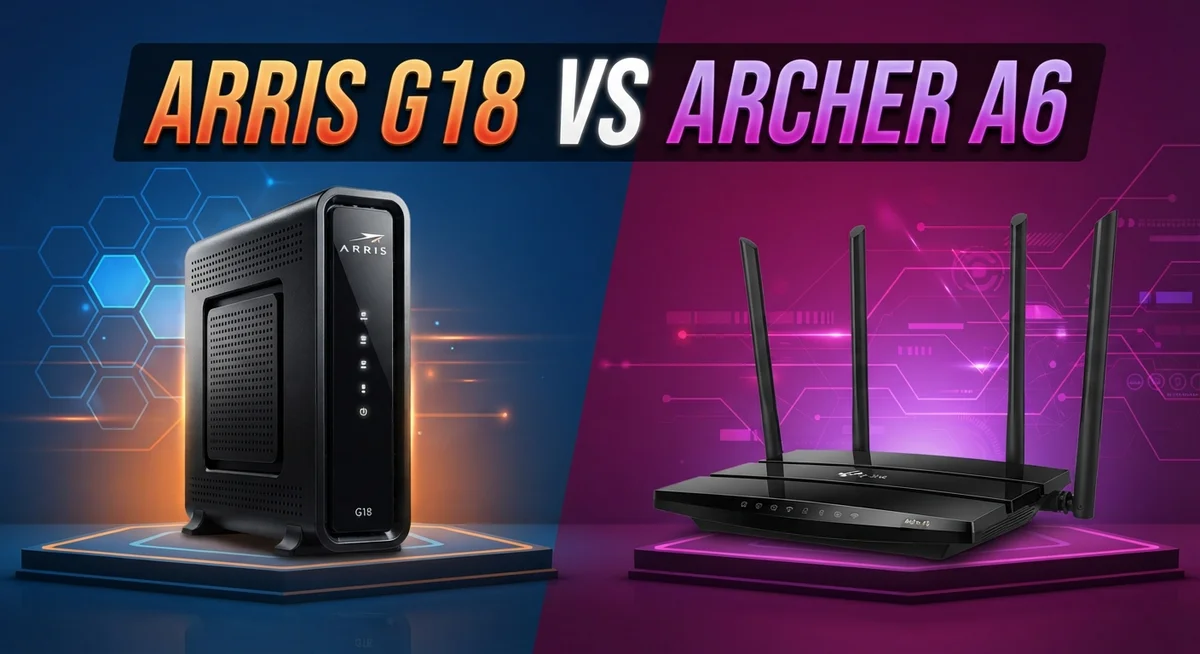
Arris G18 vs Archer A6: Who Takes the Crown?
Choosing a new networking setup can feel confusing. Two names often pop up in this search: the Arris G18 and the TP-Link Archer A6.
Both promise reliable home internet. But they work in very different ways.
The Arris G18 is a modem and router combo. It brings DOCSIS 3.1 speed and Wi-Fi 6 into one device.
The Archer A6 takes a simpler path. It is a standalone router built on the older Wi-Fi 5 standard.
Quick Comparison: Arris G18 vs Archer A6
| Feature | Arris G18 | Archer A6 |
|---|---|---|
| Device Type | Modem + Router combo | Router only (no modem) |
| Wi-Fi Standard | Wi-Fi 6 | Wi-Fi 5 (AC) |
| Max Speed | Up to 1 Gbps | 867 Mbps (5GHz) |
| Band Type | Dual-band | Dual-band |
| Ethernet Ports | Two 1 Gbps ports | Gigabit Ethernet ports |
| Design | Vertical tower design | Four external antennas |
| Reliability | Reported connection drops | Solid, proven performance |
| Best For | All-in-one convenience seekers | Budget entry-level upgrades |
Arris G18 Review

Last update on 2026-10-11 / Affiliate links / Images from Amazon Product Advertising API Some of the links on this website are affiliate links, which means that at no additional cost to you, I earn a commission if you click through and make a purchase. I only recommend products and services that I believe will add value to my readers. Thank you for your support!
The Arris G18 combines a DOCSIS 3.1 cable modem and Wi-Fi 6 router into one device. It’s ideal for cable internet subscribers who want to eliminate a separate modem box and simplify their setup.
This combo unit delivers speeds up to 1 Gbps and covers most homes with solid range. The vertical tower design saves desk or shelf space, and it includes two Gigabit Ethernet ports for wired connections.
The G18 works with major cable providers like Xfinity, Cox, and Spectrum. DOCSIS 3.1 future-proofs your modem against upcoming speed increases from your ISP.
Real-world use reveals some concerns, though. Users report occasional connection drops and shorter lifespan than expected, which can frustrate long-term reliability.
Pros
- All-in-one modem and router eliminates clutter and extra equipment
- Wi-Fi 6 standard supports faster, more efficient wireless speeds
- DOCSIS 3.1 ready for ISP speed upgrades
- Compatible with Xfinity, Cox, Spectrum, and other major cable providers
Cons
- Reliability issues reported (connection drops, sudden failures)
- Wi-Fi 6 potential not fully realized in real-world performance
- Shorter lifespan than traditional separate modem/router setups
Archer A6 Review


Last update on 2026-10-13 / Affiliate links / Images from Amazon Product Advertising API Some of the links on this website are affiliate links, which means that at no additional cost to you, I earn a commission if you click through and make a purchase. I only recommend products and services that I believe will add value to my readers. Thank you for your support!
The TP-Link Archer A6 is a standalone Wi-Fi 5 router designed for users who already have a modem. It delivers 867 Mbps on 5 GHz and 400 Mbps on 2.4 GHz, making it a solid choice for basic streaming, browsing, and light gaming.
This router suits entry-level upgrades and homes that don’t need cutting-edge speeds. Four external antennas help spread the signal across most living spaces with reliable coverage.
The Gigabit Ethernet ports ensure fast wired connections for devices that need it.
Build quality is straightforward and durable. Real-world testing shows the A6 performs consistently for everyday tasks without the complexity of newer standards.
Users report stable connections and easy setup, even for non-technical people.
Performance stays steady under normal household use. Streaming 4K video, video calls, and multiple device connections work without hiccups.
It won’t handle extreme gaming or large file transfers as quickly as Wi-Fi 6 routers, but it gets the job done.
Pros
- Four external antennas deliver solid coverage across typical homes
- MU-MIMO technology handles multiple devices smoothly
- Gigabit Ethernet ports support fast wired connections
- Straightforward setup and reliable performance
Cons
- Wi-Fi 5 standard is older than newer Wi-Fi 6 models
- Lower speeds than modem-router combos
- Router-only design requires a separate modem
Head to Head: Key Differences
The Arris G18 combines a cable modem and Wi-Fi 6 router in one unit, while the TP-Link Archer A6 is a standalone Wi-Fi 5 router that requires a separate modem. This fundamental difference shapes everything about how each device fits into your home network.
Speed performance favors the G18. The G18 pushes up to 1 Gbps through its Wi-Fi 6 connection, while the A6 maxes out at 1.267 Gbps combined (867 Mbps on 5 GHz, 400 Mbps on 2.4 GHz).
For streaming, video calls, and everyday browsing, the A6 handles these tasks smoothly, but the G18 offers more headroom for future demands.
The G18 saves physical space by eliminating a separate modem box from your setup. You get one device instead of two, which appeals to people with limited shelf or closet space.
The A6 requires you to already own a modem or obtain one separately, adding another piece of equipment to manage.
Reliability tells a different story. The G18 has received complaints about connection drops and unexpected failures, with some users reporting short device lifespans.
The A6 maintains a solid track record for stable, consistent performance under normal household conditions.
Setup complexity differs slightly too. The A6 works as a plug and play upgrade if you already have a modem in place.
The G18 requires ISP compatibility checks since it only works with specific cable providers like Xfinity, Cox, and Spectrum.
Choose the G18 if you want an all in one solution with modern Wi-Fi 6 speeds and your ISP supports it. Pick the A6 if you prioritize stability, already own a modem, and need a straightforward router for basic to moderate internet use.
Which One Should You Buy
The ARRIS G18 stands out as the overall winner in this comparison. It combines a modem and router into one device, giving you Wi-Fi 6 speeds and DOCSIS 3.1 support.
This makes it a smart, future-proof choice for most cable internet users, even though it has some reliability quirks to watch for.
The TP-Link Archer A6 still holds its own for simpler needs. It works best as a dependable, no-frills router for people who already own a modem.
Best for each buyer
- ARRIS G18: Cable internet subscribers who want an all-in-one modem and router with faster speeds and future-proof technology.
- TP-Link Archer A6: Users with an existing modem who need a reliable, entry-level router for basic streaming and browsing needs.
Frequently Asked Questions
Which device is better for cable internet users?
The ARRIS G18 is the stronger choice if you have cable internet. It combines your modem and router into one unit, so you skip the hassle of managing two separate devices.
The Wi-Fi 6 technology gives you faster speeds and better performance for multiple devices at once. Cable subscribers on Xfinity, Cox, or Spectrum will find it compatible right out of the box.
Should I pick the Archer A6 if I already own a modem?
Yes, the TP-Link Archer A6 makes sense in this situation. Since you already have a modem, you only need a standalone router.
The A6 delivers solid performance for everyday tasks like streaming, video calls, and web browsing. It’s simple to set up and keeps working reliably without fuss.
What’s the main speed difference between these two?
The G18 pulls ahead with Wi-Fi 6 technology and up to 1 Gbps speeds. The A6 uses older Wi-Fi 5 and tops out at 867 Mbps on the 5 GHz band.
For normal household use, both handle streaming and browsing smoothly. The G18 gives you more headroom if you game, transfer large files, or run many devices at once.
Which one takes up less space?
The ARRIS G18 wins here. One device replaces two, so your setup stays clean and simple.
The A6 requires a separate modem somewhere else in your home, adding clutter. If desk or shelf space matters to you, the G18 solves that problem.
Do these devices have reliability differences?
The A6 maintains a steady track record for stable performance. The G18 offers faster speeds and modern tech, but some users report connection drops or unexpected failures.
Consider your tolerance for potential issues when deciding between them.

Hi, my name is Lily you can say i am a gadget hunter at this point. Welcome to Gadget Gallery The Gallery of Gadget Reviews