Boox Go Color 7 Review 2026: Live Up To The Hype?
Are you searching for a color e-reader that runs Android, fits in one hand, and makes comics look stunning on an e-ink screen? The Boox Go Color 7 might be exactly what you need. This compact 7 inch device packs a Kaleido 3 color display, Google Play Store access, and a battery that lasts for days.
Whether you read novels, manga, or technical PDFs, this little device promises to do it all. But does it deliver? I spent weeks testing every feature, installing apps, and reading in bright sunlight and dim bedrooms. In this review, I break down every detail so you can decide if the Boox Go Color 7 deserves your money in 2026.
Stay with me as I walk you through the display quality, software experience, battery life, build quality, and much more. By the end, you will know if this e-reader fits your reading habits.
Key Takeaways:
- The 7 inch Kaleido 3 display delivers 300 PPI in black and white and 150 PPI in color, making text sharp and comics vibrant enough for comfortable reading on the go.
- Full Google Play Store access lets you install Kindle, Kobo, Libby, and hundreds of other reading apps, giving you far more freedom than a standard Kindle or Kobo device.
- Battery life averages about one week with regular use, which is shorter than a basic Kindle but impressive for a device running Android 13 with Wi-Fi and Bluetooth.
- The weight sits at just 195 grams, making this one of the lightest 7 inch e-readers available, and the slim 6.4mm profile slides easily into bags and jacket pockets.
- Stylus support on the Gen II model turns this reader into a note-taking device, which is great for students and professionals who want to annotate PDFs or jot down ideas.
- The price point sits around $250 to $290, which is higher than a Kindle Paperwhite but justified by the open Android system, color display, and extra productivity features.

Last update on 2026-08-29 / Affiliate links / Images from Amazon Product Advertising API Some of the links on this website are affiliate links, which means that at no additional cost to you, I earn a commission if you click through and make a purchase. I only recommend products and services that I believe will add value to my readers. Thank you for your support!
Boox Go Color 7: Design and Build Quality
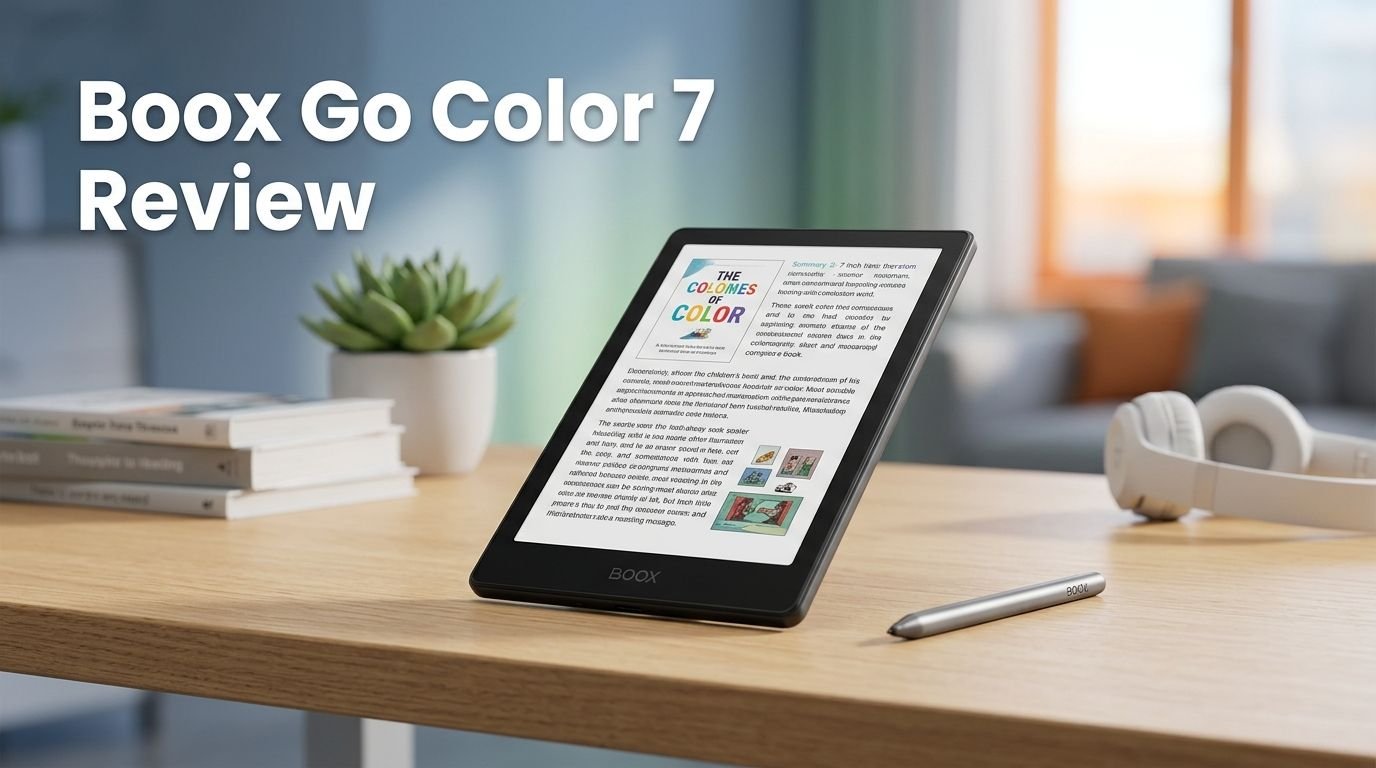
The Boox Go Color 7 has a clean and modern design. It measures 156 x 137 x 6.4 mm and weighs only 195 grams. You can hold it in one hand for long reading sessions without any strain.
The back of the device has a textured finish that prevents slipping. This small detail makes a big difference during extended use. The frame feels solid and well-built for its price range.
Physical page-turn buttons sit on one side of the device. These buttons give you a satisfying way to flip pages without touching the screen. Some users report the lower button can feel slightly stiff near its edge, but most find them reliable.
The USB-C port at the bottom handles charging and data transfer. There is no headphone jack, so you will need Bluetooth earbuds for audiobooks. The overall construction uses plastic, which helps keep the weight low while still feeling premium.
Available in black and white color options, the device looks sleek in both finishes. The white model skips the flat cover lens, giving it a slightly different feel. Either way, the Boox Go Color 7 looks and feels like a device built for readers who care about comfort and portability.
Display Performance: Kaleido 3 E Ink Screen
The display is the heart of this device. The Boox Go Color 7 uses a 7 inch Kaleido 3 E Ink screen that delivers 300 PPI for black and white content and 150 PPI for color content. Text looks crisp and paper-like in every lighting condition.
Color performance is where things get interesting. The Kaleido 3 panel can display up to 4,096 colors. This is nowhere near the 16.7 million colors on an OLED tablet. But for comics, manga, and book covers, the colors appear pleasant and natural.
Reading outdoors is a true highlight. The e-ink display has almost zero reflection in direct sunlight. You can sit at a park bench or a beach chair and read without squinting. This is something no LCD or OLED tablet can match.
The front light uses E Ink ComfortGaze technology with adjustable brightness and color temperature. You can shift the light from cool white to warm amber for comfortable nighttime reading. This front light may create a tiny side shadow, but adjusting brightness usually fixes it.
Ghosting is minimal with the latest firmware updates. Page transitions are smooth for text-based reading. Fast scrolling in apps will show some lag because e-ink screens refresh slower than traditional displays. But for the primary purpose of reading, this screen is excellent.
Software and Android Experience
The Boox Go Color 7 Gen II runs Android 13 with the full Google Play Store built in. This is a major advantage over Kindle and Kobo devices that lock you into one ecosystem.
You can install Kindle, Kobo, Libby, Readwise Reader, KOReader, and dozens of other reading apps. This means all your books from different platforms live on one device. No more carrying multiple readers or tablets.
The Boox launcher adds e-ink-specific features on top of Android. You get per-app display settings that let you control refresh rate, contrast, and color saturation. This matters because some apps look better with a faster refresh rate while others look better with higher contrast.
Performance feels snappy thanks to the octa-core processor and 4GB of RAM. Apps open quickly. Page turns happen without noticeable delay. The 64GB of internal storage holds thousands of books, comics, and documents.
One concern is that Android 13 will eventually lose app support as developers move forward. Boox promises three years of firmware updates from launch. This should keep the device current through at least 2027. Still, some users wish Boox would push updates faster to keep pace with Android version releases.
Reading Books and Documents on the Boox Go Color 7
The primary job of any e-reader is reading, and the Boox Go Color 7 does this job very well. Text appears sharp and clear on the 300 PPI black and white layer. Long reading sessions feel comfortable because e-ink does not emit blue light the way LCD screens do.
PDF handling is strong. The 7 inch screen is big enough for most documents, and the built-in NeoReader app gives you tools to crop margins, reflow text, and adjust layouts. This is useful for academic papers and technical manuals.
EPUB files open smoothly with full formatting support. You can adjust font size, line spacing, margins, and font type. The device supports 26 digital formats, including PDF, EPUB, MOBI, DJVU, CBR, CBZ, DOC, and PPTX. Very few e-readers match this format flexibility.
The built-in dictionary and translation tools help language learners and international readers. You can highlight words, add notes, and export annotations. These features make the Boox Go Color 7 a productive reading tool, not just a passive screen.
Reading in bed at night is a pleasure. The warm front light reduces eye strain. Many users report falling asleep faster after switching from a phone or tablet to this e-reader. Your eyes will thank you.
Top 3 Alternatives for Boox Go Color 7
1. Kobo Libra Colour

Last update on 2026-08-29 / Affiliate links / Images from Amazon Product Advertising API Some of the links on this website are affiliate links, which means that at no additional cost to you, I earn a commission if you click through and make a purchase. I only recommend products and services that I believe will add value to my readers. Thank you for your support!
2. Amazon Kindle Paperwhite Signature Edition (2024)

Last update on 2026-08-29 / Affiliate links / Images from Amazon Product Advertising API Some of the links on this website are affiliate links, which means that at no additional cost to you, I earn a commission if you click through and make a purchase. I only recommend products and services that I believe will add value to my readers. Thank you for your support!
3. Boox Palma 2

Last update on 2026-08-29 / Affiliate links / Images from Amazon Product Advertising API Some of the links on this website are affiliate links, which means that at no additional cost to you, I earn a commission if you click through and make a purchase. I only recommend products and services that I believe will add value to my readers. Thank you for your support!
Comics and Manga on a Color E Ink Screen
This is where the Boox Go Color 7 truly shines for a specific audience. The Kaleido 3 color display makes comics and manga look great, with a paper-like quality you cannot get on a backlit tablet.
The colors appear muted and soft compared to an iPad. But that softness gives comics a printed-paper feel that many readers actually prefer. Graphic novels like Watchmen and the Dune Graphic Novel look fantastic on this screen.
Manga readers will love the 300 PPI black and white rendering. Most manga is black and white anyway, so you get full sharpness without the color limitation. Pages load quickly, and the physical buttons make page-turning smooth and natural.
However, comics that use many subtle gradients of the same color can lose detail. If a panel relies on 20 shades of blue to create depth, those shades may merge together on the Kaleido 3 screen. This is a hardware limitation of current color e-ink technology.
Apps like Mihon (open-source manga reader) and YACReader work well on this device. The Go Color 7 supports CBR and CBZ comic formats natively through its built-in reader. You have multiple ways to load and enjoy your comic library.
Battery Life and Charging
The Boox Go Color 7 packs a 2,300 mAh lithium-ion polymer battery. This battery lasts about one week with regular daily reading. Your actual battery life depends on Wi-Fi usage, screen brightness, and app activity.
If you keep Wi-Fi turned off and just read downloaded books, you can stretch the battery even further. Some users report getting close to 10 days with conservative usage patterns.
Charging happens through USB-C. A full charge takes roughly 2 hours. There is no wireless charging on this model. The device does not include a charger in the box, so you need to use your own USB-C adapter.
Compared to a basic Kindle that can last a month, the Boox battery life is shorter. This makes sense because the Boox runs Android, keeps more processes in the background, and offers more features. The trade-off between flexibility and battery life is fair.
Battery health holds up well over months of use. Users who have owned the device for several months report no significant degradation. The device manages power efficiently when idle, losing very little charge during standby.
Note Taking and Stylus Support
The Gen II model adds active stylus support, which sets it apart from the first generation. The Boox Go Color 7 Gen II works with the Boox InkSense and InkSense Plus stylus, offering 4,096 levels of pressure sensitivity.
Writing feels natural on the e-ink screen. The slight texture of the display mimics the friction of pen on paper. This makes handwritten notes feel more authentic than writing on a glass tablet screen.
You can annotate PDFs directly, which is a huge feature for students and professionals. Mark up documents, circle key points, and add handwritten notes in the margins. All annotations save within the file for easy export later.
The note-taking app supports different pen types, colors, and thicknesses. You can create notebooks, sketch ideas, and organize your handwritten content. The 7 inch screen is small for extensive note-taking, but it works well for quick annotations and short notes.
The stylus connects directly to the device without Bluetooth. It charges through USB-C. This active pen design means there is zero lag between your stroke and the ink appearing on screen. The writing experience is responsive and satisfying.
Connectivity and Storage Options
The Boox Go Color 7 offers solid connectivity for a dedicated e-reader. You get Wi-Fi (dual band 2.4GHz and 5GHz) and Bluetooth 5.0 for connecting wireless headphones and keyboards.
Internal storage sits at 64GB, which is generous for an e-reader. You can store thousands of ebooks, hundreds of comics, and plenty of PDFs without worrying about space. There is no microSD card slot, so 64GB is your total limit.
The device includes Boox’s 10GB free cloud storage through an Onyx account. You can sync notes and documents across Boox devices using this cloud service. This is helpful if you own multiple Boox products and want a consistent library.
Bluetooth keyboard support opens interesting possibilities. You can pair a mechanical keyboard and use the Boox Go Color 7 as a distraction-free writing device. The e-ink screen removes all the visual noise of a traditional computer. Writers who want a focused environment will appreciate this setup.
USB-C also handles file transfers when connected to a computer. You can drag and drop files directly without any special software. This straightforward approach saves time compared to some competitors that require proprietary apps for file management.
Who Should Buy the Boox Go Color 7?
The Boox Go Color 7 is perfect for a specific type of reader. If you buy books from multiple platforms like Kindle, Kobo, and Libby, this device brings everything together. No other e-reader offers this level of app freedom.
Comic and manga readers should seriously consider this device. The color e-ink display, combined with the paper-like reading experience, creates something special. It bridges the gap between a traditional e-reader and a tablet.
Students and professionals who annotate PDFs and take notes will benefit from the Gen II’s stylus support. The ability to write directly on documents adds real productivity value. It replaces both your e-reader and your annotation device.
Travelers and commuters will love the 195 gram weight and slim profile. Slip it into a jacket pocket or a small bag. Read on trains, planes, or park benches without the eye strain of a phone screen.
However, if you only read Kindle books and want maximum simplicity, a standard Kindle Paperwhite is cheaper and easier. If you need vivid colors for art-heavy comics, an iPad remains the better choice. The Boox Go Color 7 sits perfectly between these two extremes.
Boox Go Color 7 vs Kindle Paperwhite Signature Edition
This is the comparison most buyers want to see. The Kindle Paperwhite Signature Edition costs about $200. The Boox Go Color 7 starts around $250. That price gap buys you several extra features.
The Boox gives you a color display, Android with Google Play Store, stylus support, and multi-format compatibility. The Kindle gives you a simpler experience, longer battery life, waterproofing, and deep Amazon ecosystem integration.
If you read only Kindle books, the Paperwhite is the better value. It does one thing and does it perfectly. The battery lasts weeks. The interface is clean and focused.
If you want flexibility, the Boox wins hands down. Install any reading app. Read any file format. Take handwritten notes. Use it as a mini Android tablet. This flexibility comes at the cost of slightly shorter battery life and a steeper learning curve.
Display quality for pure text reading is very close between the two devices. Both use high PPI e-ink screens. The Boox adds color, which the Kindle Paperwhite lacks entirely. For readers who enjoy graphic novels, this color capability is a clear advantage.
Boox Go Color 7 vs Kobo Libra Colour
The Kobo Libra Colour is another strong competitor. It also uses a Kaleido 3 display at 7 inches, so the color performance is similar. Both devices can display 4,096 colors.
The Kobo offers IPX8 waterproofing, which the Boox does not. If you read in the bathtub or by the pool, the Kobo is safer. The Boox Go Color 7 has only a water-repellent coating, not true waterproofing.
App selection is where the Boox pulls far ahead. The Kobo limits you to its own bookstore and a few supported apps. The Boox lets you install anything from the Google Play Store. This is a massive difference for readers who own books across multiple platforms.
The Kobo integrates with public libraries through OverDrive, which many readers love. The Boox can also access library books through the Libby app on the Play Store. Both devices give you library access, but through different methods.
Price is close between the two. The Kobo Libra Colour sits around $230, while the Boox Go Color 7 Gen II ranges from $250 to $290 depending on the variant. The extra cost of the Boox buys you Android, stylus support, and broader format compatibility.
Pros and Cons of the Boox Go Color 7
What works well on this device? The color e-ink display looks great for reading. The Google Play Store gives you total freedom. The 195 gram weight makes it easy to carry anywhere. Stylus support on the Gen II adds real value. The format support covers 26 file types.
What could be better? The battery life of about one week is shorter than Kindle or Kobo devices. Android 13 will eventually become outdated. There is no true waterproofing. The physical buttons can feel slightly inconsistent on some units. Color resolution at 150 PPI is noticeably lower than the black and white 300 PPI.
The price may feel high compared to a basic Kindle. But you are paying for an open platform, a color screen, and stylus capability. If you use those features, the price is justified. If you only read novels in black and white, a cheaper e-reader might serve you better.
One more thing to note: the Go Color 7 does not have a physical screen refresh button. Long-time Boox users may miss this feature. You can still trigger a manual refresh through the software, but it requires an extra step.
Final Verdict: Should You Buy the Boox Go Color 7 in 2026?
Last update on 2026-08-29 / Affiliate links / Images from Amazon Product Advertising API Some of the links on this website are affiliate links, which means that at no additional cost to you, I earn a commission if you click through and make a purchase. I only recommend products and services that I believe will add value to my readers. Thank you for your support!
The Boox Go Color 7 earns a strong recommendation in 2026. It offers the best combination of color e-ink, Android flexibility, and reading comfort in a 7 inch package. No other e-reader in this size class gives you this much freedom.
If you read from multiple platforms, enjoy comics or manga, or want a device that doubles as a note-taking tool, this is your best option. The Gen II model with stylus support and Android 13 makes it even more capable than the original.
Is it perfect? No. The battery life could be longer. The colors could be richer. The software could be newer. But these are trade-offs that come with the territory of color e-ink technology in 2026. No device avoids them entirely.
For the price of $250 to $290, you get a versatile, portable, and eye-friendly reading device that handles books, comics, PDFs, notes, and much more. The Boox Go Color 7 is one of the best e-readers you can buy right now.
Frequently Asked Questions
Does the Boox Go Color 7 support Kindle books?
Yes. You can install the Kindle app from the Google Play Store. All your Kindle purchases and library books will be accessible on the Boox Go Color 7. The reading experience in the Kindle app is smooth and comfortable on the e-ink display.
How long does the Boox Go Color 7 battery last?
The battery typically lasts about one week with regular daily reading. This includes some Wi-Fi usage and occasional app browsing. If you turn off Wi-Fi and read offline, you can extend the battery to 10 days or more.
Can you take notes with the Boox Go Color 7?
The Gen II model supports active stylus input with the Boox InkSense stylus. You can write directly on the screen, annotate PDFs, and create handwritten notes. The original Gen I model does not support stylus input.
Is the Boox Go Color 7 waterproof?
No. The device has a water-repellent design that protects against minor splashes and spills. It is not rated for submersion in water. If you need a waterproof e-reader, the Kobo Libra Colour with IPX8 rating is a better choice.
What file formats does the Boox Go Color 7 support?
The device supports 26 digital formats. These include PDF, EPUB, EPUB3, MOBI, AZW3, DJVU, CBR, CBZ, DOC, DOCX, TXT, FB2, CHM, RTF, HTML, PPT, PPTX, PNG, JPG, BMP, TIFF, WAV, and MP3. This is one of the widest format support lists among e-readers.
Is the Boox Go Color 7 worth the price in 2026?
For readers who want color e-ink, Android app access, and multi-platform reading, the Boox Go Color 7 offers excellent value. It costs more than a basic Kindle but delivers significantly more features. If you only read black and white novels from one store, a simpler device may save you money.

Hi, my name is Lily you can say i am a gadget hunter at this point. Welcome to Gadget Gallery The Gallery of Gadget Reviews