Razer Huntsman V2 Analog Gaming Keyboard Review 2026
Are you searching for a gaming keyboard that gives you controller-like analog control right from your desk?
The Razer Huntsman V2 Analog has been turning heads since its launch, and it continues to hold its ground in 2026. This keyboard blends analog optical switches, rapid trigger technology, and premium build quality into one impressive package.
But here is the real question. Does it still deserve your money in a market flooded with newer options like the Wooting 80HE and SteelSeries Apex Pro Gen 3? In this review, we break down every single detail of the Razer Huntsman V2 Analog.
Key Takeaways:
- The Razer Huntsman V2 Analog uses analog optical switches that let you adjust the actuation point for every single key. This gives you a level of control that standard mechanical keyboards simply cannot match. It is perfect for gamers who want fine-tuned input.
- Rapid trigger mode is a standout feature. It removes the fixed reset point on keys, so you can fire repeated keystrokes much faster. This is a huge advantage in games like CS2 and Valorant where speed matters.
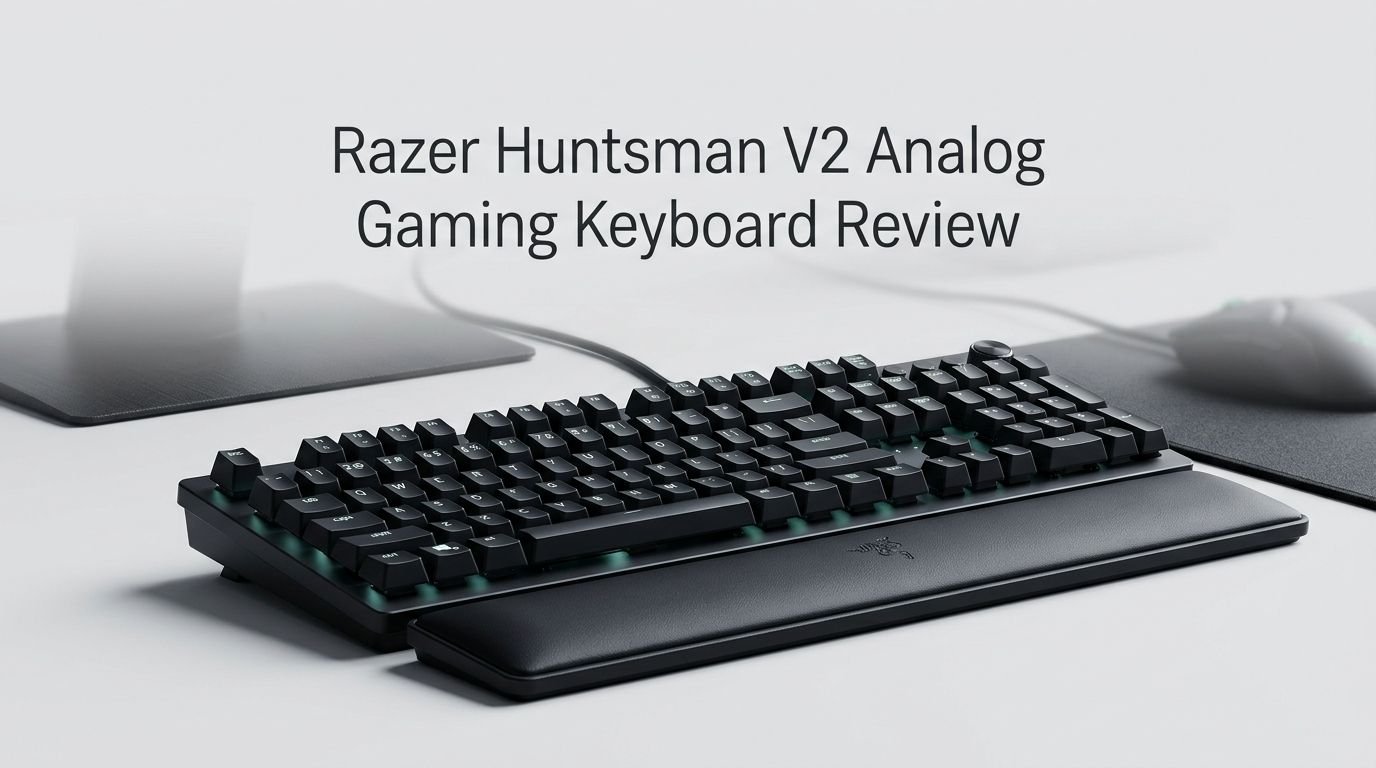
- The build quality is premium. You get an aluminum top plate, double-shot PBT keycaps, a magnetic leatherette wrist rest, and a USB passthrough port. Everything about this keyboard feels solid and well-made.
- RGB lighting is excellent thanks to Razer Synapse. You can customize each key with layered lighting effects, and the underglow adds extra flair. Pastel colors display better here than on many competitors.
- The original MSRP of $250 was steep, but prices have dropped significantly. You can often find this keyboard for around $100 to $150 on sale. At that price, it offers outstanding value for a full-size gaming keyboard.
- One downside is that it shows dirt and fingerprints easily. The black surface and leatherette wrist rest pick up smudges, so regular cleaning is needed to keep it looking fresh.

Last update on 2026-10-13 / Affiliate links / Images from Amazon Product Advertising API Some of the links on this website are affiliate links, which means that at no additional cost to you, I earn a commission if you click through and make a purchase. I only recommend products and services that I believe will add value to my readers. Thank you for your support!
Razer Huntsman V2 Analog Gaming Keyboard: Overview
The Razer Huntsman V2 Analog is a full-size wired gaming keyboard built around Razer’s proprietary analog optical switches. These switches use light-based actuation instead of traditional metal contacts. This makes them faster and more durable, with a rated lifespan of 100 million keystrokes.
Razer released this keyboard as a flagship product. It packs features like adjustable per-key actuation, rapid trigger, gamepad emulation, and full Chroma RGB lighting. The keyboard connects via USB-C and offers an 8000Hz polling rate in supported configurations.
The body features an aluminum top plate that resists flex and adds a premium feel. The included magnetic wrist rest snaps into place easily and provides cushioned support during long sessions. A dedicated media key row with a volume dial sits at the top right corner.
This keyboard weighs about 1.98 pounds without the wrist rest. It measures approximately 17.8 x 5.5 x 1.4 inches. The USB passthrough port on the left side is a nice convenience for connecting a mouse or headset dongle.
Build Quality and Design
The Razer Huntsman V2 Analog keeps things clean and classic with its all-black design. Some gamers prefer flashy aesthetics with acrylic bases and colorful keycaps. This board takes the opposite approach. It focuses on function and durability over visual flair.
The aluminum top plate gives the keyboard a sturdy foundation. There is minimal flex when you press down on the board, even during intense gaming sessions. The double-shot PBT keycaps have a slightly textured surface that resists shine and oil buildup over time.
The underside of the keyboard features RGB light strips that create a soft underglow. This adds personality without making the keyboard look overdone. The overall profile is fairly low, and the included wrist rest brings extra comfort for extended use.
One design choice worth noting is the placement of the USB passthrough port. Razer put it on the left side rather than the back. This makes it much easier to plug in devices without reaching behind the keyboard. The braided USB-C cable feels durable and is long enough for most desk setups.
The Typing Experience
You might expect a gaming-first keyboard to feel stiff or clunky during regular typing. The Razer Huntsman V2 Analog breaks that expectation. The analog optical switches deliver a smooth and satisfying keystroke that works well for both gaming and daily typing tasks.
The actuation force sits at a comfortable middle ground. Keys are not too light and not too heavy. You feel enough resistance to know you pressed a key, but your fingers do not fatigue quickly during long writing sessions.
The sound profile is another pleasant surprise. These switches produce a moderate, balanced sound. They are not clicky like blue switches and not silent like some linear options. The result is a keystroke sound that works well in shared spaces without being annoying.
The textured PBT keycaps improve the typing feel further. Your fingers grip the keys naturally. Even after hours of use, the keycaps do not become slippery or accumulate oil the way ABS keycaps do. This makes a real difference for comfort and hygiene over long periods.
Top 3 Alternatives for Razer Huntsman V2 Analog
1. SteelSeries Apex Pro HyperMagnetic Gaming Keyboard

Last update on 2026-10-11 / Affiliate links / Images from Amazon Product Advertising API Some of the links on this website are affiliate links, which means that at no additional cost to you, I earn a commission if you click through and make a purchase. I only recommend products and services that I believe will add value to my readers. Thank you for your support!
2. Corsair K100 RGB Optical-Mechanical Gaming Keyboard

Last update on 2026-10-11 / Affiliate links / Images from Amazon Product Advertising API Some of the links on this website are affiliate links, which means that at no additional cost to you, I earn a commission if you click through and make a purchase. I only recommend products and services that I believe will add value to my readers. Thank you for your support!
3. Razer Huntsman V3 Pro Gaming Keyboard

Last update on 2026-10-11 / Affiliate links / Images from Amazon Product Advertising API Some of the links on this website are affiliate links, which means that at no additional cost to you, I earn a commission if you click through and make a purchase. I only recommend products and services that I believe will add value to my readers. Thank you for your support!
Analog Optical Switches Explained
The core technology behind this keyboard is the analog optical switch. Traditional mechanical switches have a fixed actuation point. The key either fires or it does not. Analog switches change that completely.
Each key on the Razer Huntsman V2 Analog can detect how far you press it. You can set a custom actuation point anywhere from 1.5mm to 3.6mm. A lighter setting fires the key with a gentle tap. A deeper setting requires a full press. This is useful for different scenarios.
For example, you might want your movement keys (WASD) set to a light actuation for quick strafing in shooters. At the same time, you might set your ability keys to a deeper actuation to avoid accidental presses. This level of control is rare in keyboards outside of specialized models.
The optical mechanism also means there is no physical contact inside the switch. A beam of light handles actuation. This removes debounce delay and increases the switch lifespan dramatically. Razer rates these switches at 100 million keystrokes, which is far beyond most mechanical alternatives.
Rapid Trigger Mode: A Game Changer
Rapid trigger is one of the most talked-about features in competitive gaming keyboards. The Razer Huntsman V2 Analog includes it, and it works very well. Traditional keyboards have a fixed reset point. After you press a key, it must travel back up past a certain distance before it can register again.
Rapid trigger removes that fixed reset point. The moment you begin lifting the key, the stroke resets. This means you can fire repeated inputs much faster than on a standard keyboard. The difference is noticeable in fast-paced games.
You can enable rapid trigger on all keys or just specific ones. The sensitivity level is also adjustable per key through Razer Synapse. This gives you total control over which keys benefit from the feature and how sensitive they are.
For competitive FPS titles like CS2, Valorant, and Apex Legends, rapid trigger provides a measurable advantage in counter-strafing and repeated firing. Even if you play casually, the faster response can make your inputs feel snappier and more precise.
Gamepad Emulation Feature
One of the most unique features on this keyboard is gamepad emulation. The Razer Huntsman V2 Analog can make your PC recognize it as a controller. This opens up some interesting possibilities.
With this mode active, your WASD keys function like an analog joystick. You get smooth 360-degree movement instead of the rigid 8-directional input that standard WASD provides. The Q and E keys emulate the left and right triggers by default.
This feature is especially useful in racing games and third-person action titles where analog movement makes a big difference. You get the precision of a controller stick without actually using a controller. And you can fully remap which keys emulate which gamepad buttons through Synapse.
Some games may automatically detect the keyboard as a controller and display gamepad prompts. This can be confusing at first. But you can toggle the feature off easily through the Razer Synapse software. It is a niche feature, but it adds genuine value for the right user.
RGB Lighting and Customization
Razer sets the standard for RGB customization, and the Huntsman V2 Analog is no exception. The keyboard features per-key RGB backlighting plus underglow strips along the bottom edge. Together, they create a vivid lighting experience.
The Razer Synapse software makes customization simple. You can select a group of keys by dragging your mouse over them, then apply lighting effects to just that section. Effects include wave, breathing, reactive, spectrum cycling, and many more. You can layer multiple effects on the same set of keys for complex results.
Color accuracy is strong here. Pastel shades display better on this board than on many competitors. Light pink, lavender, and mint actually look close to their intended colors rather than washing out to white. Deeper colors like red, blue, and green are vibrant and consistent.
The one drawback is brightness through the keycaps. The double-shot PBT keycaps block some light. If you remove a keycap, the bare LED underneath is extremely bright. Swapping to thinner or more translucent keycaps would fix this. But out of the box, the lighting is slightly dimmer than some rival keyboards.
Razer Synapse Software
The Razer Huntsman V2 Analog relies on Razer Synapse for most of its advanced features. This includes actuation point adjustments, rapid trigger settings, macro programming, gamepad emulation, and lighting customization.
Synapse has improved a lot over the years. The interface is clean, organized, and responsive. You can access each feature category through tabs at the top. Changes save quickly, and you can store up to four profiles in the keyboard’s onboard memory. This means your settings travel with you even if Synapse is not installed on the computer you plug into.
Macro creation is straightforward. You record a sequence, assign it to a key, and set the delay timing. You can also import macros from the Razer community. The software supports per-game profiles that switch automatically when you launch a specific application.
One area where Synapse still falls short is resource usage. It runs in the background and uses a noticeable amount of RAM. Some users prefer keyboards that work entirely through onboard configuration. But for the level of customization Synapse offers, the trade-off is reasonable for most people.
Wrist Rest and Comfort
The included magnetic plush leatherette wrist rest is one of the best pack-in wrist rests available. It snaps onto the front edge of the keyboard using magnets, so it stays in place during use but detaches easily for transport or cleaning.
The cushioning is soft but supportive. It does not bottom out when you press down on it. This keeps your wrists elevated at a comfortable angle and reduces strain during long sessions. The leatherette covering feels smooth against your skin.
The main downside is that the wrist rest picks up smudges and oil. If you apply hand lotion or have naturally oily skin, marks will show up quickly. A damp cloth cleans it effectively, but it does require regular attention to keep looking good.
For a keyboard at this price point, having a quality wrist rest included is a significant bonus. Many competitors either skip the wrist rest entirely or include one made from cheap, hard plastic. Razer’s version genuinely adds to the comfort of using this keyboard daily.
Who Should Buy This Keyboard?
The Razer Huntsman V2 Analog fits several types of users. Competitive gamers benefit most from the analog switches, rapid trigger, and low latency. If you play fast-paced shooters or racing games, this keyboard gives you tools that standard boards cannot.
Content creators and streamers will appreciate the macro support, onboard profiles, and deep RGB customization. The USB passthrough port is handy for connecting a stream deck or other accessories. The dedicated media controls make adjusting volume during live sessions quick and easy.
Typists and productivity users might not need the gaming features, but the typing experience is excellent. The PBT keycaps, comfortable actuation, and included wrist rest make long work sessions pleasant. The full-size layout with a number pad is ideal for data entry and spreadsheet work.
The keyboard is less ideal for minimalists who prefer compact layouts. If you want a 65% or 75% board, look at the Razer Huntsman V3 Pro TKL or the Wooting 80HE instead. It is also not the best choice if you need wireless connectivity, as this model is wired only.
Pros and Cons of the Razer Huntsman V2 Analog
The advantages of this keyboard are clear. The analog optical switches offer customization that goes beyond what most keyboards provide. You get adjustable actuation, rapid trigger, and gamepad emulation all in one device. The build quality is excellent, and the included wrist rest is genuinely comfortable.
RGB lighting through Razer Synapse is top-tier. The software gives you granular control over every key. Onboard memory means your settings are portable. The 100 million keystroke lifespan ensures long-term durability.
On the flip side, the keyboard attracts fingerprints and debris. The black surface shows dust, crumbs, and pet hair easily. The leatherette wrist rest smudges with oily hands. Regular cleaning is necessary to keep things looking clean.
The keycaps block some RGB brightness. While the lighting is still good, removing a keycap reveals how much brighter the LEDs actually are. Users who want maximum RGB impact might want to swap keycaps.
Finally, the original $250 price tag is hard to justify. But at the current sale prices of around $100 to $150, the value proposition improves dramatically. If you can find it on sale, this keyboard delivers premium features at a mid-range price.
How Does It Compare to Newer Keyboards in 2026?
The gaming keyboard market has grown significantly since the Huntsman V2 Analog launched. Boards like the Wooting 80HE, SteelSeries Apex Pro Gen 3, and Corsair Vanguard Pro 96 have entered the scene with their own hall-effect and magnetic switch designs.
The Wooting 80HE is often considered the gold standard for competitive gaming with its ultra-low latency and 8000Hz polling rate. However, it uses a 75% layout and is harder to buy due to stock limitations. The Huntsman V2 Analog offers a full-size layout that the Wooting does not.
The SteelSeries Apex Pro Gen 3 matches many of the Huntsman V2 Analog’s features and adds OmniPoint 3.0 switches with 40 levels of actuation. It also includes an OLED display. But it comes at a higher price and does not include a wrist rest.
Where the Razer Huntsman V2 Analog still shines is in overall value at sale prices. You get analog switches, rapid trigger, a premium wrist rest, USB passthrough, and full Chroma RGB for less than most of its newer competitors. For gamers who do not need wireless or a compact form factor, it remains a strong pick in 2026.
Final Verdict: Should You Buy the Razer Huntsman V2 Analog in 2026?
Last update on 2026-10-13 / Affiliate links / Images from Amazon Product Advertising API Some of the links on this website are affiliate links, which means that at no additional cost to you, I earn a commission if you click through and make a purchase. I only recommend products and services that I believe will add value to my readers. Thank you for your support!
The Razer Huntsman V2 Analog is a feature-packed gaming keyboard that continues to perform well in 2026. Its analog optical switches, rapid trigger mode, and gamepad emulation give it capabilities that many newer boards still lack. The build quality is solid, the typing experience is satisfying, and the RGB customization is among the best available.
At its original retail price of $250, it was a tough sell. But with frequent sales bringing it down to $100 to $150, it becomes one of the best value full-size gaming keyboards on the market. If you want a reliable, full-featured keyboard and you do not mind a wired connection, the Razer Huntsman V2 Analog is absolutely worth your attention.
Our recommendation: Buy it on sale. You will get a premium keyboard experience without the premium price tag.
Frequently Asked Questions
Is the Razer Huntsman V2 Analog good for typing?
Yes, the Razer Huntsman V2 Analog is excellent for typing. The analog optical switches provide a smooth keystroke with comfortable resistance. The double-shot PBT keycaps have a textured feel that prevents slipping. Many users who primarily type for work have reported enjoying this keyboard just as much as dedicated typing boards.
Does the Razer Huntsman V2 Analog support rapid trigger?
Yes, it supports rapid trigger mode. You can enable it for all keys or select specific ones through Razer Synapse. The sensitivity level is adjustable per key. This feature removes the fixed reset point, allowing faster repeated keystrokes. It is especially beneficial for competitive FPS gaming.
Can the Razer Huntsman V2 Analog work as a controller?
Yes, the keyboard includes a gamepad emulation feature. When activated, your PC recognizes the keyboard as a controller. WASD keys act as an analog joystick with 360-degree movement. You can remap all gamepad functions through Razer Synapse.
Is the Razer Huntsman V2 Analog worth it in 2026?
At full retail price, it is a harder recommendation due to newer competitors. However, at the current sale prices of $100 to $150, it offers outstanding value. The feature set competes with keyboards that cost significantly more. If you want a full-size wired gaming keyboard with analog switches and rapid trigger, it is still a strong choice.
Does the Razer Huntsman V2 Analog have wireless connectivity?
No, the Razer Huntsman V2 Analog is a wired-only keyboard. It connects via a braided USB-C cable. If you need wireless functionality, consider the SteelSeries Apex Pro TKL Wireless or a Razer keyboard from the BlackWidow or DeathStalker lines that offer Bluetooth and 2.4GHz options.
How loud is the Razer Huntsman V2 Analog?
The keyboard produces a moderate sound level. It is not as loud as clicky switches and not as quiet as silent linear switches. The sound is balanced and appropriate for most environments. It will not disturb others in a shared room during normal use, though heavy typing during late nights may still be noticeable.

Hi, my name is Lily you can say i am a gadget hunter at this point. Welcome to Gadget Gallery The Gallery of Gadget Reviews