Razer Cynosa V2 Gaming Keyboard Review 2026: Worth It?
Are you looking for a reliable gaming keyboard that won’t drain your wallet? The Razer Cynosa V2 has been a popular pick among budget gamers for years.
It promises full Razer Chroma RGB lighting, spill resistance, and responsive membrane keys at a fraction of what you’d pay for a mechanical board.
But here’s the real question. In 2026, with so many new keyboards flooding the market, does the Cynosa V2 still hold up? This review covers everything you need to know. We tested the build quality, the key feel, the lighting, and the software.
Key Takeaways:
- The Razer Cynosa V2 uses membrane switches instead of mechanical ones. This means the keystrokes are quiet and soft. You get a comfortable typing experience without the loud clicking sounds common in most gaming keyboards. This makes it ideal for shared spaces or late night gaming sessions.
- Full per key Razer Chroma RGB lighting is a standout feature at this price point. You can customize each key with over 16.8 million colors. Most membrane keyboards in this range only offer zone based lighting, so the Cynosa V2 punches above its weight here.
- Spill resistant design gives you peace of mind. Accidents happen. The Cynosa V2 can handle minor liquid spills without damaging the internal components. This is a thoughtful feature for gamers who keep drinks at their desk.
- The keyboard offers a 1000 Hz polling rate and N key rollover. These specs ensure fast input registration and allow you to press multiple keys at once without conflict. For a membrane board, this level of performance is impressive and useful for fast paced games.
- Razer Synapse software integration lets you program macros, adjust lighting effects, and sync with other Razer Chroma devices. The software adds real value and extends what the keyboard can do beyond basic input.
- At a retail price around $59.99, the Cynosa V2 sits comfortably in the budget category. It delivers features typically found on more expensive keyboards, making it a strong option for gamers who want the Razer ecosystem without the premium price tag.

Last update on 2026-10-11 / Affiliate links / Images from Amazon Product Advertising API Some of the links on this website are affiliate links, which means that at no additional cost to you, I earn a commission if you click through and make a purchase. I only recommend products and services that I believe will add value to my readers. Thank you for your support!
Razer Cynosa V2 Gaming Keyboard Overview
The Razer Cynosa V2 is a full size wired membrane gaming keyboard. Razer released it as an upgrade to the original Cynosa Chroma. The keyboard targets entry level gamers who want quality RGB lighting and decent performance without spending over $60.
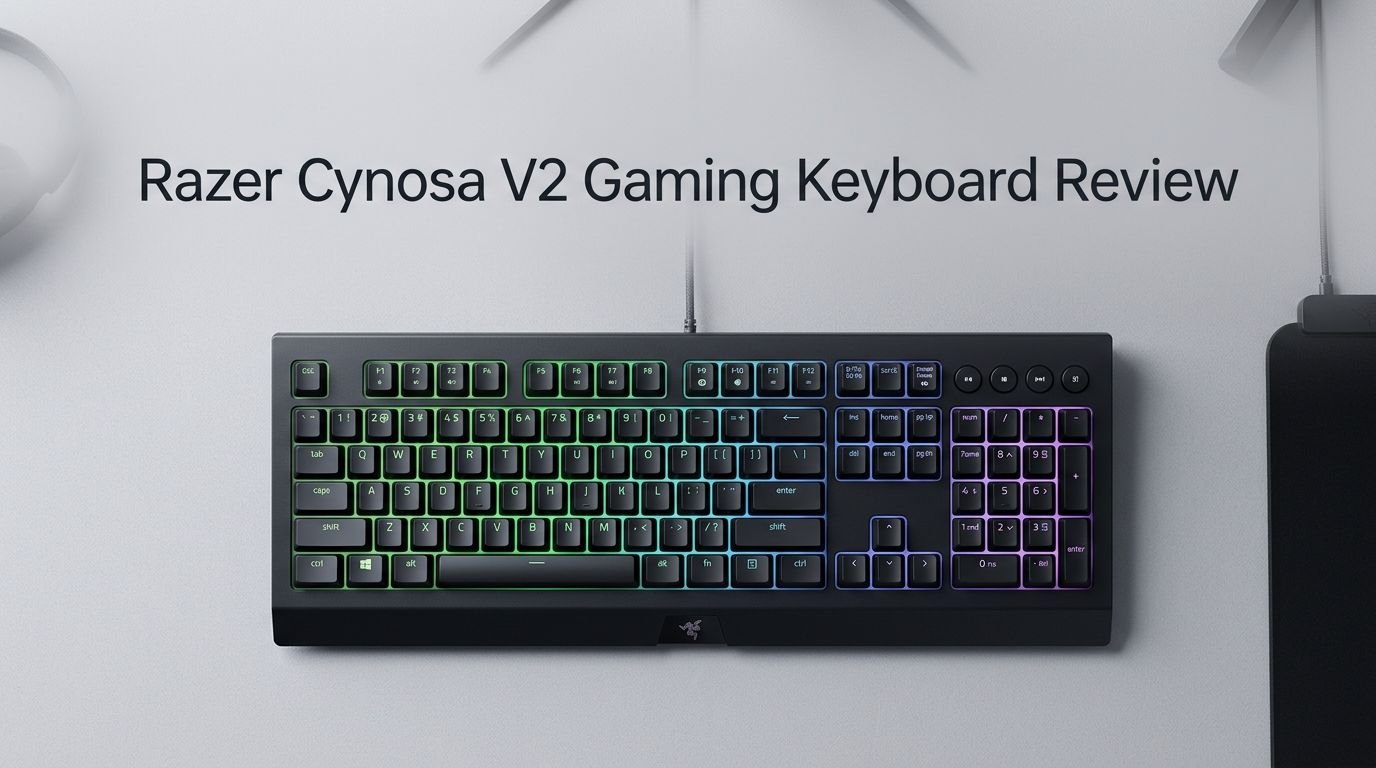
It features individually backlit keys powered by Razer Chroma RGB. This is the same lighting engine found in Razer’s high end products. You get full access to the Chroma ecosystem with effects, syncing, and third party game integrations.
The keyboard uses soft cushioned membrane switches. These feel lighter than mechanical switches and produce very little noise. Razer markets them as “gaming grade,” and for casual to mid level gaming, they perform well. You get a smooth keystroke with a decent amount of travel.
The full size layout includes a number pad, dedicated media keys, and function row. Cable routing channels on the underside let you direct the USB cable left, center, or right. Two kickstand feet offer flat, 6 degree, or 9 degree typing angles.
The Cynosa V2 also supports on the fly macro recording and full key remapping through Razer Synapse 3. This means you can set up complex macros for games or productivity without any extra hardware. The board is also Xbox One compatible for basic input, which adds extra flexibility.
Overall, the Razer Cynosa V2 packs many features into a low price bracket. It is not a mechanical keyboard and it does not try to be one. But it delivers a solid experience for its intended audience.
Build Quality and Design
The Razer Cynosa V2 has a clean and minimal design. The entire body is made of sturdy black plastic with a matte finish. It resists fingerprints well and looks professional on any desk setup.
The keyboard has a rectangular shape with slightly rounded corners. It does not have the aggressive gamer aesthetic that some keyboards use. This makes it a good fit for both gaming and office environments. The low profile body keeps the keyboard close to your desk, which reduces wrist strain during long sessions.
The keys sit slightly recessed into the keyboard body. Each key sits inside a small cutout that helps contain and direct the RGB lighting. This gives the backlighting a uniform glow. The ABS keycaps are smooth and slightly concave, which helps with finger placement.
One thing to note is that the keycaps are ABS plastic, not PBT. ABS caps tend to develop a shiny, worn look over time with heavy use. PBT keycaps are more durable but are typically found on pricier keyboards.
The USB cable is permanently attached and exits from the bottom center of the keyboard. It is a standard plastic coated cable. A braided cable would have been a nice upgrade, but at this price, it is understandable. The three cable routing channels underneath give you options for cable management.
The two flip out feet on the bottom provide adjustable angles. This is a simple but useful addition. Overall, the build quality feels solid for a budget keyboard. It does not flex or creak under normal use.
Membrane Switches and Key Feel
The Razer Cynosa V2 uses soft cushioned membrane switches. These are very different from mechanical switches. Membrane keys use a rubber dome under each key to register presses. The result is a quieter, softer keystroke.
The keys have a light actuation force. You don’t need to press hard to register a keypress. This makes the keyboard comfortable for long typing sessions and extended gaming. The travel distance feels standard for a membrane board with enough depth to feel satisfying.
Typing on the Cynosa V2 is smooth. The keys don’t have the tactile bump or audible click that mechanical switches provide. If you prefer that crisp feedback, this keyboard won’t satisfy you. But if you value quiet operation and a soft touch, the Cynosa V2 delivers well.
Gaming performance with the membrane switches is solid. The 1000 Hz polling rate means the keyboard sends input data to your PC 1000 times per second. This ensures minimal input lag. Paired with N key rollover, you can press many keys at once without any missed inputs. This is critical for games that require fast, simultaneous key presses.
One reviewer noted occasional squeaking from the backspace key. This seems to be an isolated issue and not a widespread defect. Most users report consistent, quiet performance across all keys.
For a membrane keyboard, the key feel on the Cynosa V2 is above average. It won’t replace a good mechanical board for competitive gamers. But for casual gaming and daily typing, it gets the job done with comfort and reliability.
Top 3 Alternatives for Razer Cynosa V2
1. SteelSeries Apex 3 RGB Gaming Keyboard


Last update on 2026-10-14 / Affiliate links / Images from Amazon Product Advertising API Some of the links on this website are affiliate links, which means that at no additional cost to you, I earn a commission if you click through and make a purchase. I only recommend products and services that I believe will add value to my readers. Thank you for your support!
2. Corsair K55 RGB PRO Gaming Keyboard

Last update on 2026-10-14 / Affiliate links / Images from Amazon Product Advertising API Some of the links on this website are affiliate links, which means that at no additional cost to you, I earn a commission if you click through and make a purchase. I only recommend products and services that I believe will add value to my readers. Thank you for your support!
3. Logitech G213 Prodigy Gaming Keyboard

Last update on 2026-10-14 / Affiliate links / Images from Amazon Product Advertising API Some of the links on this website are affiliate links, which means that at no additional cost to you, I earn a commission if you click through and make a purchase. I only recommend products and services that I believe will add value to my readers. Thank you for your support!
Razer Chroma RGB Lighting
The RGB lighting on the Razer Cynosa V2 is one of its biggest selling points. Every single key has its own individual RGB LED. This is called per key lighting, and it is rare at this price point. Most budget membrane keyboards only offer zone based lighting with a few color regions.
You get access to over 16.8 million colors. Each key can be set to a different color or effect. The Razer Chroma ecosystem supports hundreds of lighting profiles and effects. You can create custom color waves, reactive lighting, breathing effects, and much more.
The integration with Razer Chroma connected apps is a strong bonus. Many popular games support Chroma lighting. This means your keyboard can change colors based on in game events. For example, your health bar color can reflect on your keyboard, or different key zones light up during specific game actions.
Syncing the Cynosa V2 with other Razer Chroma devices creates a unified lighting setup across your mouse, headset, mousepad, and more. This level of customization at a budget price is impressive.
The brightness of the LEDs is good. The keys are clearly visible in a dark room without being overwhelming. The contained key design helps direct light upward, which reduces light bleed between keys.
Setting up lighting is handled through Razer Synapse 3 software. The interface is intuitive. You can pick preset effects or build your own from scratch. The software saves profiles to the cloud, so your settings follow you to any PC where you log into Synapse.
For anyone who loves RGB, the Cynosa V2 offers exceptional value.
Razer Synapse 3 Software Experience
Razer Synapse 3 is the software that powers the Cynosa V2’s advanced features. It is a free download from Razer’s website. The software handles key remapping, macro creation, lighting customization, and device syncing.
The interface is clean and organized. You can remap any key on the keyboard to a different function. This includes assigning keyboard shortcuts, launching applications, or entering text strings. For gamers, the macro editor lets you record and assign complex sequences of key presses to a single key.
The on the fly macro recording feature is convenient. You can record macros directly on the keyboard without opening the software. Press a key combination, enter your sequence, and save. This is useful during gaming sessions where you don’t want to alt tab out.
Synapse 3 also handles game mode settings. Game mode disables the Windows key and other keys that might interrupt gameplay. You can customize which keys get disabled, giving you full control over your gaming experience.
Cloud storage is another benefit. Your profiles and settings sync across devices. If you use multiple PCs, your Cynosa V2 settings travel with your Razer account. This removes the hassle of reconfiguring your keyboard every time you switch machines.
The software does require an internet connection for initial setup and syncing. Some users prefer keyboards with onboard memory that store profiles without software. The Cynosa V2 does not have onboard memory, so Synapse 3 is essential for full functionality.
Overall, the software adds significant value to the keyboard. It is well made and gives the Cynosa V2 features that go far beyond a basic membrane board.
Gaming Performance
The Razer Cynosa V2 performs well for casual and mid level gaming. The 1000 Hz polling rate delivers fast response times. Every key press registers quickly and accurately, which matters in fast paced games like shooters and MOBAs.
N key rollover ensures that every key press registers, even during intense moments where you hit multiple keys at once. This feature is critical for gaming. Without it, some key presses can get lost, leading to missed actions in game.
The membrane switches respond with a light touch. You don’t need to bottom out the keys to register a press. This reduces finger fatigue during long gaming sessions. The soft cushioned feel also means you won’t hear loud key noise through your microphone during voice chat.
In practical testing, the keyboard handled games like first person shooters, strategy titles, and MMOs without issues. There was no noticeable input delay. The anti ghosting feature worked well, allowing up to ten simultaneous key presses without conflict.
The dedicated media keys above the number pad are a nice touch during gaming. You can adjust volume, skip tracks, or pause music without leaving your game. These keys are physical buttons, not touch sensitive, so they provide reliable tactile feedback.
For competitive esports at the highest levels, most players prefer mechanical keyboards for their faster actuation and tactile feedback. But for the vast majority of gamers, the Cynosa V2 delivers responsive and reliable performance that won’t hold you back.
Typing Experience
The Razer Cynosa V2 works well as a daily typing keyboard. The soft membrane keys reduce typing noise significantly compared to mechanical keyboards. This makes it a good choice for office work, studying, or any environment where noise is a concern.
Typing speed on the Cynosa V2 is comparable to other membrane keyboards. Experienced typists report speeds around 100 to 110 words per minute with high accuracy. The keys have a smooth travel and a soft landing, which keeps fingers comfortable over extended periods.
The full size layout with number pad is ideal for data entry and productivity tasks. You get all the keys you need without any compromises on layout. The function row, navigation cluster, and arrow keys are all present and properly spaced.
The ABS keycaps have a smooth texture. They don’t offer the same grip as textured PBT keycaps. Over time, heavy use may cause them to become slightly shiny. This is a common trait with ABS plastic and is worth keeping in mind.
The keyboard does not include a wrist rest. For long typing sessions, a separate wrist rest is recommended. The low profile design helps, but additional wrist support improves comfort. Many affordable wrist rests are available and pair well with the Cynosa V2.
The two angle settings from the kickstand feet let you find a comfortable typing position. Some typists prefer a flat keyboard while others like a slight incline. Having both options is helpful.
For a membrane gaming keyboard, the typing experience is pleasant. It won’t match a high quality dedicated typing keyboard, but it serves double duty as a gaming and work keyboard effectively.
Spill Resistant Design
One standout feature of the Razer Cynosa V2 is its spill resistant construction. Razer built this keyboard to handle minor liquid spills without immediate damage. This is a practical feature that many gamers appreciate.
The keyboard body uses a sealed design that prevents liquid from reaching the internal circuitry. If you accidentally knock over a glass of water or spill a drink, the keyboard can survive. You should still clean up the spill quickly and avoid submerging the keyboard. The spill resistance handles splashes and minor spills, not full immersion.
This feature is especially useful for gamers who eat and drink at their desks. Late night gaming sessions with snacks and beverages are a common scenario. Knowing your keyboard can handle an accident reduces stress and protects your investment.
The spill resistant design also makes the keyboard easier to clean. You can wipe down the surface with a slightly damp cloth without worrying about moisture damage. Regular cleaning keeps the keys responsive and the surface looking fresh.
Not all budget keyboards offer spill resistance. The SteelSeries Apex 3 is one competitor that also includes this feature. But among membrane gaming keyboards under $60, spill resistance is a welcome addition that sets the Cynosa V2 apart from many rivals.
The sealed design does mean that individual key switches are not easily accessible for repair or replacement. But given the price of the keyboard, this is an acceptable trade off. If a key fails, the low cost of the keyboard makes replacement reasonable.
Connectivity and Cable Management
The Razer Cynosa V2 is a wired keyboard with a USB A connection. It does not support wireless or Bluetooth connectivity. For gaming, a wired connection is often preferred because it eliminates any potential wireless latency.
The USB cable is permanently attached to the keyboard. It exits from the underside and is approximately 6 feet long. This length is sufficient for most desk setups, including those where the PC sits on the floor or to the side.
Three cable routing channels are molded into the bottom of the keyboard. These channels let you direct the cable to exit from the left side, center, or right side of the keyboard. This is a simple but effective cable management feature. It helps keep your desk tidy and prevents the cable from interfering with your mouse movement.
The cable itself has a standard plastic coating. It is functional but a bit stiff. A braided cable would have been more flexible and durable, but this is a cost saving measure at the budget price point.
Since the keyboard is wired, it draws power directly from the USB port. There are no batteries to charge or replace. The connection is stable and consistent, which is exactly what you want during a gaming session. You won’t experience disconnects or signal drops.
For users who specifically want wireless freedom, the Cynosa V2 is not the right choice. But for those who prioritize reliable, lag free input, the wired connection is a benefit. The cable routing options add a nice touch of thoughtfulness to the overall design.
Compatibility and Platform Support
The Razer Cynosa V2 works with Windows 7, 8, 10, and 11 out of the box. Razer Synapse 3 software is available for Windows, which gives you full access to all customization features. The keyboard functions as a basic plug and play device on any system with a USB port.
Mac users can use the Cynosa V2 for basic typing and gaming. However, Razer Synapse 3 is not available for macOS. This means you lose access to RGB customization, macros, and key remapping on Apple systems. The keyboard will still type, but advanced features won’t be accessible.
An interesting bonus is Xbox One compatibility for basic input. You can connect the keyboard to an Xbox One console and use it for text input and basic navigation. This won’t replace a controller for gameplay, but it is useful for messaging and menu typing.
The keyboard uses a standard USB A plug. If your PC only has USB C ports, you will need an adapter. Most modern PCs still include at least one USB A port, so this is rarely an issue.
Razer Synapse 3 receives regular updates. This keeps the keyboard compatible with new games and Chroma integrations. The software support adds long term value to the keyboard, even years after purchase.
For Linux users, the keyboard functions as a basic input device. Third party tools exist for adjusting Razer lighting on Linux, but official support is limited to Windows. Keep this in mind if you run a Linux based setup.
Who Should Buy the Razer Cynosa V2?
The Razer Cynosa V2 is ideal for budget conscious gamers who want quality RGB and reliable performance. If you are building your first gaming PC and need a capable keyboard without a big price tag, the Cynosa V2 is a smart pick.
Students will find this keyboard useful. It works well for both gaming and schoolwork. The quiet membrane keys won’t disturb roommates or family members. The spill resistant design adds durability for busy desks cluttered with notebooks and drinks.
Gamers who prefer quiet keyboards should consider the Cynosa V2. Mechanical keyboards are louder by nature. If you game at night or share a space, the soft keystrokes are a real advantage. You can game for hours without generating distracting noise.
The Cynosa V2 also suits anyone already invested in the Razer ecosystem. If you own a Razer mouse, headset, or other Chroma devices, this keyboard syncs with all of them through Razer Synapse. The unified lighting experience looks great and adds a premium feel to your setup.
Casual gamers who play a few hours a week will get plenty of value from this board. It handles popular games well and the software features add depth beyond a basic keyboard.
However, competitive esports players and typing enthusiasts may want to look elsewhere. Mechanical keyboards offer faster actuation, better tactile feedback, and more durability for heavy daily use. The Cynosa V2 is a great entry point but not an endgame keyboard for serious users.
Pros and Cons of the Razer Cynosa V2
The Cynosa V2 has clear strengths. The per key Razer Chroma RGB lighting is exceptional for a keyboard at this price. Full Razer Synapse 3 support gives you deep customization options. The spill resistant build adds practical protection. And the quiet membrane keys make it a great choice for shared spaces.
The 1000 Hz polling rate and N key rollover ensure solid gaming performance. You get fast input registration and no ghosting issues during intense gameplay. The dedicated media keys are a convenient bonus that many competing keyboards lack.
The price is a major advantage. At around $59.99, you get features that often appear on keyboards costing twice as much. The Razer brand name and software ecosystem add perceived value beyond the hardware itself.
On the downside, the ABS keycaps will wear over time. They develop a shiny texture with prolonged use. PBT keycaps would have been a better choice but would have increased the price.
The keyboard lacks onboard memory. All profiles and settings require Razer Synapse 3 to be installed. If you use a public or restricted PC, you won’t have access to your customizations.
The plastic coated cable feels basic. A braided cable would improve durability and flexibility. The permanently attached cable also means you can’t swap it if it gets damaged.
There is no detachable wrist rest included. For a keyboard this size, a wrist rest improves comfort significantly during long sessions. You’ll need to buy one separately.
Despite these drawbacks, the positives outweigh the negatives for the target audience. The Cynosa V2 offers strong value for budget gaming setups.
Final Verdict: Is the Razer Cynosa V2 Worth Buying in 2026?
Last update on 2026-10-11 / Affiliate links / Images from Amazon Product Advertising API Some of the links on this website are affiliate links, which means that at no additional cost to you, I earn a commission if you click through and make a purchase. I only recommend products and services that I believe will add value to my readers. Thank you for your support!
The Razer Cynosa V2 remains a solid budget gaming keyboard in 2026. It is not the newest product on the market. But its combination of per key RGB lighting, spill resistance, quiet keys, and full software support makes it a compelling option at its price.
If you need a reliable, quiet, and feature rich keyboard under $60, the Cynosa V2 delivers. The Razer Chroma lighting alone sets it apart from most competitors in this range. The software support through Synapse 3 extends its functionality well beyond basic typing and gaming.
The keyboard won’t satisfy everyone. Mechanical keyboard fans will miss the tactile feedback and faster actuation. Competitive gamers may prefer boards with optical or Hall effect switches. And power users might want onboard memory and a detachable cable.
But for its intended audience of casual gamers, students, and budget builders, the Razer Cynosa V2 hits the right notes. It gives you a premium Razer experience without the premium Razer price. If that sounds like what you need, this keyboard is worth your money.
Frequently Asked Questions
Is the Razer Cynosa V2 a mechanical keyboard?
No, the Razer Cynosa V2 is a membrane keyboard. It uses rubber dome switches instead of mechanical switches. This gives the keys a softer, quieter feel. Membrane switches are less expensive to produce, which helps keep the keyboard affordable. The trade off is that you don’t get the tactile click or rapid actuation speed of mechanical keys.
Does the Razer Cynosa V2 have per key RGB lighting?
Yes. The Cynosa V2 features individually backlit keys with Razer Chroma RGB. Each key can display a unique color from a palette of over 16.8 million options. You can customize lighting through Razer Synapse 3. This level of lighting control is uncommon in budget membrane keyboards and is one of the Cynosa V2’s strongest features.
Is the Razer Cynosa V2 good for typing?
The Cynosa V2 works well for everyday typing. The soft membrane keys are comfortable for extended use and produce minimal noise. Typing speeds are comparable to other full size keyboards. It is not a specialized typing keyboard, but it handles word processing, emails, and general productivity tasks with ease.
Can I use the Razer Cynosa V2 on Mac?
You can use the keyboard for basic typing on a Mac. It functions as a standard USB keyboard. However, Razer Synapse 3 is not available for macOS. This means you cannot customize RGB lighting, create macros, or remap keys on a Mac system.
Does the Razer Cynosa V2 have a wrist rest?
No, the Razer Cynosa V2 does not come with a wrist rest. The keyboard has a low profile design that helps with ergonomics. But for maximum comfort during long sessions, a separate wrist rest is recommended. Many affordable options are available from various brands.
How long does the Razer Cynosa V2 last?
With proper care, the Cynosa V2 can last several years of regular use. The membrane switches are rated for millions of keystrokes. The spill resistant design adds extra durability. The ABS keycaps may develop shine over time, but the overall keyboard structure holds up well for a budget product.

Hi, my name is Lily you can say i am a gadget hunter at this point. Welcome to Gadget Gallery The Gallery of Gadget Reviews