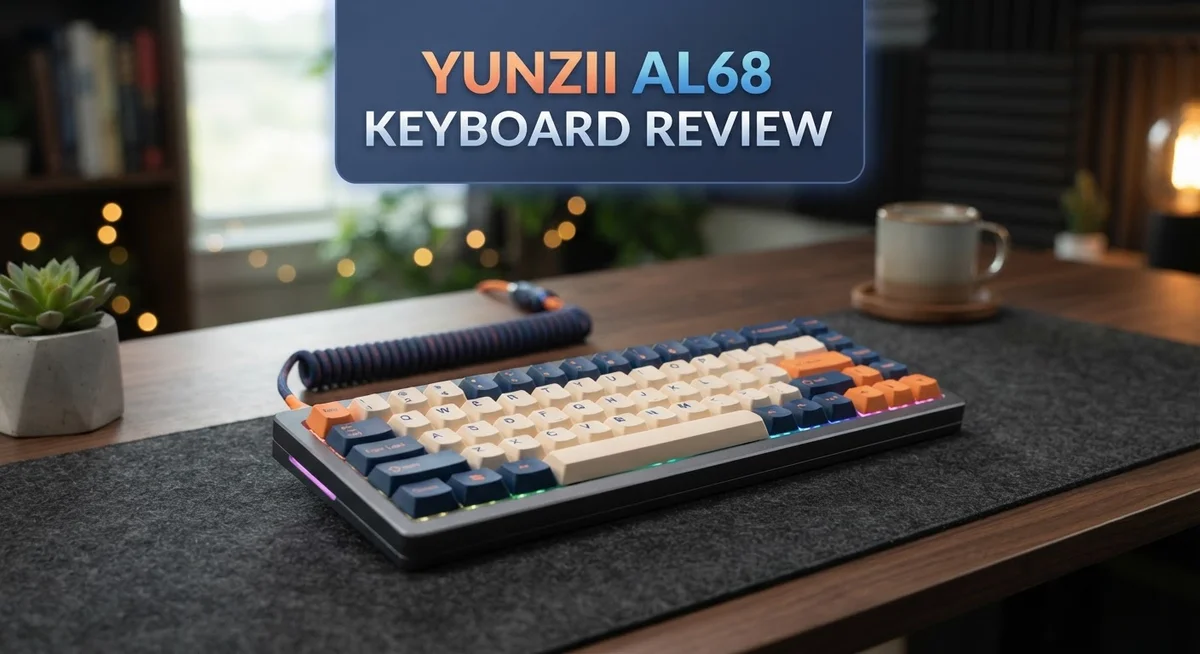
Yunzii AL68 Keyboard Review: 65% Mechanical Keyboard with Aluminum Build
Looking for a keyboard that sounds amazing and feels solid? The Yunzii AL68 might be your answer. This keyboard brings a 65% layout with 66 keys. It fits small desks but keeps all the keys you need.
The body uses premium anodized aluminum. This gives the keyboard a sturdy feel that lasts for years. Inside, the Flex-Cut PC plate works with 4 layers of sound fillings. Every keystroke sounds deep and satisfying.
Typists who love customization will enjoy the QMK/VIA support. You can remap keys and build your own layout with ease. Battery life stands out too. The 6000 mAh battery lasts up to 4 days without RGB lighting on.
In a Nutshell
- Sound quality impresses right away. The deep and firm acoustic profile makes every keystroke satisfying.
- Build quality feels premium. The aluminum construction gives this keyboard a sturdy and long lasting feel.
- Typing comfort works well for most users. The angle supports natural wrist positioning during long sessions.
- Customization options are plentiful. QMK and VIA support lets you remap keys and adjust settings easily.
- One drawback exists though. This keyboard lacks adjustable height, so some typists may need a wrist rest.
- VIA setup takes a bit of effort. You need some preparation before the app works smoothly with this board.
Overall, the Yunzii AL68 delivers a premium typing experience. It balances sound, durability, and customization in one package. Minor limitations exist, but they do not overshadow its strengths.
Design and Build Quality
The Yunzii AL68 showcases a thoughtful approach to mechanical keyboard construction. The premium anodized aluminum body feels solid in your hands and resists wear over time. This material choice means the keyboard maintains its appearance even after months of daily use.
The 65% layout fits perfectly on most desks without taking up excessive space. You get 66 keys arranged in a compact design that still feels natural to type on. The form factor works well for both gaming and office work.
Inside, the engineering impresses just as much as the exterior. The Flex-Cut PC plate sits at the heart of the keyboard’s acoustic performance. Four layers of sound fillings sit beneath this plate to absorb vibrations and reduce unwanted noise. This combination creates a deeper, more controlled typing sound compared to cheaper alternatives.
The hot-swap switch mechanism deserves special attention. You can remove and replace switches without soldering or permanent modifications. This flexibility means you can experiment with different switch types to find your perfect match.
One aspect worth noting: the keyboard lacks adjustable height options. The typing angle comes fixed, so you need to accept the default slope. Most users find this angle comfortable, but those preferring extreme inclines might feel limited.
The construction quality shines through in every detail. The gaps between keys remain tight and consistent. The stabilizers feel smooth when typing on longer keys like spacebar and shift. No rattling or loose parts distract you during work sessions.
The wireless connectivity system integrates seamlessly into the design. The 6000 mAh battery hides inside without adding bulk or weight. Three connection modes (2.4GHz wireless, Bluetooth, and wired USB) give you flexibility across different devices.
Overall, the AL68 delivers premium build quality without unnecessary complexity. The aluminum construction promises durability for years ahead. The internal sound dampening system works effectively right out of the box. If you value solid engineering and consistent typing feel, this keyboard’s design will satisfy you completely.

Last update on 2026-10-13 / Affiliate links / Images from Amazon Product Advertising API Some of the links on this website are affiliate links, which means that at no additional cost to you, I earn a commission if you click through and make a purchase. I only recommend products and services that I believe will add value to my readers. Thank you for your support!
Sound Profile and Acoustic Performance
The AL68 delivers a distinctly satisfying acoustic signature that sets it apart in its category. The sound profile leans toward the deeper end of the spectrum, with a firm and controlled character that appeals to typists who prefer substantial feedback.
The Flex-Cut PC plate forms the foundation of this acoustic performance. This component works alongside the 4-layer sound fillings to create a cohesive dampening system. The result? Keystrokes produce a rich, rounded tone rather than sharp pings or hollow echoes. Each tap feels grounded and purposeful.
The aluminum construction plays a crucial role in shaping the overall acoustics. Metal naturally resonates differently than plastic, and the premium anodized finish here contributes to a warmer sound character. The keyboard doesn’t feel tinny or brittle. Instead, it delivers warmth without muddiness.
Typists will notice that the sound remains consistent across the entire board. Whether you press keys near the edges or the center, acoustic character stays uniform. This consistency matters because it creates a predictable, enjoyable typing experience. You know exactly what sound you’ll get with each keystroke.
The hot-swap switch mechanism allows you to experiment with different switch types if desired. Swapping switches lets you fine-tune the acoustic profile to match your personal preferences. Want a slightly softer sound? Try linear switches. Prefer more tactile feedback? Tactile switches work well here too.
The wireless connectivity doesn’t compromise sound quality. Some users worry that wireless keyboards sound different, but the AL68 maintains its acoustic character across all three connection modes. Bluetooth, 2.4GHz, and wired connections all deliver the same satisfying audio profile.
One important note: the keyboard’s sound profile works best with quality switches. Cheap or worn switches may not showcase the AL68’s acoustic potential fully. Investing in decent switches unlocks the full acoustic experience this keyboard offers.
The overall acoustic performance represents genuine engineering rather than marketing hype. The deep, firm character appeals to professionals and enthusiasts alike. If you value a keyboard that sounds as good as it feels, the AL68’s acoustic profile deserves serious consideration.
Connectivity and Battery Life
The Yunzii AL68 connects in three different ways, giving you flexibility based on your setup. You can use it wired, via 2.4GHz wireless, or through Bluetooth. This multi mode approach means you’re not locked into one connection method.
The 6000 mAh battery powers the keyboard for about 4 days without RGB lighting enabled. With RGB on, expect shorter sessions between charges. The battery life performs well compared to other 65% wireless boards in this category. You won’t find yourself constantly hunting for a charger.
Charging happens through a USB C port, which is standard on modern keyboards. The cable connects easily and charges fairly quickly. Most users report the battery lasts through a full work week with moderate RGB use.
Wireless connectivity stays stable across all three modes. The 2.4GHz connection feels responsive with no noticeable lag during typing or gaming. Bluetooth works smoothly when you need to switch between devices. The keyboard remembers your paired devices, so reconnecting takes just seconds.
One thing to know: switching between connection modes requires a button combination on the board itself. The process is simple once you learn it, but new users might need to check the manual first. After that, toggling between wireless and Bluetooth becomes second nature.
The wireless system doesn’t drain the battery excessively during idle time. The keyboard enters a low power mode when not in use, which extends time between charges significantly. This feature matters if you use the board sporadically throughout your day.
The three connectivity options make the AL68 genuinely adaptable. Whether you’re at a desk with a single computer or juggling multiple devices, the keyboard adjusts to your workflow. The battery holds up well during regular use, and the charging process feels convenient.
Overall, connectivity and battery performance stand as genuine strengths of this keyboard. You get flexibility without sacrificing reliability or ease of use.
Top 3 Alternatives
Keychron Q1 Keyboard
No products found.
The Keychron Q1 offers a premium mechanical keyboard experience. This keyboard features a solid aluminum frame that feels sturdy and professional. You get hot-swappable switches, so you can change them without soldering.
The Q1 includes wireless connectivity with Bluetooth support. You can connect to multiple devices and switch between them easily. The battery lasts for weeks on a single charge. The build quality stands out with its gasket mounting system that absorbs key presses smoothly.
Nuphy Air75 Keyboard
No products found.
The Nuphy Air75 delivers a compact yet functional design. This 75% keyboard fits nicely on any desk without taking up too much space. It weighs only 600 grams, making it highly portable for travel.
You get wireless and wired connection options. The keyboard uses a unique stabilizer system that reduces wobbling. Battery life reaches up to 240 hours, which means you charge it rarely. The typing experience feels responsive and satisfying with its low-profile switches.
Varmilo VA87M Keyboard

Last update on 2026-10-13 / Affiliate links / Images from Amazon Product Advertising API Some of the links on this website are affiliate links, which means that at no additional cost to you, I earn a commission if you click through and make a purchase. I only recommend products and services that I believe will add value to my readers. Thank you for your support!
The Varmilo VA87M brings aesthetic appeal with functional performance. This keyboard comes in various colorways and designs that match different styles. The TKL layout gives you a balanced size between full and compact keyboards.
Varmilo uses high-quality stabilizers that ensure consistent key performance. The keyboard supports both USB and wireless modes. The keycaps feature durable printing that resists fading. The VA87M appeals to users who value both appearance and reliability in their typing experience.
Customization and Compatibility
The Yunzii AL68 opens up a world of personalization through QMK and VIA compatibility. These tools let you reprogram keys, adjust macros, and fine tune the entire typing experience to match your workflow.
QMK support means you get deep customization options. You can remap any key on the board. Layer switching becomes possible, so you access functions beyond the standard 66 keys. Macro recording lets you automate repetitive tasks with a single keystroke.
VIA takes customization further by offering a visual interface. You don’t need coding knowledge to make changes. The app walks you through remapping in a straightforward way. One thing to know: you’ll need to prepare the keyboard before using VIA for the first time. This setup step takes just minutes and opens unlimited possibilities.
The hot swap mechanism pairs perfectly with customization efforts. You can swap out switches without soldering. This means experimenting with different switch types becomes simple. Some users prefer clicky switches for typing, while others choose linear switches for gaming. The AL68 lets you switch between them instantly.
Compatibility extends across multiple operating systems. The keyboard works with Windows, Mac, and Linux setups. Wireless mode connects to any device with Bluetooth support. USB mode functions as a standard keyboard on any computer. This flexibility makes the AL68 a solid choice whether you’re switching between work devices or gaming rigs.
The 65% layout also means compatibility with most keycap sets available on the market. Standard profile keycaps fit without issues. You can customize the look and feel by swapping keycaps alongside your switch choices.
One limitation worth mentioning: the plate design offers limited flexibility. The Flex Cut PC plate comes fixed with its acoustic design. You cannot modify or replace it with alternatives. This design choice prioritizes sound quality over extreme customization.
Overall, the AL68 strikes a strong balance between personalization and simplicity. QMK and VIA give you powerful tools without overwhelming complexity. Whether you want subtle tweaks or complete remapping, this keyboard delivers the flexibility you need.
Ergonomics and Typing Experience
The Yunzii AL68 delivers a typing experience that feels natural and comfortable from the first keystroke. The keyboard sits at an angle that supports your wrists without forcing them into awkward positions. Your hands rest at a height that reduces strain during long typing sessions.
The 65% layout keeps all essential keys within easy reach. Your fingers don’t need to stretch far to access numbers, symbols, or function keys. This compact design actually improves ergonomics by reducing hand movement overall.
The aluminum frame provides solid support underneath your hands. Unlike plastic keyboards that flex and move, this construction stays firmly in place on your desk. The weight distribution feels balanced, so the keyboard won’t shift around while you type.
One thing to note: the keyboard has no adjustable height features. You get one fixed typing angle. Some users prefer this consistency, while others might want tilt options for different desk setups.
The typing feel depends heavily on which switches you install. Since the AL68 uses hot swap switches, you can experiment and find your perfect match. The Flex Cut PC plate absorbs impact smoothly, creating a typing experience that feels controlled and responsive.
Key presses register with satisfying feedback. The acoustic dampening layers underneath reduce unnecessary noise without making the keyboard feel mushy. Your fingers get clear confirmation that each keystroke registered properly.
The key spacing follows standard mechanical keyboard dimensions. This means typists switching from other keyboards adapt quickly. Muscle memory transfers easily because everything feels familiar.
During extended typing sessions, the ergonomic design shines. Your hands stay comfortable even after hours of work. The firm, stable base prevents fatigue that comes from keyboards that wobble or shift.
The overall typing experience balances comfort with performance. You get a keyboard that supports proper posture while delivering responsive, accurate key registration. The build quality ensures this ergonomic advantage lasts through years of daily use without degradation or wear affecting how the keyboard feels under your hands.
Pros and Cons
Pros
- Excellent sound quality with a deep, firm acoustic profile that stands out in its class
- Premium anodized aluminum construction delivers durability and solid hand support
- QMK and VIA compatibility unlock extensive customization options for your typing experience
- Hot swap switches let you swap out key mechanisms without soldering
- Strong 6000 mAh battery lasts about 4 days without RGB lighting
Cons
- No adjustable height means the typing angle stays fixed for all users
- VIA app requires some preparation and setup before you can use it effectively
- Plate design offers limited flexibility if you want to modify the board’s internal structure
Who Should Buy It
The Yunzii AL68 works best for typists who want a compact keyboard without sacrificing sound quality. If you spend hours typing and care about acoustic feedback, this board delivers. The 65% layout keeps your hands close together, which many writers and programmers prefer.
Mechanical keyboard enthusiasts will appreciate the customization depth. You can remap every single key through QMK or use VIA’s visual interface. This flexibility means you build the keyboard exactly how you want it. Hobbyists who enjoy tweaking their setup will find plenty to explore here.
Gamers seeking a portable option should consider this keyboard. The compact size fits easily in a backpack. The wireless connectivity works across three different modes, so you can switch between devices quickly. Fast response times keep up with gaming demands.
The AL68 suits people who work across multiple operating systems. Windows, Mac, and Linux all work seamlessly. If your workflow bounces between different platforms, this keyboard adapts without issues.
Keycap collectors will love the 65% layout compatibility. Most aftermarket keycap sets fit this board perfectly. You can customize the look to match your desk aesthetic while maintaining that premium aluminum feel.
This keyboard is not ideal for users who need height adjustment. The typing angle stays fixed, so if you have specific ergonomic requirements, you might need a separate stand. The plate design also limits internal modifications, so builders seeking extreme customization may find constraints.
People new to mechanical keyboards should approach the VIA app with patience. Setup requires some preparation before customization becomes possible. Once configured, the process becomes smooth, but initial steps demand attention.
The 4-day battery life without RGB lighting appeals to remote workers and travelers. You won’t constantly hunt for a charging cable. The wireless reliability means you work uninterrupted throughout your day.
In short, buy this keyboard if you value sound quality, portability, and customization in a compact form factor. Skip it if you need height adjustment or prefer plug-and-play simplicity without configuration steps.
Final Verdict
The Yunzii AL68 earns its place among solid 65% keyboards. It blends sound, build, and customization into one tight package.
If you compare it to the Yunzii AL66 or Yunzii IF75, the AL68 still holds its own. Each model targets slightly different users, but the AL68 strikes a fair balance between form and function.
Switch enthusiasts will enjoy testing different switches through the hot swap sockets. Sound chasers will appreciate how the acoustic tuning makes each keystroke feel intentional.
This keyboard is not for everyone, though. Users who need a fully adjustable setup might feel limited by the fixed typing angle.
Still, most people who try the AL68 walk away impressed. The build quality feels far above what you’d expect from a compact board.
Think of this keyboard as a long term investment in your typing setup. It rewards patience, especially if you take time to learn the VIA software.
For gamers, writers, and programmers, the AL68 offers a dependable daily driver. It handles long sessions without fatigue and keeps your desk clean with its wireless modes.
If you’re comparing it against the Yunzii AL98 PRO, remember that the AL68 trades a few extra keys for better portability. That tradeoff works well for anyone who values desk space.
In short, the Yunzii AL68 delivers where it matters most. The sound profile, build quality, and customization options make it a strong pick for most mechanical keyboard fans.
If you want a keyboard that feels premium and performs reliably, the AL68 deserves a serious look. It fits well into both casual and professional setups.
Give it time to settle into your routine. Once you adjust to its angle and layout, it becomes hard to go back to anything less refined.
Frequently Asked Questions
Does the AL68 work with Mac and Linux?
Yes, the AL68 connects to Mac and Linux without issues. The keyboard uses standard wireless protocols that work across all major operating systems. If you want to reprogram keys or customize layers, QMK and VIA support both Mac and Linux. You may need to install QMK Toolbox on your computer first, but the process is straightforward.
Can I replace the switches myself?
Absolutely. The AL68 features hot swap sockets, so you can swap switches without soldering. Simply pull out the old switch and insert a new one. This makes testing different switch types easy and fun for enthusiasts.
How long does the battery actually last?
The 6000 mAh battery gives you about 4 days of continuous use without RGB lighting enabled. With RGB on, expect 1 to 2 days depending on brightness. For remote workers and travelers, this battery life removes the need to charge daily.
Is the VIA app difficult to set up?
The VIA app requires some preparation before your first use. You’ll need to add the AL68 configuration file to VIA’s settings. Once you complete this step, remapping keys becomes simple and intuitive. New users should expect 10 to 15 minutes for initial setup.
What makes the AL68 different from the AL66?
The AL68 offers 66 keys instead of 64, giving you slightly more layout flexibility. Both keyboards share the same aluminum build quality and sound profile. Your choice depends on whether you prefer the extra keys or want a smaller footprint.

Hi, my name is Lily you can say i am a gadget hunter at this point. Welcome to Gadget Gallery The Gallery of Gadget Reviews