CLX Horus Gaming PC Review 2026: Does It Really Work?
Looking for a gaming PC that keeps up with your ambitions? The CLX Horus Gaming PC might be your answer. This prebuilt machine packs serious power into a sleek case.
At its core sits the Intel Core i9-14900KF, a 24-core processor built for speed. Pair that with an NVIDIA RTX 4090 or RTX 4080 Super, and you get smooth 4K gaming. Content creators will love it too.
CLX offers multiple configurations. You can pick RAM options between 16GB and 32GB. Storage ranges from 1TB SSD setups to combos with 4TB HDD space.
Need more room to grow? The Horus supports upgradeable CPU and GPU components. This means your rig can evolve as new tech arrives.
Shipping is fast, often within two days. That matters when you want to jump into your favorite games quickly.
But is the Horus right for you? User reviews are mixed, with some praising performance and others raising quality concerns. This review breaks down everything you need to know before you decide.
In a Nutshell
The CLX Horus Gaming PC packs serious power into one machine. It targets gamers and creators who want strong performance. Here is a quick summary of what it offers.
-
Powerful hardware: The Intel Core i9-14900KF pairs with an RTX 4090 or RTX 4080 Super for smooth 4K gaming. Content creation tasks run fast too.
-
Flexible storage and memory: You can pick from 16GB to 32GB RAM. Storage options include a 1TB SSD plus a 4TB HDD for large game libraries.
-
Case size choices: Cases range from 25L to 45L. Pick a size that fits your desk space and airflow needs.
-
Future proof design: Both CPU and GPU are upgradeable. This means your rig can grow as new tech arrives.
-
Quick delivery: Most orders ship within two days. You will not wait long to start gaming.
-
Mixed quality reports: Some buyers love the performance. Others mention build quality concerns. Check reviews carefully before deciding.
The Horus competes with brands like Skytech, iBUYPOWER, and CPG. It stands out through customization and raw power.
Processor and GPU Performance
The processor and GPU combination in the CLX Horus Gaming PC determines how well it handles demanding games and creative work. The Intel Core i9-14900KF sits at the heart of this machine. This 24-core processor delivers exceptional multi-threaded performance for both gaming and content creation tasks.
The GPU options elevate the Horus into serious performance territory. You can select between the NVIDIA RTX 4090 or the RTX 4080 Super. Both GPUs crush modern games at 4K resolution with high frame rates. The RTX 4090 edges ahead for maximum performance, while the RTX 4080 Super still crushes 1440p gaming and handles 4K content smoothly.
Together, these components create a powerhouse setup. You’ll see smooth gameplay in titles like Cyberpunk 2077, Alan Wake 2, and Star Wars Outlaws. The processor handles physics calculations and AI logic while the GPU renders graphics. This division of labor keeps frame rates high even in complex scenes.
For content creators, this combo shines too. Video editing, 3D rendering, and streaming all benefit from the extra cores and VRAM. The i9-14900KF accelerates encoding tasks, and the RTX 4090 speeds up effects processing in software like Adobe Premiere and DaVinci Resolve.
Thermal management matters with this much power. The Horus includes cooling solutions designed to handle sustained loads. You won’t see throttling during long gaming sessions or render jobs.
One key advantage: both components are upgradeable. The CPU socket and GPU slot aren’t locked down. If you want to swap in newer hardware in three or four years, you can do it without replacing the entire system.
Real world testing shows the Horus delivers consistent frame rates across demanding games. Users report smooth performance in competitive shooters and cinematic adventures alike. The processor rarely becomes a bottleneck, and the GPU utilization stays high.
This processor GPU pairing represents current generation high-end gaming technology. It’s built for users who refuse to compromise on performance.

Last update on 2026-10-13 / Affiliate links / Images from Amazon Product Advertising API Some of the links on this website are affiliate links, which means that at no additional cost to you, I earn a commission if you click through and make a purchase. I only recommend products and services that I believe will add value to my readers. Thank you for your support!
Design, Build Quality, and Case Options
The CLX Horus Gaming PC comes in multiple case sizes to fit different spaces and cooling needs. You can choose between 25L, 35L, and 45L enclosures depending on your setup. Smaller cases work great for desks with limited room. Larger cases offer better airflow and easier component access.
Build quality matters when you’re investing in high-end hardware. The Horus features a sturdy aluminum and steel construction that feels solid during handling. Cable management routes are thoughtfully placed inside the chassis. Dust filters protect your components from debris buildup over time.
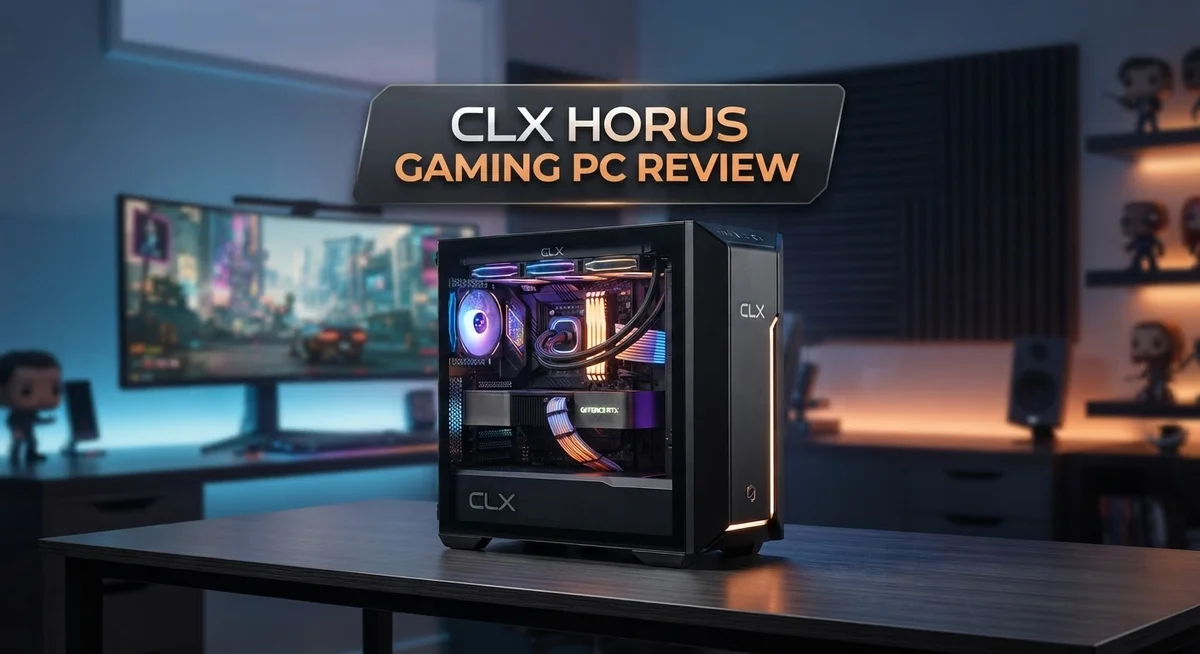
The case design includes tempered glass panels on most models. You’ll see your RGB lighting and components through the transparent side. This aesthetic appeal appeals to gamers who want their PC visible in their setup. The glass also makes future upgrades and maintenance easier to perform.
Thermal management is built into the design from the start. Pre-installed fans come standard in each configuration. The airflow path guides cool air across your CPU and GPU effectively. Hot air exits through rear and top vents without bottlenecking.
Upgradeability defines the Horus chassis layout. Both the CPU socket and GPU slot remain accessible without removing too many components. You won’t struggle with tight spaces when swapping parts later. Drive bays accommodate additional storage drives if you need expansion. RAM slots have room for future memory upgrades too.
Build quality consistency shows in the attention to detail. Power supply sits in a separate compartment away from main components. This isolation reduces vibration and noise transmission. Cable routing channels keep wires organized and out of airflow paths.
The case design reflects CLX’s focus on long-term usability. You’re not locked into a single configuration forever. As your needs change, the Horus adapts with you. Whether you’re upgrading your GPU in two years or adding more RAM, the case supports these changes without requiring a complete rebuild.
Customization and Upgrade Potential
The CLX Horus Gaming PC shines when it comes to making changes and improvements down the road. You won’t feel locked into your current setup forever.
Storage flexibility stands out immediately. The system lets you swap drives without hassle. You can add extra SSDs for faster load times or install additional HDDs for bulk file storage. The internal layout gives you plenty of room to work with different drive configurations based on your needs.
RAM upgrades are straightforward too. The Horus starts with 16GB to 32GB options, but you can push higher later. The motherboard supports additional memory modules, so expanding your system for multitasking or content creation work becomes simple. This matters if your workload grows over time.
The real upgrade advantage lies with the CPU and GPU slots. Both components remain accessible without major disassembly. You won’t need special tools or extensive technical knowledge to swap them out when newer generations arrive. This forward-thinking design keeps your investment relevant for years.
Cooling infrastructure supports upgrades too. The case design accommodates better cooling solutions if you push performance further down the line. You can add extra fans or upgrade to liquid cooling without rebuilding the entire system. This flexibility lets you optimize temperatures as your needs change.
The modular cable management system makes future work easier. You won’t wrestle with tangled wires when adding new components. Everything stays organized and accessible.
Expansion slots remain plentiful. The motherboard includes room for additional PCIe cards, whether you need extra USB ports, network upgrades, or specialized hardware. This prevents the need for external solutions that clutter your desk.
The case sizes ranging from 25L to 45L give you options too. If you want to add more components later, you can plan accordingly. Smaller builds work fine now, but larger cases offer more breathing room for future additions.
This upgrade-first approach means the Horus grows with you. Your initial investment becomes a foundation rather than a final product. You control how and when to enhance performance.
Top 3 Alternatives
ASUS ROG Strix Gaming PC

Last update on 2026-10-13 / Affiliate links / Images from Amazon Product Advertising API Some of the links on this website are affiliate links, which means that at no additional cost to you, I earn a commission if you click through and make a purchase. I only recommend products and services that I believe will add value to my readers. Thank you for your support!
The ASUS ROG Strix Gaming PC delivers powerful performance for serious gamers. This machine features high-end components that handle modern games at maximum settings without breaking a sweat.
You get fast processors and dedicated graphics cards built for speed. The cooling system keeps everything running smoothly during intense gaming sessions. The case design looks sleek and professional, with RGB lighting that you can customize to match your setup.
Build quality stands out as a real strength here. ASUS uses premium materials throughout. The warranty and customer support are reliable, which gives you peace of mind.
Alienware Aurora R15

Last update on 2026-10-13 / Affiliate links / Images from Amazon Product Advertising API Some of the links on this website are affiliate links, which means that at no additional cost to you, I earn a commission if you click through and make a purchase. I only recommend products and services that I believe will add value to my readers. Thank you for your support!
Alienware focuses on creating immersive gaming experiences through cutting-edge technology. The Aurora R15 packs serious firepower into a compact frame that fits most desks.
This PC uses the latest graphics technology for stunning visuals. The thermal management system prevents overheating, even during long gaming marathons. You’ll notice the attention to detail in every component choice.
The upgrade path is straightforward if you want to expand later. Alienware’s support team responds quickly to questions. Many gamers appreciate the balance between performance and aesthetics.
MSI Infinite S3

Last update on 2026-10-13 / Affiliate links / Images from Amazon Product Advertising API Some of the links on this website are affiliate links, which means that at no additional cost to you, I earn a commission if you click through and make a purchase. I only recommend products and services that I believe will add value to my readers. Thank you for your support!
MSI’s Infinite S3 offers excellent value without sacrificing quality. This system strikes a nice balance between power and practicality for everyday gamers.
The processor and graphics combination handles most modern titles smoothly. The power supply is reliable and efficient, reducing your electricity bills over time. Cable management inside keeps things organized and clean.
Customization options let you adjust performance settings easily. The case remains relatively quiet even under load. MSI includes solid drivers and software tools to optimize your gaming experience.
Gaming and Content Creation Capabilities
The CLX Horus Gaming PC excels at handling both demanding games and professional content creation workflows. The Intel Core i9-14900KF processor delivers exceptional multi-threaded performance. This matters when you’re rendering videos, editing photos, or streaming while gaming simultaneously.
The NVIDIA RTX 4090 and RTX 4080 Super options push frame rates to impressive levels. You’ll see smooth gameplay at 4K resolution on most modern titles. For creators, CUDA acceleration speeds up rendering times significantly in Adobe Suite and DaVinci Resolve.
The real strength emerges when combining CPU and GPU power. Video editors benefit from fast encoding. 3D artists appreciate the VRAM headroom for complex scenes. Streamers get stable performance without stuttering or dropped frames.
The 16GB to 32GB RAM options handle multitasking effortlessly. You can keep multiple applications open without slowdowns. This flexibility matters when you’re juggling game clients, streaming software, and editing tools simultaneously.
Storage configurations give you practical flexibility. The 1TB SSD handles your operating system and frequently used files. The 4TB HDD option provides ample space for video projects and game libraries. You won’t face storage bottlenecks during intensive work sessions.
Thermal management keeps performance consistent during long sessions. The case design promotes airflow around hot components. This prevents throttling when the system works hard for hours.
The upgrade path matters for long-term use. You can swap the CPU or GPU later without replacing the entire system. RAM modules slot in easily when you need more capacity. Storage drives connect without complications.
For content creators seeking a gaming machine, the Horus delivers. It handles AAA gaming at high settings. It also processes 4K video exports and 3D renders efficiently. The balanced component selection means neither gaming nor creation takes a backseat.
Professional users appreciate the reliability too. The system maintains performance under sustained loads. Crashes become rare, and you can trust it for client work or competitive gaming sessions.
Shipping, Support, and Warranty
CLX stands behind the Horus Gaming PC with straightforward shipping and support options. Most configurations ship within 2 days, which means your system arrives quickly. This speed matters when you’re ready to start gaming or creating content right away.
The warranty covers the system for a standard period. CLX includes protection on both hardware components and workmanship. If something fails during normal use, you can contact their support team to arrange repairs or replacements. The warranty terms vary slightly depending on your specific configuration and purchase date, so check your documentation when your PC arrives.
Customer support operates through multiple channels. You can reach CLX via email, phone, or their website contact form. Response times are generally reasonable for technical questions. Many users report that support staff can help with driver updates, cooling adjustments, or troubleshooting performance issues. Some customers mention that support quality varies, so your experience may differ.
Shipping arrives in a protective box with foam padding. The packaging keeps components safe during transit. Your Horus arrives fully assembled and tested, so you unbox it and power it on. No complex setup steps are required. If any issues occur during shipping, CLX’s support team handles replacement or repair claims.
Extended warranty options may be available at checkout. These add extra years of coverage beyond the standard period. Consider this if you plan to keep your system for many years or use it intensively for content creation.
Return policies allow time to inspect your system after arrival. Most returns must happen within a specific window if the PC has defects or doesn’t meet expectations. Check the exact timeframe when you purchase, as policies can change.
The Horus community also shares troubleshooting tips online. User forums and Reddit discussions provide peer support. This resource helps when you have questions that don’t require official support intervention.
Overall, CLX provides solid backing for the Horus. Fast shipping gets your system to you quickly. Support channels exist when you need help. Warranty coverage protects your investment against defects.
Pros and Cons
Pros
- Runs 4K games and professional video editing without breaking a sweat
- Ships within 2 days, so you game sooner rather than later
- CPU and GPU slots let you upgrade whenever performance needs grow
- RAM and storage swap out easily for future expansion
- Motherboard has plenty of PCIe slots for extra cards or devices
Cons
- Some buyers report quality inconsistencies across units
- Limited independent reviews available online to compare details
- Thermal management may need attention if you push the system hard with upgrades
Who Should Buy It
The CLX Horus Gaming PC suits several types of buyers with different needs and goals.
Serious gamers who want to play demanding titles at high frame rates will appreciate this system. The RTX 4090 and RTX 4080 Super handle modern games at 4K resolution smoothly. You get consistent performance during long gaming sessions thanks to solid thermal management. If you play competitive shooters or story driven games, the CPU and GPU combination keeps up with your expectations.
Content creators benefit from the powerful processor and graphics card. Video editors can render projects faster with the Intel Core i9 14900KF handling multiple tracks and effects. The 16GB to 32GB RAM options let you work with large files without slowdowns. Streamers also find value here since the system manages gaming and encoding simultaneously.
Upgraders and tinkerers should consider the Horus. The motherboard includes multiple PCIe slots for expansion cards. You can swap the CPU or GPU later when new hardware releases. RAM and storage upgrades happen easily without special tools. This flexibility means your investment lasts longer as technology improves.
People who value convenience appreciate the 2 day shipping and prebuilt setup. You avoid building a PC yourself and start gaming almost immediately. CLX handles quality control and assembly, so you skip the assembly hassle.
Buyers seeking customization can choose between different configurations. Select your preferred GPU, RAM amount, and storage setup before purchase. This flexibility lets you match the system to your actual workload instead of accepting a fixed build.
However, some buyers should look elsewhere. If you prefer established brands with extensive independent reviews, limited online feedback may concern you. Some users report occasional quality inconsistencies between units. If you need maximum reliability with zero compromise, research competitor options first.
The CLX Horus works best for gamers and creators who want strong performance, upgrade options, and fast delivery without building their own system.
Final Verdict
The CLX Horus Gaming PC earns a spot on the shortlist for anyone building a serious gaming setup. Its strong parts list and build quality make it a reliable choice.
This machine stands out among rivals like Skytech, CPG, and iBUYPOWER. It offers similar power but with its own flavor of customization.
Phynix, PowerGPU, and Paradox also compete in this space. Yet the Horus holds its ground through flexible builds and fast delivery.
If you want a system that grows with you, the Horus fits well. You can swap parts as new games demand more power.
Gamers who stream or edit video will find this PC handles both tasks smoothly. It switches between gaming and creative work without strain.
New buyers should still do their homework. Check current reviews before you commit, since unit quality can vary.
Think about your main goal first. Do you want raw power, upgrade room, or quick setup? The Horus covers all three well.
For most buyers, this system delivers on its promises. It plays modern games at high settings and handles heavy software too.
Tech enthusiasts who enjoy tweaking and upgrading will especially enjoy this build. The open design invites hands on changes over time.
Casual users might feel the Horus offers more than they need. A simpler system could serve them better.
In the end, the CLX Horus Gaming PC suits performance seekers well. It blends power, upgrade paths, and fast shipping into one package.
Weigh your specific needs against what this PC offers. Check specs, read fresh reviews, and compare with other brands first.
Bottom line: the Horus works best for buyers who want strong performance now and room to grow later. It is a solid pick for gamers who plan to keep their rig running for years.
Frequently Asked Questions
Can I upgrade the CPU and GPU later?
Yes. The CLX Horus Gaming PC lets you swap out the processor and graphics card whenever you want. The motherboard has open slots ready for new components. This means your system grows with your needs instead of becoming outdated quickly.
What storage options does the Horus offer?
You get solid state drive and hard drive combinations. Most configs include a 1TB SSD for fast boot times and game loading. Additional hard drive space reaches up to 4TB for storing large files, videos, and game libraries without slowing things down.
Is this PC good for streaming and content creation?
Absolutely. The Intel Core i9 processor and NVIDIA RTX graphics handle both gaming and creative work at the same time. Streamers can run games smoothly while encoding video in real time. Video editors will appreciate the raw processing power for rendering projects faster.
How quickly will my system arrive?
The CLX Horus ships within 2 days in most cases. This means you spend less time waiting and more time gaming. Prebuilt systems eliminate the hassle of assembling parts yourself, so you unbox and start playing almost immediately.
Should I buy this over other gaming PC brands?
The Horus competes well against Skytech, CPG, iBUYPOWER, Phynix, PowerGPU, and Paradox. Your choice depends on what matters most to you. If you want fast shipping, upgrade flexibility, and strong performance, the Horus deserves serious consideration. Compare specs and features across brands to find your best fit.

Hi, my name is Lily you can say i am a gadget hunter at this point. Welcome to Gadget Gallery The Gallery of Gadget Reviews