ASUS ROG Strix Scope II 96 Gaming Keyboard Review 2026
You want a keyboard that plays hard and types smooth. You want wireless freedom without lag. You want a compact layout that still gives you a full number pad.
The ASUS ROG Strix Scope II 96 Wireless checks all these boxes and then some. This keyboard has earned praise from top reviewers like PCMag, Tom’s Hardware, and PC Gamer. It even sits at the top spot on PC Gamer’s best wireless gaming keyboard list in 2026.
But does it deserve all that hype? In this review, we break down every detail. We cover the build quality, the switches, the battery life, the software, and the overall typing and gaming experience.
Key Takeaways
- The ASUS ROG Strix Scope II 96 Wireless offers a 96% layout that fits a full number pad into a body just 1 cm wider than a standard 80% keyboard. This saves desk space without losing daily productivity keys.
- Battery life is a standout feature. ASUS rates this keyboard at up to 1,500 hours on 2.4GHz wireless with the RGB turned off. Even with full brightness, users can expect around 90 hours of use. That is impressive for a wireless gaming keyboard.
- Hot-swappable switches make customization easy. The keyboard ships with pre-lubed ROG NX Snow linear switches. You can pull them out and swap in your favorites without soldering.
- Tri-mode connectivity covers all your needs. You get low-latency 2.4GHz wireless via the ROG Omni Receiver, Bluetooth 5.1 for up to three devices, and wired USB-C for charging and play.
- Sound dampening is built into the design. Dual layers of foam, including a silicone dampening layer and switch-dampening pads, reduce ping and echo. The result is a quieter, more satisfying typing sound.
- The build feels premium at a mid-range price. An aluminum alloy top plate, PBT double-shot keycaps, and a sturdy 1,012g body give this keyboard a solid, high-end feel at the $179.99 MSRP.


Last update on 2026-10-13 / Affiliate links / Images from Amazon Product Advertising API Some of the links on this website are affiliate links, which means that at no additional cost to you, I earn a commission if you click through and make a purchase. I only recommend products and services that I believe will add value to my readers. Thank you for your support!
ASUS ROG Strix Scope II 96 Wireless Mechanical Gaming Keyboard Overview
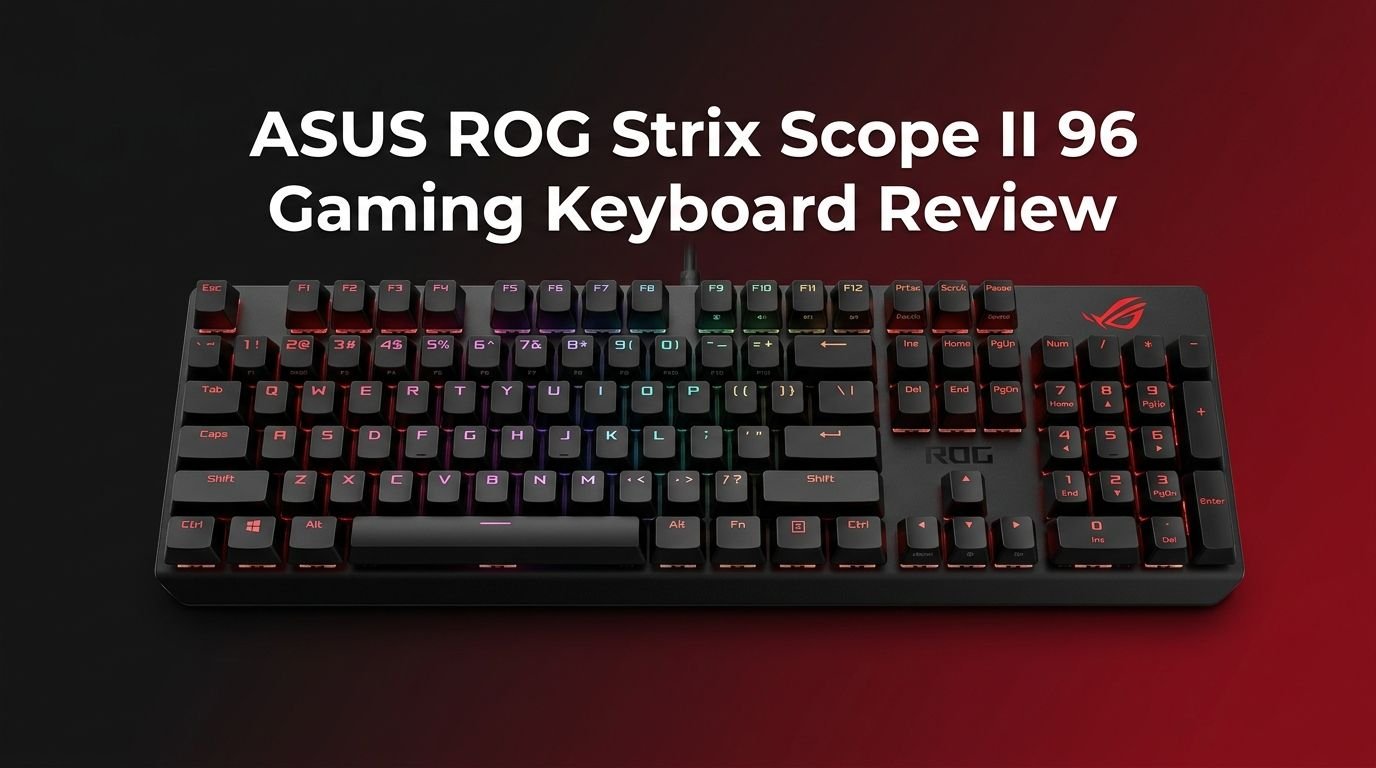
The ASUS ROG Strix Scope II 96 Wireless is a compact mechanical gaming keyboard with a 96% layout. ASUS released it as a follow-up to its popular ROG Azoth, and it targets gamers who need a number pad but want a smaller footprint. The keyboard measures 377 x 131 x 40mm and weighs about 1,012 grams without the cable.
ASUS built this keyboard around its second-generation ROG NX Snow linear switches. These switches feature a 45g actuation force and a 1.8mm actuation point. They come pre-lubed from the factory and offer a smooth, quiet keystroke out of the box.
The keyboard connects three ways. You get 2.4GHz wireless via the ROG Omni Receiver, Bluetooth 5.1, and wired USB-C. The Omni Receiver also supports pairing with a compatible ROG mouse on a single dongle. This keyboard retails at $179.99, which places it in the mid-to-upper range for wireless gaming keyboards.
ASUS included a magnetic leatherette wrist rest, a keycap and switch puller, a USB-C to USB-A cable, a USB extender, and a special ROG-themed spacebar in the box. The package feels generous for the price.
Design and Build Quality
The ASUS ROG Strix Scope II 96 Wireless looks clean and professional. It features a black plastic chassis with an aluminum alloy top plate. The design avoids flashy gamer aesthetics. It blends into both gaming setups and office desks without standing out too much.
The keyboard weighs just over one kilogram. That weight gives it a planted, stable feel on any desk surface. Five anti-slip rubber strips on the bottom keep it locked in place during intense gaming sessions.
Two sets of flip-out feet on the bottom let you adjust the typing angle. The feet click into place firmly and hold their position well. The overall construction feels tight with no flex or creaking.
Along the top edge, you will find a USB-C charging port, a wireless mode switch, and magnetic storage for the 2.4GHz dongle. The magnetic dongle storage is a small but appreciated detail. It means you are far less likely to lose the tiny receiver during travel.
96% Layout and Key Arrangement
The 96% layout is the star of this keyboard’s design. It gives you almost every key found on a full-size board. You get the full number pad, arrow keys, and function row all packed into a body barely wider than a tenkeyless keyboard.
ASUS achieved this by reducing the spacing between key clusters. The arrow keys and number pad sit closer to the main key area than on a standard full-size keyboard. A small gap still separates them, which helps you orient your fingers without looking down.
This layout does take some time to learn. If you are used to a full-size keyboard, you may overshoot certain keys for a few days. The delete, page up, and page down keys sit in a single column to the right. End and home may require the Fn key on some configurations.
Once you adapt, however, the 96% layout feels like the best of both worlds. You get full productivity features in a form factor that frees up valuable desk space for mouse movement. Gamers who rely on their number pad for macros or shortcuts will appreciate this layout.
ROG NX Snow Switches and Typing Feel
The ROG NX Snow linear switches represent the second generation of ASUS’s in-house switch design. They have a total travel distance of 4mm, an actuation point at 1.8mm, and an actuation force of 45g. ASUS pre-lubes them at the factory.
These switches feel smooth and stable from the first keystroke. The walled stem design reduces wobble during off-center presses. You will not feel scratchiness or spring crunch that cheaper linear switches often produce.
Typing on the ROG NX Snows is quiet and satisfying. The low actuation force means your fingers can fly across the keys with minimal effort. In typing tests, reviewers have recorded speeds above 118 words per minute with over 98% accuracy on this keyboard.
The switches are also hot-swappable. You can use the included switch puller to remove them and install any 3-pin or 5-pin MX-style switch you prefer. This is a huge plus for keyboard enthusiasts who want to experiment with different switch types without buying an entirely new board.
Top 3 Alternatives for ASUS ROG Strix Scope II 96 Wireless
1. Razer BlackWidow V4 75%

Last update on 2026-10-13 / Affiliate links / Images from Amazon Product Advertising API Some of the links on this website are affiliate links, which means that at no additional cost to you, I earn a commission if you click through and make a purchase. I only recommend products and services that I believe will add value to my readers. Thank you for your support!
2. Corsair K65 Plus Wireless 75%

Last update on 2026-10-13 / Affiliate links / Images from Amazon Product Advertising API Some of the links on this website are affiliate links, which means that at no additional cost to you, I earn a commission if you click through and make a purchase. I only recommend products and services that I believe will add value to my readers. Thank you for your support!
3. Logitech G915 X Lightspeed Wireless

Last update on 2026-06-08 / Affiliate links / Images from Amazon Product Advertising API Some of the links on this website are affiliate links, which means that at no additional cost to you, I earn a commission if you click through and make a purchase. I only recommend products and services that I believe will add value to my readers. Thank you for your support!
Wireless Performance and Connectivity
The ASUS ROG Strix Scope II 96 Wireless supports three connection modes. The 2.4GHz wireless mode uses the ROG Omni Receiver dongle. Bluetooth 5.1 connects to up to three devices simultaneously. Wired USB-C gives you a zero-latency backup.
The 2.4GHz wireless connection delivers near-zero latency. Multiple reviewers confirmed that input lag is virtually undetectable during fast-paced gaming. This puts it on par with wired performance for competitive play.
The ROG Omni Receiver is a neat addition. It lets you pair both this keyboard and a compatible ROG mouse on a single USB dongle. This frees up a USB port on your PC. At launch, the ROG Harpe Ace Aim Lab Edition was the only compatible mouse, but ASUS has expanded compatibility with newer peripherals.
Bluetooth mode works well for casual use and multi-device workflows. You can switch between your PC, tablet, and phone with a key combination. The connection is stable for typing and browsing, though gamers will want to stick with 2.4GHz for the lowest latency.
Battery Life That Goes the Distance
Battery life is one of the strongest selling points of this keyboard. ASUS rates it at up to 1,500 hours over 2.4GHz wireless with the RGB lighting turned off. That translates to months of use on a single charge.
With the RGB lighting turned on at full brightness, you can expect about 90 hours of battery life. That is still well above average for a wireless gaming keyboard. Many competitors tap out at 40 to 60 hours with lighting enabled.
Testing confirmed that ASUS’s battery estimates are slightly conservative. One reviewer used the keyboard at full brightness with the sleep mode disabled and still had 56% battery remaining after about 50 hours. That is reassuring.
You can check the battery level by pressing Fn + the minus key. The number row lights up to show the remaining charge. Charging happens through the USB-C port, and you can use the keyboard in wired mode while it charges.
Sound Dampening and Acoustics
ASUS put real effort into the acoustic profile of this keyboard. The ROG Strix Scope II 96 Wireless features a dual-layer dampening system. One layer of silicone foam sits under the PCB. A second layer of dampening foam with integrated switch-dampening pads sits above it.
This design absorbs the metallic pinging and hollow echoes that many mechanical keyboards produce. The result is a deeper, more muted sound that feels satisfying without being loud. The NX Snow switches themselves are already quiet, and the foam layers bring the noise down further.
The keyboard sounds good straight out of the box. You do not need to add tape mods, foam inserts, or other DIY sound modifications. ASUS essentially did the modding for you at the factory level.
The optional ROG-themed spacebar that comes in the box does alter the sound slightly. It is taller than the standard spacebar and has a different material profile. Some users prefer the stock PBT spacebar for a more consistent acoustic experience.
RGB Lighting and Customization
The keyboard features per-key RGB lighting powered by ASUS Aura Sync. You can choose from many preset effects or build your own custom lighting profiles. The lights shine through the primary legends on each keycap.
The brightness is respectable but not the brightest in the gaming keyboard market. If you want an absolute light show, keyboards from Roccat or Razer may deliver more intensity. For most users, however, the lighting on the Strix Scope II 96 is more than sufficient.
A small LED indicator strip sits between the main keys and the number pad. It shows the current mode of the multifunction button and provides status indicators for caps lock, num lock, scroll lock, Fn lock, and Windows key lock.
You control lighting effects through the keyboard’s secondary function layer or through ASUS Armoury Crate software. On-board controls let you cycle through effects and adjust brightness without opening any software.
Multifunction Button and Roller
The upper right corner of the keyboard features a dedicated multifunction button with the ROG eye logo and a clickable roller. This combo gives you quick access to four different control modes.
Pressing the multifunction button cycles through volume, media playback, lighting control, and a custom mode. The roller then adjusts the selected function. In volume mode, the roller controls system volume. In media mode, it skips tracks.
The custom mode is configurable through Armoury Crate software. You can assign any function you want to the roller in this mode. It does not need to control incremental values. You can program it like any other key for macros or shortcuts.
This control scheme works well in practice. Having quick access to volume and media without reaching for on-screen controls is a genuine quality-of-life improvement. The roller has a satisfying tactile click and does not feel cheap or loose.
Armoury Crate Software Experience
The ASUS ROG Strix Scope II 96 Wireless uses Armoury Crate for advanced configuration. This software lets you remap keys, create macros, adjust lighting effects, configure the multifunction roller, and update firmware.
Armoury Crate is feature-rich but bloated. Multiple reviewers have noted that it installs extra features like virtual pets and wallpapers that most users did not ask for. The interface can feel overwhelming compared to cleaner alternatives from Razer or Corsair.
The good news is that you do not need to keep Armoury Crate running after your initial setup. The keyboard stores up to five profiles in its onboard memory. Once you configure your settings, you can uninstall the software if you prefer a cleaner system.
You will need the software for firmware updates and Omni Receiver pairing. These are occasional tasks, so you can install it, do what you need, and remove it. The keyboard’s built-in secondary functions cover most daily adjustments without software.
Gaming Performance
The ASUS ROG Strix Scope II 96 Wireless performs at a high level for competitive gaming. The 2.4GHz wireless connection delivers polling rates and latency figures that compete with wired keyboards. RTINGS.com reported impressively low latency in their testing.
The 45g actuation force of the NX Snow switches allows rapid key presses. This light touch benefits games that require fast, repeated inputs. The 1.8mm actuation point sits at a sweet spot that avoids accidental presses while still registering inputs quickly.
The keyboard also includes a game mode that disables the Windows key and other disruptive shortcuts. This prevents accidental alt-tabs or Start menu pop-ups during gameplay.
Streamer hotkeys on F1 through F5 let you control OBS or other streaming software directly from the keyboard. These are pre-programmed shortcuts for common streaming actions like muting, starting a stream, or switching scenes. Content creators will find these particularly useful.
Keycaps and Compatibility
The keyboard ships with double-shot PBT keycaps. These keycaps resist shine and wear better than ABS alternatives. The legends are molded into the plastic rather than printed on top, so they will not fade over time.
The keycaps feature a mid-height profile with a shorter stem design. The shorter stems reduce wobble and improve keystroke stability. The texture on the keycap surfaces provides good grip without feeling rough.
The keyboard is compatible with both PC and Mac. A switch on the bottom lets you change the operating system mode. Key labels adjust accordingly. This dual compatibility makes it a flexible choice for users who work across both platforms.
Standard MX-style keycap sets will fit this keyboard. If you want to personalize the look with custom keycaps, you have many options. Just keep in mind that the 96% layout has some non-standard key sizes in the bottom row and right side.
Included Accessories and Extras
ASUS packs a generous set of accessories in the box. The magnetic leatherette wrist rest fits the keyboard’s width perfectly. It attaches with magnets and provides light cushioning for extended typing sessions.
The wrist rest uses a matte leatherette cover that wipes clean easily. It is not the most premium padding, but it does its job well for the price. Long-term durability of the leatherette material may vary with heavy use.
You also get a 6.5-foot USB-C to USB-A cable, a USB extender for the wireless dongle, a combination keycap and switch puller, and the special ROG-themed spacebar. The USB extender is handy if your PC sits far from your desk.
The ROG-themed spacebar features a pixelated ROG eye design and allows more light through thanks to three LEDs underneath. It is a fun cosmetic option, though it sits slightly taller than the stock spacebar. Some users may prefer the standard keycap for a more uniform feel.
Who Should Buy This Keyboard?
The ASUS ROG Strix Scope II 96 Wireless is ideal for gamers who also do productive work. The 96% layout provides number pad access without a massive footprint. The wireless freedom and exceptional battery life suit users who want a clean desk.
Keyboard enthusiasts will appreciate the hot-swappable switches and solid acoustic profile. You get a well-tuned board out of the box with room to customize further. The pre-lubed NX Snow switches are a strong default option.
Content creators and streamers benefit from the built-in streamer hotkeys and multifunction roller. These shortcuts save time during live broadcasts and recording sessions.
This keyboard may not be the best fit for users who want a super compact 65% or 75% layout. It is also not ideal for those who require multiple programmable layers. The single Fn layer may feel limiting compared to keyboards from Razer or Logitech that offer deeper macro programming.
Final Verdict
Last update on 2026-10-13 / Affiliate links / Images from Amazon Product Advertising API Some of the links on this website are affiliate links, which means that at no additional cost to you, I earn a commission if you click through and make a purchase. I only recommend products and services that I believe will add value to my readers. Thank you for your support!
The ASUS ROG Strix Scope II 96 Wireless delivers an impressive combination of features, build quality, and performance. The 96% layout strikes a perfect balance between compact size and full functionality. The NX Snow switches feel smooth. The battery life is extraordinary. The wireless performance matches wired latency.
At $179.99 MSRP, this keyboard sits in a competitive price bracket. It offers more features and a larger layout than many 75% keyboards at similar prices. The hot-swappable switches and PBT keycaps add long-term value.
The main drawbacks are the bloated Armoury Crate software and the single layer of key programmability. These are minor issues for most users. Overall, this keyboard earns a strong recommendation for anyone who wants a premium wireless gaming keyboard with a 96% layout in 2026.
Frequently Asked Questions
Is the ASUS ROG Strix Scope II 96 Wireless good for typing?
Yes. The pre-lubed ROG NX Snow linear switches feel smooth and quiet. The PBT keycaps offer a satisfying texture. Reviewers have recorded typing speeds above 118 WPM with high accuracy on this keyboard. The sound-dampening foam also makes extended typing sessions pleasant.
How long does the battery last on the ROG Strix Scope II 96 Wireless?
ASUS rates the battery at up to 1,500 hours with RGB off over 2.4GHz wireless. With full RGB brightness, expect around 90 hours. Real-world testing suggests these numbers are slightly conservative. You will not need to charge this keyboard often.
Can I use this keyboard with a Mac?
Yes. The keyboard includes a PC/Mac mode switch on the bottom. It adjusts key mappings for macOS compatibility. You can connect via Bluetooth, 2.4GHz wireless, or USB-C on Mac systems.
Are the switches hot-swappable?
Yes. The PCB supports hot-swapping with 3-pin and 5-pin MX-style mechanical switches. ASUS includes a switch puller in the box. You can replace the stock NX Snow switches with any compatible switches without soldering.
Does this keyboard work with the ROG Omni Receiver?
Yes. The ROG Omni Receiver comes included with the keyboard. It supports pairing with one compatible ROG keyboard and one compatible ROG mouse on a single USB dongle. This reduces the number of USB ports you need for your wireless peripherals.
What is the difference between the ROG Strix Scope II 96 Wireless and the ROG Azoth?
The ROG Azoth uses a 75% layout and features a built-in OLED display and a lubing kit. The Strix Scope II 96 Wireless has a larger 96% layout with a number pad, longer battery life, and a lower price point. The Azoth targets pure enthusiasts, while the Strix Scope II 96 serves a broader audience.

Hi, my name is Lily you can say i am a gadget hunter at this point. Welcome to Gadget Gallery The Gallery of Gadget Reviews