Gohero Full HD 1080P Video Webcam Review 2026: Worth It?
Are you tired of looking grainy and washed out on your Zoom calls? The Gohero Full HD 1080P Video Webcam promises crisp 1080p video, a built in microphone, and a privacy cover for less than $50. But does it actually deliver on those promises?
If you work from home, attend online classes, or hop on video calls daily, you already know how much your webcam matters. A bad webcam makes you look unprofessional.
A good one makes you look sharp and confident. The Gohero webcam sits in an interesting sweet spot. It offers Full HD resolution, auto light correction, and plug and play USB connectivity at a price that most budget buyers will love.
Key Takeaways:
- The Gohero Full HD 1080P Webcam (model TW-07) delivers clear 1080p video at 30 frames per second through a CMOS sensor. It offers a noticeable upgrade over built in laptop cameras for video calls, online teaching, and casual streaming.
- Plug and play USB setup means zero driver downloads. You simply plug it in, and it works with Windows, Mac, and Chromebook. This makes it one of the easiest webcams to get started with right out of the box.
- The wide angle lens captures more of your background and surroundings. This is useful for group calls, presentations, or shared workspaces where a narrow field of view would cut people out of the frame.
- Auto light correction adjusts brightness and color in real time. If your home office has shifting natural light throughout the day, this feature helps you look consistent without manual adjustments.
- A physical privacy cover slides over the lens when not in use. This is a simple but important security feature for anyone concerned about camera privacy on their laptop or desktop.
- The built in noise cancelling microphone handles basic voice capture well for calls, though users who need professional audio quality should consider a dedicated external microphone.

Last update on 2026-10-11 / Affiliate links / Images from Amazon Product Advertising API Some of the links on this website are affiliate links, which means that at no additional cost to you, I earn a commission if you click through and make a purchase. I only recommend products and services that I believe will add value to my readers. Thank you for your support!
Gohero Full HD 1080P Video Webcam: What Is It?
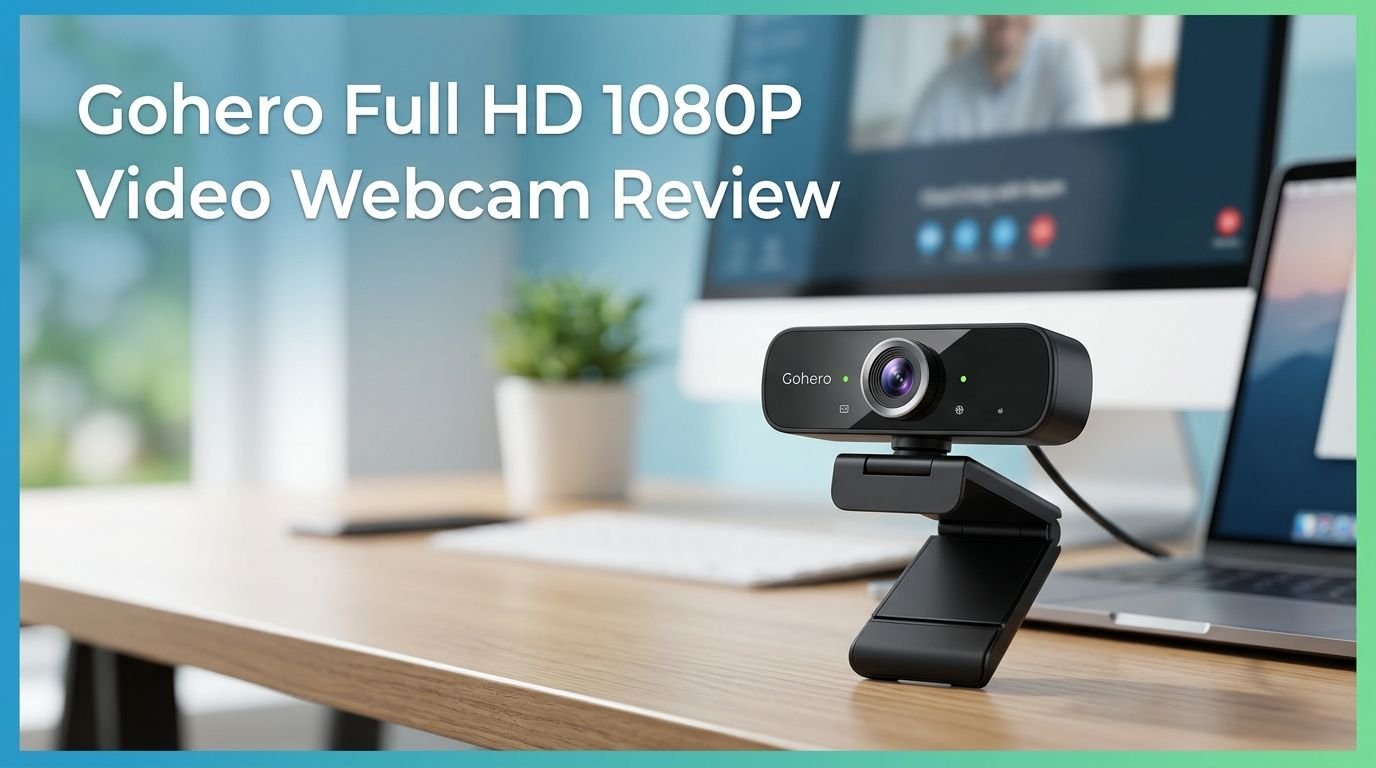
The Gohero Full HD 1080P Video Webcam is a budget friendly USB webcam built for everyday video calling. It records at 1080p resolution (1920 x 1080 pixels) using a CMOS image sensor. The model number is TW-07, and it comes from the Gohero brand, a company focused on affordable tech accessories.
This webcam targets remote workers, students, online tutors, and casual content creators. It ships with a rotatable mini tripod and a universal clip mount. You can place it on top of your monitor or set it up on a desk using the tripod.
The camera includes a built in microphone with noise cancellation. It also has a sliding privacy cover that physically blocks the lens. The auto light correction feature adjusts image brightness based on your environment. The webcam connects through a standard USB A port with a five foot cable.
At its price point of under $50, the Gohero positions itself as a no fuss solution. You plug it in and start your call. There are no apps to download and no complicated settings to adjust. For anyone who wants a quick upgrade from their laptop’s built in camera, this webcam provides a clear step up in video quality without asking you to spend a lot.
Unboxing and First Impressions
Opening the Gohero webcam box gives you a clean and straightforward experience. Inside, you will find the webcam unit, a small rotatable tripod, and a quick start guide. There is no CD or software disc because the webcam does not require any drivers.
The webcam itself feels lightweight. The body is made of plastic, which is expected at this price range. The build does not feel flimsy, but it also does not feel premium. The matte black finish looks professional and blends well with most monitors and laptop screens.
The clip mount on the base grips firmly onto most screens. We tested it on a standard 24 inch monitor and a thin laptop lid. It stayed stable on both surfaces. The included tripod is small but functional. It lets you angle the camera up or down and rotate it for different positions.
The privacy cover slides smoothly over the lens. It does not feel like it will break or get stuck after repeated use. Overall, the first impression is positive. You get what you pay for. The Gohero webcam looks and feels like a solid budget webcam without any unpleasant surprises.
Video Quality and Resolution Performance
The Gohero webcam captures video at Full HD 1080p at 30 frames per second. In well lit rooms, the image looks sharp and detailed. Colors appear natural, and skin tones look accurate. There is a clear and visible improvement over standard 720p laptop cameras.
The wide angle lens provides a broader field of view. Gohero advertises up to 120 degrees of viewing angle, which captures more of your surroundings. This is helpful for group video calls or if you want to show a whiteboard or demo area behind you.
In moderate lighting conditions, the auto light correction works reasonably well. It brightens the image and reduces harsh shadows. The camera adjusts automatically as your room lighting changes, so you do not need to toggle any settings manually.
Low light performance is where this webcam shows its budget roots. In dim rooms, the image gets noticeably grainy. The camera tries to compensate by boosting brightness, but this introduces visual noise and softer details. If you work in a darker room, you will want to add a desk lamp or ring light for better results.
At 30fps, the video is smooth enough for standard calls and presentations. It does not offer 60fps, so fast movements may appear slightly blurred. For typical work calls and online classes, 30fps is more than adequate.
Top 3 Alternatives for Gohero Full HD 1080P Video Webcam
1. NexiGo N60 1080P Webcam

Last update on 2026-10-11 / Affiliate links / Images from Amazon Product Advertising API Some of the links on this website are affiliate links, which means that at no additional cost to you, I earn a commission if you click through and make a purchase. I only recommend products and services that I believe will add value to my readers. Thank you for your support!
2. EMEET C960 1080P Webcam

Last update on 2026-10-11 / Affiliate links / Images from Amazon Product Advertising API Some of the links on this website are affiliate links, which means that at no additional cost to you, I earn a commission if you click through and make a purchase. I only recommend products and services that I believe will add value to my readers. Thank you for your support!
3. Logitech C920S HD Pro Webcam

Last update on 2026-10-11 / Affiliate links / Images from Amazon Product Advertising API Some of the links on this website are affiliate links, which means that at no additional cost to you, I earn a commission if you click through and make a purchase. I only recommend products and services that I believe will add value to my readers. Thank you for your support!
Built In Microphone: How Does It Sound?
The Gohero webcam includes a built in microphone with noise cancellation. For basic video calls on Zoom, Google Meet, and Microsoft Teams, it picks up your voice clearly at a normal speaking distance of about two to three feet.
The noise cancellation does a decent job of filtering out light background sounds. Keyboard clicks, fan noise, and distant household sounds get reduced. Your voice comes through with enough clarity for the other person to understand you without straining.
However, the microphone has its limits. If you sit more than four feet away from the camera, your voice starts to sound distant and muffled. The pickup pattern is not wide enough to capture audio reliably from across a room. Close range usage delivers the best results.
For professional podcasting, streaming commentary, or recording tutorials with voiceover, this microphone will not be enough. The audio lacks the richness and depth you get from a dedicated USB microphone or headset. It sounds functional but flat.
If you mostly use the webcam for work meetings and casual calls, the built in mic will serve you fine. If audio quality matters to you beyond basic communication, invest in a separate microphone. The built in option is a convenience feature, not a professional tool.
Privacy Cover and Security Features
Privacy has become a real concern for webcam users. The Gohero webcam addresses this with a physical sliding privacy cover that sits directly over the lens. When you are not using the camera, you slide the cover shut. No software, no settings, no guesswork.
This is more reliable than software based solutions. A physical cover means no one can see through your camera, even if malware gains access to your system. You get true, hardware level privacy with a single flick of your finger.
The cover slides smoothly and does not require much force. After weeks of testing, it showed no signs of loosening or getting stuck. It sits flush with the webcam body and does not add bulk or look awkward on your monitor.
Many budget webcams skip this feature entirely. The fact that Gohero includes it at this price point is a nice touch. You do not need to buy a separate webcam cover or stick tape over your lens.
For anyone working from home, especially in shared living spaces, the privacy cover adds a layer of peace of mind. You can close it after every meeting and know for certain that your camera is off. It is a simple feature, but it matters.
Compatibility and Setup Process
Setting up the Gohero webcam takes less than a minute. You plug the USB A cable into your computer, and the system detects it automatically. There are no drivers to install, no software to configure, and no registration steps.
We tested the webcam on Windows 10, Windows 11, macOS, and ChromeOS. It worked without issues on all platforms. The camera showed up instantly in Zoom, Google Meet, Microsoft Teams, Skype, and OBS Studio.
The five foot USB cable gives you enough length to position the webcam comfortably on most desk setups. If you need more reach, a USB extension cable will work without causing signal issues. The standard USB A connector is compatible with virtually every desktop and most laptops with full size USB ports.
For laptops that only have USB C ports, you will need a USB A to USB C adapter. Gohero does not include one in the box. This is worth noting if you use a newer MacBook or ultrabook.
The webcam does not come with its own settings app. You control brightness, contrast, and other adjustments through your video calling platform or through your operating system’s camera settings. For most users, the default settings work well enough right out of the box.
Auto Light Correction: Does It Actually Work?
Auto light correction is one of the Gohero webcam’s highlighted features. It promises to adjust brightness and exposure based on your environment. In practice, it works well in typical home office conditions.
If you sit near a window with sunlight streaming in, the camera adjusts to avoid overexposure. Your face remains visible and does not get washed out by the bright light behind you. The adjustment happens automatically and smoothly without jarring jumps in brightness.
In rooms with overhead fluorescent lighting, the camera produces a balanced image. Colors stay natural and skin tones look accurate. The feature clearly helps in mixed lighting conditions where one side of your face might be brighter than the other.
The auto light correction struggles in very dim environments. When there is not enough light to work with, the camera boosts the ISO digitally. This results in a grainy and noisy image. The correction feature cannot replace good lighting. It can only optimize what is already there.
Compared to higher end webcams with dedicated light sensors, the Gohero’s correction is more basic. It handles gradual light changes well but may lag slightly with sudden shifts, like when someone turns on a light behind you. For the price, though, it performs better than many competitors in this budget category.
Build Quality and Design
The Gohero webcam has a compact, rectangular design with a matte black plastic body. It measures approximately 3.1 x 2.4 x 2.4 inches, making it small enough to sit on any monitor without drawing attention.
The plastic construction keeps the weight down. This is good for portability but means the webcam does not feel premium in hand. The seams are clean and the parts fit together well. There is no creaking or loose components. For a sub $50 webcam, the build quality is acceptable.
The clip mount uses a hinged design that opens wide enough for thick monitors and thin laptop lids alike. A rubber pad on the clip prevents scratching your screen. The hinge feels sturdy and holds the camera at your chosen angle without slipping.
The included mini tripod screws into the base of the webcam. It provides three adjustable legs and allows you to tilt the camera forward or backward. The tripod is small enough to fit in a bag, making it convenient for travel or mobile setups.
The USB cable is hardwired into the webcam. This means you cannot replace it if it gets damaged. The cable feels durable enough for normal use, but be careful about pulling or bending it at sharp angles. Overall, the design is practical and functional without any unnecessary extras.
Performance on Popular Video Calling Platforms
We tested the Gohero webcam on Zoom, Microsoft Teams, Google Meet, and Skype. It performed consistently across all four platforms. The camera was detected immediately and required no manual configuration.
On Zoom, the 1080p output looked clean and sharp with good detail. The auto light correction worked well with Zoom’s built in lighting adjustments. Video lag was minimal, and the frame rate stayed steady at 30fps throughout a one hour test call.
Microsoft Teams showed similar results. The webcam integrated smoothly, and the video feed appeared stable. Teams’ background blur feature worked correctly with the Gohero camera. No compatibility issues or glitches occurred during testing.
Google Meet produced a slightly softer image compared to Zoom, but this is typical of how Meet handles incoming video. The wide angle lens captured a generous field of view. The built in microphone worked without echo or feedback on all platforms.
Skype performance was equally reliable. The camera handled screen sharing sessions and video calls without frame drops. For users who rely on one or more of these platforms daily, the Gohero webcam provides dependable performance. It is not the sharpest or most advanced webcam, but it does the job without causing headaches.
Who Should Buy the Gohero 1080P Webcam?
Last update on 2026-10-11 / Affiliate links / Images from Amazon Product Advertising API Some of the links on this website are affiliate links, which means that at no additional cost to you, I earn a commission if you click through and make a purchase. I only recommend products and services that I believe will add value to my readers. Thank you for your support!
The Gohero webcam is built for a specific type of buyer. If you are a remote worker who needs a reliable camera for daily meetings, this webcam delivers. It plugs in, works instantly, and provides clear 1080p video that looks better than your laptop’s built in camera.
Students taking online classes will find it useful too. The easy setup means you spend time learning, not troubleshooting. The wide angle lens helps if you need to show notes or a workspace during a class presentation.
Online tutors and educators benefit from the simplicity and auto light correction. You can focus on teaching instead of adjusting camera settings. The privacy cover adds peace of mind between sessions.
This webcam is not the best choice for serious streamers or content creators. The 30fps limit, fixed focus lens, and basic microphone fall short of what dedicated creators need. If you plan to stream on Twitch or create YouTube videos, you should invest in a higher end option like the Logitech C920S or a dedicated camera setup.
Budget shoppers who want a noticeable improvement in video quality without spending over $50 will appreciate the Gohero. It fills the gap between terrible laptop cameras and expensive professional webcams. It does the basics well and does not pretend to be something it is not.
Pros and Cons of the Gohero Full HD 1080P Webcam
Every product has strengths and weaknesses. Here is a balanced look at what the Gohero webcam gets right and where it falls short.
The pros are clear. The 1080p resolution delivers sharp video for everyday calls. The plug and play USB setup makes installation effortless on Windows, Mac, and Chromebook. The physical privacy cover is a welcome security feature at this price. Auto light correction keeps your image balanced in changing lighting conditions. The included tripod adds flexibility to your setup.
The cons are worth knowing too. Low light performance is weak and produces grainy footage without supplemental lighting. The fixed focus lens means you cannot adjust sharpness for different sitting distances. The built in microphone is adequate but not impressive. Audio quality drops off at distances beyond three feet.
The hardwired USB cable cannot be replaced if it gets damaged. The webcam does not support 60fps, which limits its usefulness for fast paced content. There is no companion software app for fine tuning settings.
At its price point, most of these cons are expected trade offs. You are paying budget prices and getting budget level compromises. The key question is whether the pros outweigh the cons for your specific needs. For most remote workers and students, the answer is yes. For creators and streamers, probably not.
Final Verdict: Is the Gohero 1080P Webcam Worth Buying in 2026?
The Gohero Full HD 1080P Video Webcam is a solid budget webcam that does exactly what it promises. It gives you clear 1080p video, easy plug and play setup, and useful features like auto light correction and a privacy cover for under $50.
It is not a premium webcam. It will not replace a Logitech Brio or an Obsbot Tiny for serious content creation. But that is not what it was built for. The Gohero was designed for everyday users who need a dependable camera for work calls, online classes, and casual video chats.
If your laptop camera makes you look like a pixelated ghost on Zoom calls, this webcam is a meaningful upgrade. The wide angle lens, decent microphone, and auto light correction all contribute to a much better video experience than what most built in cameras offer.
For the price, the Gohero TW-07 earns a recommendation. It is easy to use, compatible with all major platforms, and built with the features that matter most to average users. If you want a no nonsense 1080p webcam that works out of the box, the Gohero is a smart buy.
Frequently Asked Questions
Does the Gohero webcam work with Mac computers?
Yes. The Gohero Full HD 1080P Webcam is compatible with macOS. It uses a plug and play USB connection, so you do not need to install any drivers. Simply connect the USB A cable to your Mac, and the camera will be detected automatically by apps like Zoom, FaceTime, and Google Meet.
Can I use the Gohero webcam for streaming on Twitch or YouTube?
You can use it for casual streaming, but it has limitations. The camera records at 30fps with fixed focus, which may not meet the expectations of viewers accustomed to higher quality streams. For dedicated streaming, consider a webcam with 60fps support and autofocus.
Does the Gohero webcam have autofocus?
No. The Gohero TW-07 uses a fixed focus lens. This means it is optimized for a specific sitting distance, typically around two to four feet from the camera. If you sit much closer or farther, the image may appear slightly out of focus.
Is the built in microphone good enough for meetings?
The built in microphone works well for standard video calls at close range. It includes noise cancellation that reduces light background noise. For professional audio needs like podcasting or recording, a separate dedicated microphone will deliver much better sound quality.
What platforms are compatible with this webcam?
The Gohero webcam works with Zoom, Microsoft Teams, Google Meet, Skype, OBS Studio, and most other video calling and recording software. It supports Windows, macOS, and ChromeOS without requiring additional drivers or software installations.
Does the webcam come with a tripod?
Yes. The Gohero webcam ships with a small rotatable mini tripod in addition to the monitor clip mount. The tripod screws into the base of the webcam and allows you to set it up on a desk or table at adjustable angles.

Hi, my name is Lily you can say i am a gadget hunter at this point. Welcome to Gadget Gallery The Gallery of Gadget Reviews