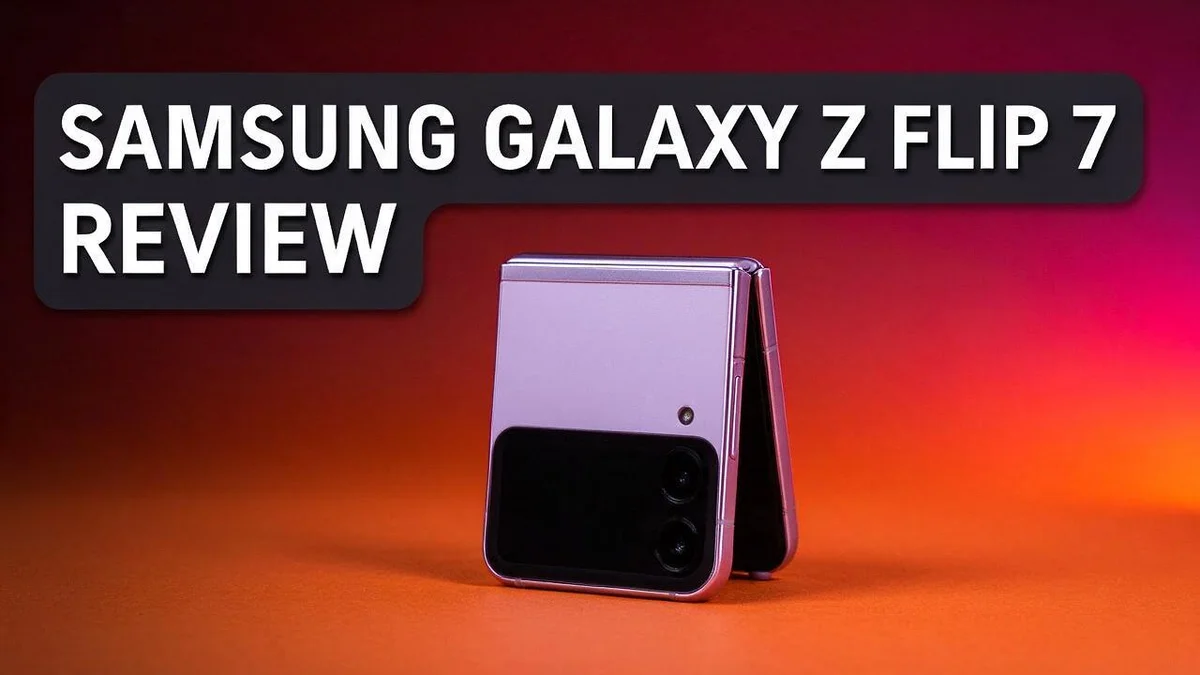
Samsung Galaxy Z Flip 7 Review: Top Tier or Trash?
Are you looking for a new foldable phone? The Samsung Galaxy Z Flip 7 could be the one you need. It packs a lot of power into a compact body.
Open the phone to find a 6.9-inch main screen with smooth 120Hz motion. The display looks sharp and bright. Everyday tasks feel quick and easy.
The cover screen is larger than on older models. You can check messages without opening the phone. The device also feels light and sleek in your hand.
Battery life is a little better than on earlier Flip models. However, some users report higher power use. The cameras are decent but not outstanding.
Keep reading to see what this phone does well and where it falls short. You will get a clear look at its design, performance, and key features.
In a Nutshell
- Best for: People who want a slim phone that fits easily in a pocket. It feels light and good in the hand.
- Smooth daily use: The phone runs very smoothly. Apps open quickly, and switching between tasks feels easy.
- Cover screen mixed feelings: The outer screen looks sharp and responds well. However, the software on it has drawn criticism, and some users report that the full screen cover interface is broken.
- Inner display needs care: The folding screen feels soft. Keep it clean and avoid pressing hard on it.
- Cameras and power use: The cameras are decent but do not stand out. Reports also say the phone uses more power than some rivals, so heavy users should keep a charger handy.
- Rivals worth comparing: Look at the Galaxy Z Fold 6, Google Pixel 9 Pro Fold, OnePlus Open, and the Galaxy Z Flip 7 FE for a different Flip option.
Design and Build

Last update on 2026-11-06 / Affiliate links / Images from Amazon Product Advertising API Some of the links on this website are affiliate links, which means that at no additional cost to you, I earn a commission if you click through and make a purchase. I only recommend products and services that I believe will add value to my readers. Thank you for your support!
The Samsung Galaxy Z Flip 7 shows a clear focus on a neater build. Samsung made the hinge smaller this time. This change helps the phone close with a tidy, flat look.
Thinner bezels frame the screen. The bezels around the inner display are smaller now. Less dark border means more of the screen feels open. The inner aspect ratio also gets a refresh, so the display looks taller and more modern.
The phone uses a capacitive fingerprint sensor to unlock the device. It gives you a quick way to skip typing a code. Quick access helps when you need to check messages fast.
Holding the phone for a long time feels easy. The light weight helps your hand stay relaxed during calls and scrolling. This makes the phone feel like a natural part of your day.
When folded, the phone works like a small companion. You can stand it on a table to watch videos or check messages, which lets you use it without holding it.
A foldable needs a few simple habits. Keep dust and grit out of the hinge area. A protective case can add extra peace of mind during busy days.
The Flip uses a clamshell design, which differs from the book style of the Fold line. This shape keeps the phone narrow when closed. It also gives a different feel from larger foldables on the market.
Open and close the phone with steady hands. Fast or forceful moves can stress the hinge over time. Smooth motions help the phone last longer.
People who want a neat and light device will enjoy this build. Those who need a bulky body may look elsewhere.
Small design choices add up over time. The phone feels balanced, neat, and easy to carry. Many users will feel at home with it from the first day, and that matters a lot.
Display and Cover Screen
The cover screen does more than show the time. It lets you read messages, check alerts, and control music without opening the phone. This saves time on busy days.
Many people use the outer panel as a viewfinder. You can take photos with the main cameras and frame the shot on the front display. This trick works well for group photos.
Software is where the outer display needs more work. Some reviewers say the cover interface feels less polished than the hardware. Reports also describe a full cover mode that does not work correctly. Test it before you depend on it.
Widgets make a big difference. Add weather, calendar, or music cards to the first cover page. Keep your most used tools in one place so you can act fast.
Notifications appear on the outer panel with clear text. You can read a short preview and decide whether to reply now or later. This keeps your focus on what matters most.
Outdoor use needs some attention. The display stays readable in sunlight, but you may need to raise brightness. Auto brightness adjusts the panel to room light, which helps save battery. A dark wallpaper also makes the screen look crisp.
The inner screen needs gentle handling. Keep any factory film in place because it helps protect the soft surface. Avoid pressing hard with your nails or keys.
Cleaning is simple. Use a soft microfiber cloth and a little water. Skip harsh wipes and strong sprays. Dust can collect near the hinge, so check the edges now and then.
Switch screens based on the task. Use the cover panel for quick replies and short checks. Open the large inner panel for videos, reading, and games. This habit keeps the phone comfortable to use every day.
Performance and Battery Life
Daily tasks feel quick and steady. Apps open fast, and switching between them causes little delay. Split screen views and multitasking run without much fuss. Most people will not notice any lag during normal use.
Heavy use shows a different side. Long gaming sessions or extended video recording can warm up the phone. Keep an eye on the temperature during demanding tasks, and give the phone a short rest when it feels hot.
Battery life is the part to watch. The listing shows a 4,300mAh battery, while another source cites a 4,174mAh rated capacity. Either number points to a compact cell for a folding phone. Your real results will depend on how you use it.
Reviewers report that the phone draws more power than some rivals. A heavy day may end sooner than you expect. Plan to carry a charger or a power bank when you leave home.
Simple settings can stretch the charge. Lower the refresh rate when you read or scroll slowly. Turn off the cover screen when you do not need it. Dim the brightness in bright rooms, since a bright display uses a lot of energy.
Adaptive refresh does much of the work on its own. It slows down when the screen shows static content. This helps save power without much effort from you.
Charging habits matter too. Top up the phone during short breaks, such as lunch or a coffee stop. Try to avoid letting the battery drop to zero every day. Batteries tend to last longer when they stay in a middle range.
Think about your routine before you decide. Light users may get through a full day with ease. Frequent travelers and gamers should expect to charge at least once in the middle of the day.
Top 3 Alternatives
Motorola Razr Plus
No products found.
The Motorola Razr Plus is a flip phone with a large cover screen. You can check messages, take selfies, and control music without opening the phone. Its design feels slim and stylish in your hand. Many people like its quick charging and smooth display.
Some users also enjoy the camera setup. It takes clear photos in daylight and handles most low light scenes well. It is a great pick if you want a bold look and easy everyday use.
Pixel 9 Pro Fold

Last update on 2026-11-06 / Affiliate links / Images from Amazon Product Advertising API Some of the links on this website are affiliate links, which means that at no additional cost to you, I earn a commission if you click through and make a purchase. I only recommend products and services that I believe will add value to my readers. Thank you for your support!
The Pixel 9 Pro Fold works more like a small tablet when opened. It has a wide inner screen that suits video, reading, and multitasking. Google software runs smoothly, and the phone gets regular updates.
Its camera is one of the strongest in the foldable market. Photos look sharp, and night mode brings out fine detail. Choose this model if you want a big screen that folds into your pocket.
Galaxy Z Flip 6

Last update on 2026-11-06 / Affiliate links / Images from Amazon Product Advertising API Some of the links on this website are affiliate links, which means that at no additional cost to you, I earn a commission if you click through and make a purchase. I only recommend products and services that I believe will add value to my readers. Thank you for your support!
The Galaxy Z Flip 6 keeps the compact style that many shoppers love. It folds neatly and fits easily in a small bag. Its cover screen lets you reply to texts and check apps fast.
This phone also offers strong performance for games and social media. Battery life handles a full day for most people. If you want a familiar Samsung experience in a smaller size, this option makes sense.
Cameras and Software Experience
The cameras on the Samsung Galaxy Z Flip 7 handle daily life with ease. Bright daylight brings out the best results. Colors look natural, and details stay crisp.
Night shots need more care. Low light can add grain and soften small details. Hold the phone steady or use night mode for better results.
Flex mode adds a fun twist. Fold the phone halfway and set it on a table. The camera can then take hands free photos or timed group shots.
The camera app opens fast from sleep. A quick double press of the side key launches it. This speed helps you catch a surprise moment before it passes.
Video recording looks smooth in most conditions. Stabilization keeps walking shots steady. Short clips from a street or park look clean when shared online.
Samsung uses One UI as its software layer. The menus follow a clear pattern, so new users find settings without much searching. Most features sit in logical places.
Photo editing tools live inside the gallery app. You can crop, adjust light, and apply filters without installing extra apps. Quick edits save time after a trip.
Samsung has offered longer update support on recent models. Regular security patches keep the phone safe over time. Check the latest update policy before you decide.
Samsung adds new features through software updates. Some tools arrive months after launch, so keep an eye on the settings menu. This keeps the experience fresh over time.
The inner screen suits split screen multitasking. Run two apps side by side for notes and video calls. Both windows stay readable on the large display.
Storage fills up fast with high resolution photos and video. Cloud backup keeps the gallery tidy and frees space. Clear old files each month to keep the phone running smoothly.
Many users set camera options once and forget them. Save your favorite mode so it opens by default. This small step makes shooting feel effortless.
Pros and Cons
Pros
– Sharp and bright cover screen that responds well to taps
– Runs very smoothly, even during heavy multitasking
– Slightly better battery life than earlier Flip models
– Slim body that feels comfortable in one hand
– Front camera takes clear 50MP selfies
Cons
– Cameras are decent but not class leading
– Some cover screen features feel unfinished
– Competitors like the Fold 6 offer a bigger canvas
– The inner screen feels soft and needs careful handling
Who Should Buy It
The Samsung Galaxy Z Flip 7 fits people who want a phone that feels fresh and fun. It suits shoppers who care about looks as much as performance.
Many buyers want a device that turns heads at a cafe or office. Anyone who enjoys a bit of playfulness will feel right at home.
Commuters and busy parents often gain the most from this design. The phone folds down small enough for a jacket pocket or a handbag.
Quick checks of messages, maps, and calendars happen with one glance at the cover screen.
Social media fans also feel at home with this model. Short clips and casual video calls feel natural with this flip shape.
Many users enjoy snapping a shot without opening the full screen. Creators who post daily may find the flip design fun to hold.
Students and first time phone owners may enjoy the compact shape. It slips into a school bag and rarely feels heavy.
Style lovers often choose this model because it looks modern in any setting.
Frequent travelers can benefit too. The compact design fits into a small bag on short trips. Quick photos of landmarks and food look bright on the cover panel.
Who should skip it? Heavy gamers and people who need a large tablet style screen may prefer another option.
Power users who want the longest battery life should also compare rivals first.
Buyers who want a bigger canvas can look at the Galaxy Z Fold 6 instead. Those who want a flip style phone with a different feel may check the Galaxy Z Flip 7 FE.
Think about your daily habits first. If you value a small, eye catching phone, this model delivers.
If you need top camera results or the biggest screen, look elsewhere. Trust your own needs above online hype.
Your lifestyle decides the answer. Match the phone to your routine, and it will feel like a good fit. Take a little time to think about what matters most to you.
Final Verdict
Our final take is clear. The Samsung Galaxy Z Flip 7 is a smart choice for people who want a stylish, pocket friendly foldable. It delivers a smooth daily experience with plenty of charm.
The biggest open question is software. The cover screen still feels unfinished in places. Reports also describe a full screen cover mode with technical problems, so expect a few rough edges for now.
Power draw is another point to weigh. Some reports suggest the phone uses more power than rival devices. Heavy gamers and long video sessions may drain it faster than expected.
Camera buyers should set clear expectations. The Galaxy S25 Ultra offers a stronger photo experience for people who shoot often. This phone suits casual snaps far better than pro level work.
A simpler option exists for some shoppers. The Galaxy Z Flip 7 FE shares the same folding idea in a more basic package. It may suit people who care less about extra features.
Think about how you use your phone day to day. A foldable rewards people who enjoy a fun, hands on device. Those who only want a plain, rugged slab may feel happier elsewhere.
Try before you commit. Visit a store and open and close the hinge several times. Check how the cover screen feels with your own apps and habits.
Overall, this model strikes a pleasing balance. It looks modern, feels light, and runs with ease. The rough spots are real, yet they do not spoil the fun for most people.
The Z Flip 7 also rewards patience. Future software fixes may smooth out the cover screen issues over time. Buyers who accept that wait can enjoy the device even more later on.
Reviewers and shoppers alike should weigh the full picture. The phone wins on looks, comfort, and smooth performance. It loses some points on software polish and power efficiency.
Our verdict: a strong recommendation for style lovers, with clear caution for software purists.
Frequently Asked Questions
Is the Galaxy Z Flip 7 good for gaming?
The 120Hz adaptive display makes motion look smooth. Most games run well, even on busy days. Long gaming sessions can warm the phone and drain power faster.
How long does the battery last in a day?
The listing shows a 4,300mAh battery, though some sources cite a lower rated capacity. Results depend on how you use the phone. Expect a full day with light to moderate use, and less with heavy gaming or video.
How should I care for the folding screen?
Keep the inner display clean and free from grit. Store the phone away from keys and coins in your pocket. A case that covers the hinge area adds helpful protection.
Does the Flip 7 feel good for everyday carrying?
Yes, the slim and light body slips into pockets and bags with ease. It stays comfortable during long days out. Pair it with a strap or a clip if you often carry it in a bag.

Hi, my name is Lily you can say i am a gadget hunter at this point. Welcome to Gadget Gallery The Gallery of Gadget Reviews