August Home Smart Lock Review 2026: Still Worth It?
Your front door says a lot about your home. If you still fumble with keys in the rain, you already know the frustration. The August Home Smart Lock promises to fix that problem without ripping out your deadbolt.
I installed one, lived with it, and pushed it hard for weeks. Some parts impressed me. Other parts annoyed me daily.
This review covers the real experience. You get the unboxing, the setup, the battery drain complaints, and the honest weak spots. By the end, you will know if this lock belongs on your door in 2026.
In a Nutshell:
- The retrofit design is the main selling point. August keeps your existing deadbolt and your existing keys. You only swap the thumb turn on the inside of the door. Renters love this because the outside of the door never changes.
- Installation takes about 10 minutes. You need one screwdriver and the August app. The app walks you through every step with animations. Most people finish before their coffee gets cold.
- Battery life is the weakest part of this lock. Two CR123 cells power the unit. August claims three to six months. Real owners often report six to ten weeks on a busy door with a weak WiFi signal.
- Auto Unlock feels like magic when it works. The lock senses your phone within roughly 200 meters and opens the door as you walk up. It fails sometimes, and that inconsistency frustrates people.
- Smart home support is broad. Alexa, Google Assistant, Apple Home, SmartThings, and Airbnb all connect. Guest keys stay free with no subscription required.
- The price stays high at around $229.99. You can find sales near $150. At full price, competitors offer keypads and fingerprint readers for similar money.
What Is the August Home Smart Lock?

Last update on 2026-08-22 / Affiliate links / Images from Amazon Product Advertising API Some of the links on this website are affiliate links, which means that at no additional cost to you, I earn a commission if you click through and make a purchase. I only recommend products and services that I believe will add value to my readers. Thank you for your support!
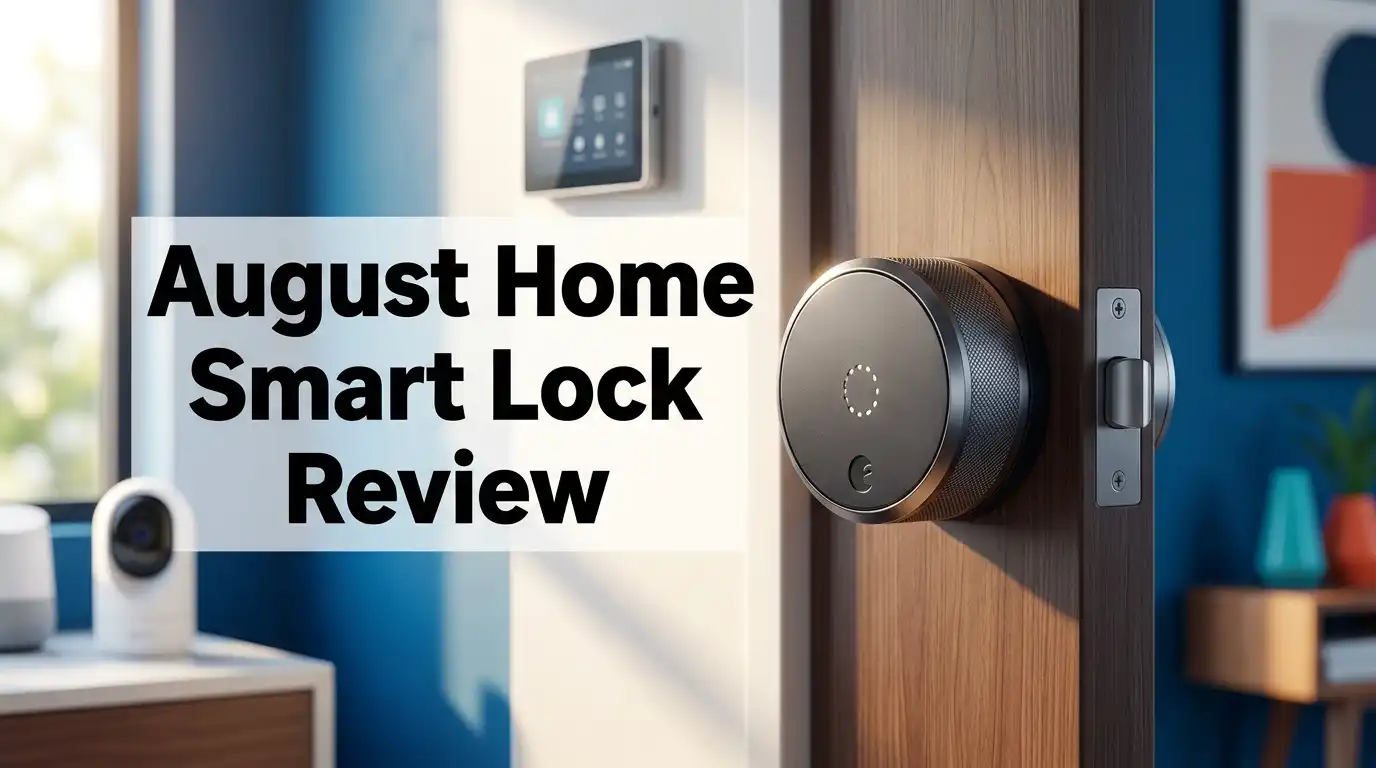
The August Home Smart Lock is a retrofit smart deadbolt controller. It attaches to the inside of your door and turns the deadbolt you already own.
The current model is the 4th generation August WiFi Smart Lock. It carries model number AUG SL05 and ships in matte black or silver.
The lock does not touch the outside of your door. Your original key still works. Your original keyhole stays in place. That single design choice separates August from Schlage and Yale.
WiFi sits inside the unit now. Older August models needed a separate August Connect bridge plugged into a wall outlet. That extra box is gone.
Bluetooth handles close range control. WiFi handles remote control from anywhere with a signal.
The package includes DoorSense. This small magnetic sensor sticks to your door frame and tells the app whether the door is truly shut. A locked deadbolt means nothing if the door hangs open, so this sensor earns its keep.
August built the lock around 2.83 inches of width and 1.81 inches of depth. That makes it 45 percent smaller than the old Smart Lock Pro.
Who is this for? Renters, condo owners, Airbnb hosts, and anyone who wants smart access without replacing hardware.
Who should skip it? Anyone who wants a keypad or fingerprint reader built into the lock body.
Unboxing the August WiFi Smart Lock
The box feels premium in your hands. August uses a white sleeve with a clean product photo and almost no clutter on the front.
Slide the sleeve off and you find the lock body seated in a molded tray. It sits face up like a watch in a jewelry case.
The first thing you notice is the weight. The unit feels dense. The brushed metal ring around the edge has a ridged texture that helps your fingers grip it.
Under the tray sits a smaller compartment. Inside you find the mounting plate, three deadbolt adapters in different colors, a small screwdriver, mounting screws, and two CR123 batteries.
August includes the batteries, which saves you a trip to the store on day one.
The DoorSense sensor comes in its own tiny bag with adhesive tape and a screw option. You get a printed quick start card too.
The instructions are short. August wants you in the app instead, and the card says so.
I appreciated the color coded adapters. Each one matches a common deadbolt brand, so you match the color rather than measure anything.
Nothing feels cheap. The plastic used on the battery cover is the only part that feels a step below the rest.
Total unboxing time was under two minutes. No zip ties, no foam peanuts, no wasted material.
Design and Build Quality
August hired designer Yves Behar for this hardware, and it shows. The lock looks like a small speaker instead of a chunk of security equipment.
The matte black finish resists fingerprints better than the silver version. I tested black and it stayed clean for weeks.
The whole body turns when you lock or unlock manually. You grab the ridged edge and twist. The motion feels smooth and quiet compared to older August models.
The August logo on the side doubles as a status indicator. Its position tells you at a glance whether the bolt is thrown.
This is a small touch, but it removes the need to open your phone just to check the door.
Motor noise is moderate. You hear a soft mechanical whir for about one second. It will not wake anyone sleeping in another room.
The battery cover pops off with a light pull. No tools needed. Swapping cells takes 15 seconds.
Build quality issues do exist. Some owners report the locking wings that clip the body to the base plate loosening over time.
The unit also sticks out from the door by nearly two inches. Doors with narrow trim or storm door frames can create clearance problems.
Check your clearance before you buy. Measure from your thumb turn to any nearby wall or frame.
Overall the hardware feels solid for the price. It looks far better than the boxy competition.
Installation: How Easy Is It Really?
This is where August wins. I have installed several smart locks, and nothing comes close to this one for speed.
Step one: remove the two screws holding your interior thumb turn. Set the thumb turn aside in a drawer.
Step two: pick the adapter that matches your deadbolt. The app tells you which color to use after you select your lock brand.
Step three: mount the August base plate with the included screws. Keep the cam bar centered while you tighten.
Step four: clip the lock body on and rotate the two locking wings until they click.
Total time was 11 minutes on my first door. The second door took six.
The app then runs calibration. It turns the bolt several times to learn the travel distance. This takes about a minute.
Three things ruin a smart lock installation, and none of them are August’s fault. A door that needs a shove to close will fail calibration. A stiff deadbolt will drain batteries. A weak WiFi signal at the door will cause constant disconnects.
Fix those problems first. Sand the strike plate, lubricate the bolt, and check your router coverage.
August publishes a deadbolt compatibility list on its support site. Check your model before ordering.
Single cylinder deadbolts work. Double cylinder deadbolts with a key on both sides do not work.
Top 3 Alternative for August Home Smart Lock


Last update on 2026-08-22 / Affiliate links / Images from Amazon Product Advertising API Some of the links on this website are affiliate links, which means that at no additional cost to you, I earn a commission if you click through and make a purchase. I only recommend products and services that I believe will add value to my readers. Thank you for your support!
Yale Assure Lock 2 Keypad Deadbolt with WiFi

Last update on 2026-08-23 / Affiliate links / Images from Amazon Product Advertising API Some of the links on this website are affiliate links, which means that at no additional cost to you, I earn a commission if you click through and make a purchase. I only recommend products and services that I believe will add value to my readers. Thank you for your support!
Schlage Encode Plus Smart WiFi Deadbolt

Last update on 2026-08-22 / Affiliate links / Images from Amazon Product Advertising API Some of the links on this website are affiliate links, which means that at no additional cost to you, I earn a commission if you click through and make a purchase. I only recommend products and services that I believe will add value to my readers. Thank you for your support!
Aqara Smart Lock U100 with Fingerprint and Apple Home Key
The August App and Daily Use
The August app is the control center. It runs on iOS and Android, and it looks clean.
The home screen shows one large circle. Tap it to lock or unlock. That is the whole interaction.
Guest keys are free and unlimited. You send a virtual key by phone number or email. The guest downloads the app and gets access.
You can set keys to permanent, temporary, or recurring schedules. A cleaner can get Tuesday mornings only.
The activity feed logs every event. It shows who opened the door, when, and by which method. This log alone convinced two of my neighbors to buy one.
Notifications work well. You choose alerts for unlock events, door left open, or specific users arriving.
Response time over WiFi averages two to four seconds in my testing. Bluetooth commands land almost instantly when you stand near the door.
The app is not perfect. It occasionally shows a spinning wheel and reports the lock as unreachable.
A force close and reopen usually fixes it. That should not be necessary on a $230 product.
Firmware updates arrive through the app. They take a few minutes and rarely cause problems.
August also offers a paid subscription for extended activity history and video integration. The core features stay free forever, which deserves credit.
Auto Unlock and DoorSense Performance
Auto Unlock is the headline feature. Your phone acts as the key, and the door opens before you reach it.
The system uses geofencing. When your phone crosses a boundary roughly 200 meters from home, the lock arms itself.
Bluetooth then confirms you are actually at the door. The bolt retracts.
When it works, it feels like the future. Arms full of groceries and the door just opens.
When it fails, you stand outside feeling silly. Failures happen for real reasons.
Phone battery saver mode kills background location. iOS sometimes suspends the app. A weak Bluetooth handshake stalls the process.
In my testing, Auto Unlock succeeded around 80 percent of the time. That number matches what most owners report online.
Android users report more inconsistency than iPhone users because of aggressive battery management on some phones.
DoorSense performed better. The magnet sensor correctly reported door status nearly every time.
Auto Lock pairs with DoorSense nicely. You set a delay from instant up to 30 minutes, and the door locks itself after closing.
One warning from experience: if you walk the dog without your phone and Auto Lock fires, you are locked out. Carry a key or add the August Smart Keypad.
Smart Home Compatibility in 2026
August supports the big three voice platforms. Alexa, Google Assistant, and Apple Home all connect directly.
Voice unlocking requires a spoken PIN for security. Locking needs no PIN.
SmartThings works, and so does Airbnb. The Airbnb integration auto generates guest codes tied to bookings, which hosts love.
Apple Home support means you can add the lock to scenes and automations. Say goodnight and watch the door lock along with the lights.
Matter support is the sticking point. The 4th generation August WiFi Smart Lock does not natively speak Matter.
If you want a future proof Matter over Thread lock, look at the Aqara U100 or the newer Yale models instead.
Home Assistant users can connect through the official integration. Note that Yale has been migrating accounts from Yale Access to the Yale Home app, and August accounts sit in a separate lane.
That migration has confused some owners. Read the current app notes before you buy if you run a complex setup.
IFTTT support exists but feels neglected.
Overall the ecosystem coverage remains broad. August still plays nicely with more platforms than most competitors.
Battery Life: The Biggest Weakness
Let us be blunt. Battery life is the number one complaint about this lock.
Two CR123 lithium cells power everything. August estimates three to six months of life.
Many owners get far less. Reports of six to eight weeks appear constantly in owner forums.
Why the gap? WiFi radios drain power fast. The lock must stay awake and reachable for remote commands.
Weak signal strength is the main culprit. If the lock struggles to hold a connection, it retries endlessly and burns power.
Mesh WiFi systems cause specific trouble. Some mesh nodes poll connected devices frequently, which wakes the lock over and over.
Door friction matters too. A bolt that binds forces the motor to work harder on every cycle.
Three fixes actually help. Move a router or node closer to the door. Use quality lithium CR123 cells rather than bargain brands. Fix any binding in the deadbolt.
Replacement cells cost roughly $8 to $12 per pair. Budget for four to six pairs per year in a worst case scenario.
The good news is simple. A dead battery never locks you out because your physical key still works from outside.
August also sends low battery alerts through the app and email. You get warning before the lock quits.
Still, this is a real ongoing cost and a real annoyance. Buy with your eyes open.
Security and Privacy Features
Smart locks raise fair security questions. August addresses most of them properly.
The app uses two factor authentication for account access. You cannot log in with a password alone.
Bluetooth communication uses AES 128 bit encryption. App traffic runs over TLS.
If you lose your phone, you can disable the app and revoke all virtual keys through a browser. That kill switch matters.
The physical security story is different. August does not change your deadbolt at all.
Your security level equals whatever your existing deadbolt provides. A cheap builder grade deadbolt stays a cheap builder grade deadbolt.
Buyers who want ANSI Grade 1 hardware should replace the deadbolt first, then add August on top.
The retrofit design also keeps the keyhole outside. Lock picking and bumping remain possible on weak cylinders.
Activity logging helps accountability. Every unlock ties to a named user or a specific method.
August has not suffered a major publicized breach affecting lock control. That track record counts for something.
Privacy wise, August collects usage data and location for Auto Unlock. Read the policy if that concerns you.
You can disable geofencing entirely and use manual control only.
The Older August Smart Lock Plus Connect Bridge

Last update on 2026-08-22 / Affiliate links / Images from Amazon Product Advertising API Some of the links on this website are affiliate links, which means that at no additional cost to you, I earn a commission if you click through and make a purchase. I only recommend products and services that I believe will add value to my readers. Thank you for your support!
Some retailers still sell the 3rd generation August Smart Lock bundled with the Connect WiFi bridge. It shows up cheaper and tempts buyers.
Here is the honest comparison.
The older model uses four AA batteries. Those cells last considerably longer, often six months to a year.
The Connect bridge plugs into a wall outlet near the door. It relays commands between Bluetooth and your WiFi network.
That separation means the lock itself sips power. Many long time owners prefer this arrangement for exactly that reason.
The downside is size. The older unit is noticeably bigger and less attractive on the door.
The bridge also adds a point of failure. If it unplugs or loses WiFi, remote control stops working.
Feature parity is close. You still get guest keys, activity logs, Auto Unlock, and voice assistant support.
DoorSense availability varies by bundle. Check the listing before ordering.
If deep discounts appear, the older bundle offers strong value. If you want the smaller body and cleaner look, pay more for the 4th generation.
What the August Smart Lock Does Not Do Well
Honest reviews name the flaws. Here are mine after extended use.
It has no keypad. You must buy the August Smart Keypad separately for about $60. Competitors include one in the box.
It has no fingerprint reader. In 2026 that feels dated at this price point.
Battery consumption remains poor. No firmware update has fully solved it.
Auto Unlock is inconsistent. Roughly one in five attempts needs manual intervention.
The app disconnects occasionally. You reopen it and everything works, but the moment erodes trust.
No native Matter support. Buyers building a Matter first home should look elsewhere.
The unit protrudes from the door. Tight door frames and storm doors create clearance conflicts.
Physical security depends on your old deadbolt. August adds convenience, not strength.
Customer support responses vary widely. Some owners report quick replacements. Others describe long waits and repeated troubleshooting scripts.
Finally, the price sits above what the feature set justifies at full retail. Wait for a sale.
None of these flaws are dealbreakers on their own. Together they mean you should think carefully rather than buy on brand reputation alone.
Pros and Cons
Pros
- Installs over your existing deadbolt in about 10 minutes with one screwdriver
- Keeps your original keys and leaves the exterior of your door unchanged
- Smallest and best looking retrofit smart lock body on the market
- Built in WiFi with no extra bridge required
- Free unlimited guest keys with schedules and no subscription
- Detailed activity log showing who opened the door and when
- Works with Alexa, Google Assistant, Apple Home, SmartThings, and Airbnb
- DoorSense included so you know if the door is actually closed
- Auto Lock and Auto Unlock handle the door hands free
- Physical key backup always works even with dead batteries
Cons
- Battery life often falls well short of the advertised three to six months
- CR123 cells cost more than standard AA batteries
- No keypad or fingerprint reader in the box
- Keypad accessory costs an extra $60
- Auto Unlock fails often enough to be irritating
- No native Matter support on this generation
- App occasionally loses connection and needs a restart
- Two inch depth causes clearance issues on some doors
- Security level still depends on your existing deadbolt quality
- Full retail price feels high against 2026 competition
Who Should Buy the August Home Smart Lock?
Renters should buy this lock. Nothing on the outside of the door changes, and reinstalling the original thumb turn takes five minutes when you move out.
Condo owners with HOA hardware rules benefit for the same reason.
Airbnb and short term rental hosts get real value from the free guest keys and the booking integration. Adding the keypad accessory makes it a complete host solution.
Apple Home users appreciate the direct integration and the clean design.
People who love their current keys should buy it. You keep every key on your ring.
Skip this lock if you want a keypad built in. The Schlage Encode Plus or Yale Assure Lock 2 serve you better.
Skip it if fingerprint entry matters. The Aqara U100 handles that job.
Skip it if you cannot get a strong WiFi signal at your front door. Battery drain will make you miserable.
Skip it if you want Matter over Thread today.
Households with several people and frequent door traffic should think hard. More cycles means faster battery drain.
Anyone upgrading from a keypad lock needs to retrain habits. Walking the dog without a phone becomes a lockout risk.
Price and Value in 2026
August lists the WiFi Smart Lock at $229.99 on its own site. That price has held steady.
Amazon pricing moves around. Sales drop it to the $150 to $180 range regularly.
At $150 the value proposition looks strong. At $229.99 it looks stretched.
Compare the field. The Yale Assure Lock 2 with WiFi includes a keypad and often sells near $200.
The Schlage Encode Plus includes a touchscreen keypad and Apple Home Key tap to unlock around $270 to $300.
The Aqara U100 bundles fingerprint, keypad, and Apple Home Key near $150 to $190 on sale.
August charges a premium for the retrofit design and the app experience. Those things have genuine worth, but the hardware feature list trails competitors.
Add $60 for the keypad accessory and the real world total climbs past $280.
Factor in batteries. Four pairs of CR123 cells per year adds roughly $40 annually.
My advice is simple. Set a price alert and buy during a sale event. Prime Day and Black Friday reliably bring this lock under $170.
At that number, few products deliver more convenience per dollar.
Final Verdict
The August Home Smart Lock remains the best retrofit smart lock you can buy in 2026. That statement comes with conditions.
Buy it for the installation experience, the design, and the free guest key system. Those three things are genuinely excellent.
Do not buy it expecting long battery life. Do not buy it expecting flawless Auto Unlock.
The lock earns about 8 out of 10 from me. Points come off for battery drain, the missing keypad, and the absent Matter support.
If your front door has strong WiFi, a smooth deadbolt, and a household that mostly carries phones, you will be happy.
If any of those conditions fail, a keypad lock from Yale or Schlage will serve you better.
August built its reputation on solving one problem elegantly. It still solves that problem better than anyone else.
Just wait for the sale price before you click buy.
Frequently Asked Questions
Does the August Smart Lock replace my deadbolt?
No. It attaches to the inside of your existing deadbolt and turns it for you. The exterior hardware and keyhole stay exactly as they are, and your original keys keep working.
How long do the batteries actually last?
August estimates three to six months. Real world reports often land between six weeks and four months. Signal strength at the door, door friction, and daily lock cycles all affect the result.
Can I still use a key if the battery dies?
Yes. Your original key works from the outside at all times. A dead battery never locks you out of your home.
Does the August Smart Lock need WiFi to work?
Not for basic use. Bluetooth handles control when you stand near the door. WiFi is only required for remote access, notifications, and voice assistant commands.
Does it work with Apple Home and Alexa?
Yes. The 4th generation model supports Apple Home, Amazon Alexa, Google Assistant, SmartThings, and Airbnb. Voice unlocking requires a spoken PIN for safety.
Does the August Smart Lock support Matter?
The current 4th generation WiFi model does not offer native Matter support. Buyers who want Matter over Thread should look at the Aqara U100 or newer Yale models.
Is a keypad included?
No. The August Smart Keypad sells separately for around $60. Many buyers add it so guests and family can enter without a phone.
Can renters install this lock?
Yes, and renters are a core audience. Installation requires only a screwdriver, and you can restore the original thumb turn in minutes when you move out.
Will it fit my deadbolt?
Most single cylinder deadbolts from Kwikset, Schlage, Baldwin, and Yale work. Double cylinder deadbolts with a key on both sides do not. Check the August compatibility list before ordering.
Is the August Smart Lock secure?
The app uses two factor authentication and encrypted communication. Physical security depends entirely on the quality of the deadbolt already installed on your door.

Hi, my name is Lily you can say i am a gadget hunter at this point. Welcome to Gadget Gallery The Gallery of Gadget Reviews