Xbox Series X Review: 4K Performance, Design and Verdict
Looking for a console that loads games fast and runs quietly? The Xbox Series X might be the answer you need. It packs a custom next gen processor into a clean, good looking design.
Gamers love its strong 4K gaming performance. Features like Variable Rate Shading and hardware accelerated DirectX Raytracing help games look sharp and smooth. HDMI 2.1 support also prepares your setup for future displays.
Backward compatibility is another big win. Your older games and accessories often work right away. Still, the console is very large, so check your shelf space first.
Many players also compare it with the PlayStation 5. This guide breaks down the strengths, the weak spots, and whether this console fits your setup. Keep reading to see if it deserves a place under your TV.
In a Nutshell
-
Ray tracing adds realistic light. The console supports hardware accelerated DirectX Raytracing. Shadows and reflections look more natural in games that use it.
-
Variable Rate Shading saves effort. This feature, called Variable Rate Shading (VRS), focuses processing power where it matters most. Players can enjoy smoother action during busy scenes.
-
HDMI 2.1 suits modern TVs. The console offers HDMI 2.1 support. This helps it pair well with newer displays that need high bandwidth.
-
A custom processor drives performance. The custom next generation processor handles demanding tasks for the whole system. It supports the console’s advanced graphics features.
-
Size is a real consideration. This console is very large. Make sure you have enough shelf or cabinet space before you set it up.
-
Many see it as a refinement. Some reviewers view it as a polished upgrade rather than a true generational leap. Fewer games fully push the hardware, so the gains may feel gradual.
Performance and Load Times


Last update on 2026-11-06 / Affiliate links / Images from Amazon Product Advertising API Some of the links on this website are affiliate links, which means that at no additional cost to you, I earn a commission if you click through and make a purchase. I only recommend products and services that I believe will add value to my readers. Thank you for your support!
Load times shape how a session feels from the very first moment. Short waits keep you in the action instead of staring at loading screens. When you press start, the Xbox Series X gets you into play quickly.
Quick loading also helps after a break. Returning to a game feels easy, so you can pick up where you left off. Your squad also spends less time waiting before the match begins.
Loading screens also shape how you feel about a game library. Fewer waits mean more time for exploring worlds and trying new strategies. This matters most for open world adventures.
Performance also depends on the game itself. A few titles fully push the hardware, so you may not see every bit of power in each game. Choose games that match what the console can do.
Steady frame rates matter just as much as speed. Smooth motion makes fast races and shooters feel more responsive. Your aim and timing feel more precise when the screen keeps up with your inputs.
Quiet operation supports a calm play space. The fans stay low, so the sound will not pull your focus during tense moments. Long sessions feel more comfortable in a quiet room.
Smooth performance also helps during team play. Quick reactions depend on steady visuals and fast response. Your squad will notice when every player stays in sync.
Cloud play gives you another route to fast access. Through the Xbox app on supported LG TVs and similar devices, you can stream games straight to the screen. Players who care most about quick starts and stable play will notice these strengths right away.
Casual gamers and serious competitors both benefit from that reliable feel. Good performance rewards patience with better results. Try different display settings in your TV menu to match your screen. Small changes can make motion look clearer.
Finally, test a few favorite titles yourself. Check how quickly they start and how smoothly they run on your setup. Your own experience tells you more than any spec sheet.
Design and Build Quality
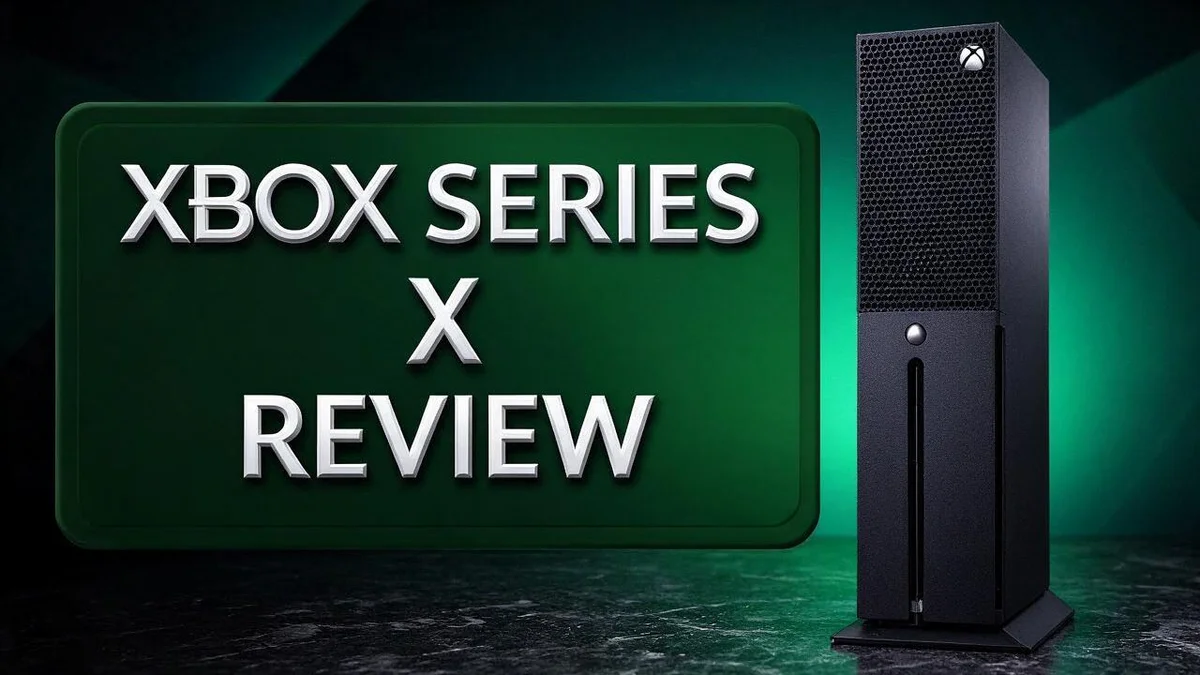
The Xbox Series X shows a clean and simple design. Its black tower shape stands out in any living room.
Many people enjoy how the console looks on a shelf or in an entertainment unit. The matte black finish hides small scratches and dust well.
You can place the console upright or lay it flat. Each position suits different spaces, so pick the one that fits your setup best. Always use the included stand when standing it upright.
The front panel keeps controls simple. You will find a disc slot and a power button. Insert discs gently and wait for the tray to close fully.
Build quality feels solid in the hand. The shell feels firm, and the parts fit together with care. This sturdy feel gives many players confidence during long gaming nights.
Airflow matters more than most people expect. Vents on the sides and back help hot air escape. Keep the area around the console clear so the system can breathe.
Cable management is easy with this layout. The rear panel gives room for power, HDMI, and network cables. Leave a little slack behind the unit so cables do not bend sharply.
Good placement helps the console last longer. Choose a spot with open air around it. Avoid closed cabinets that trap heat, because trapped heat can affect performance over time.
Overall, the design focuses on function first. It looks modern without flashy lights or bold colors. Friends who visit your home will likely notice its clean lines right away.
Game Library and Backward Compatibility
Your game library decides how often you play. Think about the genres you enjoy most. Check that those genres have plenty of titles on this console.
The Xbox Series X lets you bring your past with you. Older titles often carry over, so your old collection stays useful for years.
Keep your favorite older games close. Many players hold onto discs and digital copies for a long time. This console gives those games a fresh place to play.
Not every new release pushes the hardware. Some titles look stunning, while others barely use the extra power. Reviewers point out that only a few games fully push the system.
Review the library before you commit. Browse upcoming releases and read the game descriptions. Ask yourself whether the games you want run well on this system.
Cloud play adds another layer to your library. You can stream titles through the Xbox app on supported LG TVs and similar devices. This lets you sample games without a long download.
A mix of game types keeps your schedule interesting. New releases, older favorites, and streamed titles work well together. Try a range of genres to discover your personal favorites.
Your library also shapes how you spend time with others. Friends often ask which titles you own. A shared favorite can make group sessions more fun.
Plan your first month of play. List three games you want to try first. Then check how each one handles the console.
Your library grows with you. Every new release and every new friend adds something fresh. Choose games that match your schedule and your taste.
Top 3 Alternatives
If you want a different way to play, these three options are worth a look. Each one offers something special. Read on to find the best fit for your gaming style.
PlayStation 5

Last update on 2026-11-06 / Affiliate links / Images from Amazon Product Advertising API Some of the links on this website are affiliate links, which means that at no additional cost to you, I earn a commission if you click through and make a purchase. I only recommend products and services that I believe will add value to my readers. Thank you for your support!
The PlayStation 5 is a strong pick for fans of big, cinematic games. It delivers fast load times and smooth frame rates for action packed play. The DualSense controller adds haptic feedback, so you feel every jump and explosion. Many exclusive titles make it a favorite for solo and online play.
Nintendo Switch OLED

Last update on 2026-10-21 / Affiliate links / Images from Amazon Product Advertising API Some of the links on this website are affiliate links, which means that at no additional cost to you, I earn a commission if you click through and make a purchase. I only recommend products and services that I believe will add value to my readers. Thank you for your support!
The Nintendo Switch OLED works as both a home console and a portable device. Its bright OLED screen makes colors pop, and the built in stand lets you prop it up anywhere. Families love it because the games suit all ages. Pick this option if you like to play on the go.
Steam Deck

Last update on 2026-11-06 / Affiliate links / Images from Amazon Product Advertising API Some of the links on this website are affiliate links, which means that at no additional cost to you, I earn a commission if you click through and make a purchase. I only recommend products and services that I believe will add value to my readers. Thank you for your support!
The Steam Deck is a handheld PC that opens up a huge library of games. You can play your existing Steam titles right on the device. It also connects to a TV with a dock, so you get a bigger screen at home. Tinkerers enjoy tweaking settings to boost performance. Each choice brings a fresh experience to your living room or your backpack.
Cloud Gaming and Streaming Options
Cloud gaming gives you another way to play. Games run on remote servers and stream straight to your screen. You can start playing without a large download.
The Xbox app supports cloud play on certain LG TVs and similar devices. This means you can play without the console in the room. It works well for guests or a spare room.
Streaming depends on your internet connection. A steady connection keeps the picture sharp. Slow or unstable internet can cause blur or delayed controls.
A wired connection usually gives the most reliable results. A wireless connection can work too. Keep the signal strong in the area where you plan to play.
Cloud play also helps when you want to try a game first. You can sample a title before you commit to a full install. This saves valuable storage space on your console.
Pair a compatible controller with your streaming device before you begin. Open the app settings and check the connection status. A quick setup check prevents frustration during your first session.
Many people mix both options. They play installed favorites on the console and stream new releases from the cloud. This mix gives you flexibility across different days and moods.
Test your connection before you rely on streaming. Run a speed test and play a short session. Watch how the controls feel during fast action scenes. This quick check shows whether streaming fits your home setup.
Cloud play works best as a flexible extra. It fits travel days, guest visits, or a quick session on another screen. Keep the console as your main hub for the best overall experience.
Noise and Thermal Operation
Quiet operation is one of the Xbox Series X strengths. Many players notice the calm sound during long sessions. Fan noise stays low during everyday tasks like browsing menus.
The console handles light work with ease. Streaming apps, background updates, and simple menus rarely create a loud hum. Quiet play helps when you share a room with family or a roommate.
Demanding games can raise the fan speed. Intense titles push the processor and graphics chip harder. The cooling system spins faster to keep temperatures steady.
That change in sound is normal. A soft whoosh during action scenes shows the system is doing its job. Most players tune it out once the story or match grabs their attention.
Downloads and updates can also change the noise. Large game installs keep the system busy for hours. The fans may run longer than you expect, even when you are not playing.
Dust can change the sound over time. Loose debris may cause rattles or a louder whir than usual. Wipe the outside surfaces regularly and check the area around the console for lint.
Listen for warning signs. A clicking or grinding noise sounds very different from a gentle fan hum. Stop play and power down the console if the sounds seem sharp or uneven.
A simple sound test helps you judge normal behavior. Start a demanding game and play for about twenty minutes. Listen for a steady fan pitch, then compare it with the quieter menu screens.
Headsets help you catch small problems early. A good headset picks up subtle changes that speakers might hide. Quiet rooms also make small rattles easier to spot.
Room conditions matter for thermal comfort too. A warm room makes the console work harder to cool itself. Keep your gaming space comfortable so the system can stay calm during long sessions.
Pros and Cons
Pros
– Games load very quickly between sessions
– The 4K picture looks sharp on large screens
– The sleek design suits a living room setup
– HDMI 2.1 support keeps your TV features ready
– Hardware ray tracing adds realistic lighting to scenes
Cons
– The console takes up a lot of shelf space
– It feels more like a refinement than a leap
– Owners of recent consoles may notice small upgrades
Who Should Buy It
The Xbox Series X fits some players better than others. Think about your room, your TV, and your gaming habits before you decide.
Loyal Xbox fans often gain the most from this console. Your older games and accessories keep working, so you can upgrade without starting over.
Owners of large 4K screens also get strong results. Games run smoothly, so a big display feels like a good match.
Families sharing one living room benefit from its flexibility. Several people can take turns on the same console without fuss.
Players who stick with one platform can build a long-term library. The console suits anyone who plans to stay on Xbox for years.
Sony loyalists may feel more at home with the PS5. If you love exclusive games on that platform, weigh your options carefully.
Owners with tight spaces should measure first. The console is large, so check your cabinet or stand before you commit.
Players who want heavy hitters may find fewer options. Only a handful of games fully test the hardware right now.
Shoppers craving a dramatic jump should set realistic expectations. Think of this model as a careful evolution of the Xbox line.
New players should start with a few popular titles. Starting small helps you learn the menus and controls without pressure.
Ask yourself a few simple questions. Do you already own many Xbox games? Do you have a 4K TV? Do you have room for a large console?
Hold a controller in person when possible. Comfort matters most during long sessions, especially on lengthy game nights.
If you answered yes to most questions, this console could be a strong fit. In short, it suits loyal Xbox players with a big screen and room to spare.
Final Verdict
The Xbox Series X earns a strong place in any living room. It is a polished console that works well every day.
It does not reinvent gaming. Instead, it refines the experience players already know.
Real life matters more than spec sheets. Day to day comfort, quick startups, and easy menus shape how much you enjoy the machine.
Backward compatibility adds real value. Many older games and accessories can carry over, so your existing collection stays useful.
Make a simple checklist. Write down your top three must-haves. Then check each console against that list.
Think about where you sit. Viewing distance changes how sharp the 4K picture feels to your eyes.
Consoles often stay in use for several years. A stable base like this one matters over that long stretch.
Your display settings shape the final picture. Spend a few minutes in the system menus to match your screen.
Small changes can make the image feel even richer. Good setup choices pay off in every session.
Storage space deserves attention too. Large game installs fill drives quickly, so plan which titles to keep installed.
A controller test matters as well. Hold the controller for a few minutes to see whether the grip suits your hands.
The PS5 remains the main rival. Compare exclusive lineups, controller feel, and the games your friends already play.
Trust your own experience above any single review. Your comfort decides whether the console feels right.
Our verdict is simple. The Xbox Series X suits players who value fast loading, sharp visuals, and a quiet design. Test it in a store if you can. Then decide with confidence.
Frequently Asked Questions
Can I play Xbox games without owning the console?
Yes, you can try cloud play. The Xbox app runs games on supported LG TVs and similar devices. You only need a steady internet connection to start. This option lets you test games before you commit to anything else.
Should I choose the Xbox Series X or the PS5?
Both consoles deliver strong 4K gaming. The right pick depends on the games you love most. Choose Xbox if you enjoy its library and backward compatibility. Pick the PS5 if Sony exclusives call to you. Take a few minutes to list the titles your friends play, because shared games make multiplayer fun.
Will this console handle future games well?
Few games fully push the hardware today. That gives the console plenty of room to grow. New releases can use its ray tracing and Variable Rate Shading tools in fresh ways. Strong hardware gives your library room to grow over the coming years.
What does Variable Rate Shading do?
Variable Rate Shading helps the console focus its power where it matters most. Fast moving scenes can use lighter processing, while key details stay sharp. This smart approach can help games run more smoothly. You rarely need to change any settings to enjoy it.

Hi, my name is Lily you can say i am a gadget hunter at this point. Welcome to Gadget Gallery The Gallery of Gadget Reviews