Sonoff S40 Smart Plug Review: Features, Performance & Reliability
Smart plugs make your home smarter in seconds. The Sonoff S40 is one of the simplest ways to start. This small device connects to your Wi-Fi. It lets you control lamps, fans, and other gadgets from your phone.
You can also use voice commands. The S40 works with Alexa and Google Home for hands free control. Want to automate your day? The eWeLink app lets you set schedules and timers. You can even create sunrise and sunset routines for your devices.
Many people want a simple way to manage their home. They do not want complicated setups or confusing apps.
In a Nutshell
- Small and sleek: The S40 fits into tight spaces without blocking other outlets.
- Handles real power: It supports loads up to 15A, so it covers most household devices.
- Smart daylight sync: The sunrise and sunset routine lets your devices follow natural light patterns.
- Connection hiccups: Some users notice the plug loses Wi-Fi connection now and then.
- Weak as a repeater: If you hope it boosts your Zigbee network, it falls short here.
- No energy tracking on Lite: The S40 Lite skips power monitoring, so you get zero usage data.
- Tough competition: Names like TP-Link Kasa and Shelly bring similar features to the table.
Key Features and Specifications
The Sonoff S40 packs serious features into a pocket-sized form factor. This Wi-Fi smart plug handles up to 15A of power, making it suitable for most household appliances you’ll want to control remotely.
Voice control integration works seamlessly with both Alexa and Google Home. You can command your devices hands-free without touching your phone. Just say “Alexa, turn off the coffee maker” and it happens instantly.
The eWeLink app gives you full remote management from anywhere. Schedule your devices to turn on and off at specific times. Set timers for automatic shutdowns. Create custom routines that fit your lifestyle perfectly.
One standout feature is the sunrise and sunset automation. Your plugged-in devices can follow natural light patterns automatically. Lights turn on as the sun sets. Fans activate when morning arrives. This creates a home that adapts to your daily rhythm.
The S40 and S40 Lite differ in one key way. The standard S40 includes power monitoring and energy reporting. You see exactly how much electricity each device consumes. The S40 Lite skips this feature entirely, so you get zero usage data.
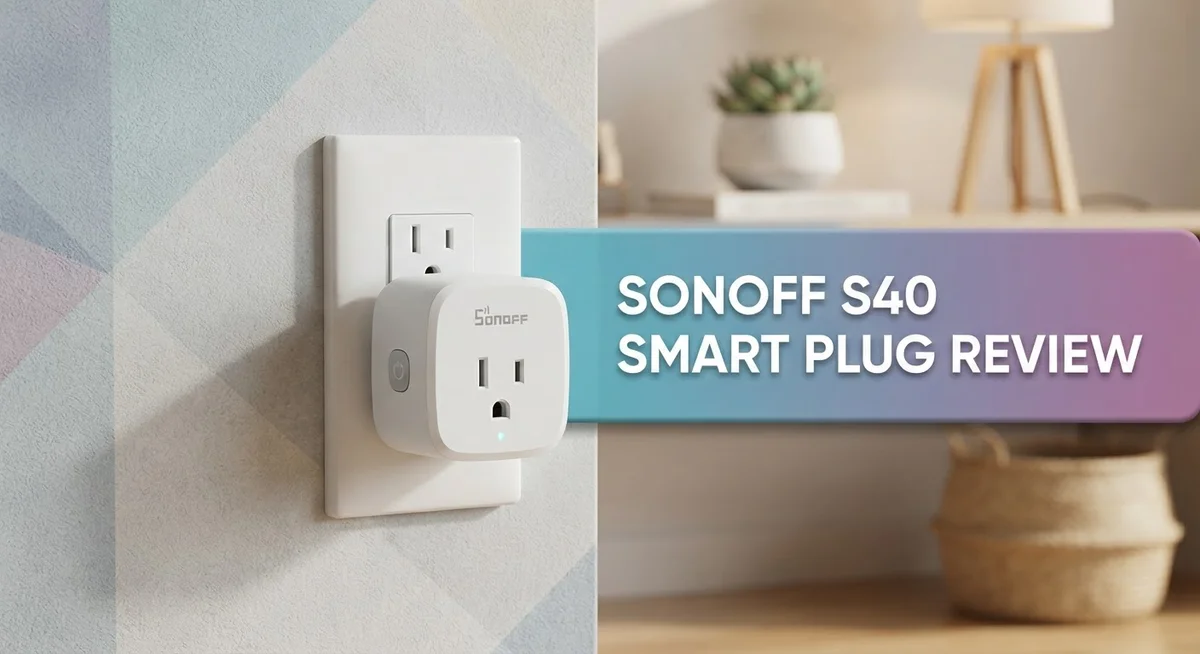
Compact design means the S40 fits into tight outlet spaces without blocking adjacent sockets. This matters in real homes where outlets are clustered together. Your other plugs stay accessible.
However, some users report network stability concerns. Devices occasionally drop off Wi-Fi and require reconnection. This inconsistency frustrates people who want reliable automation.
The S40 also performs poorly as a Zigbee repeater. If you hoped it would strengthen your Zigbee network, you’ll be disappointed. It simply doesn’t extend range effectively.
These specifications position the S40 as a straightforward smart plug for basic automation needs. You get voice control, scheduling, and remote management. The compact size and power capacity cover most everyday use cases. The trade-off is that reliability and advanced features like energy tracking vary between models.
No products found.
Design and Compactness
The Sonoff S40 Smart Plug stands out because of its slim profile. This device fits into tight spaces where bulky plugs would block adjacent outlets. You can plug it in and still use the socket next to it without any problems.
The physical build feels solid. The plug measures just the right size to slip behind furniture or into crowded power strips. Your living room won’t look cluttered with this device taking up minimal real estate on your wall outlet.
What makes the S40 particularly useful is its lightweight construction. You can move it from room to room without any hassle. Whether you want to power a lamp in your bedroom or a coffee maker in your kitchen, the portability works in your favor.
The S40 Lite shares the same compact advantage. Both versions maintain that pocket friendly size that appeals to anyone with limited outlet space. If your home has older outlets or power strips already packed with devices, this plug won’t add frustration.
The design includes a simple LED indicator. This light shows you the connection status at a glance. You know immediately if the plug is online or experiencing issues without opening the app.
The button placement feels intuitive. You can manually toggle power on and off directly from the plug itself. This manual override gives you control even when your phone is across the room.
One thing to note: the compact size comes with a trade off. The plug runs warm during extended use. This is normal for smart plugs handling higher loads, but you should avoid covering it with anything that blocks airflow.
The overall design philosophy keeps things simple. Sonoff avoided adding unnecessary features that would bulk up the device. You get a straightforward smart plug that does what it promises without extra complexity.
If outlet space matters in your home, the S40’s small footprint delivers real value. The device disappears into your setup while still providing the smart automation features you need for basic home control.
Voice Control and Smart Home Integration
The Sonoff S40 works with both Alexa and Google Home. You can control it using voice commands from anywhere in your home. This compatibility makes it easy to integrate into existing smart home setups you already use.
The eWeLink app serves as your command center. You manage the plug remotely through this application. Scheduling and timers work directly from the app interface. You can turn devices on or off even when you’re away from home.
Sunrise and sunset routines add a natural automation layer. Your lights or devices follow daylight patterns automatically. This feature works without needing additional programming or complex setup steps. The plug learns your local sunrise and sunset times.
Integration with other smart devices depends on your ecosystem choice. If you use Alexa primarily, the S40 responds to Alexa routines and groups. Google Home users get similar functionality through their preferred platform. Both voice assistants recognize the plug instantly after setup.
The eWeLink ecosystem connects multiple Sonoff devices together. You can create scenes that trigger multiple plugs at once. This means turning on several devices with a single voice command becomes possible. The app interface stays simple enough for beginners.
Network stability remains a concern for some users. The plug occasionally drops connection to your Wi-Fi network. This happens more frequently in homes with weak signal areas. Reconnecting usually resolves the issue quickly.
The S40 performs poorly as a Zigbee repeater. If you hoped it would extend your Zigbee network range, expect disappointment. It works as a standalone device much better than as a network extender.
Voice control setup takes just minutes. The plug pairs with Alexa or Google Home through their respective apps. Once connected, you speak commands naturally without special syntax. The voice recognition accuracy matches other mainstream smart plugs.
The combination of voice control and app management gives you flexibility. You choose how to interact with your devices each time. This dual approach suits different situations throughout your day. Whether you’re hands-free or phone-in-hand, the S40 responds accordingly.
Top 3 Alternatives
TP-Link Kasa Smart Plug


Last update on 2026-10-21 / Affiliate links / Images from Amazon Product Advertising API Some of the links on this website are affiliate links, which means that at no additional cost to you, I earn a commission if you click through and make a purchase. I only recommend products and services that I believe will add value to my readers. Thank you for your support!
Wyze Smart Plug

Last update on 2026-10-21 / Affiliate links / Images from Amazon Product Advertising API Some of the links on this website are affiliate links, which means that at no additional cost to you, I earn a commission if you click through and make a purchase. I only recommend products and services that I believe will add value to my readers. Thank you for your support!
Meross Smart Plug Mini

Last update on 2026-10-21 / Affiliate links / Images from Amazon Product Advertising API Some of the links on this website are affiliate links, which means that at no additional cost to you, I earn a commission if you click through and make a purchase. I only recommend products and services that I believe will add value to my readers. Thank you for your support!
App Control, Scheduling, and Automation
The eWeLink app puts control in your hands whenever you need it. You can turn the S40 on or off from anywhere using your smartphone. The app interface keeps things straightforward so you don’t waste time figuring out menus.
Scheduling features let you set exact times for the plug to activate. You might want your coffee maker running before you wake up. The S40 handles this without any fuss. You can create multiple schedules for different days of the week.
Timers work great for devices you use temporarily. Set a timer for 30 minutes and the plug cuts power automatically. This prevents you from forgetting to turn things off. The timer function saves energy and adds safety to your routine.
Sunrise and sunset automation brings natural timing to your home. The plug activates or deactivates based on daylight hours in your location. This works perfectly for outdoor lights or porch equipment. You don’t need to adjust settings as seasons change.
Scenes let you group multiple actions together. Press one button and several Sonoff devices respond at once. This creates a coordinated smart home experience. You might have a “leaving home” scene that secures everything.
The app syncs across your devices instantly. Changes you make on your phone appear on your tablet right away. This real time synchronization keeps your automation running smoothly.
Voice commands add another layer of control beyond the app. Say “Alexa, turn on the living room plug” and it responds immediately. Google Home users get the same seamless integration. Voice control works even when your hands are full.
One thing to keep in mind: some users report connection drops where the plug loses contact with the network temporarily. This can interrupt your automation routines. Restarting your Wi-Fi router usually fixes these issues quickly.
The combination of app control, scheduling, timers, and voice commands makes the S40 flexible for most home automation needs. You get multiple ways to manage your devices. This variety ensures you can automate your home exactly how you want.
Network Stability and Reliability
The Sonoff S40 Smart Plug faces real challenges when it comes to maintaining a stable connection to your home network. Users have reported that the device occasionally drops off Wi-Fi, requiring manual reconnection to restore functionality.
Connection drops happen more often than ideal for a plug you depend on daily. The issue appears to surface when the S40 sits far from your router or when your network experiences congestion. You may notice the plug stops responding to app commands or voice requests without warning.
The eWeLink app does provide visibility into connection status. You can see when the plug loses contact and manually reconnect it through the app interface. This workaround works, but it defeats the purpose of a truly set-and-forget smart home device.
Network reliability becomes critical if you plan to automate important devices. Lights that fail to turn on or off create frustration. Smart power strips controlling entertainment systems need consistent connections to function properly.
The S40 performs particularly poorly as a Zigbee repeater. If you hoped to use it to extend your mesh network coverage, you’ll face disappointment. The plug simply doesn’t maintain the signal strength needed to relay data between devices effectively.
For basic automation tasks, occasional disconnects may not matter much. A plug controlling a decorative lamp tolerates brief outages. However, security devices, climate control equipment, or critical appliances demand better reliability.
Your placement strategy matters significantly for network stability. Positioning the S40 closer to your router helps maintain connection. Reducing interference from other electronics also improves performance.
The connection issues don’t affect all users equally. Some people report stable operation for months without problems. Others experience regular dropouts from day one. This inconsistency suggests either unit variation or sensitivity to specific network environments.
When shopping for a smart plug where reliability ranks high, you should weigh these network concerns carefully. The S40 works fine for non-critical applications. For devices where dependable operation matters, considering alternatives with stronger network performance makes sense.
Pros and Cons
Pros
- Compact design fits almost any outlet without blocking adjacent sockets
- Works seamlessly with Alexa and Google Home for instant voice commands
- Remote control and scheduling through the eWeLink app let you manage devices from anywhere
- Sunrise and sunset routines automate your home with natural timing patterns
- 15A maximum load handles most household appliances and devices
Cons
- Connection drops occur frequently, causing the plug to lose network contact temporarily
- The S40 Lite model lacks energy monitoring and power usage reporting features
- Network stability issues make it unreliable as a Zigbee repeater for extending your mesh
- Placement strategy becomes critical to maintain a steady connection in your home
Who Should Buy It
The Sonoff S40 Smart Plug works best for people who want basic home automation without complexity. If you need simple on/off control for lamps, fans, or seasonal devices, this plug delivers what you need.
Renters love this plug because it requires no installation. You plug it in, set it up through the eWeLink app, and you’re done. No wiring. No landlord approval needed. This makes it perfect for temporary automation in apartments or shared spaces.
Voice assistant users benefit from the Alexa and Google Home integration. If you already use voice commands in your home, adding the S40 lets you control more devices hands-free. Just say “turn off the lamp” and it happens instantly.
People who want scheduling and timers find real value here. You can automate your coffee maker to turn on at 7 AM. You can set a timer for your space heater. Sunrise and sunset routines add natural timing without manual adjustments.
The S40 suits light users best. If you need occasional remote access to a device, this plug handles it well. You travel for work? Turn off devices from your phone. You forget if you left something on? Check the app and control it remotely.
However, skip this plug if you need rock solid reliability. Network connection drops happen too often for critical devices. Don’t use it for security systems, medical equipment, or anything you depend on constantly. The frequent disconnects make it unsuitable for these uses.
Energy monitoring matters for some people. If you want to see how much power your devices use, the standard S40 shows this data. The S40 Lite model skips this feature entirely, so avoid it if energy tracking matters to you.
Tech enthusiasts who want simplicity appreciate the plug’s straightforward approach. No complicated setup. No advanced features you won’t use. Just basic, functional smart home control.
The S40 finds its sweet spot with casual users who want to dip their toes into home automation. It’s not for people who need professional grade reliability or advanced features. It’s for everyone else.
Final Verdict
The Sonoff S40 is a simple choice for smart home beginners. It handles basic tasks without fuss. But it does have real limits you should know about.
This plug works best as a starting point, not a permanent solution. Think of it as your first step into smart automation. It teaches you what you need before you invest more.
Who should buy this plug? Anyone curious about smart plugs but unsure where to start. First time smart home users benefit most. People testing automation ideas on a single device also fit well.
Who should look elsewhere? Users needing dependable uptime for critical devices should consider other options. If you run a security system or medical equipment, pick something else. Reliability matters more than features in those cases.
The competition offers stronger alternatives. TP-Link Kasa KP115 gives you steadier performance. Shelly plugs bring better build quality overall. IKEA Zigbee plugs integrate more smoothly with mesh networks.
Each competitor targets different needs. Some users want energy monitoring. Others want Zigbee mesh support. The Sonoff S40 skips these advanced features entirely.
Your specific use case decides the right choice here. Casual automation? The S40 fits fine. Serious smart home setup? Look at premium options instead.
We recommend the S40 for testing waters, not diving deep. It shows you what smart plugs can do. Then you decide if you want more.
The bottom line: This plug does simple jobs simply. It won’t replace advanced systems. But it opens doors to home automation without complications.
Buy it if you want an easy entry point. Skip it if you need guaranteed connectivity. Match your expectations to what this plug actually offers.
Smart home journeys start somewhere. The Sonoff S40 makes a reasonable starting point for many users. Just know its boundaries before you begin.
Frequently Asked Questions
Does the Sonoff S40 work with my existing smart home setup?
Yes, it integrates with Alexa and Google Home. You can control it through voice commands on either platform. The eWeLink app also connects to both ecosystems, so mixing brands works well. Just make sure your Wi-Fi network reaches the outlet location.
Can I monitor power usage with the S40?
The standard S40 model does not include energy monitoring. The S40 Lite also lacks this feature. If tracking electricity consumption matters to you, consider alternatives like the TP-Link Kasa KP115, which offers detailed power reporting.
Why does my Sonoff S40 keep disconnecting?
Network stability issues are common with this plug. Devices sometimes drop off Wi-Fi and lose connection temporarily. This happens more often in homes with weak signal or interference. Moving your router closer or adding a mesh system can help. However, don’t rely on this plug for critical devices that must stay online constantly.
Can the S40 extend my Zigbee network?
The plug has limited reliability as a Zigbee repeater. It works better as a standalone Wi-Fi device rather than a mesh extender. If extending your Zigbee range is your main goal, look at other options designed specifically for that purpose.
What appliances can the S40 handle?
The plug supports up to 15A maximum load. This covers most household items like lamps, fans, coffee makers, and small electronics. Avoid using it with high-power devices like space heaters or air conditioners. Always check your appliance’s power rating before plugging it in.

Hi, my name is Lily you can say i am a gadget hunter at this point. Welcome to Gadget Gallery The Gallery of Gadget Reviews