Boox Palma 2 Review: Save Your Money or Upgrade?
Are you tired of staring at a bright phone screen before bed? Many readers want a device that feels more like paper. The Boox Palma 2 might be the answer you need.
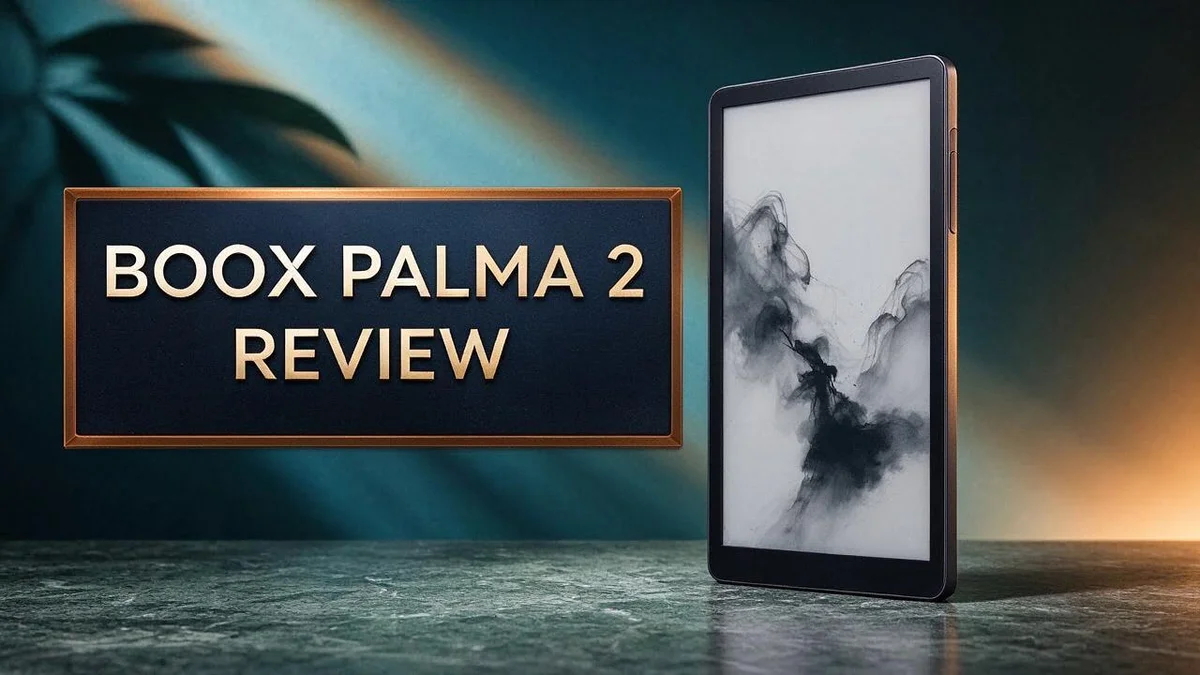
This compact reader packs a 6.13 inch Carta 1200 E Ink screen into a body that fits almost anywhere. It feels light in your hand and offers a solid grip. Its recessed screen also helps resist scratches over time.
Under the hood, you get an open Android system and a faster processor than the older model. You can also load more ebook formats, so your library stays flexible. Battery life is another highlight, lasting weeks with light use.
Want to know if this gadget suits your reading habits? Let us look at what it does well and where it falls short.
In a Nutshell
-
Battery life is a strong point. The device can run for weeks, and light readers may get a month or two on one charge. Many readers find this helpful for travel and long trips.
-
Daily heavy use shortens the charge. Hours of reading each day drain the battery much faster. Heavy readers should plan regular charging so they do not run out during a trip.
-
The build feels solid in the hand. A good grip and a recessed screen help protect it from scratches. It feels comfortable during long reading sessions too.
-
Apps can feel slow. The screen often lags behind when you open Android apps. Quick tasks may test your patience, so plan accordingly.
-
Some extras may go unused. Features like the camera and microphone add little for most readers. Those who want a simple reader may find them distracting.
-
Color lovers may prefer the Pro model. The Palma 2 Pro offers Kaleido 3 color, Android 15, and 5G support. Buyers who want more than black and white text should compare both models carefully before choosing.
Display and Reading Comfort

Last update on 2026-10-31 / Affiliate links / Images from Amazon Product Advertising API Some of the links on this website are affiliate links, which means that at no additional cost to you, I earn a commission if you click through and make a purchase. I only recommend products and services that I believe will add value to my readers. Thank you for your support!
Eye comfort matters most on a device you use every day. Many readers notice strain after a long session on a bright phone. This reader uses E Ink, so the text sits on the surface like ink on paper.
Light does not shine straight into your eyes. The screen reflects ambient light instead of glowing. You can read by a sunny window or under a soft desk lamp without much fuss.
Text stays crisp at small sizes. The high pixel density keeps letters smooth and clean. Small fonts, footnotes, and tight margins still look sharp.
You can change font size, line spacing, and margins. Set each page the way your eyes feel best. This control helps readers who need larger text for longer sessions.
Page turns take a moment, though. Each change flashes the screen, so fast scrolling may feel slow. Many readers accept this trade off for a calm, steady page.
Faint traces of earlier text can linger after several pages. This effect is called ghosting. A full refresh clears the screen and restores a clean look.
Text reflow also matters for ebooks. Books from many sources adapt to the page size, so chapters flow without awkward breaks. The layout stays tidy from start to finish.
Some people read PDFs, which can feel cramped on a small screen. Zooming and cropping help, but the layout may need extra effort. Plain text books usually look best.
The page looks like paper rather than a glowing panel. Your gaze can rest on the words for an hour without much fatigue.
Overall, the display suits people who read for hours. Anyone who wants a calm, paper-like screen will likely feel at home. Just expect a short wait when you flip pages.
Design and Portability
Think about where you read most. The Palma 2 slips into a coat pocket or a small bag without much fuss. Its size also works well for reading with one hand on a crowded bus or train.
Small size changes how you carry it. You can toss it into a backpack beside a notebook and forget it is there. Many commuters like having a full library without extra bulk.
A case adds protection, but it also changes the feel. Pick a slim sleeve that keeps the edges clear. That way, your fingers can still press buttons and turn pages with ease.
Want a steady reading position? Stand the device on a small desk stand or lean it against a book. A fixed angle can feel more comfortable than holding it for long stretches.
Keep the screen size in mind. The display is compact, so long PDFs can feel tight. Still, the small footprint makes it easy to pack for flights, hotel stays, or weekend trips.
Hold it in one hand while standing on a train, and it stays easy to manage. Shifting it to the other hand takes little effort.
Pairing it with a tote or sling bag also makes sense. Keep it in a front pocket for quick access. Reach for it during a short wait at the clinic or a lunch break.
Think about your bag size before choosing an accessory. A thin cover adds little bulk, while a thick folio can add noticeable size. Measure your favorite pocket first so the device fits comfortably.
In short, the compact body suits readers who value the freedom to read anywhere.
Performance and Speed
The Palma 2 feels quicker than its predecessor. Boox gave it an upgraded octa core processor. Opening your library and moving between menus feels smoother than before.
The device runs open Android, so you can install many reading apps. Light tasks run smoothly. Choose apps that load text and images, not heavy animations.
Fingerprint unlock saves you time. The built in scanner lets you reach your book with a single touch. Less waiting means more reading time.
BSR technology helps manage screen updates. Boox includes this feature to keep screen updates under control.
Small habits keep things moving. Close apps you no longer use. Choose a simple home screen with few widgets. Turn off animations in the settings when possible.
Simple apps work best. Kindle and Libby suit this device well. Their plain text pages load quickly and keep the reading flow steady.
Do one thing at a time. The device works best with one task open. Switching between many apps can test its patience.
Keep the system fresh. Install updates when they arrive. Restart the device once a week to clear memory and keep responses quick.
Speed depends on how you use it. Readers who open a book, read, and close the device will enjoy steady performance. Those readers rarely notice any lag at all. People who want fast multitasking may find the Palma 2 limited.
Speed affects your reading habit. A quick response makes the device feel natural in hand. Slow moments can pull you out of a chapter. Smooth flow keeps your attention on the story.
In short, the Palma 2 handles everyday reading with ease, while heavier tasks need patience.
Top 3 Alternatives
If you want other options, these three ereaders are strong choices.
Kindle Paperwhite


Last update on 2026-10-21 / Affiliate links / Images from Amazon Product Advertising API Some of the links on this website are affiliate links, which means that at no additional cost to you, I earn a commission if you click through and make a purchase. I only recommend products and services that I believe will add value to my readers. Thank you for your support!
The Kindle Paperwhite offers a bright E Ink screen that feels like real paper. It has a built-in front light, so you can read in bed or at night. It is waterproof, which makes it great for pool or bath time. Its battery can last for weeks on a single charge.
Kobo Clara Colour

Last update on 2026-10-31 / Affiliate links / Images from Amazon Product Advertising API Some of the links on this website are affiliate links, which means that at no additional cost to you, I earn a commission if you click through and make a purchase. I only recommend products and services that I believe will add value to my readers. Thank you for your support!
The Kobo Clara Colour adds a color screen to the classic ereader experience. Kids and comic fans will enjoy the extra color in books and magazines. It also offers adjustable warm light, which can reduce eye strain at night. Many readers like its simple layout and easy library syncing.
Boox Go 7
No products found.
The Boox Go 7 is a larger option with a seven inch screen. It runs on Android, so you can install reading apps and take handwritten notes. This makes it ideal for students and professionals who read documents every day. Its screen supports fast refresh modes for smooth page turns and clear note taking.
Battery Life in Real Use
Battery life shapes how often you think about charging. Many readers want a device they can pick up and forget. The Palma 2 fits that goal when your reading stays light.
With light use, the battery can last weeks. Some owners report one to two months between charges. Your results depend on how you spend your time with the device.
Heavy days change the picture. Hours of reading and app use drain the battery faster. Plan a charge before a long trip so you never run low.
Your daily habits matter most. A reader who opens a book for twenty minutes each night will keep far more charge than someone who scrolls through apps all afternoon. Track your usage for one week to learn your pattern.
Background tasks also use power. Syncing cloud accounts, downloading large files, and keeping a wireless connection active all take energy. Turn off sync for apps you rarely open, and the battery will stretch further.
Think about charging as part of your routine. Charge the device overnight with the same cable you use for your phone. A quick top up during lunch can cover a short commute.
Keep an eye on the battery indicator. Watching the percentage helps you avoid surprises. When the charge drops low during a trip, switch to airplane mode to save power for reading.
Temperature also affects performance. Leaving the device in a hot car or a freezing room can reduce its efficiency. Store it at room temperature so the battery holds its charge better over time.
Every battery wears down slowly over the years. Charging to full every time and letting it sit empty can shorten its life. Keeping the charge between twenty and eighty percent often helps lithium batteries last longer.
Software, Formats and Extras
Software is where the Palma 2 really shows its character. It supports more ebook formats than many older readers. Common files like EPUB and PDF open with ease.
Formats matter when your library grows. Many readers collect books from different stores. A wide format list means fewer file conversions and less hassle.
Test a few files before loading your full library. Check how the device handles fonts, layouts, and images. This quick step shows you what to expect from your favorite titles.
Copying files over a cable is another option. Connect the device to a computer and drag your books across. Many people find this simpler than syncing through a cloud service.
The Palma 2 also includes a camera and a microphone. These extras set it apart from some rivals. The Moaan InkPalm Plus, for example, skips both features.
The camera can snap a printed page or a handwritten note. You can then save the image as a file. The microphone works well for quick voice memos during study sessions.
Not every extra will earn a place in your day. Some built-in features may feel unnecessary to you. You can simply leave them alone and focus on reading.
Apps need patience on an E Ink display. Reading apps run smoothly enough. Video and animations, however, can look choppy and slow.
Color is the biggest software gap. The standard Palma 2 uses a grayscale screen. Comics and magazines with bright artwork may look flat. Readers who want color should consider the Palma 2 Pro, which uses Kaleido 3 color E Ink.
The Pro model also runs Android 15. The standard Palma 2 reportedly runs Android 13. Choose the model that matches your reading habits. Text heavy readers will likely be happy with the standard version.
Pros and Cons
Pros
– Your eyes stay relaxed during long reading sessions.
– It feels lighter to carry than a Kindle for many readers.
– The solid build gives you a firm grip.
– The recessed screen helps resist scratches.
– It runs faster than the older model.
Cons
– The screen can feel slow with apps and Android tasks.
– Some extra features may not fit your daily routine.
– Frequent long sessions shorten the time between charges.
Who Should Buy It
The Palma 2 suits people who read a lot on the go. Its small size fits neatly in a coat pocket.
Commuters often find it useful during busy days. A short train ride becomes a chance to finish a chapter.
Students can also benefit from this device. They can load textbooks, articles, and class notes in one spot.
It works best for people who want fewer distractions. The slow screen makes endless scrolling less tempting. Many readers find that calm helpful.
Writers who draft ideas while traveling may also like it. A quiet screen keeps the focus on the words.
Book clubs and reading challenges suit this device too. Tracking progress feels natural when the reader stays close at hand.
Dog walkers, nurses, and parents with spare minutes can read in short bursts. Quick sessions fit well when life feels full.
It may not suit everyone. Anyone who expects a fast phone experience may feel let down. Heavy app users should think twice before buying.
If you rely on specific Android apps every day, test them first. Make sure they run well enough for your needs.
Readers who want color pages can look at the Palma 2 Pro instead. It uses Kaleido 3 color E Ink and runs Android 15.
Some readers prefer fewer built in extras. For them, the Boox Go 6 Gen II may feel like a simpler choice.
Think about your reading goals too. A reader aiming for ten books a year will use this device every week. Casual readers may need less.
Ask yourself one simple question first. Do you read more than you scroll? If the answer is yes, this device may fit your life well.
Final Verdict
Our final verdict is clear. The Boox Palma 2 suits readers who want a focused device for books. It does not replace a phone or tablet.
Think about your reading habits first. If you mostly read novels, notes, or articles, this device feels right. If you want color pages or video, look elsewhere.
The Pro version changes the picture. The Palma 2 Pro adds Kaleido 3 color, Android 15, and 5G. That makes it a different choice for people who want color covers and newer software.
Compare it with simpler rivals too. The Moaan InkPalm Plus lacks a camera and microphone. Buyers who never plan to use those extras may find a simpler model enough.
Keep a backup reading option nearby. A phone or tablet handles tasks that need speed. The Palma 2 works best as a partner, not a sole device.
Ask yourself a few honest questions. Do you read every day? Do you carry books to places with no charger? Do you enjoy a slower, calmer screen? Yes answers point toward a good fit.
Remember that your library will grow. Plan your file management from the start. Sort books into folders so the device stays easy to navigate.
Give it a week before deciding. Load a small collection and read every day. This short test shows whether the calm screen suits your routine.
The overall verdict leans positive for focused readers. Comfortable reading, a solid build, and broad file support earn respect. Weak app speed and extra features keep it from being a perfect pick for everyone.
Our recommendation is a conditional yes. Buy it if books come first and you accept a slower screen. Skip it if you need a fast, all in one gadget.
Final thought. The Palma 2 offers a calm, distraction free way to read. Choose it for the reading life you want, not the apps you might use.
Frequently Asked Questions
Is the Boox Palma 2 screen good for reading?
The Palma 2 uses a 6.13 inch Carta 1200 screen with about 300 PPI. Text looks sharp and clear. Small fonts stay easy to read on the go.
How long does the battery last?
With light use, the battery can last weeks to a month or two. Heavier daily reading uses more power, so keep the charger handy on busy days.
Can I load books from different stores?
Yes. The device supports more ebook formats than many basic readers. You can load files from several sources. This helps if you buy from one shop and borrow from a library.
Is the fingerprint scanner useful?
It can be. You can unlock the device with a quick touch instead of typing a passcode. This saves a few seconds each time you pick it up.

Hi, my name is Lily you can say i am a gadget hunter at this point. Welcome to Gadget Gallery The Gallery of Gadget Reviews