Acer Chromebook 514 Review: Features, Performance, and Value
Looking for a laptop that just works? The Acer Chromebook 514 might be your answer. This device combines a sleek aluminum body with real everyday power.
You get a 14 inch touchscreen with a matte finish. It stays bright and clear, even in tricky lighting. Battery life stands out here. You can work, stream, and browse for hours without hunting for an outlet.
Performance feels smooth for web tasks and daily productivity. Multitasking between tabs and apps does not slow this machine down. The build quality feels solid too. Durable construction means this Chromebook can handle bumps and daily wear.
In a Nutshell
- Storage and memory scale up to 8GB RAM and 512GB SSD. That gives you room for apps, files, and multitasking.
- Ports galore: two USB-C (Thunderbolt 4) slots, two USB-A ports, and a built-in HDMI output. Plug in almost anything without extra dongles.
- The trackpad uses Gorilla Glass. It feels smooth and resists scratches over time.
- Webcam quality impresses for video calls and quick selfies. Clear images even in mixed lighting.
- A few users notice keyboard flex during typing. Some models also skip the backlit keyboard option.
- Color choices stay limited. You won’t find many finish options here.
- Some reviewers flag minor display limitations, though the touchscreen still handles daily tasks well.
Design and Build Quality
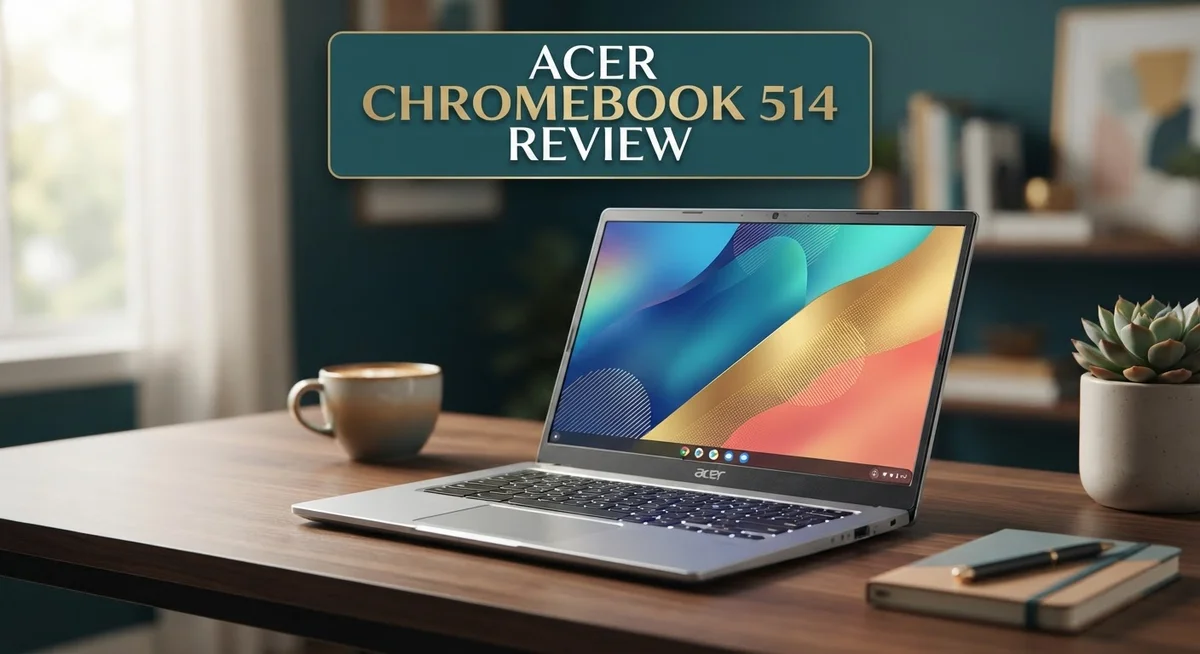
The Acer Chromebook 514 sits in a sweet spot when it comes to physical design. The aluminum chassis gives it a premium feel without unnecessary weight. You can carry this machine anywhere without strain.
The 14 inch display dominates the front, and the matte finish prevents glare during work sessions. Touchscreen functionality adds flexibility for users who prefer tap and swipe interactions. The screen stays bright enough for indoor and outdoor use.
Dimensions matter for portability. This Chromebook measures just 0.63 inches thick, making it genuinely slim. The overall weight keeps things light for daily commutes and travel. You won’t feel burdened carrying it in a backpack or shoulder bag.
The keyboard area shows some interesting choices. Gorilla Glass covers the trackpad, which feels smooth and responsive during navigation. Some users report keyboard flex when typing with force, though this doesn’t affect most casual users. The optional backlit keyboard improves visibility in dim lighting, though not all configurations include this feature.
Port placement deserves attention here. Two USB-C ports with Thunderbolt 4 support handle fast data transfers and charging. The two USB-A ports keep older peripherals compatible. Built in HDMI output connects directly to projectors and external monitors without adapters.
The hinge design opens smoothly and holds its position reliably. Screen stability matters during video calls and presentations. This Chromebook maintains its angle without wobbling or drifting.
Color options remain limited compared to competitors. You’ll typically find silver or gray finishes. This simplicity keeps manufacturing costs down and maintains a professional appearance.
The overall construction feels durable for daily use. Corners and edges resist damage from typical bumps and drops. The matte aluminum surfaces hide fingerprints better than glossy alternatives.
Build quality reflects careful engineering without unnecessary complexity. Every component fits snugly without rattles or gaps. The design prioritizes function over flashy aesthetics, making it ideal for students, professionals, and everyday users who value reliability and simplicity over trendy features.


Last update on 2026-09-17 / Affiliate links / Images from Amazon Product Advertising API Some of the links on this website are affiliate links, which means that at no additional cost to you, I earn a commission if you click through and make a purchase. I only recommend products and services that I believe will add value to my readers. Thank you for your support!
Display and Touchscreen Performance
The 14 inch touchscreen forms the heart of the Acer Chromebook 514’s display experience. The matte finish coating serves a practical purpose. It cuts down glare significantly, which means you can work comfortably in bright environments without squinting at reflections.
Brightness levels perform well for a device in this category. The screen produces vivid colors for web browsing, streaming, and document editing. Touch responsiveness feels snappy and accurate when you tap or swipe across the panel.
One thing to note: some users report minor display limitations in specific scenarios. These don’t affect everyday use for most people. If you spend hours editing photos or doing color critical work, you might notice slight constraints. For typical productivity tasks, email, and video calls, the screen handles everything smoothly.
The touchscreen accuracy remains consistent across the display surface. You won’t experience dead zones or delayed responses. This makes the touch feature genuinely useful rather than just a nice to have addition.
The matte coating does one more important thing. It reduces fingerprints and smudges compared to glossy alternatives. Your screen stays cleaner longer, which means fewer cleaning sessions and better visibility throughout the day.
Resolution and refresh rate work together to create a smooth viewing experience. Scrolling through web pages feels fluid. Video playback appears natural without stuttering or lag issues.
Viewing angles stay decent for a laptop in this segment. You can share the screen with someone sitting beside you without colors washing out or text becoming unreadable. The display maintains consistency even when tilted at different positions.
For video conferencing, the display works well alongside the capable webcam. Your meeting participants see you clearly, and you see them without distortion. The brightness supports both indoor office settings and home environments.
The touchscreen adds genuine value to the Acer Chromebook 514. It transforms how you interact with Chrome OS features. Gestures work intuitively, and touch navigation feels natural for anyone familiar with tablets or smartphones.
Performance and Processing Power
The Acer Chromebook 514 runs on processors designed to handle everyday computing tasks without breaking a sweat. This machine excels at web browsing, document editing, and video streaming. You get smooth performance when you juggle multiple browser tabs or work in Google Workspace applications.
The device comes with up to 8GB of RAM, which keeps multitasking responsive. This amount of memory lets you work comfortably without experiencing slowdowns. The 512GB SSD storage option gives you plenty of space for files, apps, and offline content. Faster storage means applications launch quickly and files open instantly.
Wi-Fi 6 and Wi-Fi 6E connectivity keeps your internet speeds fast and stable. This technology reduces lag during video calls and speeds up file downloads. Bluetooth 5.1 ensures your wireless peripherals stay connected reliably.
The processor handles ChromeOS operations efficiently. You won’t experience stuttering during regular work sessions. Video playback remains smooth across streaming platforms. Photo editing tools and light creative work run without hiccups.
Battery life deserves special mention here. The Acer Chromebook 514 delivers excellent endurance, lasting through a full workday on a single charge. This means you can work from coffee shops, libraries, or classrooms without hunting for outlets.
Real world performance impresses most users. Students report completing assignments without frustration. Professionals find it suitable for email, spreadsheets, and presentations. The machine handles these tasks with consistent reliability.
One thing to note: this Chromebook isn’t built for heavy video editing, 3D rendering, or gaming. Those activities require more powerful hardware. For the typical user focusing on productivity and content consumption, performance stays more than adequate.
The processing power pairs well with the touchscreen interface. Interactions feel responsive and immediate. You can tap, swipe, and scroll without noticeable delays. This combination creates a satisfying user experience for daily computing.
Overall, the Acer Chromebook 514 offers solid processing capability for its intended audience. It matches what users actually need from a portable work machine.
Top 3 Alternatives
ASUS Chromebook 15

Last update on 2026-09-17 / Affiliate links / Images from Amazon Product Advertising API Some of the links on this website are affiliate links, which means that at no additional cost to you, I earn a commission if you click through and make a purchase. I only recommend products and services that I believe will add value to my readers. Thank you for your support!
The ASUS Chromebook 15 offers a large display that works great for students and professionals. You get a 15.6-inch screen, which gives you more space than the Acer 514. The keyboard feels comfortable for long typing sessions.
This model runs Chrome OS smoothly. Battery life lasts through a full school or work day. The build quality feels solid, and the device handles multitasking well. Video streaming and document editing work without lag.
Lenovo Chromebook Duet

Last update on 2026-09-17 / Affiliate links / Images from Amazon Product Advertising API Some of the links on this website are affiliate links, which means that at no additional cost to you, I earn a commission if you click through and make a purchase. I only recommend products and services that I believe will add value to my readers. Thank you for your support!
The Lenovo Chromebook Duet brings something different. It’s a 2-in-1 device that works as both a tablet and laptop. The 10.1-inch screen is smaller but offers flexibility.
You can detach the keyboard when you want tablet mode. This works well for reading, drawing, or watching content. The Duet feels lightweight and portable. Battery performance is impressive on this model. Productivity tasks like email and spreadsheets run smoothly.
HP Chromebook 14

Last update on 2026-09-17 / Affiliate links / Images from Amazon Product Advertising API Some of the links on this website are affiliate links, which means that at no additional cost to you, I earn a commission if you click through and make a purchase. I only recommend products and services that I believe will add value to my readers. Thank you for your support!
The HP Chromebook 14 delivers a balanced experience. It has a 14-inch display that sits between the other options. The screen brightness is excellent, making it easy to work outdoors or in bright rooms.
Performance is snappy for everyday tasks. The keyboard and trackpad feel responsive and accurate. Audio quality stands out on this model—speakers sound clear for video calls. The device stays cool during use, and the fan runs quietly. Storage and RAM options keep everything running fast.
Each option serves different needs. Choose based on screen size preference, portability requirements, and how you plan to use your device.
Battery Life and Portability
The Acer Chromebook 514 delivers impressive battery performance that keeps you working throughout your day. Most users report getting 10 to 12 hours of real world usage on a single charge. This means you can leave your power adapter at home during typical work sessions.
The battery holds up well even during video calls, web browsing, and document editing. ChromeOS optimizes power consumption across all your apps and tabs. You won’t experience sudden drops in battery percentage during normal tasks.
Charging speed is another strong point. The device uses USB-C fast charging, so you can top up the battery quickly between sessions. A 30 minute charge often gives you several more hours of work time.
Weight and thickness make this Chromebook genuinely portable. At just over 3 pounds, it fits comfortably in most backpacks and laptop bags. The thin aluminum chassis doesn’t feel flimsy despite its light weight. You can carry it all day without shoulder fatigue.
The 14 inch display size strikes a perfect balance for mobility. It’s large enough for comfortable work, yet compact enough to slip into tight spaces. The matte touchscreen stays visible even in bright environments, which matters when you’re moving between locations.
Port placement supports your mobile workflow. The two USB-C ports with Thunderbolt 4 give you flexibility for charging and connecting peripherals. The built in HDMI port means you can connect to projectors or external monitors without adapters.
Heat management stays efficient during portable use. The device doesn’t get hot even during extended sessions, so it’s safe to use on your lap or in enclosed spaces. Fans run quietly, which helps when you’re in libraries or coffee shops.
The combination of battery endurance and light weight makes this Chromebook an excellent choice for people who move between locations. Students, remote workers, and frequent travelers will appreciate how this device keeps up with active lifestyles. You get real productivity without being tethered to a desk or power outlet.
Connectivity and Ports
The Acer Chromebook 514 packs a solid selection of ports and wireless options that cover most daily connectivity needs. You get two USB-C ports with Thunderbolt 4 support, which means faster data transfers and the ability to charge the device quickly. These ports handle external displays and high-speed peripherals without any fuss.
On the traditional side, the device includes two USB-A ports for backward compatibility. This matters if you still use older mice, keyboards, or storage devices. You won’t feel forced to buy adapters for legacy equipment.
The built-in HDMI port is a nice touch that many ultrabooks skip. You can connect directly to projectors or monitors without hunting for an adapter. This proves especially useful during presentations or when you need a larger workspace at your desk.
Wi-Fi 6 and Wi-Fi 6E connectivity keep your internet speeds fast and reliable. The device handles multiple simultaneous connections smoothly. Bluetooth 5.1 rounds out the wireless setup, enabling quick pairing with headphones, speakers, and other accessories.
The port layout itself deserves mention. Acer positioned the ports thoughtfully so cables don’t interfere with your mouse movement or hand position. This practical design choice makes daily use more comfortable than you might expect.
One consideration: the USB-C ports do double duty for both charging and data transfer. You’ll need to plan your setup if you want to charge while using multiple external devices. Most users adapt quickly to this common modern laptop reality.
The combination of Thunderbolt 4 speed, traditional USB-A compatibility, and direct HDMI output makes this Chromebook genuinely flexible. Whether you’re connecting to older office equipment or modern docking stations, the Acer Chromebook 514 handles it all. The connectivity options support both stationary and mobile workflows without requiring a drawer full of adapters.
Pros and Cons
Pros
- Touchscreen display stays bright and responsive for daily work and browsing
- Aluminum construction feels solid and survives drops and bumps well
- Webcam quality works great for video calls and online meetings
- Excellent battery life keeps you working all day without searching for outlets
- Strong performance handles productivity apps, web tasks, and multitasking smoothly
Cons
- Keyboard shows flex when typing, which some users find annoying
- Some models arrive without backlit keys, making low light typing harder
- Color options are limited compared to other Chromebooks on the market
- Display has some brightness limitations in very bright outdoor settings
Who Should Buy It
The Acer Chromebook 514 works best for students and professionals who spend most of their time in web browsers and cloud apps. If you rely on Google Workspace, Microsoft 365 online, or similar services, this machine delivers solid performance without extra weight to carry.
Teachers and educators benefit from the touchscreen and portability. You can move between classrooms easily, and the bright display works well for presentations. The long battery life means you won’t hunt for outlets between lessons.
Remote workers find this Chromebook particularly useful. Video calls stay smooth, document editing flows without lag, and the port selection lets you connect external monitors or projectors when needed. The built-in HDMI port is especially handy for presentations at client sites.
Casual users who browse the web, stream videos, and check email will feel right at home here. The touchscreen adds convenience for everyday tasks. Performance stays steady even when you have multiple tabs open.
However, this machine is NOT ideal for you if you need Windows-only software or heavy creative work. Video editing, photo manipulation, and design tools typically require more power than Chrome OS provides. If your workflow depends on Adobe Creative Suite or similar programs, look elsewhere.
Gamers should also consider other options. While Chrome OS games exist, the Chromebook 514 isn’t built for demanding gaming experiences. The graphics performance simply doesn’t match what serious gamers expect.
People who type in dim lighting may find the lack of backlit keys frustrating on some models. If you work late at night regularly, verify your specific configuration includes the backlit keyboard option.
The limited color selection might disappoint users who want their devices to match their personal style. Only a few finishes are available compared to competitors.
In short, buy this Chromebook if you’re a student, teacher, or remote worker who primarily uses web apps and cloud services. It shines for portable productivity and all day computing. Skip it if you need specialized software or intensive creative tools.
Final Verdict
The Acer Chromebook 514 earns its spot as a smart everyday laptop. It blends solid build quality with reliable performance. Anyone who lives in a browser will feel satisfied with this machine.
This Chromebook shines brightest for simple, focused tasks. Writing documents, checking email, and streaming shows all feel smooth. The aluminum frame adds a premium touch that many similar laptops lack.
ChromeOS itself deserves credit here too. It boots fast, updates quietly in the background, and rarely slows down. Security patches arrive automatically, so users do not worry about manual updates or antivirus software.
Storage and memory options fit light computing needs well. The device handles multiple browser tabs and cloud based apps without stuttering. However, users planning heavy local file storage should manage expectations accordingly.
The Gorilla Glass trackpad feels smooth and responsive during daily use. It tracks accurately and glides well under fingers. This small detail often gets overlooked but adds real comfort during long sessions.
Overall build feedback from users stays largely positive. Most complaints center on minor issues rather than deal breakers. That says a lot about how Acer balanced design choices on this model.
Think of the Acer Chromebook 514 as a dependable companion device. It does not try to replace a full desktop setup. Instead, it supports quick, portable computing wherever you go.
Students juggling classes, remote workers on the move, and casual browsers all find something to like here. The laptop covers common use cases without overcomplicating things. That simplicity is part of its charm.
Before buying, think about your daily habits. If web based tasks dominate your routine, this Chromebook fits naturally. If you need specialized software or heavy editing tools, look elsewhere.
In short, the Acer Chromebook 514 delivers a well rounded experience for everyday computing. It combines durability, decent performance, and thoughtful design touches. For the right user, it becomes a reliable daily tool rather than just another laptop on a shelf.
Frequently Asked Questions
Does the Acer Chromebook 514 have a touchscreen?
Yes, it does. The 14 inch touchscreen comes with a matte finish to reduce glare. This feature works great for students who take notes or professionals who prefer touch navigation. The display stays bright enough for most indoor work.
What ports does this Chromebook include?
You get two USB C ports with Thunderbolt 4 support. There are also two USB A ports for older accessories. Built in HDMI lets you connect to projectors or external monitors without adapters. This port selection covers most everyday needs.
Is the keyboard backlit on all models?
No. Some models ship without backlit keys. This can make typing in low light spaces tricky. If you work in dim environments, check your specific model before buying. You may want to use a desk lamp as a workaround.
How much RAM and storage can I get?
The Acer Chromebook 514 goes up to 8GB RAM and 512GB SSD. These specs handle multiple browser tabs, document editing, and video streaming without lag. For most users, these options provide plenty of power for daily tasks.
Who should buy this Chromebook?
This machine works best for students taking online classes, remote workers using web apps, and casual users who stream content. Teachers love the touchscreen for interactive lessons. However, skip this if you need Windows software or heavy video editing. Gamers should look elsewhere too.

Hi, my name is Lily you can say i am a gadget hunter at this point. Welcome to Gadget Gallery The Gallery of Gadget Reviews