Loona Petbot Review 2026: A Comprehensive Guide
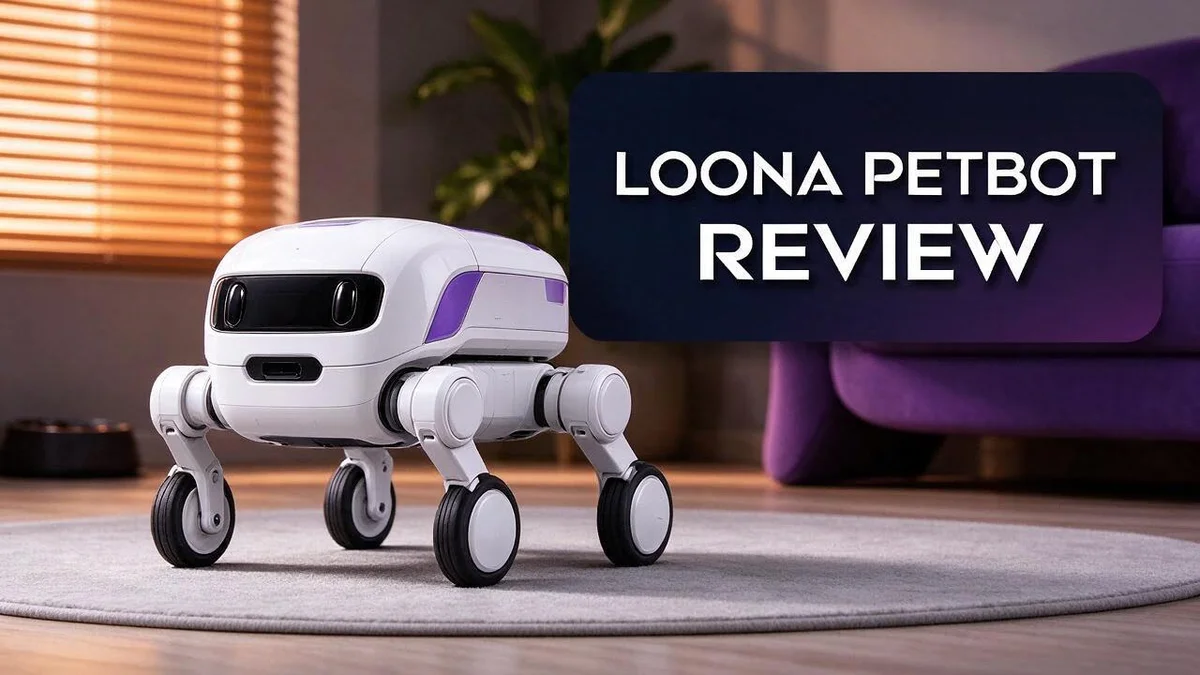
Are you looking for a pet robot that feels alive? The Loona PetBot might be the one. It is a small companion that sees, hears, and reacts to you.
Inside, it has a 3D ToF sensor and an AI chip. This helps it recognize faces, follow voices, and detect pets in the room. It also responds to touch, gestures, and speech.
Many families enjoy its AI feature games. Young children can also enjoy simple stories with it. Its magnetic iPhone mount holds your phone and charges it wirelessly at 15W.
In this review, you will see how Loona performs day to day. You will also learn who it suits best. Let’s take a closer look at this playful little robot.
In a Nutshell
-
Face and voice recognition: Loona recognizes faces and follows voices as people move through a room. It also detects pets, so it can notice a family cat or dog nearby.
-
Emotional responses: The robot adapts to moods and reacts to touch, gestures, and speech. Owners can interact with it in simple, natural ways that feel personal.
-
Story time for kids: Young children can enjoy storytelling sessions with Loona. The robot keeps little ones engaged, curious, and focused on the fun.
-
Easy phone setup: A magnetic snap on iPhone mount holds the phone in place. The mount also offers 15W wireless charging, so the phone stays powered during use.
-
App support: Loona works with apps, and the vendor says it needs no prompts or switching. This keeps daily use smooth, quick, and simple for everyone at home.
-
Closest rivals: Loona Deskmate comes from the same KEYI line, while Aibo and Vector compete in the wider pet robot space. Shoppers can compare each model by its abilities, features, and overall feel.
Key Features

Last update on 2026-10-21 / Affiliate links / Images from Amazon Product Advertising API Some of the links on this website are affiliate links, which means that at no additional cost to you, I earn a commission if you click through and make a purchase. I only recommend products and services that I believe will add value to my readers. Thank you for your support!
Loona does more than react to people. It also notices pets in the home.
Pet detection adds a fun layer for families with animals. The robot can spot a dog or cat moving through the room. This helps Loona feel like part of the household.
Pet owners often wonder how their animals will react to a new gadget. Loona gives them a calm way to see that interaction up close.
Wireless charging keeps the fun going. The magnetic mount supports 15W wireless charging, so the phone stays powered during play. Owners do not need to hunt for extra cables each day.
The sensors and AI chip work as a team. Sensors gather details about the room. The AI chip then decides how Loona should respond next.
Game time works well for mixed groups. Players can take turns with the robot, which keeps everyone involved. Short sessions fit neatly into a busy evening.
Simple commands help younger players feel confident. A quick touch or a spoken word can start an activity. Adults can also enjoy a short break from screens.
A good play space helps too. Keep a clear area near a charging spot so the robot stays ready. Open floor gives Loona room to move and show off its moves.
Owners can also change activities during the day. A quick session in the morning can lift the mood before work. Another session after dinner can help the household wind down.
Families with busy schedules may find these features handy. The robot can fill short gaps in the day with easy play. Each feature adds something useful to daily life.
Overall, these features make Loona a lively companion for many homes. Readers can decide which features matter most for their own routine.
Design and Build
Loona looks like a friendly little companion at first glance. Its rounded shape feels soft and welcoming. Many families place it in a living room or a kids room where everyone can see it.
The outer shell feels smooth to the touch. Light surfaces blend into most home decor. Dark corners can make any robot look out of place, but Loona fits in easily.
Size matters a lot for a home robot. Loona stays compact, so it does not crowd a coffee table or desk. You can move it from room to room without much effort. Small apartments and shared spaces benefit from that.
The build quality feels solid when you lift it. The moving parts seem sturdy enough for daily play. Still, kids should handle it with care. Every electronic device can take a hard knock.
Balance matters too. When the robot turns or shifts position, it keeps a steady stance. This makes its motions look smooth and natural instead of jerky. Small details like this make a big difference during playtime.
The expressive eyes add charm to the design. They give the robot a clear face, so people can read its mood at a glance. A simple face also helps younger users connect with it quickly.
Materials play a part in how the robot ages. A matte finish hides fingerprints better than glossy plastic. Wiping the surface with a soft cloth keeps it looking fresh for longer.
Placement is simple as well. The robot sits well on a flat surface without needing a special stand. You can set it on a shelf, a desk, or a play mat and it stays in place.
Overall, the design balances cute looks with practical sturdiness. Parents and grandparents often feel comfortable placing it near children. Good design builds trust in any household, and that trust makes Loona easier to enjoy every day.
Interaction and Responsiveness
Interaction is where Loona really shines. Every touch, gesture, or spoken word gets a visible reply. This makes the robot feel present in the room.
Timing matters a lot. Quick reactions keep people engaged. Slow replies can make the robot feel more like a gadget than a companion.
Busy rooms test its focus. Several people may talk at once. Loona seems to pick the nearest face or clearest voice.
Quiet moments matter too. When nobody speaks, the space stays calm. Many owners enjoy watching the robot rest between activities.
Variety keeps things fresh. Repeating the same touch again and again can feel dull. Mixing up gestures and phrases may reveal new responses.
Good habits help a lot. Speak clearly and use short phrases. Give the robot a moment to look around before you call its name.
Patience helps too. Give the robot a few seconds to respond before trying again. Repeated taps can confuse the flow of play.
Lighting and noise can affect results. Bright sunlight or a loud television may confuse the sensors. Try a calmer corner of the room for the best experience.
First meetings set the tone. Let the robot scan the room and notice your face. Then greet it with a warm voice and a gentle touch.
Kids often pick up the rhythm fast. They learn which gestures get a reaction and which phrases work best. This sense of cause and effect makes play feel rewarding.
A short daily routine builds comfort. Greeting the robot at the same time each day helps everyone know what to expect. Small wins matter too. A quick wave that earns a response can brighten the whole day.
Strong interaction makes Loona feel alive. Clear and consistent responses turn short visits into regular habits. Families who take time to learn its signals often enjoy it most.
Top 3 Alternatives
Sony aibo
Last update on 2026-10-21 / Affiliate links / Images from Amazon Product Advertising API Some of the links on this website are affiliate links, which means that at no additional cost to you, I earn a commission if you click through and make a purchase. I only recommend products and services that I believe will add value to my readers. Thank you for your support!
If you want a robot that feels like a true companion, Sony aibo is a strong pick. It looks like a small dog and moves with smooth, lifelike motion.
Its AI learns from daily life. Over time, it recognizes its owner and shows different moods. Owners can also check on it through a companion app.
Enabot EBO Air

Last update on 2026-11-06 / Affiliate links / Images from Amazon Product Advertising API Some of the links on this website are affiliate links, which means that at no additional cost to you, I earn a commission if you click through and make a purchase. I only recommend products and services that I believe will add value to my readers. Thank you for your support!
Want a helpful home companion? The Enabot EBO Air rolls around your space on its own. It uses a built in camera to keep an eye on pets and family members.
You can talk through it in real time. Its screen face and gentle movement make it fun for kids and pets. It suits people who want to check in while away from home.
Tombot Jennie

Last update on 2026-11-24 / Affiliate links / Images from Amazon Product Advertising API Some of the links on this website are affiliate links, which means that at no additional cost to you, I earn a commission if you click through and make a purchase. I only recommend products and services that I believe will add value to my readers. Thank you for your support!
For a softer and more cuddly option, Tombot Jennie is a great choice. This robotic puppy has a soft, furry body that feels warm to the touch.
It responds to petting and sounds. Many owners find it calming, especially older adults or anyone who misses having a pet. It offers comfort without the daily care a real animal needs.
Software, Apps, and Updates
Software keeps Loona fresh. The robot runs on its own software, and that code shapes every day. Smart habits make the experience smoother for the whole household.
Setup takes only a few minutes. Keep your phone nearby and follow the steps on the screen. A stable home network helps the first connection go smoothly.
Keep the app current. Updates can add new games, improve recognition, and fix small bugs. Check the app store every few weeks. Turn on automatic updates if your phone allows it.
Firmware works a little differently. It lives inside the robot itself. When a firmware update arrives, Loona may restart for a short time. Choose a quiet moment, such as the evening, so nobody gets surprised.
Review privacy settings early. Loona uses its sensors to see faces and hear voices. Open the settings and check what information the app stores. Turn off any feature that feels uncomfortable.
Share control with the family. If the app lets several phones connect, share the setup with trusted adults. Clear house rules keep play calm and safe for children.
Watch phone compatibility. Older phones may struggle with newer app versions. Check the system needs listed in the app store before installing. Keeping your phone updated also helps the app run smoothly. A phone with free storage space handles updates with fewer problems.
Notice signs of trouble. Slow replies, missed touches, or delayed voice answers can point to old software. Try an update before assuming the robot has a fault.
Fix common glitches fast. If Loona stops responding after an update, restart the robot and the phone. Then reconnect the app. Keep your network password handy for this step.
A little care goes a long way. Monthly checks keep the software tidy and the fun going strong.
Pros and Cons
Pros
- Face recognition helps Loona greet family members by sight.
- It follows voices and turns toward whoever is speaking.
- Pet detection lets Loona notice nearby cats and dogs.
- Loona adapts to emotions and supports storytelling for young kids.
- A magnetic iPhone mount with wireless charging keeps it ready to use.
Cons
- The magnetic mount works only with iPhones.
- Loona Deskmate from the same line offers a similar feel.
- Aibo, Vector, and other rivals compete for the same buyers.
- Fans of deep conversation may find its replies simple.
Who Should Buy It
Loona suits people who want a little life in their living space. It works best for someone who enjoys playful technology and likes watching a device show personality.
Solo workers often find it a pleasant companion. A desk robot can break up long hours alone at home. It offers a friendly presence without demanding constant attention.
Gadget lovers also make strong candidates. People who enjoy AI games and new features will find plenty to explore. Each small surprise can keep the fun going for weeks.
Tech newcomers can enjoy Loona too. Its reactions are clear and easy to read. It can serve as a friendly first step into home robotics.
Families with curious children can benefit as well. Kids may practice talking, moving, and playing with the robot nearby. Parents who want more interactive play may appreciate that energy.
Pet owners may enjoy seeing how Loona reacts to a dog or cat in the room. Watching a real animal and a robot share space can spark plenty of laughs. Still, the robot should never replace real playtime with animals.
Who should skip it? People who want a true pet replacement will likely feel let down. Loona offers charm and cheer, but it cannot offer the warmth of a living animal.
Buyers who need a serious home helper may want a different device. Loona focuses on play and presence rather than chores or daily tasks. Expecting more could lead to disappointment.
Think about your daily habits before you decide. If you enjoy short bursts of fun, Loona may suit you well. If you prefer a quiet gadget that stays out of the way, it may feel like too much.
Overall, the best buyer is curious, playful, and ready to engage. That person will enjoy the robot most. They will also get the most from every feature it offers.
Final Verdict
Loona brings a fun mix of sight, sound, and touch into a home. It feels more like a playful companion than a gadget. That charm makes the final call easy for some people and harder for others.
Think of Loona as a lively helper, not a pet. It reacts with personality and keeps the mood light. Yet it does not replace a real animal, and it does not try to.
The best way to judge it is to picture a normal week. Ask yourself whether you want a device that greets you, plays games, and responds to your voice. If the answer is yes, Loona fits well.
Its strongest moment comes when it responds to people. Watching it turn to a speaker or notice a visitor can bring real delight. Small moments like these often matter more than a long list of features.
Daily life shapes the outcome too. A busy office worker may enjoy quick check ins. A quiet home may feel livelier with a companion that moves and reacts.
Each family member may notice different traits. That variety keeps conversations going long after setup.
Still, expectations need care. Loona works best as a fun extra. It will not carry heavy tasks or serve as a full household assistant, so keep that in mind.
Think about what you value most. A curious person who loves exploring new gadgets will likely enjoy the daily surprises. Someone who wants deep talks or serious productivity may feel the spark fade quickly.
Give yourself time to adjust. Early days often bring the most surprises, so watch how the robot fits into your routine.
Our final take is simple. Loona earns a place in homes that welcome playful gadgets. It brings warmth, humor, and a sense of presence that few devices offer. Keep your expectations grounded and your curiosity open. In our view, that mix leads to the happiest owners. Give it a chance, and you may find a little friend waiting at your desk.
Frequently Asked Questions
Can Loona play games?
Yes, Loona runs AI feature games. Games give the robot a fun way to engage with you. You can try them when you want a quick break or a bit of play.
How does Loona respond to touch and gestures?
Loona reacts to touch, hand gestures, and speech. Each input gives you a different way to interact. Try a light tap or a wave to see how it answers.
How does the 3D sensor help Loona see?
Loona uses a 3D ToF sensor paired with an AI chip. This setup lets it read its surroundings and respond to the people in the room. The sensor works with the AI chip to help it notice movement and shapes around it.
Does Loona work with my apps without extra steps?
The maker says Loona works with apps with no prompts and no switching. Check this claim yourself during setup. Test a few apps you already use to see how smoothly they connect.

Hi, my name is Lily you can say i am a gadget hunter at this point. Welcome to Gadget Gallery The Gallery of Gadget Reviews