Boox Go 10.3 Review: Is This Android E Ink Note-Taker Worth It?
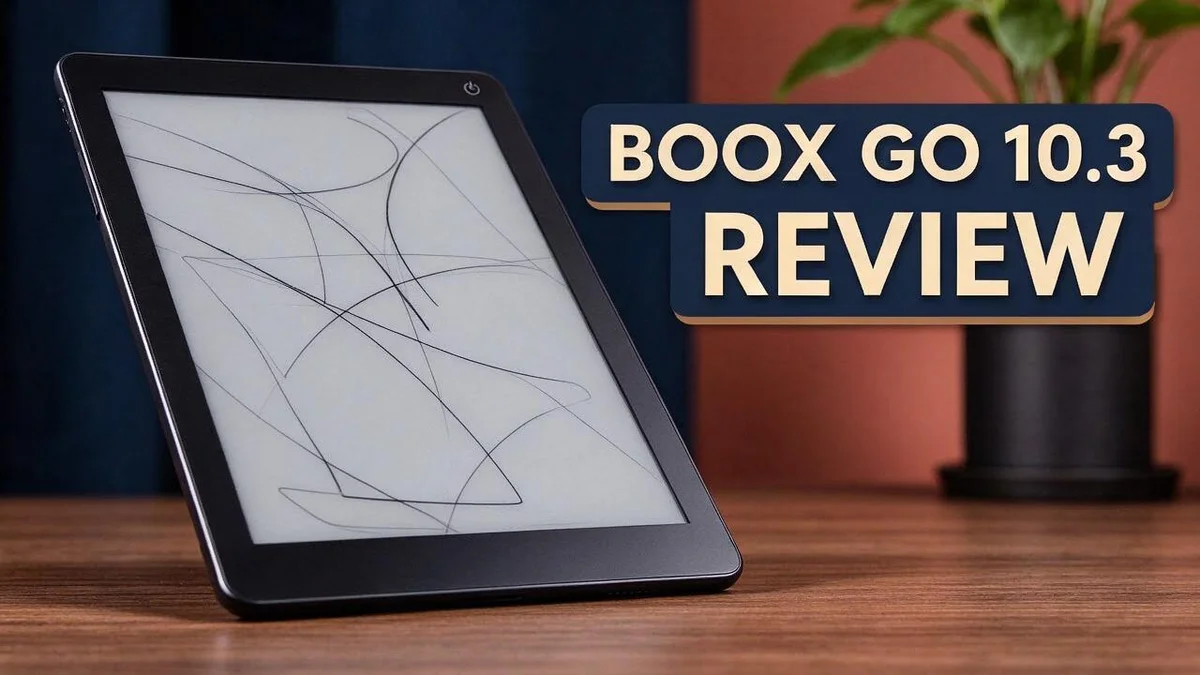
Looking for a large screen that feels like paper? The Boox Go 10.3 Gen II could be the right fit. Its 10.3 inch E Ink display sits inside a slim body.
This Android device does more than show books. It runs Android apps, so you can read, take notes, and explore extra tools. The screen is bright and sharp, with clear text and deep blacks.
At only 373 g and 4.6 mm thick, it feels light in your hand. It weighs less than the reMarkable 2, which makes it easy to carry. Battery life stays strong for long reading sessions.
Still, the cover feels basic, and the magnets may let the device slip off. Keep reading to see whether it suits your daily reading and note taking.
In a Nutshell
- Sharp text on a big canvas: The 10.3 inch E Ink Carta screen shows clear letters and darker blacks. Long reading sessions feel easy on the eyes.
- Light for any setting: The Lumi version adds an adjustable front light. You can change the brightness and pick a warm or cool tone. The base model skips the front light, so check which version you want.
- A good writing feel: Note taking feels smooth and natural. Many people enjoy jotting ideas down on this screen.
- Strong battery life: The device lasts a long time between charges. You can take it on trips without packing a charger.
- Android opens more doors: This model runs Android apps. The built in tools handle reading and notes well. For other jobs, you can install third party apps.
- A fair match for rivals: It stands against the reMarkable Paper Pure, the reMarkable 2, and Boox’s own Boox Go 7. Each option suits a different type of user, so compare them based on your daily needs.
Display and Reading Experience

Last update on 2026-10-31 / Affiliate links / Images from Amazon Product Advertising API Some of the links on this website are affiliate links, which means that at no additional cost to you, I earn a commission if you click through and make a purchase. I only recommend products and services that I believe will add value to my readers. Thank you for your support!
Reading on the Boox Go 10.3 Gen II feels calm from the first page. The large canvas fits full PDF pages, so you rarely zoom or scroll. Textbooks and magazines look almost like print.
Eye comfort is a major win. E Ink screens do not shine light straight into your eyes like a tablet does. Many readers find long sessions easier on their eyes.
The warm tone setting on the Lumi version helps at night. You can shift the light to an amber glow before bed. This may help you wind down after reading.
Night reading needs care. Turn the front light down in dark rooms. Bright light can feel harsh when your eyes have adjusted to darkness.
Glare stays low in bright spots. The matte surface handles sunlight well. You can read by a window or outside without fighting reflections.
Text settings are easy to change. You can adjust font size, line spacing, and margins. This helps every page fit your eyes and your preferred style.
Ghosting needs a quick refresh. After many pages, faint traces of earlier text may appear. A simple full refresh clears them quickly.
Comics and images show detail. Grayscale art looks crisp on the large page. Fine lines and panels stay easy to follow, even at full size.
Long documents feel manageable. Scrolling through a long report feels steady. Each page holds more text than a phone, so you see more at once.
Page turns take a moment. E Ink needs a short time to redraw each page, so fast scrolling feels slower than on a phone. Many readers get used to this pace quickly.
Overall, the screen suits people who read for hours. It delivers a calm experience close to real paper that many readers will enjoy every day.
Writing and Note-Taking Feel
Writing on this device starts with space. The 10.3 inch page gives your ideas room to breathe. You can spread notes, sketches, and diagrams across one screen without feeling cramped.
Your hand also has room to move. The light frame helps you find a comfortable angle. Many people find this helpful during long writing sessions.
Split layouts work well here. Keep an agenda or reading passage on one side and your own thoughts on the other.
Students and professionals can use this setup for meeting notes or lecture summaries. The large canvas keeps everything visible at once.
Revisions feel simple too. You can jot a quick correction in the margin and keep writing without breaking your flow. Margins become a handy space for comments.
Rough drawings fit well on this screen. A quick flowchart or doodle can explain an idea faster than a long paragraph.
Pages can also hold lists and checklists. Create a new blank page in a moment when you need more space, so your thoughts never get stuck.
Android note apps add more tools when built-in options feel limited. You can pick the style that fits your habits.
Writing sessions often run long, so comfort matters. A light body helps you hold the device for longer periods. Short breaks still keep your focus sharp.
Organizing notes takes little effort after a session. Page by page, you can review your ideas and tidy up the layout. A clear page makes future study easier.
Think of the screen as a sketchbook and a notebook in one. This blend suits people who move between words and images during a single project. It works well for brainstorming, outlining, or planning a project from start to finish.
In short, this device suits anyone who likes to think on paper. Your notes stay organized, and your writing time feels relaxed.
Weight, Thickness and Portability
The Boox Go 10.3 weighs about 373 to 375 grams, depending on which review you read. That is light enough to hold in one hand while reading in bed.
The device measures only 4.6 mm thick. Its slim profile slides into a backpack or a tote bag with ease.
Carrying it feels different from carrying a paperback. Holding it for a long time feels comfortable, so the weight rarely gets in the way during a lecture or a commute.
Portability shines on busy days. You can pack it beside a laptop without adding much bulk. Commuters can read on a crowded train and still keep room for other items.
Compared with the reMarkable 2, the Boox Go 10.3 feels easier to slip into a crowded bag. Its lighter build gives it an edge for people who move between home, school, and office often.
Think about your daily route before you buy. If you walk to class or ride public transport, the size and weight matter more than the spec sheet suggests.
Travelers also appreciate how little space it needs. A slim tablet fits on an airport tray table, in a seat pocket, or beside a notebook on a desk.
Most owners will use a bag rather than a jacket pocket. Pack a sleeve for extra protection during busy trips.
Long reading sessions also benefit from a light device. Your arms feel less strain after an hour of notes. A lighter tablet also eases pressure on the shoulders when you carry it up stairs or across campus.
Size matters too. The 10.3 inch screen sits in a sweet spot, large enough for full pages yet small enough for a standard bag.
Short summary: The weight and thickness make this device easy to carry every day. Most readers will forget it is in the bag until they need it.
Top 3 Alternatives
Looking for other options? These three devices make strong alternatives for readers and note takers. Each one offers a large screen and a smooth pen. Let’s see how they compare.
Kindle Scribe


Last update on 2026-10-31 / Affiliate links / Images from Amazon Product Advertising API Some of the links on this website are affiliate links, which means that at no additional cost to you, I earn a commission if you click through and make a purchase. I only recommend products and services that I believe will add value to my readers. Thank you for your support!
The Kindle Scribe comes from Amazon and suits readers who also take notes. Its large display feels close to real paper. You can write with the included pen, and your notes sync across your devices. This choice works well if you already read Kindle books.
reMarkable Paper Pro

Last update on 2026-11-04 / Affiliate links / Images from Amazon Product Advertising API Some of the links on this website are affiliate links, which means that at no additional cost to you, I earn a commission if you click through and make a purchase. I only recommend products and services that I believe will add value to my readers. Thank you for your support!
The reMarkable Paper Pro focuses on writing and sketching. It includes a color screen that helps with diagrams and highlights. The pen feels smooth and natural during long sessions. This device fits students, designers, and anyone who loves handwritten notes.
Kobo Elipsa 2E

Last update on 2026-10-31 / Affiliate links / Images from Amazon Product Advertising API Some of the links on this website are affiliate links, which means that at no additional cost to you, I earn a commission if you click through and make a purchase. I only recommend products and services that I believe will add value to my readers. Thank you for your support!
The Kobo Elipsa 2E pairs a large screen with a stylus for markup. It handles ebooks and PDF annotation with ease. You can organize notes in folders and send them to cloud storage. This option suits people who want a clean reading and writing setup.
Pick the device that fits your daily routine. Think about how you read, how you write, and where you keep your files. The right choice will feel comfortable from day one.
Software and App Ecosystem
The Boox Go 10.3 runs on Android, so you get a large library of apps. Most people find the basic layout easy to learn. Setup takes only a few minutes.
Reading apps shape your daily routine. Pick the reader that handles your files best. Some apps show PDFs with clean margins, while others focus on ebooks. Test two or three options before you settle.
Cloud sync keeps your files in one place. You can link services like Google Drive or Dropbox to move documents on and off the device. Check that the app supports the file types you use most.
Software updates matter more than you might think. Updates can improve system performance, app support, and stability. Set aside time each month to check for new versions. A current system runs more smoothly.
Many Android apps were built for color screens. They often assume fast refresh and bright animations. Some menus may lag or leave faint trails. Adjust the refresh settings or choose simpler apps to fix this.
Web browsing works, but it asks for patience. A browser lets you check articles or save pages for later. Pages load more slowly than on a phone. Reading mode and plain layouts help a lot.
Multitasking plays a smaller role here. The screen does not suit fast switching between many windows. Pick one main app for each task. Close the others to keep the device calm and focused.
Customizing the home screen saves time. Place your favorite reader, calendar, and file manager on the first page. Hide apps you never open. A clean setup makes every session feel quicker.
Security and accounts deserve a quick check. Sign in with a strong password and turn on a second login step where possible. Review app permissions before you install anything new.
Overall, the software gives you flexibility. You get the power of Android with an E Ink screen. Spend a little time on setup, and the device fits your routine well.
Cover, Magnets and Accessories
The cover is the first thing many buyers notice. Reviewers often consider it lacking, so the device may need extra care in daily use. Some owners also wish the cover felt sturdier at the corners.
Think about how you carry it every day. A basic cover offers limited protection, so a sleeve or pouch can help. Loose items in a bag can scratch the screen, too.
The magnets deserve a close look. Because the edge is so thin, the magnets may not hold the device firmly. Some owners worry that it could slip off a desk or a lap.
Keep the device in a snug sleeve when you move it. A sleeve keeps the edges steady and cushions the corners. Choose a material that resists scratches and moisture.
Check the fit before you add any accessory. Compare the case dimensions with the device size. A loose case can shift during a long session and weaken the magnetic hold.
Look for a stand or grip if you write for long periods. A stand holds the screen at a comfortable angle, so your wrist rests more easily.
Pens are another accessory to plan for. Choose a stylus that suits your handwriting and your grip. Keep a spare tip nearby, because writing sessions can wear one down over time. A small pouch keeps the charger, tips, and cable together. That habit saves time when you pack for school or work.
Try a few setups for a week. Adjust the cover, the stand, and the angle until the device feels natural in your hands. Then keep the combination that works best for you.
In short, the cover and magnets need extra thought. A sleeve, a careful fit check, and a good stand can make the device feel more secure. Plan these add-ons early, so you avoid surprises later.
Pros and Cons
Pros
– Sharp text and deep blacks make reading feel clear and easy.
– The writing feel is smooth, so notes flow naturally.
– Strong battery life lasts through many reading sessions.
– Built in tools handle basic reading and note taking well.
– The Lumi version adds a front light with warm or cool tones.
Cons
– The base model has no front light, so dim rooms can be hard.
– Some tasks need third party apps beyond the built in tools.
– There is only one storage option, so you cannot choose a larger size.
Who Should Buy It
This device suits people who read long documents every week. Students, researchers, and office workers often fit this group.
Researchers and academics build large libraries of papers. Searching and marking up many PDFs feels easier on a large, open page.
Students preparing for exams can keep study notes beside source material. Flipping between pages stays simple when the layout feels steady.
Teachers and tutors often get real use from it. They can mark up worksheets, review lesson plans, and keep notes in one place.
Freelancers and editors often switch between many files. A device that stays focused on text can reduce tab overload on other gadgets.
Professionals who review contracts can benefit too. Signing and redlining files feels natural when the page looks like paper.
Journal keepers who value a quiet space may appreciate the calm display. Fewer alerts and popups keep attention on the page.
Parents helping with homework can review school packets together. A large page makes it easy to point, circle, and talk through each question.
Night readers should plan their lighting first. If most reading happens after dark, check the lighting options before you decide.
Not everyone needs this device. Casual readers who only finish paperback novels may prefer a smaller, simpler gadget. Video fans and gamers should also look elsewhere, since this screen is not built for fast motion.
Choose it if you read long texts and want fewer distractions. Compare your daily habits with these strengths before you decide.
In short, this tablet fits readers who spend hours with text. It may frustrate people who want color, video, or games, so think about your main use first.
Final Verdict
Overall, the Boox Go 10.3 is a strong pick for focused readers and note takers. It offers a clear screen, a pleasant writing feel, and a light body.
The right choice depends on how you plan to use it. If you want one device for documents, notes, and a few apps, this tablet covers most needs.
Android support gives you room to grow. You can add tools when your work changes, so the device does not feel limited. That flexibility sets it apart from simpler reading devices.
Daily use will shape how you feel about it over time. Try it for a week with your real reading and note taking tasks. This shows whether the size, weight, and screen match your routine.
Before you buy, think about the full setup. A good case, a reliable stylus, and a steady way to hold the device all matter. Plan these extras early so the experience feels smooth from day one.
Compare it with its rivals. The reMarkable Paper Pure focuses on a calm, simple writing experience. The reMarkable 2 offers a similar writing focus with a different feel.
The Boox Go 7 is smaller and may suit readers who value portability over screen space. Each option trades size, lighting, and app freedom in a different way.
Lighting may settle the decision for many people. If your reading happens after dark, the Lumi version may be the better fit. Think about the rooms where you will use it most.
Finally, ask yourself three quick questions. Do you read or write for long sessions every week? Will you rely on built in tools most days? Can you live with one storage option?
If you answered yes to most of these, this device deserves a spot on your shortlist. Test your habits first, then decide with confidence.
Frequently Asked Questions
Is the Boox Go 10.3 light enough to carry every day?
Yes, it is. At about 375 grams and 4.6 mm thick, it fits easily into a bag. It also weighs less than the reMarkable 2, which helps on busy days.
Does the cover keep the device secure?
Reviewers have mixed views on the cover. Some find it lacking. The magnets can let the device slip off because the edge is thin, so handle it with care when you move it around.
Can I add other apps to it?
Yes. It runs Android apps, so you can add tools beyond the built in ones. The included apps handle reading and notes well. For other jobs, you can install a third party app that fits your needs.
How does it compare with the Boox Go 7?
The Boox Go 7 is smaller and easier to slip into a pocket. The 10.3 inch screen gives you more room for long pages and detailed notes. Pick the size that matches how you work.
Should I compare it with reMarkable devices?
Yes, you should. The Boox Go 10.3 competes directly with the reMarkable Paper Pure and the reMarkable 2. Look at each one side by side before you decide.

Hi, my name is Lily you can say i am a gadget hunter at this point. Welcome to Gadget Gallery The Gallery of Gadget Reviews