Energizer Bulb Security Camera Review 2026: Setup Guide
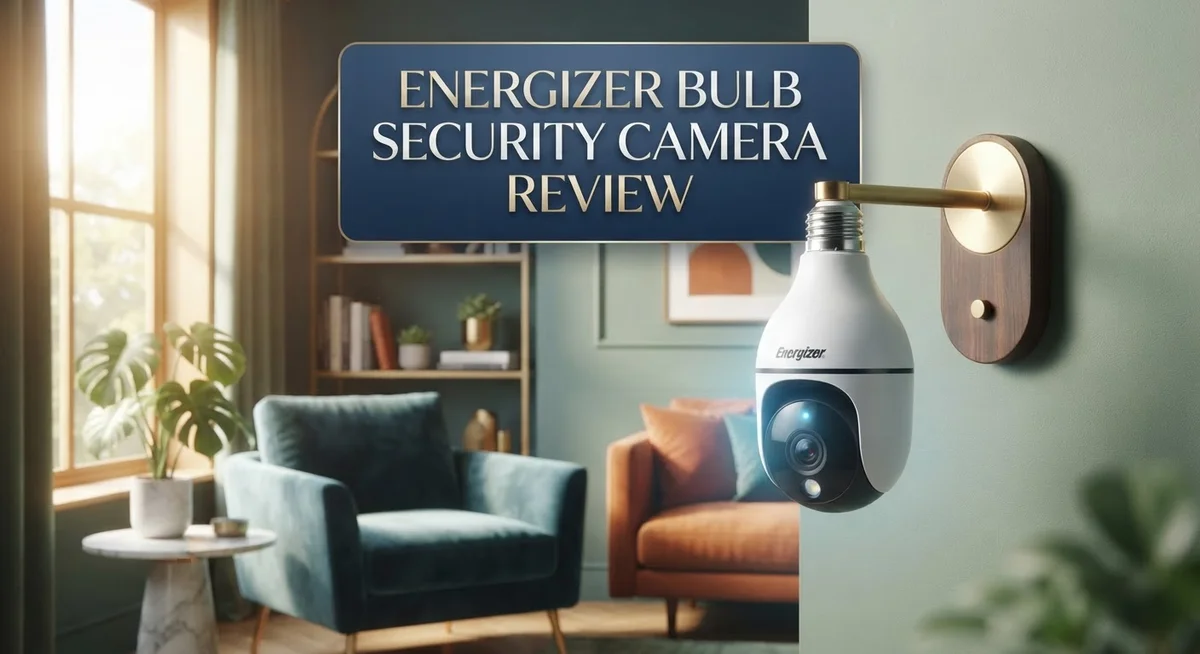
Do you want light and security in one device? The Energizer Bulb Security Camera gives you both. It screws into any standard E26/E27 socket. You get a working light and a smart camera in one simple device.
This camera offers 1080p HD or 2K resolution options. It lights up your space with 1000 lumens. You can dim it or change white settings to fit your mood.
Setup takes only two minutes. You do not need tools or wires. Just screw it in like a normal bulb and connect it to your Wi-Fi.
The camera pairs with Google Home and Alexa. You can control it with your voice or through an app. It also offers pan and tilt features with auto-tracking. This means it follows movement around your room or yard.
Night vision helps you see clearly in the dark. Two way audio lets you talk to visitors or pets. Motion alerts keep you informed about activity at home.
In this review, we break down its features, performance, and value. Let’s see if this smart bulb camera fits your home security needs.
In a Nutshell
This camera blends smart lighting with home security. It fits into your daily routine without extra wiring or tools.
Here is what stands out about this device:
-
Pan and tilt tracking follows movement across the room. You get a wider view than fixed cameras offer.
-
1000 lumens of LED light brightens any space. You can dim it or switch between white light settings.
-
Two way audio lets you talk to people at home. This works well for greeting guests or checking on pets.
-
Motion alerts notify you right away. You stay informed about activity near your camera.
-
Wi-Fi options include 2.4GHz and dual-band 5GHz models. You can pick the version that suits your network setup.
-
Some users report connectivity hiccups during setup. Reconnection issues pop up for a few buyers too.
This camera works best for people who want simple security. It mixes function with everyday convenience in one bulb socket.
Key Features and Specifications
The Energizer Bulb Security Camera packs several standout technical capabilities into a single device. Let’s explore what makes this camera function well in real homes.
Resolution and image quality matter most when you’re watching your property. This camera gives you two choices: 1080p HD or 2K options. The higher resolution captures more detail, which helps you identify faces and objects clearly. Both versions record sharp video that you can review later.
Lighting performance sets this device apart from traditional cameras. The integrated LED produces 1000 lumens of brightness. You control the light output and adjust color temperature to match your room’s mood. The dimmable feature lets you reduce brightness when you need softer lighting at night.
Connectivity options affect how smoothly the camera works in your home. You can connect via 2.4GHz Wi-Fi for standard range or upgrade to dual-band 5GHz models for faster speeds. The 5GHz option works best if you have multiple smart devices competing for bandwidth.
Pan and tilt capability gives you wider coverage without buying extra cameras. The auto-tracking feature follows motion across your room automatically. This means you capture activity instead of missing important moments. The 2-way audio lets you speak through the camera and hear responses clearly.
Night vision technology keeps watch when the sun goes down. The infrared mode activates in low light, so you see what’s happening even in complete darkness. This feature works independently from the LED light, giving you flexibility in how you use the device.
Installation simplicity matters if you want to set things up yourself. The E26 and E27 bulb socket design means you simply screw it into any standard light fixture. No special wiring or tools required. Most users complete setup in about two minutes.
Smart home integration connects this camera to your existing ecosystem. Google Home and Alexa compatibility means you control the camera through voice commands. You receive motion alerts on your phone instantly when activity occurs.

Last update on 2026-10-13 / Affiliate links / Images from Amazon Product Advertising API Some of the links on this website are affiliate links, which means that at no additional cost to you, I earn a commission if you click through and make a purchase. I only recommend products and services that I believe will add value to my readers. Thank you for your support!
Installation and Setup
Getting your Energizer Bulb Security Camera up and running is straightforward. The device screws into any standard E26 or E27 bulb socket, just like a regular lightbulb. No special wiring or tools are needed.
Start by turning off the power to your light fixture before installation. Screw the camera bulb in firmly until it sits snug in the socket. Turn the power back on and wait about 30 seconds for the device to boot up. You’ll see a light indicator on the bulb showing it’s ready.
Next, download the Energizer app on your smartphone. The app guides you through a simple pairing process. You’ll connect the camera to your Wi-Fi network using either the 2.4GHz or 5GHz band, depending on your router. The dual-band option gives you flexibility if one connection works better in your home.
During setup, keep your phone close to the camera. This ensures a strong signal while the device learns your network details. The process typically takes under two minutes. Once connected, the app lets you name the camera, adjust settings, and enable motion alerts.
The camera integrates with Google Home and Alexa. Add it to your smart home ecosystem through these apps for voice control. You can ask your assistant to show the camera feed on compatible displays or arm motion detection hands-free.
Some users report connection hiccups during initial setup. If your camera doesn’t connect on the first try, restart both your router and the bulb. Move closer to the Wi-Fi router temporarily, then try pairing again. This usually resolves any temporary glitches.
After setup, explore the app’s features. Adjust the lighting brightness and color temperature to match your preferences. Enable night vision mode and configure motion detection zones. Test the two-way audio by speaking through the app to confirm it works properly.
The entire installation and setup experience rarely takes more than five minutes from start to finish. Most people complete it without needing technical support or extra help.
Video Quality and Night Vision Performance
The Energizer Bulb Security Camera delivers solid performance in both daylight and low light conditions. 1080p HD resolution captures fine details across most home environments. The 2K variant offers sharper images if you need extra clarity for identifying faces or license plates.
Night vision performance stands out as a key strength. The camera uses infrared technology to see in complete darkness without any visible light source. You get a clear, usable feed even when your room lights are off. The infrared range covers typical room distances effectively. Colors fade to grayscale in night mode, which is normal and expected.
The integrated LED lighting adds a practical dimension to video quality. 1000 lumens of brightness illuminate your space while the camera records. This dual function means better video quality at night compared to cameras without built in lights. You can dim the light or switch between warm and cool white tones. The lighting doesn’t interfere with the camera’s night vision capability.
Video clarity depends partly on your Wi-Fi connection strength. The 5GHz band delivers faster data transfer for smoother streaming. The 2.4GHz option works fine for standard viewing but may lag during playback on slower internet speeds. Stable connectivity ensures consistent video quality.
Pan and tilt movement keeps footage smooth and responsive. The auto tracking feature follows motion across your room without jerky movements. This creates a more natural viewing experience compared to fixed cameras.
Low light performance shows noticeable improvement with the integrated light on. When you enable the LED, video quality jumps significantly. Dark corners and shadowy areas become visible. Without the light, night vision still performs well but with less color detail.
The camera handles transitions between day and night modes automatically. No manual adjustments needed. The image stabilization prevents blurring from minor vibrations or wind if installed outdoors.
Overall, video quality meets expectations for home security use. Night vision works reliably. The combination of resolution, lighting, and infrared technology creates a capable surveillance solution for most residential spaces.
Top 3 Alternatives
Wyze Cam Outdoor


Last update on 2026-10-13 / Affiliate links / Images from Amazon Product Advertising API Some of the links on this website are affiliate links, which means that at no additional cost to you, I earn a commission if you click through and make a purchase. I only recommend products and services that I believe will add value to my readers. Thank you for your support!
The Wyze Cam Outdoor offers simple setup and reliable monitoring. You get clear 1080p video with night vision that works well in low light. The camera connects to your Wi-Fi and sends alerts to your phone when motion happens. Battery life lasts for months, so you don’t need to charge it constantly. You can view live footage anytime through the Wyze app. The camera handles rain and cold weather without problems.
Ring Stick Up Cam

Last update on 2026-10-13 / Affiliate links / Images from Amazon Product Advertising API Some of the links on this website are affiliate links, which means that at no additional cost to you, I earn a commission if you click through and make a purchase. I only recommend products and services that I believe will add value to my readers. Thank you for your support!
Ring Stick Up Cam brings flexibility to your security setup. You can mount it anywhere on your property. The camera records in 1080p and includes two-way audio. This means you can talk to visitors or delivery people from your phone. Motion detection alerts arrive instantly on your device. The battery version works without wires. You also get cloud storage options to save your videos safely.
Arlo Essential Outdoor

Last update on 2026-10-13 / Affiliate links / Images from Amazon Product Advertising API Some of the links on this website are affiliate links, which means that at no additional cost to you, I earn a commission if you click through and make a purchase. I only recommend products and services that I believe will add value to my readers. Thank you for your support!
Arlo Essential Outdoor delivers dependable outdoor protection. The camera features 1080p video quality and color night vision. This lets you see details even after dark. Smart motion zones help reduce false alerts by ignoring movement you don’t care about. The battery lasts several months between charges. Weather resistance keeps the camera working in rain, snow, and heat. You get cloud storage to keep your recordings secure. The Arlo app makes it easy to check your cameras from anywhere.
Each option provides different strengths for your home. Wyze focuses on affordability and simplicity. Ring emphasizes flexibility and two-way communication. Arlo highlights advanced features like color night vision and smart zones.
Smart Home Integration and Connectivity
The Energizer Bulb Security Camera connects to your home network using either 2.4GHz or dual band 5GHz Wi-Fi. This flexibility helps you choose the connection that works best in your space.
Google Home and Alexa compatibility means you can control this camera with voice commands. You can ask your smart speaker to show you the camera feed on compatible displays. You can also manage alerts and settings through your existing smart home app.
The setup process starts with downloading the Energizer app. The app walks you through connecting the camera to your Wi-Fi network. Most users complete this step in just a few minutes without technical knowledge needed.
Some users report occasional reconnection issues with their Wi-Fi. If your camera drops connection, try moving your router closer or reducing interference from other devices. Restarting the camera by turning off the light switch usually fixes temporary problems.
Once connected, the camera sends motion alerts directly to your phone. You receive notifications instantly when movement happens near your camera. The 2 way audio feature lets you speak through the camera to visitors or deter unwanted activity.
The pan and tilt functions work smoothly through the app. You can move the camera view left, right, up, and down from anywhere. The auto tracking feature follows motion automatically, so you capture more of what matters.
Integration with smart home routines adds convenience to your daily life. You can set the camera to turn on lights when motion is detected after sunset. You can also create routines that send alerts to multiple family members at once.
The dual band Wi-Fi option reduces lag and improves reliability compared to single band cameras. This matters most if you have many devices already using your network. The 5GHz band handles higher data speeds, which keeps your video feed smooth and responsive.
Smart home integration transforms this camera from a security tool into part of your connected home. The device works alongside your existing ecosystem rather than forcing you to use separate apps and systems.
Lighting Functionality and Brightness Control
The Energizer Bulb Security Camera combines lighting and surveillance in one device. The integrated LED produces 1000 lumens of brightness. You can adjust the light output to match your needs and preferences.
Dimmable brightness control lets you set the perfect lighting level for any room. The camera offers multiple white settings. You can choose warm white for cozy spaces or cool white for task areas. This flexibility means one device handles both security and ambiance.
The brightness control works through the Energizer app. You adjust settings from your smartphone without touching the physical camera. Changes take effect instantly. This remote control feature adds convenience to your daily routine.
The integrated lighting serves a dual purpose in your home. During the day, it provides standard illumination. At night, the light enhances video clarity by reducing shadows and dark spots. Motion detection triggers the light to turn on automatically in some modes.
Brightness levels impact video quality directly. When the integrated light is on, the camera captures sharper details. Faces become more recognizable. License plates and small objects show up clearly in footage. This feature proves especially useful for monitoring entryways and outdoor areas.
You can set the light to stay on continuously or activate only during motion events. Continuous lighting provides steady illumination for your space. Motion activated mode saves energy while maintaining security coverage. The choice depends on your specific security needs and lighting preferences.
The dimmable function prevents harsh glare or excessive brightness. You won’t experience the uncomfortable over lighting that some security lights create. The camera balances security requirements with livable lighting conditions.
The brightness control integrates seamlessly with smart home routines. You can program the light to dim during evening hours. You can set it to brighten when motion is detected. These automation options enhance both security and convenience.
The multi white settings adapt to different room purposes. A bedroom benefits from warm, softer lighting. An entryway needs brighter, cooler light for security. The Energizer Bulb Security Camera adjusts to your specific location requirements. This versatility makes it suitable for multiple rooms throughout your home.
Pros and Cons
Pros
- Screws into any standard E26/E27 light socket for instant setup without tools or professional help
- Combines security camera and LED lighting in one device, eliminating the need for separate fixtures
- Pan and tilt movement with auto tracking keeps your home covered from multiple angles
- Delivers clear 1080p or 2K video in daylight and darkness with effective night vision performance
- Works with Google Home and Alexa for voice control and smart home automation
Cons
- Some users experience Wi Fi connection drops and occasional reconnection problems after initial setup
- Limited customer review data available online to verify long term reliability
- Network connectivity issues can interrupt motion alerts and live streaming to your phone
Who Should Buy It
You should buy the Energizer Bulb Security Camera if you want a single device that handles both lighting and surveillance. This camera fits into any standard E26/E27 light socket, so installation takes just two minutes without tools or professional help.
Homeowners who value simplicity benefit most from this product. You eliminate the need to install separate fixtures for lights and cameras. The device screws in like a regular bulb and connects to your home network through the Energizer app.
If you own smart home devices like Google Home or Alexa speakers, this camera integrates seamlessly into your setup. You can control the light and camera using voice commands. This works well for people who want centralized control across multiple devices.
Renters find this camera particularly useful because installation requires no permanent modifications. You simply screw it into an existing light socket and remove it when you move. The portability makes it ideal for temporary security needs.
People who need flexible lighting options should consider this model. The dimmable brightness control lets you adjust light levels for different times of day or activities. You can set the light to activate only during motion events, which saves energy while keeping your space secure.
Property owners with multiple rooms appreciate the pan and tilt functionality with auto tracking. The camera follows movement across your space, so you monitor larger areas without buying several cameras. This feature works especially well for entryways, living rooms, or hallways.
The 1080p or 2K video quality suits homeowners who want clear footage in daylight and darkness. Effective night vision performance means you see activity even when lights are off. This makes it suitable for monitoring entry points or outdoor covered areas.
However, if you experience frequent Wi Fi connection problems in your home, research your network setup before purchasing. Some users report occasional reconnection issues, though these typically relate to individual network configurations rather than the camera itself. Consider this camera if you want straightforward security without complicated installation or separate equipment clutter.
Final Verdict
The Energizer Bulb Security Camera proves itself as a smart choice for anyone who wants extra coverage without extra clutter. It blends a working light source with a functional camera in one simple device.
Choosing between the 1080p and 2K variants matters most here. The 2K model suits users who want sharper detail for identifying faces or license plates. The 1080p version works fine for general monitoring of porches or hallways.
Wi-Fi band selection also plays a role in your final decision. The dual-band 5GHz option often connects faster and holds signal strength better than the standard 2.4GHz version. Check your router setup before picking a model.
Network stability remains the biggest factor to weigh before buying. Some buyers report drops in connection that require manual reconnection. This issue can frustrate users who expect constant live monitoring.
Still, the overall package performs well for daily use. The camera handles basic security needs while doubling as a light fixture. This makes it a practical pick for anyone short on space or wiring options.
We recommend testing your Wi-Fi signal strength near the installation spot first. A weak signal area may cause more frequent reconnection problems. Placing it closer to your router often solves this issue quickly.
Tech comfort level also affects satisfaction with this product. Users familiar with smart home apps will adjust settings faster. Beginners may need a short learning curve to master all features.
Overall, the Energizer Bulb Security Camera earns its spot among solid smart home options. It offers real convenience through its two-in-one design. The minor connectivity hiccups do not outweigh its core strengths.
If you want a camera that saves space and effort, this model delivers. It suits practical buyers who value function over complexity. For most households, it stands as a reliable and simple security solution.
Frequently Asked Questions
Can I use this camera if I rent my home?
Yes, this camera works great for renters. You simply screw it into any standard light socket. No wiring, drilling, or permanent changes needed. When you move, you unscrew it and take it with you. This makes it perfect for temporary living situations.
Does the camera work in complete darkness?
The camera has effective night vision built in. It captures clear video even when the room is completely dark. The infrared technology kicks in automatically. You get usable footage without needing extra lighting equipment.
What happens if my Wi-Fi drops?
Some users report occasional connection issues after setup. The camera may need reconnection to your network. Test your Wi-Fi signal at the installation spot before mounting. A strong signal reduces these problems significantly. If you experience drops, try moving your router closer or switching between the 2.4GHz and 5GHz bands.
How do I control the brightness of the light?
The bulb outputs 1000 lumens with dimmable settings. You adjust brightness through the app or voice commands. Multiple white settings let you choose warm or cool light tones. This gives you lighting flexibility beyond just security monitoring.
Will this work with my smart home devices?
The camera integrates with Google Home and Alexa. You can use voice commands to check your camera or adjust the light. Smart home automation becomes easier when this device connects to your existing ecosystem. Setup takes just minutes through the app.

Hi, my name is Lily you can say i am a gadget hunter at this point. Welcome to Gadget Gallery The Gallery of Gadget Reviews