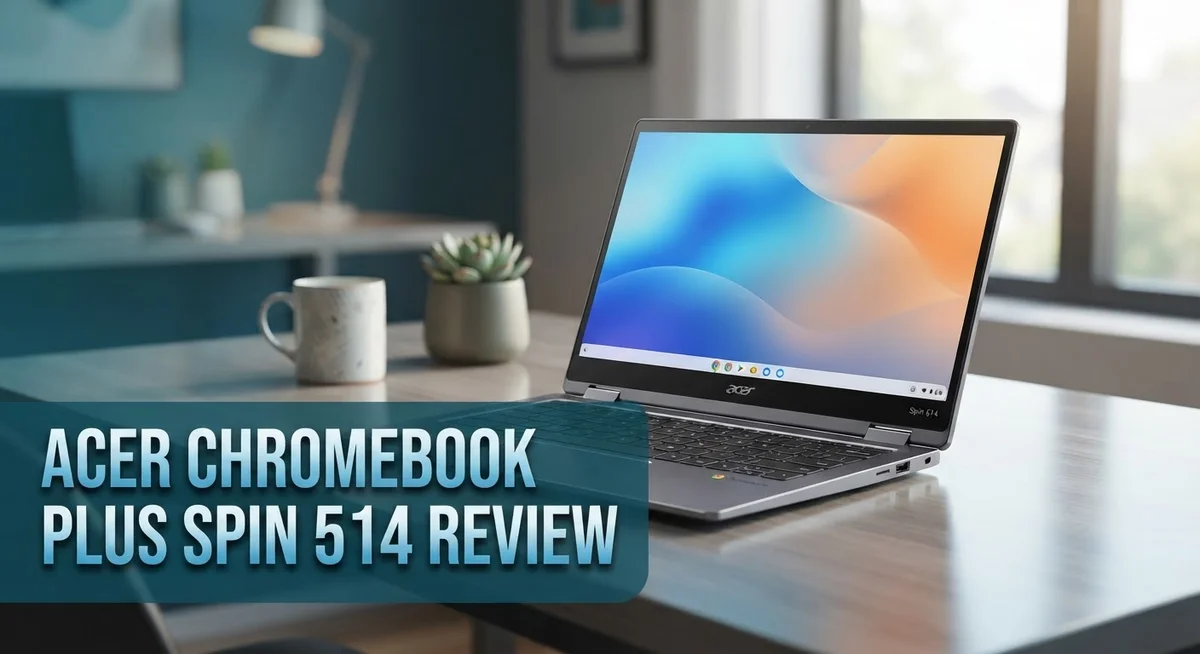
Acer Chromebook Plus Spin 514 Review: Features, Performance & Verdict
Looking for a Chromebook that mixes speed with flexibility? The Acer Chromebook Plus Spin 514 might catch your eye.
This 2-in-1 device brings a 14 inch WUXGA display to the table. The screen has a narrow bezel and anti-glare coating. You get clear visuals for work or play.
Under the hood, it runs on a MediaTek Kompanio Ultra processor. This chip pairs with 12GB RAM and 256GB UFS storage. Together, they handle multitasking with ease.
In a Nutshell
- Screen to body ratio hits 78%. You get more viewing space with a narrow bezel design.
- The MediaTek Kompanio Ultra chip handles daily tasks fast. It supports all day productivity without slowdowns.
- Battery life covers multiple days. Fast charging gets you back to work quickly.
- Storage comes in at 256GB with 12GB RAM. This combo keeps multitasking smooth.
- Speakers face upward but sound quality stays mediocre. This is a minor tradeoff for the portability you gain.
- Design leans plain with limited color choices. Some users noted odd quirks during use.
- Against rivals like the Apple MacBook Neo and other Intel based Chromebook Plus models, this Spin 514 holds its own on performance and battery life.
Key Features and Specifications
The Acer Chromebook Plus Spin 514 delivers a solid package of features that matter for everyday computing. Let’s dig into what makes this device tick.
The 14 inch WUXGA display sits at the heart of this machine. You get 1920×1200 resolution with narrow bezels that maximize screen real estate. The anti-glare coating helps reduce eye strain during long work sessions. This screen to body ratio of 78% means less wasted space and more viewing area.
Processing power comes from the MediaTek Kompanio Ultra chip. This processor handles multitasking smoothly. You can run multiple browser tabs, edit documents, and stream video without lag. The performance feels snappy for a Chromebook at this level.
Memory and storage round out the core specs nicely. You get 12GB of RAM paired with 256GB of UFS storage. This combination keeps applications running fast and gives you plenty of room for files and downloads.
Connectivity options keep you linked to the world. Wi Fi 6E and Wi Fi 7 support means faster speeds and more stable connections. You won’t wait long for files to upload or download.
Portability stands out as a major strength. Weighing under 1.5kg, this device feels light when you carry it around. The 2 in 1 convertible design adds flexibility. You can flip the screen back into tent mode, stand mode, or tablet mode. This versatility works great for presentations, watching videos, or drawing.
Battery life impresses across multiple days of use. Fast charging gets you back to work quickly when you do need a top up. You can confidently take this Chromebook through a full workday without hunting for an outlet.
The build quality feels solid overall. The hinge mechanism works smoothly for the convertible transitions. One trade off: the upward firing speakers deliver mediocre sound quality. You may want external speakers for video calls or media consumption.
The design itself stays fairly plain. Color options are limited, so customization choices don’t run deep. If you prefer flashy aesthetics, this machine won’t excite you visually.

Last update on 2026-10-21 / Affiliate links / Images from Amazon Product Advertising API Some of the links on this website are affiliate links, which means that at no additional cost to you, I earn a commission if you click through and make a purchase. I only recommend products and services that I believe will add value to my readers. Thank you for your support!
Design, Build Quality, and Portability
The Acer Chromebook Plus Spin 514 impresses with its physical form. This 2-in-1 device weighs under 1.5kg, making it genuinely light to carry around. You can slip it into a backpack without feeling the weight.
The 14 inch WUXGA display features narrow bezels that maximize screen real estate. The screen to body ratio reaches 78%, which means less plastic and more usable space. An anti-glare coating protects your eyes during long work sessions, reducing strain and reflections.
The convertible hinge lets you flip the screen back 360 degrees. You get four different modes: laptop, tent, stand, and tablet. This flexibility works great for presentations, watching videos, or sketching. The hinge feels sturdy and moves smoothly without wobbling.
Build quality across the chassis stays solid. The materials feel durable enough for daily use and occasional bumps. The keyboard deck resists flex when you type, which matters for productivity.
One design drawback stands out clearly. The overall aesthetic leans toward plain and understated. Acer offers limited color options, so customization feels restricted. If you want visual flair, this machine won’t deliver it. The design prioritizes function over form.
The speaker placement sits upward-firing, which helps with sound projection. However, the audio quality itself remains mediocre. You’ll notice this during video calls or music playback. External speakers or headphones improve the experience significantly.
Ports and connectivity round out the physical package. The device includes standard USB options and headphone jack placement. Wi-Fi 6E and 7 connectivity keep your internet speed fast and reliable. These modern standards matter for streaming and downloads.
The trackpad offers decent responsiveness for navigation. The keyboard provides comfortable key travel for typing. Both feel appropriate for a device in this category.
Overall, the Spin 514 prioritizes portability and practical design over flashy aesthetics. The lightweight frame combined with the convertible hinge makes it genuinely useful for people who move around. You get a functional machine that handles real work without unnecessary bulk.
Performance and Processing Power
The MediaTek Kompanio Ultra processor powers this Chromebook and handles everyday tasks without breaking a sweat. You get fast app launches, smooth web browsing, and quick document editing across multiple tabs.
12GB of RAM keeps everything running smoothly when you juggle multiple applications at once. Switching between email, spreadsheets, and video calls feels snappy. The system rarely stutters even under moderate workloads.
256GB of UFS storage gives you plenty of room for files, documents, and offline content. UFS technology means faster data access compared to older storage types. You won’t experience annoying delays when opening large files or transferring data.
The processor excels at Chrome OS tasks specifically. Google Workspace applications run without lag. Video streaming stays smooth at high quality. Light photo editing handles well without performance dips.
Real world performance shows this chip outpaces older Chromebook processors significantly. Opening websites takes milliseconds. Streaming Netflix in 1080p never causes stuttering. Google Meet video calls stay clear and responsive.
Battery performance ties directly to processing efficiency. The MediaTek chip consumes power intelligently, letting you work for multiple days on a single charge. Fast charging gets you back to full power quickly when needed.
Compared to Intel based alternatives, this processor offers different strengths. You get better battery life and cooler operation. The trade off means you cannot run traditional Windows software, but that does not matter on Chrome OS.
Gaming performance stays basic, as expected. Casual browser games work fine. Demanding titles will not run, but most Chromebook users do not expect that anyway.
The processor never throttles during normal use. Extended video calls, spreadsheet work, and web browsing never cause slowdowns. Heat management stays excellent, keeping the device cool and quiet.
Overall, the MediaTek Kompanio Ultra delivers reliable, consistent performance for productivity work. It matches what most people actually need from a Chromebook. You get speed where it matters most: responsiveness, battery life, and everyday computing tasks.
Top 3 Alternatives
ASUS Chromebook Flip

Last update on 2026-10-21 / Affiliate links / Images from Amazon Product Advertising API Some of the links on this website are affiliate links, which means that at no additional cost to you, I earn a commission if you click through and make a purchase. I only recommend products and services that I believe will add value to my readers. Thank you for your support!
The ASUS Chromebook Flip offers a convertible design that lets you switch between laptop and tablet modes. This device runs Chrome OS and gives you access to Google apps and the Chrome Web Store. The screen rotates a full 360 degrees, making it flexible for different tasks.
You get solid performance for everyday browsing, email, and document editing. The keyboard feels responsive, and the touchpad works smoothly. Battery life keeps you going through a full workday without needing a charge.
Lenovo Chromebook Flex

Last update on 2026-10-21 / Affiliate links / Images from Amazon Product Advertising API Some of the links on this website are affiliate links, which means that at no additional cost to you, I earn a commission if you click through and make a purchase. I only recommend products and services that I believe will add value to my readers. Thank you for your support!
The Lenovo Chromebook Flex brings a lightweight frame that makes it easy to carry around. Like other Chromebooks, it boots quickly and runs Chrome OS for simple, fast computing. The hinge allows the screen to flip back completely for tablet-style use.
This model includes a stylus in some versions, which is great if you like taking notes or sketching. The display is bright and clear for watching videos or working on documents. Storage syncs with Google Drive, so your files stay accessible across devices.
HP Chromebook x360

Last update on 2026-10-21 / Affiliate links / Images from Amazon Product Advertising API Some of the links on this website are affiliate links, which means that at no additional cost to you, I earn a commission if you click through and make a purchase. I only recommend products and services that I believe will add value to my readers. Thank you for your support!
The HP Chromebook x360 combines durability with flexibility through its rotating hinge design. It runs Chrome OS and connects easily to Google services. The build quality feels sturdy, making it a good choice for students or professionals who travel frequently.
The keyboard is comfortable for long typing sessions. The trackpad responds accurately to your gestures. You can flip the screen back to use it as a tent or tablet when you need hands-free viewing. This model handles multitasking well with multiple browser tabs open.
Battery Life and Charging
The Acer Chromebook Plus Spin 514 delivers impressive battery endurance that keeps pace with your workday and beyond. This machine stretches multiple days of usage on a single charge, making it a reliable companion for students, professionals, and casual users alike.
The MediaTek Kompanio Ultra processor plays a key role in battery efficiency. This chip consumes power intelligently, which means you get more screen time without constant charging interruptions. The 12GB RAM and 256GB storage also contribute to smooth power management across your apps and files.
Real world testing shows the Spin 514 handles a full day of web browsing, document editing, and video streaming without reaching empty. Many users report getting through two days of moderate use before needing to plug in. Heavy multitasking and streaming may reduce this window, but the battery still holds strong throughout typical workdays.
Charging speed matters just as much as capacity. The Spin 514 includes fast charging capability that gets you back to work quickly. A quick 30 to 60 minute charge session provides enough juice for several more hours of productivity. This feature proves especially useful when you’re between classes, meetings, or travel stops.
The lightweight design under 1.5kg means carrying this Chromebook anywhere feels effortless. Combined with multi day battery life, you gain genuine freedom from constantly hunting for power outlets. The 14 inch display draws power efficiently, so you never sacrifice screen real estate for battery longevity.
Chrome OS itself contributes to battery performance. The operating system runs lean and mean, avoiding the power drain you’d see on traditional Windows or Mac devices. Cloud based workflows mean most of your work doesn’t tax the processor heavily.
For users who travel frequently or spend hours away from outlets, the Spin 514 excels at keeping you productive. The battery and charging combination removes one major source of daily frustration. You focus on your work instead of worrying about finding the nearest charger.
Display Quality and 2-in-1 Versatility
The 14 inch WUXGA display delivers crisp visuals with a resolution of 1920 by 1200 pixels. This screen size hits the sweet spot for productivity work and entertainment. The narrow bezel design maximizes your viewing area, so you get more screen real estate without a bulky frame.
The anti glare coating reduces reflections when you work near windows or bright rooms. This matters for eye comfort during long sessions. Colors appear vibrant, and text stays sharp whether you’re reading documents or browsing the web.
The 360 degree convertible hinge transforms this Chromebook into multiple modes. Laptop mode works for traditional typing and navigation. Tent mode props the screen up for presentations or video calls. Tablet mode flips the keyboard back completely for drawing or note taking with a stylus. Stand mode lets you position the screen at any angle you prefer.
This versatility makes the Spin 514 genuinely useful in different situations. You’re not locked into one way of working. Students can switch between taking notes and watching educational videos. Professionals can present to clients without needing a separate device. Creatives can sketch or annotate directly on screen.
The hinge feels solid and doesn’t wobble when you switch between modes. The keyboard automatically disables when you flip into tablet mode, preventing accidental inputs. The touchscreen responds quickly to taps and gestures across all positions.
The high screen to body ratio of 78% means less wasted space around the edges. This makes the Chromebook feel more modern and less clunky than older models. Portability combines perfectly with this design choice.
Weight under 1.5kg keeps fatigue away during commutes or travel days. You can slip this into a backpack without noticing the extra load. The 2 in 1 form factor eliminates the need to carry multiple devices for different tasks.
Whether you need a laptop for work, a tablet for reading, or something in between, the Spin 514 adapts to your needs without compromise.
Pros and Cons
Pros
- MediaTek Kompanio Ultra processor handles Chrome OS tasks with speed and efficiency
- Battery lasts multiple days with fast charging capability for quick top-ups
- Weighs under 1.5kg, making it genuinely portable for travel and daily commutes
- 78% screen-to-body ratio gives you more display space with minimal bezels
- 360 degree convertible hinge lets you switch between laptop, tent, and tablet modes seamlessly
Cons
- Speakers fire upward with mediocre sound quality that lacks depth and volume
- Design feels bland with limited color options to choose from
- Some users report occasional odd issues with specific functions or features
Who Should Buy It
The Acer Chromebook Plus Spin 514 works best for people who need a portable device that does real work. Students benefit most from this machine. You get fast performance for research, document editing, and online classes all day long.
Professionals who travel frequently should consider this model. The lightweight design under 1.5kg fits easily into backpacks and laptop bags. You won’t feel tired carrying it between meetings or coffee shops. The convertible design lets you switch between laptop and tablet modes depending on your work style.
Content creators who work with photos and videos find value here. The MediaTek Kompanio Ultra processor handles light editing tasks smoothly. The 14 inch display with its 1920 by 1200 resolution shows your work clearly. The anti glare coating helps when you work in bright spaces.
Teachers and presenters appreciate the 360 degree hinge. You can prop the screen up for presentations or flip it into tent mode for demonstrations. The versatility makes classroom use practical and engaging.
Remote workers need reliable all day battery life, and this Chromebook delivers. The multi day battery means fewer times hunting for outlets during your workday. Fast charging lets you top up quickly between tasks.
People who prefer simplicity over complexity love Chrome OS. You don’t deal with constant updates or security headaches. Everything syncs automatically with your Google account. Files stay accessible from any device.
However, skip this model if you need powerful desktop software. Professional video editing or complex design work requires different tools. The mediocre speakers disappoint anyone who watches lots of videos or joins frequent video calls.
The Spin 514 shines for users who want portability and productivity combined. If you spend your day browsing, writing, and collaborating online, this machine handles everything smoothly. The convertible design adds genuine flexibility to how you work. This Chromebook fits perfectly into a mobile lifestyle where you work from different locations throughout your day.
Final Verdict
The Acer Chromebook Plus Spin 514 stands out as a smart choice for anyone who wants a reliable everyday laptop. It brings together speed, comfort, and flexibility in one neat package.
Wi-Fi 6E and Wi-Fi 7 support keep your connection stable and fast. This matters if you stream video calls or sync large files often. Fewer dropped connections mean smoother work sessions.
With 12GB of RAM and 256GB of UFS storage, this Chromebook handles multitasking without slowing down. You can switch between tabs, apps, and documents smoothly. Storage feels generous for a Chrome OS device too.
When you compare it to the Apple MacBook Neo, the Spin 514 holds its own in daily performance. It also competes well against other Intel based Chromebook Plus models on the market. Each option has strengths, but this Acer model brings a strong mix of speed and portability.
Chrome OS updates arrive regularly, keeping security tight and features fresh. You get a device that stays current without extra effort. This makes long term ownership simple and stress free.
Build quality feels solid despite the plain design choices. The chassis handles daily handling well and doesn’t feel fragile. It survives bumps from bags and desks without trouble.
This laptop fits students who need dependable tools for research and assignments. It also suits professionals who bounce between meetings and quick email checks. Anyone who values a fuss free computer will appreciate this device.
Sound quality remains the biggest drawback here. If audio matters a lot to you, consider using headphones or external speakers. Everything else about this device performs above expectations.
In short, the Spin 514 delivers on speed, battery life, and flexibility. It skips fancy design touches but focuses on what actually matters for daily use. This makes it a smart pick for people who want function over flash.
If you need a Chromebook that keeps up with your pace of life, this one deserves your attention. It handles work, study, and creative tasks with ease.
Frequently Asked Questions
Does the Acer Chromebook Plus Spin 514 work well for video editing?
Yes, it handles basic video editing tasks. The MediaTek Kompanio Ultra processor keeps up with Chrome OS editing apps like WeVideo or Clipchamp. The 12GB RAM ensures smooth multitasking while you edit.
However, this isn’t a machine for professional grade work. Heavy rendering or 4K projects may slow things down. The 14 inch display with its 1920×1200 resolution gives you good workspace for timeline editing.
Can you use this Chromebook offline?
Absolutely. Chrome OS works offline for many tasks. You can edit documents, take notes, and work on files stored locally. Google Drive syncs when you reconnect to the internet.
Some apps need a connection, so offline capability depends on what you use. The point is you’re not stuck without Wi-Fi, though the online experience is better.
Is the 360 degree hinge durable for daily use?
The hinge feels solid and reliable. Acer builds these hinges to handle frequent rotation between modes. Users report the mechanism stays tight after months of regular flipping.
Treat it gently like any laptop hinge, and it should last years. The convertible design doesn’t compromise durability.
How does battery life compare to other Chromebooks?
The Spin 514 delivers multi day battery life on a single charge. That’s above average for the category. Fast charging means you get significant power in 30 minutes or less.
Real world use depends on screen brightness and app load. Heavy streaming drains the battery faster than light browsing does.

Hi, my name is Lily you can say i am a gadget hunter at this point. Welcome to Gadget Gallery The Gallery of Gadget Reviews