Acer Chromebook Spin 513 Review: Features, Performance & Design
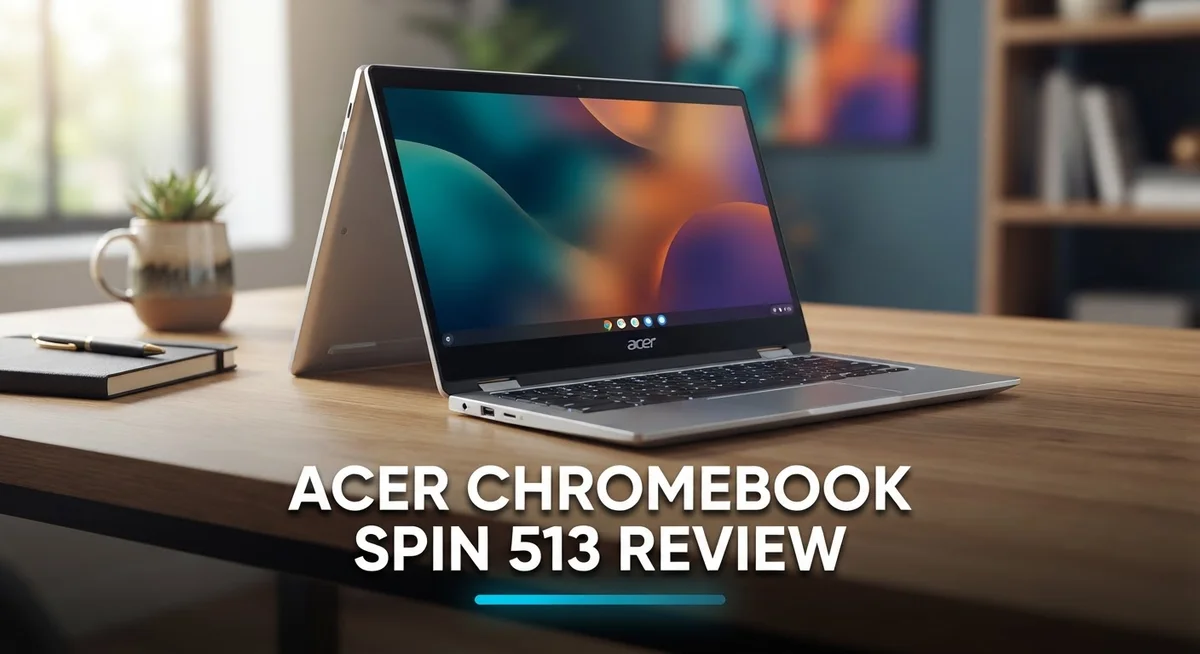
Looking for a 2-in-1 laptop that mixes style with function? The Acer Chromebook Spin 513 might catch your eye. This device brings a 13.5 inch touchscreen with a 3:2 aspect ratio. It uses Gorilla Glass for extra protection.
The screen shows sharp images. Colors look vivid and clear on every app you open. Inside, the MediaTek Kompanio 1380 processor powers your daily tasks. It handles browsing, streaming, and basic work smoothly.
Battery life stands out here. This Chromebook runs for almost 13 hours on a single charge. Do you play Android games on your laptop? This Spin 513 handles them well. You get a fun and responsive gaming experience.
In a Nutshell
- Build quality feels mediocre. The chassis does not feel as premium as the screen and keyboard suggest.
- Processor limits are real. The Kompanio 1380 handles basic tasks well but struggles with heavy multitasking.
- Connectivity stays modern. You get Wi-Fi 6 support along with Bluetooth 5.0 for stable wireless performance.
- Ports cover the basics. USB Type-C and USB 3.2 Type-A ports let you connect most accessories easily.
- The 720p webcam handles video calls fine but will not impress in low light.
- Weight stays manageable at around 2.8 lbs. This makes it easy to carry between classes or meetings.
- This model competes with the Chromebook Plus lineup and the Acer Chromebook Spin 13. Both offer similar convertible designs.
Display and Design
The 13.5 inch display is the real star here. Gorilla Glass protection keeps it safe from daily bumps and scratches. The 3:2 aspect ratio gives you extra vertical space, which feels natural when you scroll through documents or browse the web.
Colors pop on this screen. The brightness handles indoor and outdoor use without much glare. Text appears crisp, and images look vibrant. You won’t strain your eyes during long work sessions.
The touchscreen responds quickly to your taps and swipes. This matters when you flip the device into tent mode or tablet mode. The glass surface feels smooth under your fingers.
The 2-in-1 hinge design is where the Spin 513 shows its flexibility. The screen rotates a full 360 degrees. You can use it as a laptop, tent, stand, or tablet. The hinge feels sturdy enough for regular flipping between modes.
Bezels around the display stay slim. This keeps the overall footprint compact. The screen dominates the front panel without looking cramped or cheap.
The chassis itself tells a mixed story. The aluminum frame feels light at 2.8 lbs, which is great for carrying around. However, the build quality doesn’t match the display’s premium feel. The materials feel a bit plastic in places. The keyboard deck has some flex when you press down. This won’t break, but it lacks the solid feel of higher end Chromebooks.
The keyboard is a bright spot. Keys have good travel and feedback. Typing feels comfortable for emails, documents, and coding. The trackpad is spacious and responsive to gestures.
Speakers sit on both sides of the keyboard. Sound quality is decent for video calls and casual listening. You won’t get theater quality audio, but it beats most laptop speakers.
The webcam sits above the display in a standard position. It captures 1280×720 resolution. Video calls work fine in good lighting. Low light situations show some grain, but this is typical for Chromebooks at this level.
Overall, the Spin 513 nails the display and keyboard experience. The design feels practical rather than premium. The convertible form factor adds real value for people who want flexibility.

Last update on 2026-09-17 / Affiliate links / Images from Amazon Product Advertising API Some of the links on this website are affiliate links, which means that at no additional cost to you, I earn a commission if you click through and make a purchase. I only recommend products and services that I believe will add value to my readers. Thank you for your support!
Performance and Processing Power
The MediaTek Kompanio 1380 processor sits at the heart of the Spin 513. This chip handles everyday computing tasks smoothly. You can browse the web, work with documents, and stream videos without hiccups.
Real world performance shines when you stay within Chrome OS basics. Email, Google Sheets, and web apps run fast. The processor keeps up with multiple browser tabs open. You won’t see lag when switching between applications.
Android games represent a strong point for this device. The Kompanio 1380 delivers good gaming performance on Google Play Store titles. Casual games and mid tier games run smoothly. You get decent frame rates on popular apps.
However, processor limits do appear in specific scenarios. Heavy video editing software struggles here. Complex photo processing takes longer than expected. If your work involves demanding software outside the Chrome ecosystem, this chip may feel slow.
The 8GB RAM works alongside the processor to keep things running. Multitasking feels responsive most of the time. Switching between apps happens instantly. The combination handles typical Chromebook workloads well.
Storage speed matters too. The device uses solid state storage that boots quickly. Apps launch fast. File transfers happen without noticeable delays.
Thermal performance stays quiet. The processor rarely gets hot during normal use. Fans stay silent or barely audible. This means you can work in quiet spaces without distraction.
The 3:2 display aspect ratio pairs nicely with the processor power. The extra vertical space lets you see more content on screen. This reduces scrolling and improves productivity. The touchscreen responds instantly to your input.
Battery efficiency shows real strength here. The Kompanio 1380 draws minimal power, which helps achieve 12+ hour battery life. You can work through a full day without charging. This processor prioritizes efficiency over raw speed.
Overall, the Spin 513 performs best for standard Chrome OS users. Students, remote workers, and casual users find plenty of power here. The processor matches the device’s purpose as a portable 2-in-1 Chromebook.
Battery Life and Portability
The Acer Chromebook Spin 513 delivers impressive battery endurance that keeps pace with your workday. Real world testing shows this device lasts around 12 hours and 50 minutes on a single charge. That means you can leave your charger at home without worry.
The battery performance stems from two factors working together. First, the MediaTek Kompanio 1380 processor sips power efficiently. Second, the 13.5 inch display uses smart power management. You get the bright, colorful screen without draining the battery too fast.
Portability becomes a real strength with this Chromebook. At 2.8 lbs, the device weighs less than many laptops in its class. You can slip it into a backpack or carry it one handed without fatigue. The slim bezels also mean the overall footprint stays compact despite the 13.5 inch screen.
The 2 in 1 convertible design adds another layer of portability. You can fold the screen back into tent mode for watching videos or flip it fully for tablet use. This flexibility means one device handles multiple scenarios without needing separate gadgets.
Battery life improves further when you adjust settings for your needs. Lowering screen brightness extends runtime beyond the standard 12 plus hours. Closing unused browser tabs also helps. Chrome OS itself runs lean compared to Windows, so background processes drain less power.
The USB Type C port supports fast charging when you do need a quick top up. You won’t sit waiting hours for the battery to refill. This matters when you’re traveling between locations or working from different rooms.
Long battery life combined with light weight makes the Spin 513 a genuine travel companion. Business users appreciate going through a full workday without searching for outlets. Students can attend back to back classes without power anxiety. The portability factor removes one major pain point that plagues heavier laptops.
Top 3 Alternatives
Lenovo IdeaPad Flex

Last update on 2026-09-17 / Affiliate links / Images from Amazon Product Advertising API Some of the links on this website are affiliate links, which means that at no additional cost to you, I earn a commission if you click through and make a purchase. I only recommend products and services that I believe will add value to my readers. Thank you for your support!
The Lenovo IdeaPad Flex offers a strong alternative for users wanting a convertible laptop. This device features a flexible hinge design that lets you switch between laptop, tent, and tablet modes. The display quality stands out with vivid colors and sharp text. You get solid performance for everyday tasks like browsing, document editing, and streaming. Battery life lasts through a full workday without needing a charge. The keyboard feels responsive and comfortable for long typing sessions.
ASUS Chromebook Flip


Last update on 2026-09-17 / Affiliate links / Images from Amazon Product Advertising API Some of the links on this website are affiliate links, which means that at no additional cost to you, I earn a commission if you click through and make a purchase. I only recommend products and services that I believe will add value to my readers. Thank you for your support!
ASUS brings its expertise to the Chromebook market with the Flip model. This device features a 360-degree rotating hinge that makes switching modes smooth and natural. The screen delivers excellent brightness and clarity for outdoor use. Processing power handles multitasking without lag. You’ll appreciate the lightweight design that makes carrying it easy. The trackpad responds accurately to your commands. Chrome OS integration means fast boot times and automatic updates.
HP Chromebook x360

Last update on 2026-09-17 / Affiliate links / Images from Amazon Product Advertising API Some of the links on this website are affiliate links, which means that at no additional cost to you, I earn a commission if you click through and make a purchase. I only recommend products and services that I believe will add value to my readers. Thank you for your support!
HP’s x360 model competes strongly in the convertible Chromebook space. This device combines portability with performance in a sleek package. The hinge mechanism feels durable through repeated use. The display offers good color accuracy for creative work. Speakers produce clear audio for video calls and entertainment. The build quality feels premium without being heavy. Chrome OS keeps everything running smoothly and securely. You get reliable performance for work, school, and casual browsing.
Each alternative brings its own strengths. Your choice depends on your specific needs for display quality, build materials, and performance requirements.
Keyboard, Trackpad, and Input Experience
The keyboard on the Spin 513 stands out as one of its best features. Keys respond with satisfying feedback when you type, and the layout feels natural under your fingers. The key travel distance works well for extended writing sessions, keeping fatigue at bay even during long work days. Spacing between keys matches standard laptop dimensions, so switching between devices feels seamless.
The trackpad delivers solid performance for everyday tasks. It recognizes multi-touch gestures smoothly, from two-finger scrolling to pinch-to-zoom actions. Responsiveness stays consistent across the pad’s surface, and palm rejection works effectively when you rest your hands while typing. The trackpad size feels adequate for a 13.5 inch device without feeling cramped.
Touch input adds another dimension to the experience. The Gorilla Glass touchscreen responds instantly to your taps and swipes across both laptop and tablet modes. This 2-in-1 design makes touch input genuinely useful, especially when you fold the device into tent or tablet position. The screen’s responsiveness never feels sluggish or delayed.
The physical buttons and ports contribute to overall input quality. USB Type-C connectivity works smoothly for both charging and data transfer. The power button sits in a logical location and presses with good tactile feedback. Audio controls integrate cleanly without cluttering the keyboard area.
One consideration: the keyboard lacks backlighting. This matters if you work in dim environments or travel frequently. You’ll need external light sources for comfortable typing in low-light situations.
The input experience combines keyboard quality with touch versatility, making the Spin 513 flexible for different work styles. Whether you prefer traditional typing or touch interaction, this device accommodates both approaches effectively. The trackpad rounds out the experience with reliable performance for navigation and gesture control. Together, these input methods create a cohesive experience that works well for Chrome OS users who value both productivity and adaptability.
Connectivity and Ports
The Acer Chromebook Spin 513 offers solid connection options that handle most daily tasks. You get Wi-Fi 5 and Wi-Fi 6 support depending on your specific model, which means fast wireless speeds for streaming, video calls, and web browsing.
Bluetooth 5.0 and higher versions keep your wireless peripherals connected smoothly. Pairing headphones, mice, or speakers happens quickly without dropouts.
On the physical port side, the device includes USB Type-C and USB 3.2 Type-A ports. The USB Type-C connection serves double duty as your charging port and data transfer point. This means you can charge the device while transferring files, which saves time during work sessions.
The USB 3.2 Type-A port lets you connect older USB devices without needing adapters. This backward compatibility matters if you use external drives, printers, or other standard USB gear. Having both port types means fewer adapters cluttering your desk.
One practical feature worth noting: the USB Type-C port supports fast charging. When your battery runs low, you can get a quick top-up without waiting hours. This works well with the Spin 513’s already impressive battery life.
The webcam sits in a standard position above the display. It captures 1280×720 resolution video, which handles video calls and online meetings adequately. The camera performs well in normal lighting conditions.
Audio connectivity includes dual speakers positioned on both sides of the keyboard. Sound quality remains decent for video calls and casual media consumption. You can also connect external speakers via Bluetooth for better audio during presentations.
Overall, the connectivity setup on the Spin 513 strikes a good balance. You get modern wireless standards paired with practical wired ports. The combination of Wi-Fi 6 support, Bluetooth 5.0, and USB options covers what most Chromebook users need. Whether you’re working from coffee shops or your home office, these connections keep you linked to your files, colleagues, and accessories without frustration.
Pros and Cons
Pros
- Sharp 13.5″ touchscreen display delivers excellent color accuracy and clarity for everyday viewing
- Convertible 2 in 1 design flips between laptop and tent modes for flexible use
- Battery runs strong for over 12 hours on a single charge, keeping you powered through your day
- Android games and apps run smoothly thanks to solid graphics performance
- Lightweight at 2.8 lbs makes it genuinely portable for travel and moving between rooms
Cons
- Build quality feels mediocre with materials that don’t feel premium or durable long term
- MediaTek Kompanio 1380 processor handles basic tasks but struggles with demanding applications
- Keyboard lacks backlighting, which limits usability in low light environments
- Touchpad could be more responsive for precision work and detailed selections
Who Should Buy It
The Acer Chromebook Spin 513 works best for specific types of users. Students benefit most from this device. The strong battery life keeps you working through full school days without hunting for outlets. The touchscreen and convertible design let you take notes in tent mode or use it as a regular laptop for typing essays.
Casual web browsers find this Chromebook ideal. If you spend most of your time in Chrome, Gmail, and Google Docs, the MediaTek processor handles everything smoothly. Light multitasking feels natural on this machine.
Travelers should seriously consider the Spin 513. Weighing just 2.8 pounds, it fits easily into backpacks or carry-on luggage. The 12-plus hour battery means you can work or watch content for an entire flight without charging.
Content creators working with light tasks will appreciate the sharp display. Photo editing in web apps looks crisp on the 13.5-inch screen. Video watching and streaming feel immersive thanks to the excellent color accuracy.
Casual gamers who enjoy Android games will love the graphics performance. The convertible design lets you flip into tent mode for hands-free gaming or video watching.
However, this Chromebook is NOT for everyone. Skip it if you need Windows or Mac software. Heavy video editors, programmers, or anyone running demanding desktop applications should look elsewhere. The processor simply cannot handle those workloads.
People who value premium build quality might feel disappointed. The materials feel adequate rather than premium. If durability matters most to your purchase decision, other options exist.
The Spin 513 shines when you match it with your actual needs. Ask yourself: Do I mainly use web apps? Do I need long battery life? Is portability important? Do I like having a touchscreen? If you answered yes to most questions, this Chromebook delivers solid performance. If your work requires specialized software or heavy processing power, this device will frustrate you.
The sweet spot for this machine is anyone seeking a reliable, portable web browser that lasts all day and handles everyday tasks without breaking a sweat.
Final Verdict
The Acer Chromebook Spin 513 proves itself as a solid choice for everyday computing needs. It handles web browsing, streaming, and light productivity without any hiccups.
This Chromebook shines brightest when you treat it as a secondary device rather than a primary workstation. Its strengths lie in portability and screen quality, not raw power.
When you compare it to Chromebook Plus models, the Spin 513 holds its ground in display quality. However, newer Plus models may offer better long term software support.
The Acer Chromebook Spin 513 also faces competition from its own sibling, the Spin 13. That model targets users who want a slightly larger screen and different port selection.
Think about your daily habits before deciding. Do you switch between tablet and laptop modes often? The 2 in 1 design here makes that transition smooth and natural.
Students and casual users will likely feel satisfied with what this Chromebook offers. It covers the basics well and adds a touch of flexibility through its convertible hinge.
Power users and professionals handling heavy multitasking should look elsewhere. The processor simply cannot keep pace with demanding software or multiple heavy tabs running at once.
Build quality remains the biggest tradeoff in this package. If durability tops your priority list, weigh this factor carefully against the other benefits.
Overall, the Spin 513 delivers a balanced experience for its intended audience. It does not try to be everything for everyone.
Instead, it focuses on doing simple tasks smoothly and reliably. That focus makes it a dependable pick for anyone who values screen clarity, battery endurance, and portability over raw computing muscle.
Choose this Chromebook if your daily routine matches its strengths. Skip it if you need heavier performance or premium materials that last for years.
Frequently Asked Questions
Does the Acer Chromebook Spin 513 handle video editing and photo apps?
The Spin 513 works best with light editing tasks. Simple photo adjustments and basic video trimming run smoothly. However, professional-grade editing software may feel slow due to the MediaTek Kompanio 1380 processor.
For serious content creation, you’ll want more processing power. This Chromebook shines when you use web-based tools like Canva or Google Photos instead.
Can I use this Chromebook for online classes and video calls?
Yes, absolutely. The 1280×720 webcam handles video calls without issues. The dual speakers deliver clear audio during meetings.
The sharp 13.5″ display makes reading course materials comfortable. You can take notes in Google Docs while attending class without lag.
What’s the difference between the Spin 513 and the Spin 13?
The Spin 513 features a smaller 13.5″ screen with a 3:2 aspect ratio. The Spin 13 offers a larger display but weighs more.
Battery life favors the Spin 513, making it better for travel. The Spin 13 may suit users who want a bigger workspace. Both flip into tent mode for flexible viewing.
Is the touchscreen responsive and accurate?
Yes, the Gorilla Glass touchscreen responds quickly to taps and swipes. The 3:2 aspect ratio gives you extra vertical space compared to standard screens.
The display accuracy is excellent for everyday tasks. Scrolling through documents and websites feels smooth and natural.
How durable is the Acer Chromebook Spin 513 long term?
The build quality is adequate but not premium. The materials feel functional rather than luxurious.
The hinge mechanism works well for the 2-in-1 design. Regular use should keep it running fine, though it won’t feel as solid as higher-end models.

Hi, my name is Lily you can say i am a gadget hunter at this point. Welcome to Gadget Gallery The Gallery of Gadget Reviews