Gigabyte B650M Gaming Plus WiFi Motherboard Review 2026
Are you building an AMD Ryzen PC on a budget and wondering if the Gigabyte B650M Gaming Plus WiFi can do the job?
This Micro ATX motherboard has earned a solid reputation among budget PC builders. It packs DDR5 support, WiFi 6E, and a 2.5GbE LAN port into a compact package.
But here’s the real question. Can a board at this price point truly handle Ryzen 9000 series processors without breaking a sweat? Does it offer enough features for a mid range gaming setup? And is it a better buy than the MSI Mortar or ASUS TUF alternatives?
Key Takeaways:
- The Gigabyte B650M Gaming Plus WiFi uses the AMD B650 chipset and supports all AM5 processors, including the Ryzen 7000, 8000, and 9000 series. This makes it a solid long term investment for anyone who plans to upgrade their CPU down the road.
- It features a 5+2+2 phase digital VRM design with Low RDS(on) MOSFETs. This power delivery is sufficient for processors up to the Ryzen 7 7700X and even the Ryzen 5 9600X, though it may limit extreme overclocking on higher end chips.
- DDR5 memory support goes up to 8000 MHz (OC) with AMD EXPO and Intel XMP compatibility. You get four DIMM slots, which is rare at this price point for a Micro ATX board.
- WiFi 6E (802.11ax) and 2.5 Gigabit Ethernet come built in. You will not need an extra network card for fast wired or wireless connections.
- Two PCIe 4.0 x4 M.2 slots provide fast NVMe storage options. However, there is no PCIe 5.0 M.2 slot, which is a trade off at this price.
- Quality of life features like Q Flash Plus, EZ Latch, and WiFi EZ Plug make the build process easier, especially for first time builders.

Last update on 2026-08-29 / Affiliate links / Images from Amazon Product Advertising API Some of the links on this website are affiliate links, which means that at no additional cost to you, I earn a commission if you click through and make a purchase. I only recommend products and services that I believe will add value to my readers. Thank you for your support!
Gigabyte B650M Gaming Plus WiFi Motherboard Overview
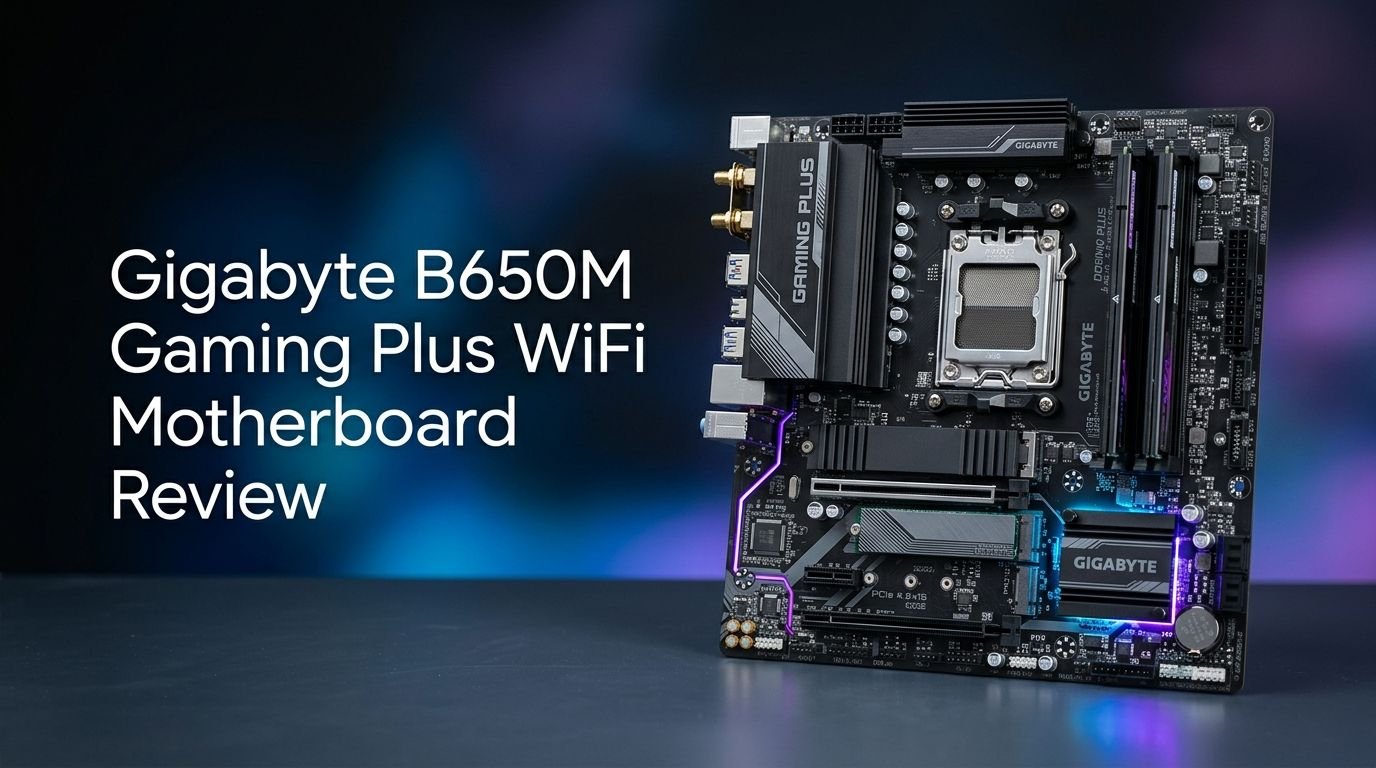
The Gigabyte B650M Gaming Plus WiFi is a Micro ATX motherboard built on the AMD B650 chipset. It uses the AM5 socket (LGA 1718), so it supports AMD Ryzen 7000, 8000, and 9000 series desktop processors. Gigabyte markets this board as an affordable entry point into the AM5 platform.
The board measures 244mm x 244mm, making it a true square Micro ATX design. It fits well in compact cases while still offering four DDR5 DIMM slots. The PCB uses a dark color scheme with subtle branding. It looks clean and professional inside any build.
Gigabyte has released multiple revisions of this board, including Rev 1.0, 1.1, 1.2, and 1.3. The latest revision (Rev 1.3) includes improvements to memory compatibility and BIOS stability. Make sure you check the revision number before purchasing, as older versions may lack support for newer Ryzen 9000 series CPUs out of the box.
Overall, this motherboard targets budget and mid range builders. It delivers solid core features without the premium cost of X670 or X670E boards. For the price, it packs a lot of value.
VRM and Power Delivery Performance
The power delivery system on the Gigabyte B650M Gaming Plus WiFi uses a 5+2+2 phase digital VRM design. This setup includes Low RDS(on) MOSFETs that reduce heat and improve power efficiency. The digital PWM controller ensures precise voltage regulation for the CPU.
For processors like the Ryzen 5 7600X, Ryzen 7 7700X, and Ryzen 5 9600X, this VRM design is more than adequate. These chips draw around 65W to 105W under full load. The board handles that power draw without significant thermal throttling.
However, if you plan to run a Ryzen 9 7950X or Ryzen 9 9900X, you should think twice. The 5+2+2 phase setup struggles under sustained heavy loads from 16 core processors. VRM temperatures can climb above comfortable levels during extended stress tests.
DDR5 Memory Support and Overclocking
The Gigabyte B650M Gaming Plus WiFi supports DDR5 memory across four SMD DIMM slots. It works with both AMD EXPO and Intel XMP memory profiles, giving you broad compatibility with popular memory kits.
Out of the box, the board supports DDR5 speeds up to 8000 MHz with overclocking. You can reach these speeds using the BIOS memory tuning options. Gigabyte also includes a DDR5 Auto Booster feature. This tool automatically increases native DDR5 frequency to 5000 MHz under heavy load with a single click.
One standout feature is the exclusive DDR5 circuit design from Gigabyte. It unlocks the native DDR5 PMIC (Power Management IC) from secure mode into programmable mode. This gives you wider voltage control over your RAM, which improves overclocking potential.
The board also uses shielded memory routing. All memory traces run through inner PCB layers, shielded by a large ground plane. This protects signals from external interference and improves stability at higher frequencies.
Top 3 Alternatives for Gigabyte B650M Gaming Plus WiFi
1. MSI MAG B650M Mortar WiFi

Last update on 2026-08-29 / Affiliate links / Images from Amazon Product Advertising API Some of the links on this website are affiliate links, which means that at no additional cost to you, I earn a commission if you click through and make a purchase. I only recommend products and services that I believe will add value to my readers. Thank you for your support!
2. ASUS TUF Gaming B650M PLUS WiFi

Last update on 2026-08-29 / Affiliate links / Images from Amazon Product Advertising API Some of the links on this website are affiliate links, which means that at no additional cost to you, I earn a commission if you click through and make a purchase. I only recommend products and services that I believe will add value to my readers. Thank you for your support!
3. ASRock B650M PG Riptide WiFi

Last update on 2026-08-29 / Affiliate links / Images from Amazon Product Advertising API Some of the links on this website are affiliate links, which means that at no additional cost to you, I earn a commission if you click through and make a purchase. I only recommend products and services that I believe will add value to my readers. Thank you for your support!
PCIe Slots and Expansion Options
The Gigabyte B650M Gaming Plus WiFi includes one PCIe 4.0 x16 slot for your graphics card. This slot features the EZ Latch quick release design. You can remove your GPU with a simple push on the latch, even in tight builds. No more reaching under the card to press a tiny clip.
PCIe 4.0 x16 provides plenty of bandwidth for current GPUs. Even high end cards like the RTX 4070 Ti and RX 7800 XT do not saturate a PCIe 4.0 x16 connection. You will not experience any GPU bottleneck from this slot.
The board does lack a PCIe 5.0 x16 slot, which is a limitation compared to X670 based boards. If you are planning for next generation GPUs that might use PCIe 5.0, this is something to consider. But for current hardware, PCIe 4.0 x16 remains sufficient.
There is also a secondary PCIe slot for additional expansion cards. You can use this for a capture card, sound card, or additional network adapter. The Micro ATX form factor limits total expansion slots, but most users only need one or two.
For a budget board, the expansion options are adequate. You get what you need for a standard gaming or productivity build without excess.
Storage Options: M.2 and SATA
Storage on the Gigabyte B650M Gaming Plus WiFi is solid for the price. The board provides two PCIe 4.0 x4 M.2 slots for NVMe SSDs. Both slots support 2280 size drives, which is the most common M.2 form factor.
PCIe 4.0 x4 M.2 drives offer sequential read speeds up to 7,000 MB/s depending on the drive. Popular options like the Samsung 990 Pro and WD Black SN850X work perfectly in these slots. You get fast boot times, quick game loading, and snappy file transfers.
The board does not include a PCIe 5.0 M.2 slot. This means you cannot take full advantage of newer Gen 5 NVMe drives like the Crucial T700 or Samsung 990 EVO Plus. However, PCIe 5.0 SSDs remain expensive and offer minimal real world benefit for gaming in 2026.
WiFi 6E and Networking Features
Built in networking is a highlight of this motherboard. The WiFi 6E (802.11ax) module provides wireless speeds up to 2.4 Gbps. It operates across 2.4 GHz, 5 GHz, and the newer 6 GHz bands. The 6 GHz band offers less congestion and lower latency, which benefits online gaming.
Bluetooth 5 is also included. You can connect wireless controllers, headsets, keyboards, and mice without needing a separate adapter. Pairing devices is quick and reliable.
Gigabyte includes the WiFi EZ Plug design on this board. It combines the WiFi antenna connections into a single adapter for easier installation. You simply screw the antenna onto the rear I/O panel. This is a small touch that new builders will appreciate.
For wired connections, the board features a Realtek 2.5 Gigabit Ethernet port. This is 2.5 times faster than standard Gigabit LAN. If your router supports 2.5G speeds, you will notice faster local file transfers and more stable online performance.
Rear I/O Panel and USB Ports
The rear I/O panel on the Gigabyte B650M Gaming Plus WiFi includes a practical selection of ports. You get two DisplayPort outputs and one HDMI output for integrated graphics. This is useful if you run a Ryzen APU like the Ryzen 8000G series.
USB connectivity includes three USB 3.2 Gen 1 Type A ports and one USB 3.2 Gen 1 Type C port. There are also two USB 2.0 ports for peripherals like keyboards and mice. The USB Type C port is a welcome addition for modern devices and external SSDs.
The rear panel also houses the 2.5G Ethernet port, WiFi antenna connectors, and audio jacks. The audio section provides a line out, line in, and microphone jack powered by the onboard HD audio codec.
One criticism from users is the limited number of USB ports. Budget boards often sacrifice rear I/O space. If you have many USB devices, a USB hub (around $10) solves this problem easily.
Audio Quality and Codec
The Gigabyte B650M Gaming Plus WiFi uses an 8 channel HD audio codec with dedicated audio capacitors. Gigabyte calls this their Hi Fi Audio design. It includes an Audio Noise Guard feature that isolates the audio traces from the rest of the PCB to reduce electrical interference.
For casual gaming and music listening, the onboard audio performs well. You get clear sound through headphones and speakers without noticeable static or humming. The high end audio capacitors deliver better signal quality than basic codec implementations.
The audio output supports 7.1 surround sound configurations. This is useful for home theater setups or games that support multi channel audio. Most users will find the sound quality acceptable for daily use.
However, audiophiles and music producers may want a dedicated sound card or external DAC. The onboard codec has limits in terms of impedance range and signal to noise ratio. A $50 to $100 USB DAC will offer a significant upgrade.
BIOS Features and User Experience
The Gigabyte BIOS on this motherboard offers a clean and organized interface. It includes both an Easy Mode and Advanced Mode. Easy Mode shows essential system information at a glance. Advanced Mode gives full access to overclocking, fan control, and boot settings.
Q Flash Plus is one of the best BIOS features on this board. It allows you to update the BIOS without installing a CPU, RAM, or graphics card. You simply download the BIOS file to a USB drive, rename it to “gigabyte.bin,” and press the Q Flash Plus button. The board handles the rest.
This feature is critical for Ryzen 9000 series support. Older board revisions may ship with BIOS versions that do not recognize newer CPUs. Q Flash Plus lets you update to a compatible BIOS before you even install the processor.
Smart Fan 6 is another useful BIOS tool. It supports up to seven control points for custom fan curves. You can switch between Slope mode and Stair mode for different cooling behaviors. Stair mode keeps fans at a constant speed within temperature ranges, reducing noise fluctuations.
The BIOS also includes AMD EXPO and XMP profile management. You can enable memory overclocking with a single toggle. Advanced users can create and save custom SPD profiles directly to the memory module.
Overall, the BIOS is stable and responsive. Gigabyte has refined it over multiple updates since the board’s launch.
Build Quality and Design
The Gigabyte B650M Gaming Plus WiFi uses a standard 4 layer PCB with a clean dark color scheme. The board avoids flashy design elements. It focuses on function over form, which suits budget and stealth builds.
Component placement is logical and well organized. The M.2 slots, SATA connectors, and fan headers sit in accessible locations. You will not struggle with cable management or clearance issues in most Micro ATX cases.
The VRM heatsink is modest in size but uses a direct contact design. It handles mid range CPUs without problems. The M.2 heatsinks add thermal protection for NVMe drives.
Build quality matches the price point. The board feels solid during installation. The PCIe EZ Latch is a practical improvement over standard slot clips. It makes GPU removal much easier, especially in compact builds.
RGB lighting options include two addressable LED headers and one RGB LED header. You can sync lighting effects using Gigabyte’s RGB Fusion software. This gives you enough lighting control without overwhelming the board with built in LEDs.
Gaming Performance with Ryzen Processors
Last update on 2026-08-29 / Affiliate links / Images from Amazon Product Advertising API Some of the links on this website are affiliate links, which means that at no additional cost to you, I earn a commission if you click through and make a purchase. I only recommend products and services that I believe will add value to my readers. Thank you for your support!
Gaming performance depends primarily on your CPU and GPU. The Gigabyte B650M Gaming Plus WiFi does not bottleneck mid range gaming setups. Paired with a Ryzen 5 7600X or Ryzen 5 9600X and an RTX 4070 or RX 7800 XT, you can expect smooth 1080p and 1440p gaming.
Frame rates remain consistent across popular titles. Competitive games like Valorant, CS2, and Fortnite run well above 200 FPS at 1080p. Story driven AAA games hit 60+ FPS at 1440p with high settings.
The DDR5 memory support helps with frame time consistency. Running DDR5 6000 MHz with tight timings improves 1% low frame rates, which translates to smoother gameplay during intense scenes.
The board’s PCIe 4.0 x16 slot does not limit GPU performance. Current generation graphics cards operate within PCIe 4.0 bandwidth limits without any measurable FPS loss.
For esports and competitive gaming, this motherboard is a strong choice. It provides a stable platform with low latency networking and reliable power delivery. You get a competitive edge without spending extra on premium boards.
Who Should Buy This Motherboard?
The Gigabyte B650M Gaming Plus WiFi is ideal for budget and mid range PC builders. If you want to enter the AM5 platform without spending $200+ on a motherboard, this board delivers strong value.
First time builders will appreciate features like Q Flash Plus, EZ Latch, and WiFi EZ Plug. These tools simplify the building process and reduce common frustrations.
Compact build enthusiasts benefit from the Micro ATX form factor. The board fits smaller cases while offering four DDR5 slots and two M.2 slots. You do not sacrifice essential features for size.
This board is NOT the best choice for extreme overclockers or users running Ryzen 9 16 core processors. The 5+2+2 VRM limits high power CPU operation. If you need more power delivery, consider the MSI MAG B650M Mortar WiFi or an X670 board.
Content creators on a budget can also use this board effectively. Video editing, 3D rendering, and photo editing tasks perform well with a Ryzen 7 CPU, 64 GB DDR5, and NVMe storage. The board provides all the essential connectivity for a productive workstation.
Pros and Cons Summary
The Gigabyte B650M Gaming Plus WiFi has clear strengths. It supports all AM5 processors. It offers DDR5 up to 8000 MHz. WiFi 6E and 2.5G LAN come built in. Q Flash Plus makes BIOS updates effortless. The price sits comfortably in the budget category.
The weaknesses are also clear. The VRM is limited for high end 16 core CPUs. There is no PCIe 5.0 support for M.2 or the GPU slot. The rear USB port count is low. The VRM heatsink could be larger.
For every dollar spent, you get a lot of motherboard. The feature set punches above its price class. The board does everything a mid range gaming PC needs without unnecessary extras.
If your build centers around a Ryzen 5 or Ryzen 7 processor with a mid range GPU, this board checks every box. It delivers dependable performance, modern connectivity, and future proofing through the AM5 platform.
The trade offs only matter if you push beyond the board’s intended range. Stay within its sweet spot, and it performs beautifully.
Final Verdict: Gigabyte B650M Gaming Plus WiFi in 2026
In 2026, the Gigabyte B650M Gaming Plus WiFi remains a smart buy for budget AM5 builds. The AM5 platform continues to receive new CPU releases, so your investment in this board has long term value.
The board handles Ryzen 9000 series processors with updated BIOS support. Pair it with a 6 core or 8 core chip, and you get a responsive gaming and productivity machine. DDR5 prices have dropped significantly, making the memory platform even more attractive.
WiFi 6E and 2.5G Ethernet ensure your networking stays current. These standards will remain relevant for several more years. You do not need to worry about outdated wireless connectivity.
The competition has grown, with newer B850 boards entering the market. But if you find the B650M Gaming Plus WiFi at a good price, it still represents excellent value. The feature set holds up against boards costing $30 to $50 more.
Our recommendation: buy this board if you are building a Ryzen 5 or Ryzen 7 system on a budget. It delivers the performance, features, and reliability you need without wasting money on extras you may never use.
Frequently Asked Questions
Does the Gigabyte B650M Gaming Plus WiFi support Ryzen 9000 series processors?
Yes, this motherboard supports AMD Ryzen 9000 series processors. You may need to update the BIOS to the latest version using the Q Flash Plus feature. This works without installing a CPU, making the process simple and straightforward.
Can I use PCIe 5.0 NVMe SSDs on this motherboard?
No, the Gigabyte B650M Gaming Plus WiFi only supports PCIe 4.0 x4 M.2 slots. PCIe 5.0 NVMe drives will work in the slots but will operate at PCIe 4.0 speeds. For full Gen 5 SSD performance, you need an X670 or B850 based board.
How many USB ports does the Gigabyte B650M Gaming Plus WiFi have?
The rear I/O includes three USB 3.2 Gen 1 Type A ports, one USB 3.2 Gen 1 Type C port, and two USB 2.0 ports. Internal headers provide additional front panel USB connectivity. A USB hub can expand your port options if needed.
Is this motherboard good for overclocking?
The board supports DDR5 memory overclocking up to 8000 MHz and basic CPU overclocking. The 5+2+2 VRM handles mild to moderate overclocking on Ryzen 5 and Ryzen 7 processors. It is not ideal for extreme overclocking on high end 12 core or 16 core chips.
Does the Gigabyte B650M Gaming Plus WiFi have Bluetooth?
Yes, it includes Bluetooth 5 through the integrated WiFi 6E module. You can connect wireless peripherals, headsets, and controllers without any additional hardware.
What is the maximum RAM capacity supported?
The board supports a maximum of 256 GB of DDR5 memory across four DIMM slots. Most users will run 32 GB or 64 GB kits, which the board handles without issues. Both AMD EXPO and Intel XMP profiles are supported for easy overclocking.

Hi, my name is Lily you can say i am a gadget hunter at this point. Welcome to Gadget Gallery The Gallery of Gadget Reviews