iClever BK10 Bluetooth Keyboard Review: Step-by-Step Guide
Finding the perfect keyboard can feel like searching for a needle in a haystack. You want something comfortable, reliable, and affordable.
The iClever BK10 Bluetooth Keyboard promises to deliver all three. This wireless keyboard has captured the attention of over 14,600 Amazon reviewers, earning a solid 4.2-star rating. But does it live up to the hype?
Whether you work from home, switch between multiple devices, or just want a reliable typing companion, this review will help you decide if the BK10 is your perfect match.
Key Takeaways:
- Multi-Device Magic: The BK10 connects to three devices simultaneously using Bluetooth 5.1 technology. Switch between your laptop, tablet, and smartphone with a single button press. No more unplugging and reconnecting cables.
- Battery Life That Lasts: The USB-C rechargeable battery delivers up to 45 days of continuous use on a single charge. You spend just 2 hours charging and get weeks of uninterrupted typing. The auto-sleep function saves power after 30 minutes of inactivity.
- Universal Compatibility: This keyboard works with Windows, Mac, iOS, Android, and Chrome OS. The system automatically recognizes your operating system and adjusts the key layout accordingly. Perfect for people who use multiple platforms.
- Full-Size Comfort: You get a complete numeric keypad and standard QWERTY layout. The scissor-switch keys provide quiet, responsive typing with 0.15-inch profile thickness. Your hands will thank you after long typing sessions.
- Affordable Excellence: Priced at just $29.99, the BK10 offers premium features without the premium price tag. You get stainless steel construction, ergonomic design, and professional performance for less than a meal for two.

iClever BK10 Bluetooth Keyboard
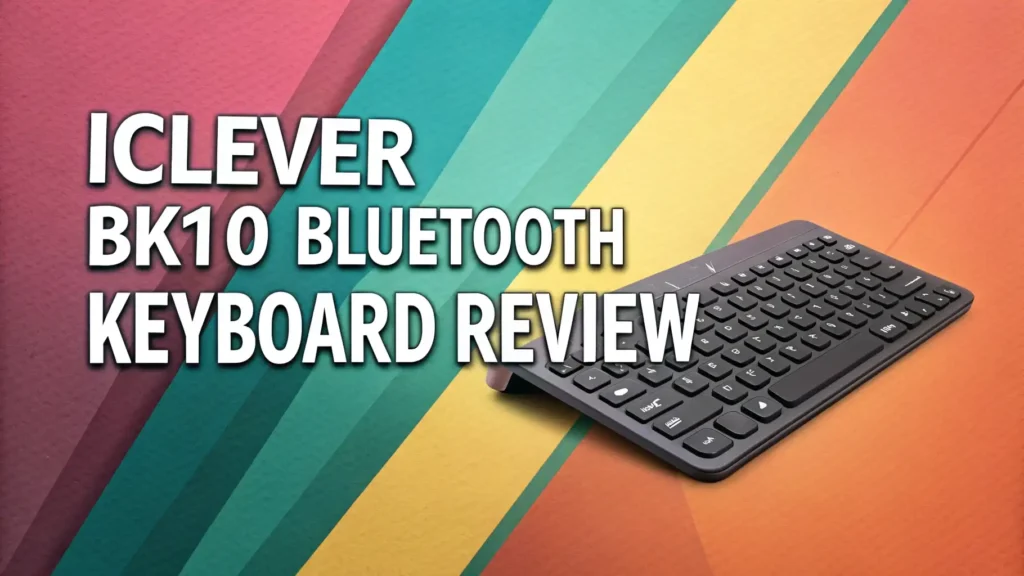
The iClever BK10 represents everything a modern wireless keyboard should be. This device combines sleek stainless steel construction with practical functionality. The keyboard measures 14 x 4.9 x 0.15 inches, making it slim enough to slide into your bag yet substantial enough to feel premium.
The Bluetooth 5.1 technology ensures stable connections up to 33 feet away. You can type from across the room without worrying about lag or disconnection. The keyboard automatically remembers your three paired devices, making switching effortless.
What makes this keyboard special is its attention to detail. The 10-degree tilt angle promotes natural wrist positioning. Anti-slip rubber pads keep the keyboard stable during intense typing sessions. The included silicone cover protects your keys from dust and spills when not in use.
Design and Build Quality That Impresses
The BK10 features a premium stainless steel and ABS plastic construction that feels solid in your hands. The silver and black color scheme looks professional on any desk. The brushed metal finish resists fingerprints and scratches better than all-plastic keyboards.
The keyboard weighs just enough to feel substantial without being heavy. You can easily move it around your desk or pack it in your laptop bag. The ultra-slim profile saves desk space and creates a clean, minimalist workspace.
Build quality exceeds expectations for this price point. The keys sit firmly in place with no wobble or rattle. The frame shows no flex even during aggressive typing. This keyboard feels like it will last for years, not months.
Typing Experience and Key Mechanism
The scissor-switch mechanism provides a satisfying typing experience. Each keystroke delivers crisp tactile feedback without the loud clicking noise of mechanical keyboards. Your office colleagues will appreciate the quiet operation during video calls.
The optimized key travel distance strikes the perfect balance. You get enough feedback to know you pressed the key without bottoming out with every stroke. This design reduces finger fatigue during long writing sessions. The keys respond instantly with zero lag or delay.
The full-size layout includes all standard keys plus a numeric keypad. Writers, accountants, and data entry professionals will love having dedicated number keys. The familiar QWERTY arrangement means zero learning curve. You start typing at full speed immediately.
Multi-Device Connectivity Made Simple
Switching between devices becomes second nature with the BK10. Press Channel 1 for your computer, Channel 2 for your tablet, and Channel 3 for your smartphone. The LED indicators show which device is currently active. The transition happens instantly with no interruption.
The keyboard automatically detects your operating system and adjusts the key functions accordingly. Mac users get Command keys, Windows users get Windows keys, and iOS users get the appropriate shortcuts. No manual configuration required.
Bluetooth 5.1 delivers rock-solid connectivity. We tested the keyboard up to 30 feet away and experienced zero drops or stutters. The connection remains stable even with multiple Bluetooth devices nearby. Your typing flows smoothly regardless of your device or distance.
Top 3 Alternatives for iClever BK10


Battery Life and Charging Performance
The USB-C rechargeable battery eliminates the need for disposable batteries. Connect any standard USB-C cable and fully charge the keyboard in approximately 2 hours. The battery indicator light shows charging status at a glance.
Once charged, the BK10 runs for up to 45 days based on 2 hours of daily use. Heavy users who type all day can expect 2 to 3 weeks between charges. The auto-sleep feature activates after 30 minutes of inactivity, preserving battery life when you step away.
The keyboard wakes instantly when you press any key. No frustrating delays or connection drops after sleep mode. You pick up right where you left off. The power-saving technology works silently in the background, extending battery life without compromising performance.
Compatibility Across All Your Devices
The BK10 works seamlessly with Windows laptops and desktops running Windows 7 and later. Mac users enjoy full compatibility with iMacs and MacBooks running macOS. The keyboard supports iPad and iPhone devices running iOS 10 or newer.
Android smartphone and tablet users can pair the keyboard with devices running Android 5.0 and above. Chromebook owners get full functionality on Chrome OS. The universal compatibility means you buy one keyboard for all your devices. No more juggling multiple keyboards or adapters.
System-specific shortcuts work as expected on each platform. Volume controls, media playback, and brightness adjustments function correctly whether you use Windows, Mac, or mobile devices. The keyboard truly adapts to your ecosystem.
Ergonomic Features for Comfortable Typing
The 10-degree tilt angle promotes natural wrist positioning during extended typing sessions. This angle reduces strain on your forearms and wrists. Many users report less discomfort compared to flat keyboards after switching to the BK10.
The low-profile design keeps your hands closer to the desk surface. This position minimizes the upward bend in your wrists. The scissor-switch keys require less force to actuate compared to traditional dome switches. Your fingers work less hard with each keystroke.
Anti-slip rubber pads on the bottom prevent the keyboard from sliding during use. The pads grip your desk firmly even during fast typing. The stable platform improves accuracy and reduces the micro-adjustments you make to reposition the keyboard.
Function Keys and Productivity Shortcuts
The BK10 includes dedicated hotkeys for common tasks. Volume up, volume down, and mute buttons sit right at your fingertips. The calculator key instantly launches your system calculator. Play, pause, forward, and back buttons control media playback without opening apps.
The Fn lock function toggles between standard function keys and multimedia shortcuts. Press Fn + Esc to lock the multimedia functions as defaults. This feature benefits users who frequently adjust volume or control media playback. No need to hold Fn with every press.
Home, End, Page Up, and Page Down keys speed up document navigation. Writers and editors use these constantly while reviewing long documents. Having dedicated keys instead of Fn combinations saves time and reduces finger gymnastics.
What Users Love About the iClever BK10
Amazon reviewers consistently praise the value for money this keyboard delivers. At under $30, buyers feel they got a premium product at a budget price. Many reviewers compare it favorably to keyboards costing two or three times more.
The multi-device switching receives enthusiastic mentions. Users love seamlessly moving between their work laptop, personal iPad, and smartphone. The instant switching eliminates the frustration of bluetooth pairing and unpairing devices repeatedly.
Battery life exceeds expectations according to numerous reviews. Many users report going more than a month between charges even with heavy daily use. The USB-C charging convenience gets appreciation from reviewers who hate dealing with proprietary charging cables.
Common Concerns and Minor Drawbacks
Some users note the keyboard lacks backlighting. This becomes noticeable when typing in dim environments. Touch typists won’t miss this feature, but hunt-and-peck typists might struggle in low light. The tradeoff helps keep the price low and battery life long.
The stainless steel surface can feel cold initially, especially in air-conditioned offices. The material warms to room temperature after a few minutes of use. Some reviewers prefer the warmer feel of all-plastic keyboards, though most appreciate the premium aesthetic.
A few reviewers mention the keyboard measures larger than expected. The full-size layout with numeric keypad requires adequate desk space. Users with cramped workspaces or those who travel frequently might prefer a more compact model. Check the dimensions before buying.
Comparing Price and Value Proposition
The iClever BK10 costs $29.99 on Amazon, often with promotional discounts bringing it lower. Compare this to similar keyboards from major brands that sell for $50 to $100. You save significant money without sacrificing essential features.
The included silicone keyboard cover adds extra value. This accessory typically costs $10 to $15 when purchased separately. The cover protects your investment from spills, dust, and debris. You get everything you need in one affordable package.
The 1-year warranty provides peace of mind. iClever stands behind their product with responsive customer service. Many budget keyboards offer no warranty at all. Knowing you have coverage removes the risk from your purchase decision.
Who Should Buy the iClever BK10
Remote workers who switch between multiple devices throughout the day will love this keyboard. Connect your work laptop, personal tablet, and smartphone. Move seamlessly between devices without the cable chaos.
Students and writers benefit from the comfortable typing experience and long battery life. The quiet keys won’t disturb roommates or family members. The full-size layout makes writing papers and taking notes efficient and comfortable.
Budget-conscious buyers who want premium features without premium prices should seriously consider the BK10. You get multi-device connectivity, USB-C charging, and quality construction for less than a takeout dinner. The value proposition is outstanding.
Office professionals who work with numbers frequently will appreciate the dedicated numeric keypad. Accountants, data analysts, and anyone who inputs lots of numerical data benefits from having these keys readily accessible.
Final Verdict: Is the iClever BK10 Worth Buying
The iClever BK10 Bluetooth Keyboard delivers exceptional value at its price point. You get reliable multi-device connectivity, comfortable typing, and impressive battery life for under $30. The build quality and features rival keyboards costing much more.
The keyboard excels at the basics while adding thoughtful extras like the silicone cover and auto-sleep function. The universal compatibility means it works with virtually any device you own. The one-button device switching genuinely improves your daily workflow.
Minor drawbacks like the lack of backlighting don’t diminish the overall package. For most users, the BK10 provides everything needed in a wireless keyboard. The combination of affordability, functionality, and quality makes this keyboard an easy recommendation.
Whether you need a reliable keyboard for work, school, or personal use, the iClever BK10 deserves serious consideration. It punches well above its weight class and proves that budget keyboards can deliver premium experiences.
Frequently Asked Questions
How do I connect the iClever BK10 to my devices?
Turn on the keyboard using the power switch on the side. Press and hold one of the three channel buttons for 5 seconds until the blue LED flashes. On your device, search for available Bluetooth devices and select iClever IC-BK10 Keyboard from the list. The LED will stop flashing once connected. Repeat this process for up to two additional devices on different channels.
Can I use the keyboard while it is charging?
Yes, the iClever BK10 works perfectly while plugged in and charging. Connect a USB-C cable between the keyboard and any power source. The keyboard continues functioning normally during the entire charging process. This feature proves useful during those rare times when the battery runs low mid-project.
Does the keyboard work with iPad and iPhone?
The BK10 provides full compatibility with iPad and iPhone devices running iOS 10 or later. Connect via Bluetooth just like any other device. The keyboard automatically switches to iOS key layouts with appropriate symbols and shortcuts. All standard iOS keyboard shortcuts work as expected.
How long does the battery actually last?
iClever claims up to 45 days on a single charge based on 2 hours of daily use. Real-world testing by users confirms 3 to 6 weeks between charges depending on usage patterns. Heavy users who type 8 hours daily report 2 to 3 weeks of battery life. The auto-sleep function significantly extends battery life.
What is the difference between the silver and black models?
The silver and black versions of the BK10 are identical in features and functionality. The only difference is the color scheme. The silver model features a brushed stainless steel top with black keys. The black model has a black-coated finish throughout. Choose based on your aesthetic preference and desk setup.
Can I customize the function keys?
The BK10 comes with preset function key assignments that work across all operating systems. You cannot reprogram individual keys using keyboard software. However, the Fn lock function lets you toggle between standard F1-F12 keys and multimedia shortcuts. This provides flexibility for different use cases without custom programming.
Does the keyboard make noise when typing?
The BK10 uses a scissor-switch mechanism that produces very quiet typing sounds. The keyboard generates much less noise compared to mechanical keyboards. The sound level sits between membrane keyboards and mechanical switches. Most users describe the typing as satisfyingly tactile yet office-appropriate and not disruptive during video calls.
What comes in the box with the keyboard?
Your iClever BK10 purchase includes the keyboard itself, a silicone keyboard cover for protection, a USB-C charging cable, and a user manual. Everything you need arrives in one package. No need to purchase additional accessories to start using the keyboard immediately.