HP Victus 15 Review 2026: Is This Worth It?
Are you searching for a gaming laptop that won’t burn a hole in your wallet? The HP Victus 15 has been a popular name in the budget gaming space for years. Now in 2026, it continues to attract first time gamers and casual users alike.
This laptop packs a 15.6 inch FHD 144Hz display, capable AMD or Intel processors, and NVIDIA GeForce graphics. It promises solid 1080p gaming at a price point most students and beginners can afford. But does it deliver on those promises?
In this full review, we break down the HP Victus 15 from every angle. We cover its design, display, performance, battery life, keyboard, thermals, and more.
Key Takeaways:
- Budget friendly pricing makes the HP Victus 15 one of the most affordable entry points into PC gaming. You can find configurations starting around $600, with higher spec models reaching around $1,200.
- The 15.6 inch FHD 144Hz display delivers smooth visuals and surprisingly strong brightness for its price class. Colors are decent but not studio grade.
- Gaming performance at 1080p is solid. The RTX 4050 configuration handles popular titles like Call of Duty, Cyberpunk 2077, and F1 2024 at respectable frame rates. You may need to lower settings for very demanding games.
- Battery life is a standout feature. Recent models last over 10 hours on a single charge during general use. This is rare for a gaming laptop in this price range.
- Build quality is acceptable but not premium. The plastic chassis feels sturdy enough for daily use. However, it lacks the metal construction found in more expensive gaming laptops.
- Newer 2025/2026 configurations now include options with RTX 5050 and RTX 5060 GPUs, AMD Ryzen AI processors, and Intel Arrow Lake chips. These offer even better performance at similar price points.

HP Victus 15 Overview and Specifications
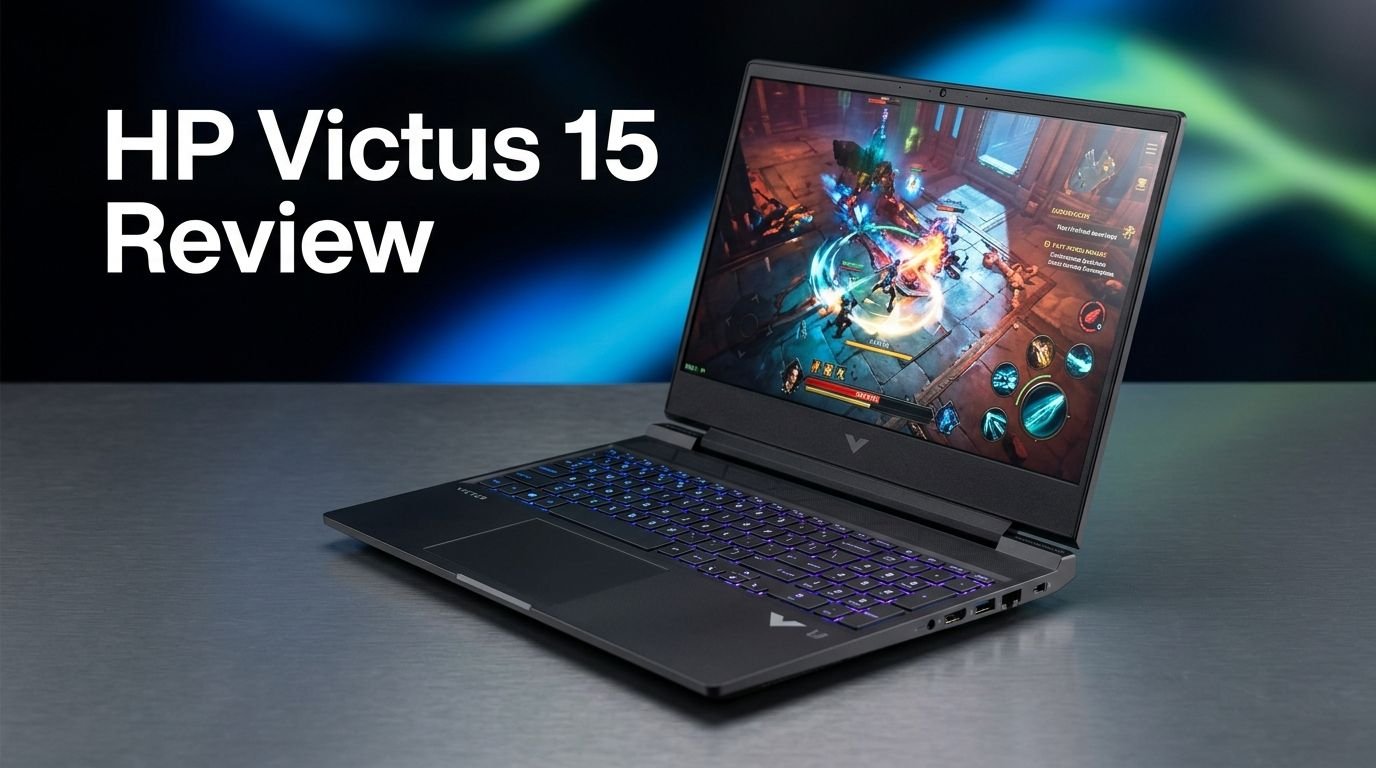
The HP Victus 15 is a 15.6 inch budget gaming laptop from HP’s Victus line. It sits below the HP Omen series in HP’s gaming hierarchy. HP offers this laptop in many configurations. You can choose between AMD Ryzen and Intel Core processors.
The most popular tested configuration includes the AMD Ryzen 7 8845HS processor with eight cores and a 5.1GHz turbo speed. It pairs with the NVIDIA GeForce RTX 4050 graphics card. You also get 16GB of DDR5 RAM and a 1TB PCIe SSD for storage.
The display runs at 1920 x 1080 resolution with a 144Hz refresh rate. This makes it suitable for smooth gameplay in most popular titles. Connectivity includes Wi-Fi 6E, Bluetooth 5.3, USB Type A ports, USB Type C, HDMI, and an Ethernet jack.
The laptop weighs about 5.1 pounds and measures 0.93 inches thick. It runs Windows 11 Home out of the box. HP also includes its Omen Command Center software for performance tuning and system monitoring.
Design and Build Quality
The HP Victus 15 uses a plastic chassis with a clean, understated look. Our reviewed unit came in a Mica Silver finish. HP also offers a Performance Blue option on select models.
The design is simple. You will find a Victus logo on the lid and below the display. There are no flashy RGB lights on the exterior. This keeps the laptop looking professional enough for school or office use.
The build feels sturdy for its price. The lid flexes slightly under pressure, but the overall structure holds up well during daily use. The bottom bezel around the display is thick. This gives the laptop a slightly dated look compared to slim bezel competitors.
HP has not changed the external design much since the original Victus 15 launched in 2022. This could be a downside for those who want a fresh look. But the functional layout and port placement remain practical. The barrel charger plugs into the left rear corner, keeping cables out of the way during use.
Display Performance and Quality
The 15.6 inch Full HD IPS display on the HP Victus 15 is one of its stronger features. It runs at a 144Hz refresh rate, which provides smooth motion during gaming and general scrolling.
Peak brightness is a highlight. HP has significantly improved screen brightness compared to earlier Victus models. The 2022 version peaked at just 252 nits. The newer models reach much higher brightness levels, making them usable in well lit rooms.
Color accuracy is acceptable for a budget laptop. Reds may appear slightly orange, and overall tones look somewhat subdued. This display is not ideal for professional photo editing or color critical work. But for gaming, streaming, and everyday tasks, it performs well above its price point.
The IPS panel provides wide viewing angles. Multiple people can watch the screen from different positions without major color shifts. For a laptop under $1,200, this display delivers solid value.
Top 3 Alternatives for HP Victus 15
1. Acer Nitro V 15 Gaming Laptop

2. Lenovo IdeaPad Gaming 3 15 Laptop

3. MSI Thin 15 Gaming Laptop

Gaming Performance and Benchmarks

The HP Victus 15 with an RTX 4050 GPU handles 1080p gaming with confidence. In Call of Duty: Modern Warfare 3, it runs smoothly at minimum settings and remains playable at extreme presets.
In Cyberpunk 2077, the laptop delivers decent frame rates at the Ultra preset. However, you will need to turn on DLSS or lower the settings if you enable ray tracing. The RTX 4050 at 50 watts is capable but not a powerhouse.
F1 2024 runs well and shows the benefit of DLSS frame generation technology. This feature uses AI to create extra frames. It helps the Victus maintain high frame rates even in demanding racing scenes.
In 3DMark synthetic tests, the Victus trails behind laptops with higher wattage GPUs. The Acer Nitro V 15 with a 75 watt RTX 4050 scores higher in these tests. But in real world gaming, the gap shrinks to just a few frames per second. The Victus’ newer Ryzen 7 processor helps close this gap.
For esports titles like Valorant, Fortnite, and CS2, the HP Victus 15 performs excellently. These games run well above the 144Hz refresh rate at medium to high settings. Overall, this laptop is a dependable choice for entry level 1080p gaming.
Processor and Multitasking Capability
The AMD Ryzen 7 8845HS processor inside the tested HP Victus 15 delivers strong everyday performance. It has eight cores and can boost up to 5.1GHz. This chip handles multitasking with ease.
In the PCMark 10 benchmark, the Victus competed for the top position among budget gaming laptops. It performed well in word processing, web browsing, and spreadsheet tasks. The Ryzen 7 chip also did well in the Cinebench 2024 rendering test.
Video editing and content creation are possible on this machine. The HandBrake video transcoding test showed fast conversion times. The Geekbench 6.3 results placed the Victus ahead of laptops with older Ryzen 5 processors.
For students and professionals, this processor is more than enough. You can run multiple Chrome tabs, a Zoom call, and a document editor at the same time. The 16GB of DDR5 RAM supports smooth multitasking without slowdowns.
Newer 2026 models offer AMD Ryzen AI processors and Intel Arrow Lake chips. These deliver even faster performance and better AI capabilities. They also improve power efficiency for longer battery life.
Keyboard and Trackpad Experience
The HP Victus 15 has a full size keyboard with a numeric keypad. This is useful for data entry, accounting tasks, or quick number inputs during gaming.
The keys offer bright white backlighting. Some configurations include different color options. Key travel distance is comfortable. The keys register with enough actuation pressure so you always know when a press has been accepted.
The layout includes useful keyboard shortcuts. You can press Fn+F11 to disable the touchpad during gaming. Fn+F12 turns off the Windows key to prevent accidental presses. The arrow key cluster is properly arranged, which is a nice detail.
The touchpad is large and responsive. It tracks smoothly and clicks quietly. For a budget gaming laptop, the input experience is satisfying. Most users will not need an external keyboard for basic tasks.
Battery Life: A Pleasant Surprise
Battery life is one of the biggest strengths of the HP Victus 15 in 2026. The latest tested configuration lasted over 12 hours on a single charge during video playback. This is exceptional for a gaming laptop.
For comparison, the Acer Nitro V 15 lasted just under 10 hours. The Dell G15 and Gigabyte G6X could not reach 8 hours. This gives the Victus a clear advantage for users who need portability.
Of course, gaming on battery will drain it much faster. You should expect around 2 to 4 hours during active gaming sessions. But for classes, meetings, and general productivity, the Victus can last a full day.
HP has optimized the power management through its Omen Command Center software. The Eco and Quiet modes extend battery life further by reducing performance output. This flexibility makes the laptop useful in both performance heavy and power saving situations.
Audio and Speaker Quality
The HP Victus 15 has built in speakers that deliver respectable sound for a budget laptop. Clarity is good at moderate volume levels. You can use them for casual gaming, movie watching, and video calls without issues.
Bass response is limited. This is expected in any thin laptop. The speakers lack branded audio tuning like Bang & Olufsen, which HP includes in its higher end models. There is no built in EQ customization app.
However, HP does include a DTS Headphone:X license. This improves the audio experience when you use compatible headphones. It simulates surround sound and adds depth to games and movies.
For serious gaming sessions, we recommend using a dedicated headset or external speakers. The built in audio is fine for quick sessions, but it cannot match the quality of a good pair of gaming headphones.
Webcam and Video Call Quality
The HP Victus 15 features a 720p webcam above the display. Image quality is basic. The camera produces blurry footage in anything less than ideal lighting. This is a clear reminder of the laptop’s budget positioning.
There is no privacy shutter on the webcam. This is a missing feature that many modern laptops now include. You will need to use tape or a third party cover if privacy is a concern.
Biometric features like fingerprint readers or IR cameras are absent. You will rely on a standard password or PIN to log in. These omissions are common in budget gaming laptops, so they are not surprising.
For occasional Zoom or Teams calls, the webcam works. But if you attend frequent video meetings, you may want to invest in an external USB webcam for better image clarity and low light performance.
Thermal Management and Fan Noise
The HP Victus 15 manages heat well for its price. During testing, the chassis remained cool to the touch on both the top and bottom surfaces. This is a comfort advantage during extended gaming sessions.
The cooling fans are audible under load. You can hear them during gaming, but they are not loud enough to be annoying. At idle, the fans stay quiet. This makes the laptop pleasant to use in libraries or quiet environments.
HP uses internal heat pipes and dual fans to manage thermals. The laptop’s Omen Command Center offers Balanced, Quiet, and Eco performance modes. Balanced mode is the default and works well for most situations. Quiet mode reduces fan speeds for noise sensitive environments.
The cooling system does a solid job of preventing thermal throttling. The Ryzen 7 and RTX 4050 maintain stable clock speeds during extended gaming sessions. This ensures consistent frame rates over time.
Software and Pre installed Apps
The HP Victus 15 runs Windows 11 Home. HP includes its Omen Command Center app for system monitoring and performance tuning. You can switch between performance modes and view real time system vitals.
The HP Support Assist app handles software updates and technical support access. It keeps your drivers current and helps troubleshoot common issues.
There is some bloatware pre installed on the laptop. A McAfee antivirus trial comes bundled. Several other unwanted apps may be present. The good news is that all of these are removable. We recommend uninstalling them after setup for a cleaner experience.
HP does not offer many deep customization settings through the Omen Command Center on this budget model. But the basic features like network booster and performance mode switching are useful. The software experience is clean and functional for the price.
Connectivity and Ports
The HP Victus 15 covers the essentials with its port selection. You get one USB Type A port on each side of the laptop. A USB Type C port sits on the right side along with an HDMI output and an Ethernet jack.
A 3.5mm audio jack is located on the left side. All USB connections transfer data at 5Gbps speeds. The barrel connector for charging sits at the left rear corner.
The laptop includes Wi-Fi 6E and Bluetooth 5.3 through a MediaTek networking card. Wi-Fi 6E provides fast wireless speeds and lower latency. Bluetooth 5.3 ensures stable connections to wireless peripherals.
The port selection is modest but practical. You can connect an external monitor via HDMI, plug in a gaming mouse and keyboard, and use the Ethernet port for stable online gaming. The USB Type C port adds versatility for modern accessories.
Who Should Buy the HP Victus 15?
The HP Victus 15 is ideal for budget conscious gamers who want solid 1080p performance. If you play esports titles, casual single player games, or indie games, this laptop delivers.
Students will appreciate the long battery life, lightweight design, and full size keyboard. It handles schoolwork, video streaming, and light creative tasks without trouble.
First time gamers get an affordable entry into PC gaming. The RTX 4050 configuration provides enough power to enjoy most modern games at reasonable settings. DLSS support extends the GPU’s abilities further.
This laptop is not ideal for professional video editors, 3D artists, or anyone who needs color accurate displays. The 720p webcam also makes it a poor choice for content creators who rely on video. If you need more raw gaming power, look at laptops with RTX 4060 or RTX 5060 GPUs instead.
HP Victus 15 Pricing and Value in 2026
The HP Victus 15 starts at around $600 to $900 for base configurations. The RTX 4050 model we reviewed is priced at $1,199.99 at full retail, but it frequently drops to around $849.99 during sales.
At the sale price, the Victus offers excellent value. You get a modern Ryzen 7 processor, RTX 4050 graphics, 16GB RAM, and 1TB storage. Competitors like the Acer Nitro V 15 and MSI Cyborg 15 offer similar specs with only 512GB storage at similar prices.
HP has also released newer models with RTX 5050 and RTX 5060 GPUs. These start at slightly higher base prices. The AMD Ryzen AI models begin at $1,119.99. Intel based models start at $999. These are worth considering if you want the latest hardware.
Watch for seasonal sales. The HP Victus 15 regularly sees significant discounts during Amazon Prime Day, Black Friday, and back to school events. Buying during a sale maximizes the value of this already affordable laptop.
Final Verdict: Should You Buy the HP Victus 15 in 2026?
The HP Victus 15 remains a strong choice for budget gaming in 2026. It offers reliable 1080p performance, impressive battery life, and a bright display. The build quality is solid for the price. The keyboard and trackpad deliver a comfortable daily experience.
Its weak points include a low quality 720p webcam, average color accuracy, and a design that has not changed in years. The RTX 4050 at 50 watts also limits its gaming ceiling compared to higher wattage competitors.
If you catch it on sale, the HP Victus 15 becomes one of the best value gaming laptops available. For students, casual gamers, and anyone entering the PC gaming space, it is a smart investment. Just consider upgrading to the RTX 5050 or 5060 models if your budget allows.
Frequently Asked Questions
Is the HP Victus 15 good for gaming in 2026?
Yes. The HP Victus 15 handles 1080p gaming well. The RTX 4050 configuration runs popular games at solid frame rates. Esports titles run smoothly above 100 FPS. Demanding games like Cyberpunk 2077 require lower settings for the best experience.
How long does the HP Victus 15 battery last?
The latest models deliver over 12 hours of battery life during video playback. For general productivity tasks, you can expect 8 to 10 hours. Gaming on battery reduces this to about 2 to 4 hours.
Can the HP Victus 15 run Valorant and Fortnite?
Absolutely. Both Valorant and Fortnite run well above 144 FPS on the HP Victus 15 at medium to high settings. The 144Hz display ensures smooth and responsive gameplay for these titles.
Is the HP Victus 15 good for students?
Yes. Its long battery life, full size keyboard, and lightweight design make it a practical student laptop. It handles documents, web browsing, video streaming, and light creative work with ease.
Does the HP Victus 15 have a good display?
The 15.6 inch FHD 144Hz IPS display is good for its price. Brightness is a strong point. Color accuracy is average. It works well for gaming and entertainment but is not suitable for professional color work.
What are the main downsides of the HP Victus 15?
The main downsides include a low quality 720p webcam, limited color accuracy, no privacy shutter, and an unchanged design since 2022. The RTX 4050 at 50 watts also limits peak gaming performance compared to higher wattage alternatives.