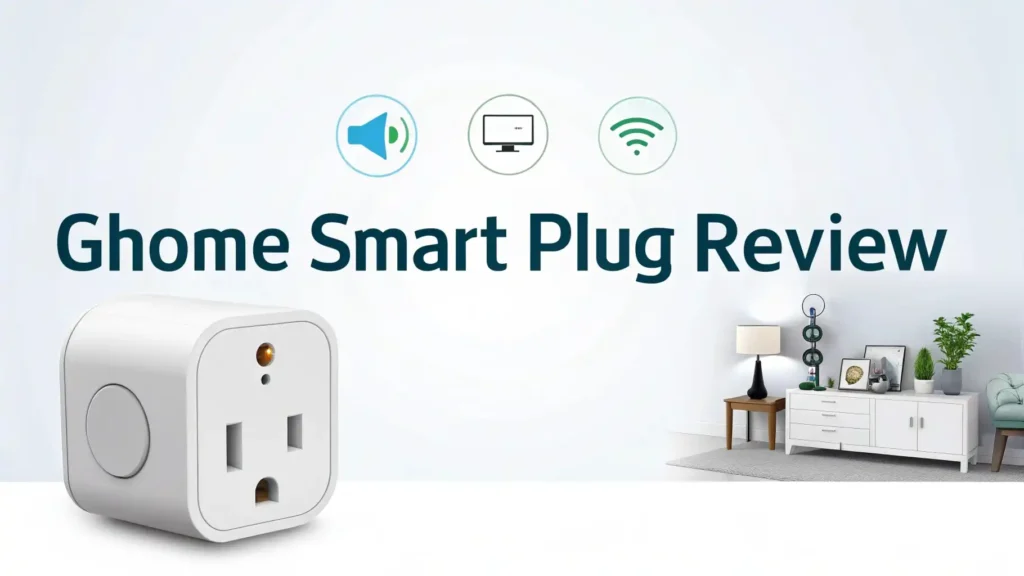
GHome Smart Plug Review: Is This Worth The Hype?
Are you tired of getting up from your cozy couch to turn off the lamp? Do you wish you could control your coffee maker from bed? Welcome to the world of smart plugs, where convenience meets affordability.
The GHome Smart Plug has been making waves on Amazon, and today we’re diving deep into why thousands of homeowners are choosing this little device to upgrade their living spaces. This review will show you everything you need to know before hitting that buy button.
Smart home technology used to cost a fortune. Not anymore. The GHome Smart Plug brings professional level automation to your home at a price that won’t make your wallet cry.
In a Nutshell:
- Voice Control Freedom: The GHome Smart Plug works seamlessly with both Alexa and Google Home, letting you control your devices with simple voice commands. No more fumbling for switches in the dark.
- Easy Setup Process: You don’t need a technical degree to set this up. The plug connects directly to your 2.4GHz WiFi network without requiring any additional hub or complicated equipment.
- App Control Anywhere: The dedicated smartphone app gives you complete control from anywhere in the world. Turn devices on or off, set schedules, and create timers right from your phone.
- Safety Certified: This smart plug comes with ETL and FCC certifications, ensuring it meets strict safety standards for your home and family.
- Budget Friendly Option: Compared to other smart plugs on the market, GHome offers excellent value for money with features that rival more expensive brands. You get multiple pack options that bring the per unit cost down significantly.
- Energy Monitoring Potential: Some models in the GHome Smart lineup include energy monitoring features, helping you track which devices consume the most power and potentially saving money on electricity bills.

What Makes GHome Smart Plug Stand Out
The GHome Smart Plug has earned its place as an Amazon’s Choice product for good reason. This device transforms any regular appliance into a smart device within minutes.
You plug it into your wall outlet, connect your lamp or fan or coffee maker to the smart plug, and suddenly you have remote control over that device.
The plug supports 15 amps of power, which means it can handle most household appliances safely. The compact design ensures it won’t block the second outlet on your wall plate. This thoughtful engineering makes a huge difference when you want to use both outlets.
What really sets GHome apart is the stable connection technology. Many cheap smart plugs suffer from frequent disconnections. GHome has improved their WiFi technology to maintain a solid connection to your home network. You won’t experience the frustration of devices going offline randomly.
The white finish looks clean and professional on any wall. It blends into your home decor rather than standing out as an obvious tech addition. The small LED indicator light shows you the connection status without being too bright at night.
Setting Up Your GHome Smart Plug Is Actually Simple

You might worry that setting up smart home devices requires technical knowledge. The GHome Smart Plug proves that wrong. The setup process takes less than five minutes from opening the box to having full control.
First, you download the GHome Smart app from the App Store or Google Play Store. The app has a clean interface that walks you through each step. You plug the smart plug into your wall outlet and open the app. The app searches for new devices automatically.
You connect the smart plug to your 2.4GHz WiFi network by entering your password. This is important to note because the plug does not work with 5GHz networks. Most homes have both options available on their router, so just make sure you select the 2.4GHz option.
After the connection establishes, you can name your device. You might call it “Living Room Lamp” or “Bedroom Fan.” These names help when you use voice commands later. The entire setup happens without any hub or bridge device, which keeps costs down and simplifies your smart home system.
Voice Control That Actually Works
The integration with Alexa and Google Assistant makes daily life smoother. You simply say “Alexa, turn on the living room lamp” and it happens. No more walking across the room or searching for a switch in the dark.
The voice recognition works reliably once you set up the device names properly. You can create custom routines through the Alexa or Google Home app. For example, you might set up a “Good Morning” routine that turns on your coffee maker and bedroom lights automatically when you say the phrase.
The response time is quick. When you give a voice command, the plug reacts within a second or two. This immediate response makes the technology feel natural rather than clunky. Your family members will adapt to using voice commands quickly because it just works.
Parents appreciate the ability to control kids’ room lights or gaming consoles from anywhere in the house. You can set bedtime schedules or turn off devices remotely without arguments. The voice control extends your parenting reach in helpful ways.
Top 3 Alternatives for GHome Smart Plug


Scheduling and Timer Features Save Energy
The scheduling function is where smart plugs really show their value. You can program your devices to turn on and off at specific times every day. This automation saves electricity and adds convenience to your routine.
Many people use the schedule feature for lamps. You set the living room lamp to turn on at sunset and turn off at bedtime. This creates the appearance that someone is home even when you’re away, which improves security. The lights follow your schedule perfectly without any input from you.
The timer function works differently from schedules. You might turn on a device and set a timer for it to automatically shut off after 30 minutes or 2 hours. This is perfect for space heaters, fans, or bathroom exhaust fans that you want to run temporarily.
Small businesses use these scheduling features to control signs and display lighting. Coffee shops program their exterior signs to turn on before opening and off after closing. The automation ensures consistency and saves the cost of leaving lights on accidentally overnight.
Remote Control From Anywhere on Earth

The smartphone app gives you control regardless of your location. As long as your phone has internet access, you can control your home devices. This remote access opens up practical possibilities.
Forgot to turn off your curling iron? No problem. Open the app and switch it off from work. Want to turn on lights before you arrive home after dark? Do it from your car. The peace of mind that comes from this remote control is genuinely valuable.
The app shows you the current status of each plug. You can see whether devices are on or off with a quick glance. This status display helps you verify that you actually did turn something off when you meant to.
Some users set up away routines that randomly turn lights on and off when they vacation. This simulated presence deters potential break ins. The GHome Smart app makes setting up these randomized schedules straightforward through the interface.
Energy Monitoring Helps Cut Costs
Certain GHome Smart Plug models include energy monitoring capabilities. This feature tracks how much electricity each connected device consumes. The data appears in the app with daily, weekly, and monthly views.
You might discover that an old refrigerator in the garage uses far more power than you realized. Or that leaving your computer plugged in draws phantom power even when turned off. These insights help you make informed decisions about which appliances to replace or unplug.
The app can calculate the estimated cost based on your local electricity rates. You see exactly how much money each device costs to run per month. This transparency motivates people to change habits or upgrade inefficient appliances.
Businesses use energy monitoring to understand overhead costs better. A small office might track the power consumption of air conditioning units or computer equipment. The data supports decisions about operating hours and equipment upgrades.
Safety Features and Certifications Matter

The GHome Smart Plug carries ETL and FCC certifications, which verify that it meets safety standards. These certifications mean the product has been tested for electrical safety and radio frequency interference. You want these certifications on any device that plugs into your wall.
The plug includes overload protection that shuts off power if the connected device draws too much current. This safety mechanism prevents overheating and potential fire hazards. The 15 amp rating handles most household appliances, but you should not use smart plugs with high wattage heat producing devices like space heaters or hair dryers.
The fire resistant materials used in construction add another layer of safety. The polycarbonate housing can withstand high temperatures without melting or catching fire. These material choices reflect responsible engineering focused on user safety.
Child safety becomes easier with smart plugs. You can turn off outlets remotely when small children are near them. The ability to disable power to certain outlets gives parents an extra tool for keeping kids safe around electricity.
Compatible Devices and Limitations
The GHome Smart Plug works with most standard household items. Lamps, fans, coffee makers, televisions, and small appliances all work perfectly. You can control holiday lights, humidifiers, air purifiers, and charging stations without issues.
However, some devices are not suitable for smart plug control. Appliances that have electronic touch controls often don’t work properly. The smart plug cuts power completely when turned off, which resets these devices. When power returns, they don’t automatically turn back on.
Major appliances like refrigerators and washing machines should not be controlled with smart plugs. These devices draw high power and need dedicated circuits. The smart plug is designed for smaller devices within its 15 amp rating.
Devices with mechanical switches work best. If you can physically flip a switch to the on position and the device will run when power is applied, it will work with a smart plug. This includes most older lamps, fans, and simple appliances.
Comparison With Premium Smart Plug Brands

Premium brands like Belkin WeMo and Leviton offer smart plugs at higher price points. These brands provide slightly more robust construction and longer warranty periods. However, for most users, the performance difference doesn’t justify the extra cost.
The GHome Smart Plug delivers 90 percent of the functionality at about half the price. The connection stability matches more expensive options in real world use. The app interface is actually simpler and cleaner than some premium alternatives.
Where premium plugs excel is in energy monitoring accuracy and advanced scheduling options. If you need detailed power consumption data for professional purposes, a premium plug might be worth the investment. For typical home automation needs, GHome provides excellent value.
Brand loyalty plays a role in smart home decisions. If you already own TP-Link or other ecosystem devices, staying within that brand makes sense. But if you’re starting fresh, GHome offers a cost effective entry point that works with all major voice assistants.
Multi Pack Options Maximize Value

GHome Smart Plugs come in various pack sizes including 2-pack, 4-pack, and even larger quantities. The per unit price drops significantly when you buy multi packs. A 4-pack typically costs less than buying four individual plugs.
Most homes benefit from having several smart plugs in different rooms. You might put one in the living room for lamps, another in the bedroom for a fan, and more in the kitchen or home office. The multi pack pricing makes outfitting your entire home affordable.
The consistent performance across multiple units means you get a unified experience. All your smart plugs connect to the same app and respond to voice commands in the same way. This consistency makes managing your smart home much easier than mixing different brands.
Gift giving becomes simple with multi packs. You can split a 4-pack between family members or keep extras for future use. Smart plugs make practical gifts for new homeowners or anyone interested in starting their smart home journey.
Real User Experiences and Reviews
Thousands of Amazon customers have shared their experiences with GHome Smart Plugs. The overall 4.4 star rating reflects solid satisfaction among users. People consistently praise the easy setup process and reliable daily operation.
Common positive feedback mentions the quick connection to WiFi and responsive voice control. Users appreciate that the plugs don’t randomly disconnect like some budget alternatives. The compact size gets mentioned frequently as a practical advantage.
Some negative reviews focus on the 2.4GHz WiFi requirement. Users with newer routers that primarily use 5GHz sometimes struggle with the initial setup. However, once connected properly, the 2.4GHz network actually provides better range throughout the home.
Customer support receives mixed reviews. Some users report helpful responses to questions, while others mention slow reply times. This inconsistency is common with budget brands that focus on keeping costs low rather than maintaining large support teams.
The Bottom Line: Is GHome Smart Plug Worth Buying
The GHome Smart Plug delivers excellent value for budget conscious shoppers. It provides all the essential smart plug features without unnecessary complexity or inflated pricing. For most people looking to add smart home control, this plug checks all the important boxes.
You get reliable voice control, easy smartphone app management, scheduling capabilities, and safety certifications. The multi pack options bring the price down to incredibly affordable levels. The performance matches more expensive alternatives in daily use.
The main limitation is the lack of 5GHz WiFi support, but this actually benefits range in most homes. The 2.4GHz network reaches further and penetrates walls better. Unless you need advanced energy monitoring features, the GHome Smart Plug provides everything a typical smart home needs.
For anyone starting their smart home journey or expanding an existing setup, these plugs represent a smart purchase decision. They work reliably, integrate with major voice assistants, and cost less than competing options. You can automate your entire home without spending hundreds of dollars.
Frequently Asked Questions
Does the GHome Smart Plug work with iPhone and Android phones?
Yes, the GHome Smart app is available for both iOS and Android devices. You can download it from the App Store or Google Play Store for free. The app works identically on both platforms, giving you full control regardless of which phone you own. You can even control the same plugs from multiple phones in your household.
Can I use GHome Smart Plugs outdoors?
The standard GHome Smart Plug is designed for indoor use only. It lacks weatherproofing and should not be exposed to rain or moisture. However, GHome does offer outdoor specific models with waterproof ratings if you need to control exterior lights or decorations. Always check the product specifications before using any smart plug outside.
How many smart plugs can I connect to one WiFi network?
Most home WiFi routers can handle 20 to 30 smart devices without performance issues. The GHome Smart Plug uses minimal bandwidth, so you can connect multiple units without slowing down your network. If you plan to use more than 20 smart devices total, you might consider upgrading to a mesh WiFi system for better coverage and capacity.
Will the smart plug remember settings if power goes out?
Yes, the GHome Smart Plug saves your schedules and settings in the cloud. If your power goes out and comes back on, the plug will reconnect to your WiFi automatically and resume its programmed schedules. You don’t need to reconfigure anything after a power outage. The device state when power was lost is restored automatically.
Can I share control of my smart plugs with family members?
Absolutely. The GHome Smart app allows you to share device access with other users. You simply invite family members through the app using their email addresses. They can then download the app and control the shared devices. This feature is perfect for households where multiple people need access to control lights and appliances. You maintain control over which devices each person can access.