DJI Osmo Mobile 6 Smartphone Gimbal Stabilizer Review 2026
Have you ever watched back a video you recorded on your phone and cringed at how shaky it looked? You are not alone. Millions of content creators, vloggers, and casual video lovers struggle with the same problem every day.
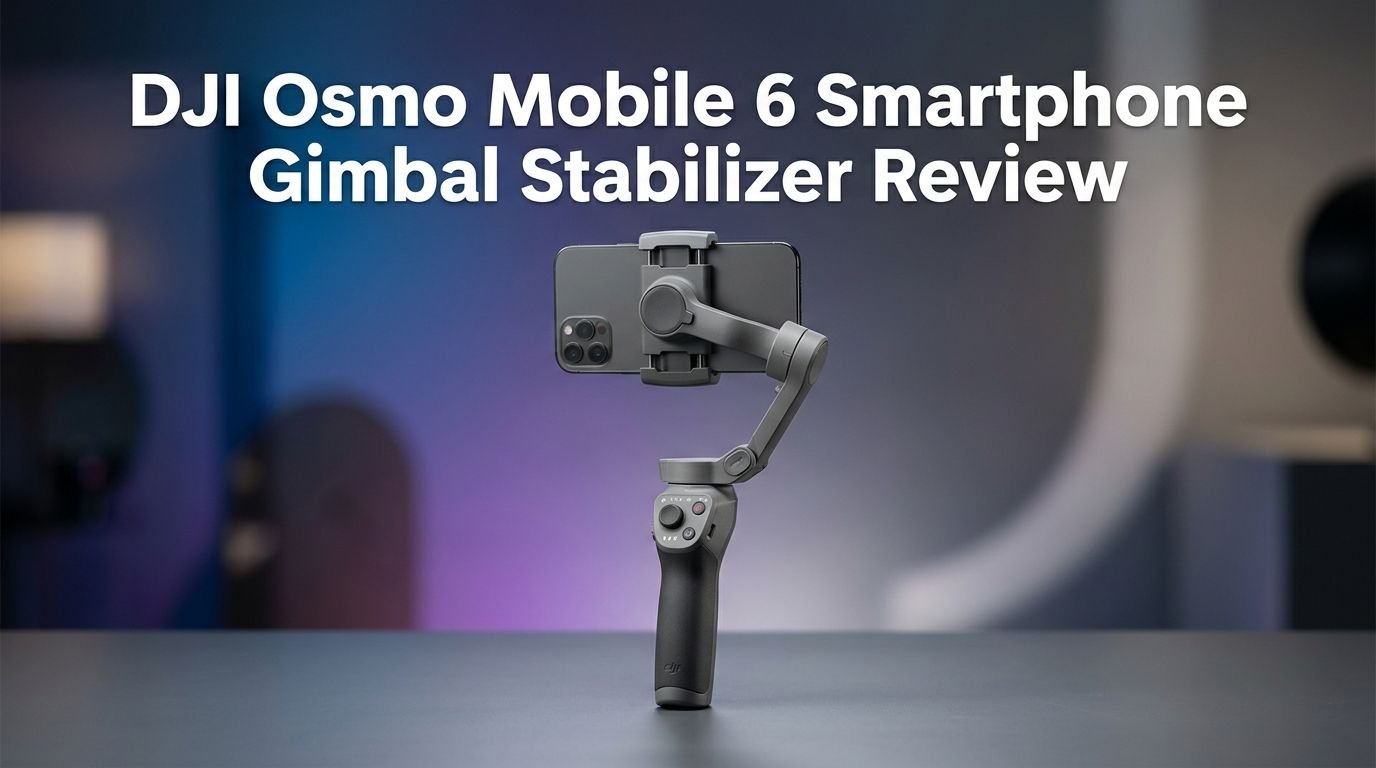
The DJI Osmo Mobile 6 promises to fix all of that with its 3-axis gimbal stabilization, smart tracking, and a pocket-friendly foldable design.
But here’s the real question. In 2026, with newer gimbals on the market, does the Osmo Mobile 6 still hold up? Is it still a smart buy for your money?
Key Takeaways:
- 3-axis stabilization delivers butter-smooth footage across walking, jogging, and even light running situations. The motors handle modern heavy smartphones without struggling or overheating.
- ActiveTrack 5.0 locks onto subjects quickly and can follow them for up to 150 yards before losing the connection. It works best with a single subject and can sometimes jump to another person who crosses in front.
- The magnetic phone clamp system is fast and convenient. You snap your phone onto the gimbal in seconds. There is no fiddling with screw mounts or awkward brackets. This alone saves a lot of setup time.
- Battery life sits around 6 hours and 24 minutes on a full charge, and it takes about 1 hour and 24 minutes to recharge through USB-C. That is enough for a full day of casual shooting.
- The built-in extension rod stretches out to 215mm (8.5 inches) and gives you selfie stick angles without carrying an extra accessory. This is great for solo vloggers and group shots.
- The DJI Mimo app offers tons of shooting modes including Timelapse, Hyperlapse, DynamicZoom, Slow Motion, Pano, and Story mode. Some features like Quick Launch remain iOS-exclusive, which is a downside for Android users.

DJI Osmo Mobile 6 Smartphone Gimbal Stabilizer Overview
The DJI Osmo Mobile 6 is a 3-axis smartphone gimbal that launched at a retail price of $159. It replaced the DJI OM 5 and brought several upgrades to the table. The gimbal weighs about 309 grams (including the magnetic phone clamp at 25 grams) and folds down to a compact size of 189mm x 85mm x 44mm. That is small enough to fit inside a jacket pocket or a small purse.
DJI built this gimbal for content creators, vloggers, and everyday users who want professional-looking video from a smartphone. It works with both iPhone and Android devices, although iOS users get a few extra perks like Quick Launch. The device pairs with the DJI Mimo app, which gives you access to dozens of shooting modes and creative templates.
What makes the Osmo Mobile 6 stand out is its combination of portability, stabilization quality, and smart features. The magnetic clamp system, the built-in extension rod, the side wheel for zoom and focus control, and the updated status bar on the handle all work together to create a smooth shooting experience. For its price point, it packs a lot of value.
Design and Build Quality
The DJI Osmo Mobile 6 has a clean, modern design with a Slate Gray finish. It looks premium and feels solid in your hand. DJI improved the ergonomics over the OM 5, giving the handle a slightly thicker grip that reduces hand fatigue during long shooting sessions.
The foldable design is one of the best parts. You unfold the gimbal and it automatically powers on, ready to shoot within seconds. DJI fixed the unfolding mechanism from the OM 5, which many users complained felt fragile. The Osmo Mobile 6 feels sturdier and more confident to open and close.
The front panel has a clear layout. You get an M button for power and mode switching, a red record button, and a switch button that toggles between cameras, orientations, and photo/video modes. The status bar LEDs on the handle show battery level, connectivity, and active gimbal mode at a glance. Everything is intuitive and easy to reach with one hand.
On the left side, the new side wheel lets you zoom in and out or adjust manual focus. On the back, a trigger button activates ActiveTrack 5.0. The bottom features a 1/4-inch-20 tripod mount and the built-in extension rod. Overall, the build quality is impressive for a gimbal at this price.
Top 3 Alternatives for DJI Osmo Mobile 6
If you want to explore other options before making a decision, here are three strong alternatives worth considering.
Insta360 Flow 2 Pro

Hohem iSteady M7

Zhiyun Smooth 5S AI
![ZHIYUN Smooth 5S AI [Official] 3-Axis Gimbal Stabilizer for Smartphone, iPhone Gimbal with Built-in Fill Light, Tripod, Phone Stabilizer for Video Recording Supports Gesture Control, 360° Inception](https://gadgetgallery.blog/wp-content/plugins/aawp/public/image.php?url=YUhSMGNITTZMeTl0TG0xbFpHbGhMV0Z0WVhwdmJpNWpiMjB2YVcxaFoyVnpMMGt2TkRGWVJGQjZaamhwTjB3dVgxTk1NVFl3WHk1cWNHYz18MTc3NjAzMDE2Mg=)
3-Axis Stabilization Performance
The core purpose of any gimbal is stabilization, and the DJI Osmo Mobile 6 excels in this department. The 3-axis system (pan, tilt, and roll) works together to cancel out hand shakes and body movements. The result is footage that looks like it came from a Steadicam rig.
We tested the gimbal while walking on uneven surfaces, climbing stairs, and even jogging lightly. The motors kept up without any visible stuttering or jitter. Modern smartphones are heavy, especially flagship models with large screens. The Osmo Mobile 6 handles phones up to 290 grams without breaking a sweat.
There are four gimbal modes available. Follow Mode tracks your hand movements on the pan and tilt axes. Tilt Lock keeps the tilt axis steady while following pan movements. FPV Mode unlocks all three axes for creative shots. SpinShot allows 360-degree barrel roll effects. Each mode serves a different creative purpose, and switching between them is quick with the M button.
The stabilization quality is one of the biggest reasons to choose this gimbal. For content creators who shoot while moving, it delivers consistent, professional results. Even in 2026, this level of performance holds up against newer competitors.
ActiveTrack 5.0: Smart Subject Tracking
ActiveTrack 5.0 is DJI’s subject-tracking technology built into the Osmo Mobile 6. You activate it by pressing the trigger button on the back of the gimbal. A green box appears around your subject on the screen, and the gimbal follows them as they move.
The tracking works well for single subjects. It locks on quickly and can follow a person for up to 150 yards before losing the connection. This is a clear improvement over the OM 5, which lost subjects much sooner. The system recognizes body shapes and faces, so it does not rely only on color detection.
However, there is a limitation. If another person walks in front of your tracked subject, ActiveTrack can sometimes jump to the new person. This is frustrating in crowded environments like busy streets or events. You need to reselect your subject when this happens.
ActiveTrack 5.0 also does not work when the camera is zoomed in beyond 3X. This limits its use for certain creative scenarios. Despite these drawbacks, the tracking is reliable enough for most vlogging and content creation tasks. It saves you from manually panning the gimbal to follow a moving subject.
DJI Mimo App and Shooting Modes
The DJI Mimo app is the software backbone of the Osmo Mobile 6 experience. It connects to the gimbal through Bluetooth 5.1 and provides access to all the creative shooting modes. The app is available on both iOS and Android, though iOS users get the advantage of Quick Launch.
The shooting modes are generous. You get Video, Photo, Hyperlapse, Timelapse, DynamicZoom, Slow Motion, Pano, and Story mode. Each one serves a specific creative need. Timelapse has four default motion paths, and you can create custom paths with up to four positions. DynamicZoom simulates a dolly zoom effect that looks cinematic.
Slow Motion records at 4X or 8X speeds. The default is 8X, and switching to 4X requires going into settings rather than tapping the screen. This is a small annoyance. Pano mode lets you capture 3×3 grids, 240-degree panoramas, or a CloneMe effect where the same person appears multiple times in one photo.
The ShotGuides feature analyzes your surroundings and recommends shot types and sequences. It then stitches them together into a shareable clip. The concept is helpful for beginners, but the interface can feel cluttered and overwhelming with too many tutorials and options.
Built-In Extension Rod and Selfie Stick
One of the most practical features of the DJI Osmo Mobile 6 is its built-in extension rod. It extends to 215mm (8.5 inches) and gives you extra reach for selfies, group shots, and creative high or low angles.
This feature eliminates the need to carry a separate selfie stick. You pull the rod out from the bottom of the handle, and it locks into place. The build feels secure. There is no wobble or flex even when your phone is fully extended.
For solo vloggers, the extension rod is a game-changer. It puts the camera far enough away to capture your face and background without the awkward close-up look. You can also extend the rod and hold the gimbal above your head for overhead shots. This works well at concerts, festivals, or in crowds.
The rod also helps with low-angle shots. Flip the gimbal upside down, extend the rod, and you can get ground-level footage without bending down. This kind of versatility adds real creative value. It is one of those features you do not think you need until you use it. Then it becomes essential.
Battery Life and Charging
The DJI Osmo Mobile 6 runs on a Li-Po 2S battery with a capacity of 1000 mAh and 7.74 Wh of energy. DJI rates the operating time at approximately 6 hours and 24 minutes under ideal conditions. In real-world use, you can expect around 5 to 6 hours depending on how aggressively the motors are working.
Charging is done through a USB-C port on the handle. A full charge takes about 1 hour and 24 minutes. This is reasonable and means you can top up the gimbal during a lunch break and get back to shooting.
The status bar on the handle shows the battery level visually. When it drops to 20% or below, the indicator turns red as a warning. This is useful because you do not need to check the app to know your remaining power.
One concern some users have is that the gimbal drains their phone’s battery faster because the Mimo app runs GPS, Bluetooth, and the camera simultaneously. This is worth keeping in mind. Bringing a portable power bank for your phone is a smart move during long shoots. The gimbal battery itself, however, is more than adequate for a full day of casual use.
Magnetic Phone Clamp System
The magnetic phone clamp is one of the standout features that DJI introduced with the OM 4 series. The Osmo Mobile 6 continues this system and refines it. A small clamp attaches to the back of your phone and snaps magnetically onto the gimbal mounting plate in under two seconds.
This is a huge improvement over older gimbal designs that required balancing your phone with screw clamps. The magnetic system is fast, secure, and repeatable. Once you position the clamp at the center of your phone, it snaps into the right spot every time.
DJI also offers the OM Fill Light Phone Clamp as an optional accessory for $59. This clamp works exactly like the standard one but adds LED lights on both sides with three brightness levels and adjustable color temperatures. It needs its own separate charge but is very useful for indoor or low-light vlogging.
The standard clamp accommodates phones up to 6.7 inches wide and handles devices weighing up to 290 grams. That covers almost every modern smartphone including the iPhone Pro Max lineup and large Android flagships. The clamp is lightweight at just 25 grams and easy to leave attached to your phone all day.
Video Quality and Creative Features
The DJI Osmo Mobile 6 does not have its own camera. It uses your smartphone’s built-in camera to capture all footage. This means your video quality depends entirely on your phone’s camera hardware. What the gimbal does is make that footage dramatically smoother and more professional.
The DynamicZoom feature simulates a classic dolly zoom effect. You select a subject, then walk toward or away from them while the camera zooms in the opposite direction. The result is a dramatic, cinematic look. However, you cannot pre-zoom before recording, which limits flexibility in tight spaces.
Glamour Effects in the Mimo app offer face-slimming and eye-widening filters. These work for quick social media posts but are not dramatic enough for heavy retouching needs. The Story mode provides templates that guide your shooting and stitch clips together automatically.
The gimbal supports zooming from 0.5X wide angle to 8X using the side wheel or the on-screen slider. The side wheel zoom is functional but not perfectly smooth. Many users prefer dragging the zoom bar on the screen for finer control. For creative content on TikTok, Instagram Reels, or YouTube Shorts, the Osmo Mobile 6 provides all the tools you need.
Who Should Buy the DJI Osmo Mobile 6?
The DJI Osmo Mobile 6 is best suited for casual to semi-professional content creators. If you record videos regularly for social media, vlogs, or personal memories, this gimbal offers real value. It turns shaky, amateurish footage into smooth, watchable content with minimal effort.
Travel vloggers will love the compact size and built-in extension rod. You can fold it, toss it in your bag, and pull it out whenever a great shot presents itself. The magnetic clamp means you go from pocket to recording in under 10 seconds.
TikTok and Instagram creators benefit from the various shooting modes. Timelapse, Hyperlapse, and DynamicZoom give you creative tools that stand out in feeds. The Story mode and ShotGuides can help beginners learn shot composition and editing.
However, if you already own a DJI OM 5, the upgrade may not be worth it. The side wheel and status bar are nice additions but not groundbreaking. The core stabilization and tracking are similar. Wait for a more significant generational leap if you fall into this category. For first-time gimbal buyers, though, the Osmo Mobile 6 remains an excellent choice even in 2026.
Pros and Cons of the DJI Osmo Mobile 6
Pros:
The stabilization performance is outstanding. Three-axis control keeps footage smooth across all types of movement. The magnetic phone clamp is fast and secure. The foldable design is compact and travel-friendly. Battery life at over 6 hours is generous. The Mimo app provides dozens of creative modes and templates. The built-in extension rod adds versatile shooting angles.
Cons:
Some features like Quick Launch are iOS-exclusive, which frustrates Android users. ActiveTrack 5.0 can lose subjects in crowded scenes. The ShotGuides interface feels cluttered and overwhelming for beginners. DynamicZoom does not allow pre-zooming before recording. The side wheel zoom is less smooth than using the on-screen slider. The gimbal can drain your phone’s battery quickly because of constant Bluetooth and camera usage.
The pros clearly outweigh the cons for most users. The iOS limitations are the biggest disappointment. If you use an Android phone, you still get excellent stabilization and most shooting modes. You just miss out on the fastest setup experience.
DJI Osmo Mobile 6 vs Newer Competitors in 2026
The smartphone gimbal market has grown since the Osmo Mobile 6 launched. Products like the Insta360 Flow 2 Pro, Hohem iSteady M7, and DJI Osmo Mobile 7P now compete in this space. So how does the OM 6 compare?
The Insta360 Flow 2 Pro offers AI-powered tracking that works with over 200 apps through Apple DockKit. This is a significant advantage over the OM 6, which requires the Mimo app for tracking. The Flow 2 Pro also offers Active Zoom Tracking up to 15X zoom.
The Hohem iSteady M7 brings a detachable remote control with a 1.4-inch OLED touchscreen. This lets you monitor your shot remotely. It also features a magnetic AI tracker with fill light built in. The 12-hour battery life is double that of the Osmo Mobile 6.
Despite these newer options, the DJI Osmo Mobile 6 still competes well on price and reliability. DJI’s ecosystem, app quality, and brand reputation give it an edge. If you find the OM 6 at a discounted price in 2026, it represents strong value for the money. For users who want the latest features, the newer models are worth the extra cost.
Final Verdict: Is the DJI Osmo Mobile 6 Worth It in 2026?
The DJI Osmo Mobile 6 remains a solid smartphone gimbal in 2026. Its 3-axis stabilization is excellent. The magnetic clamp system is still one of the fastest on the market. Battery life is good. The Mimo app offers plenty of creative tools. And the foldable, portable design makes it easy to carry everywhere.
Yes, newer gimbals have arrived with fancier AI tracking and longer battery life. But the Osmo Mobile 6 delivers where it matters most: smooth, stable video that looks professional. If you can find it at a reduced price, it is one of the best value picks in the smartphone gimbal category.
For first-time buyers, this is an easy recommendation. For users upgrading from an OM 5, the improvements are modest. Consider waiting for a bigger leap or looking at the newer alternatives listed above. Overall, the DJI Osmo Mobile 6 has earned its reputation as a reliable, user-friendly gimbal that gets the job done.
Frequently Asked Questions
Is the DJI Osmo Mobile 6 compatible with Android phones?
Yes, the DJI Osmo Mobile 6 works with both Android and iPhone devices. You need to download the DJI Mimo app from the Google Play Store or Apple App Store. However, some features like Quick Launch are only available on iOS. Android users still get full access to stabilization, shooting modes, and ActiveTrack 5.0.
How long does the DJI Osmo Mobile 6 battery last?
The battery lasts approximately 6 hours and 24 minutes under ideal conditions. Real-world use typically gives you around 5 to 6 hours. Charging takes about 1 hour and 24 minutes through the USB-C port. The battery status is visible on the handle’s LED status bar.
Can the DJI Osmo Mobile 6 track moving subjects?
Yes, the gimbal features ActiveTrack 5.0, which locks onto a subject and follows them as they move. It recognizes faces and body shapes. The tracking works well for up to 150 yards but may lose subjects in crowded environments or when someone walks between the camera and the target.
Does the DJI Osmo Mobile 6 come with a tripod?
Yes, the DJI Osmo Mobile 6 includes a small grip tripod in the box. The tripod screws into the 1/4-inch-20 mount on the bottom of the gimbal. It is useful for timelapse, hyperlapse, and static shots where you need the gimbal to stand on its own.
Is the DJI Osmo Mobile 6 still a good buy in 2026?
The Osmo Mobile 6 is still a strong option, especially if you find it at a discounted price. Its stabilization, build quality, and app ecosystem hold up well. Newer gimbals like the Insta360 Flow 2 Pro and Hohem iSteady M7 offer more advanced features, but the OM 6 provides reliable performance for most content creation needs.
What phones fit the DJI Osmo Mobile 6 magnetic clamp?
The magnetic phone clamp supports smartphones up to 6.7 inches wide and up to 290 grams in weight. This covers most modern iPhones and Android flagships. The clamp weighs just 25 grams and attaches to the back of your phone near the center for proper balance.