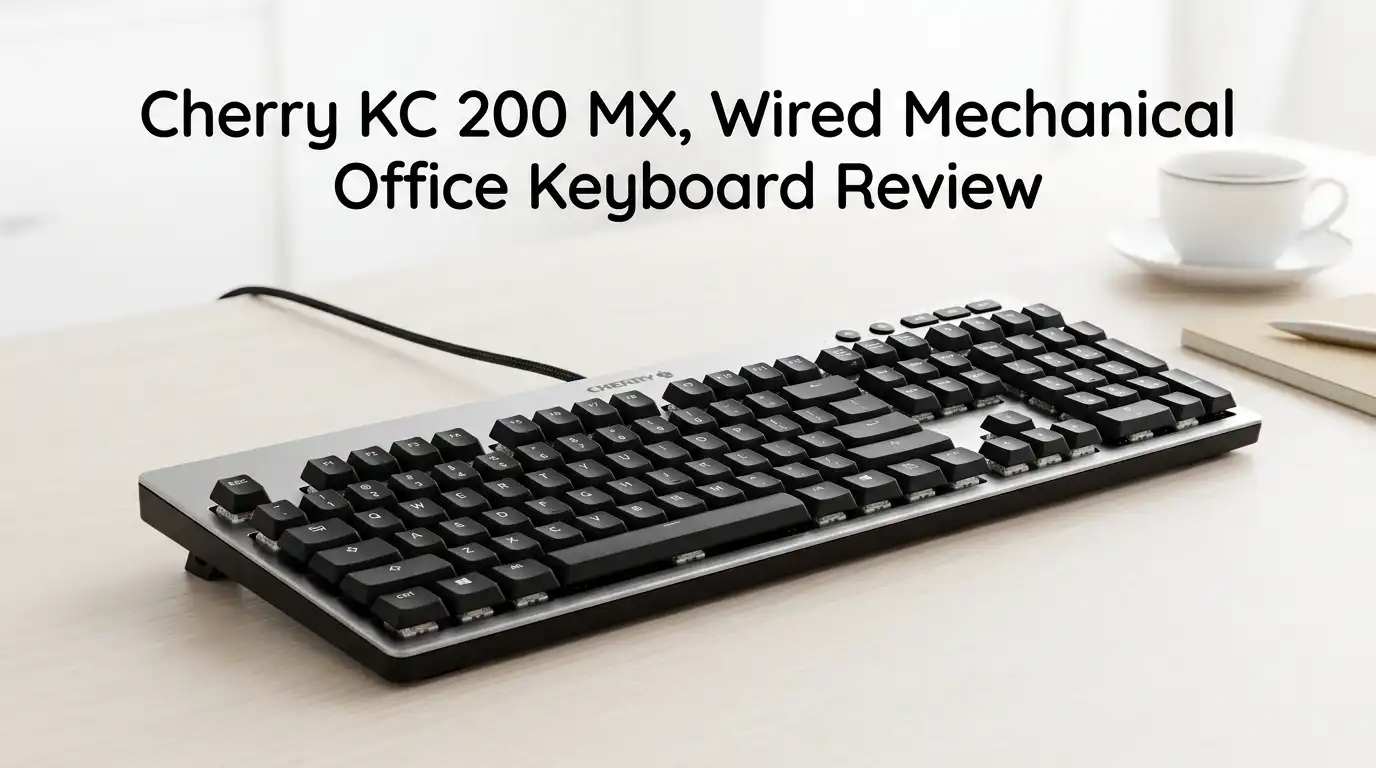
Cherry KC 200 MX, Wired Mechanical Office Keyboard Review
I work in a shared office. For two years my old membrane board clacked away while a coworker shot me looks across the desk. So when the Cherry KC 200 MX landed on my desk promising a quiet mechanical feel, I was curious but skeptical.
Most “silent” keyboards trade away the satisfying typing feel to get there. They go mushy and lifeless. I wanted to know if Cherry actually solved that problem or just slapped a marketing word on the box.
I typed on this board every workday for three weeks straight. Emails, spreadsheets, long writing sessions, and a little gaming after hours. Here is my honest take for 2026.
In a Nutshell
- Truly quiet, truly mechanical. The MX2A Silent Red switches muffle sound without going fully mute, so coworkers genuinely will not notice you typing.
- Built for the office, not the gaming den. This is a full-size 108-key board with a numpad, status LEDs, and a clean look. There is no RGB and no wireless.
- The metal plate is the real upgrade. An anodized aluminum top plate makes a mostly plastic body feel far more premium than its price.
- Two switch choices change everything. Pick Silent Red (smooth, linear, hushed) or MX2A Brown (tactile, a bit clicky-feeling) based on how you type.
- Best for open offices and quiet writers. Worst for gamers, Mac power users, and anyone who needs backlight in a dark room.
- Priced around $90. Fair for the build, though rivals at this price toss in more features.
What Exactly Is the Cherry KC 200 MX?

Last update on 2026-10-13 / Affiliate links / Images from Amazon Product Advertising API Some of the links on this website are affiliate links, which means that at no additional cost to you, I earn a commission if you click through and make a purchase. I only recommend products and services that I believe will add value to my readers. Thank you for your support!
The KC 200 MX is a full-size wired office keyboard. It connects over a fixed USB-A cable. No Bluetooth, no dongle, no battery to worry about.
It was the first board built entirely by Cherry to use its new MX2A switches. These are a real upgrade over the old Cherry MX line, which had grown scratchy and outdated next to cheaper clones.
The headline feature is the Silent Red switch. It is a smooth linear switch with built-in sound dampening. There is also a tactile MX2A Brown option for people who want feedback under their fingertips.
You get 108 keys, a numpad, and four extra keys above it. Three control volume. One launches the calculator, which I found a bit random.
How Does the Unboxing Feel?
The box is plain and businesslike. No theatrics, no glossy enthusiast packaging. You get the keyboard, a short manual, and that is it.
Lifting it out, the first thing I noticed was the weight, or lack of it. At just under 29 ounces, it feels light. Most of the body is plastic.
Then my fingers hit the top plate. The anodized aluminum surface has a faint texture and a cool, premium touch that the price tag does not suggest.
The keycaps sit low in Cherry profile. They feel smooth and slightly curved, cradling each fingertip. The cable is long and sturdy, though a fixed wire does break up an otherwise tidy desk.
Setup took seconds. Plug it in, and it works. No software required to start typing, which I appreciated.
What Is the Typing Experience Like?
This is where the KC 200 MX earns its keep. My review unit had the Silent Red switches, and they are genuinely whisper-quiet.
I typed hard, fast, and angry during deadline crunches. The board never once sounded obnoxious. My coworker stopped noticing me entirely.
The switches are light at 45gf operation force with 1.9mm of pre-travel. Keypresses register easily without slamming.
Honestly, the first two days felt mushy. Silent switches give less feedback than I was used to, so I pressed harder than needed.
By the end of week one, that feeling faded. Factory lubrication makes the keys smooth and consistent, with a deep, soft sound that I came to really like.
Top 3 Alternatives for the Cherry KC 200 MX
If the KC 200 MX is not the right fit, these three are the boards I would point you to instead.


Last update on 2026-10-13 / Affiliate links / Images from Amazon Product Advertising API Some of the links on this website are affiliate links, which means that at no additional cost to you, I earn a commission if you click through and make a purchase. I only recommend products and services that I believe will add value to my readers. Thank you for your support!
Logitech MX Mechanical Wireless Illuminated Performance Keyboard

Last update on 2026-10-13 / Affiliate links / Images from Amazon Product Advertising API Some of the links on this website are affiliate links, which means that at no additional cost to you, I earn a commission if you click through and make a purchase. I only recommend products and services that I believe will add value to my readers. Thank you for your support!
Logitech MX Keys S Wireless Keyboard

Last update on 2026-10-13 / Affiliate links / Images from Amazon Product Advertising API Some of the links on this website are affiliate links, which means that at no additional cost to you, I earn a commission if you click through and make a purchase. I only recommend products and services that I believe will add value to my readers. Thank you for your support!
Keychron V6 Max Wireless Custom Mechanical Keyboard
Are the MX2A Silent Red Switches Actually Silent?
Almost. They are not completely mute, and that is by design. You hear a soft, muffled thud rather than the sharp clack of a normal mechanical board.
In a quiet room you will still notice them. On a video call, nobody on the other end heard a thing.
Compared to the old Cherry MX Reds, the MX2A version is noticeably smoother and deeper. The wobble is gone. The scratch is gone.
If you share a desk, a meeting room, or a home with thin walls, this is the single best reason to buy this keyboard. It is the rare silent switch that still feels good.
That said, if you love a loud, clicky, tactile bump, these will feel flat to you. Silent and clicky are opposites, and Cherry chose silent.
Should You Pick Silent Red or Brown Switches?
This choice matters more than the color. The two switches deliver completely different experiences.
The Silent Red is linear and hushed. There is no bump, just a smooth press from top to bottom. It suits fast typists and anyone in a shared space.
The MX2A Brown is tactile. You feel a small bump at the actuation point that tells your finger the key registered.
One reviewer found the Brown bump a touch too prominent for comfort. I would call it noticeable but not aggressive.
My rule of thumb: pick Silent Red for pure quiet and office harmony. Pick Brown if you want feedback and do not mind a slightly louder, but still gentle, sound.
How Good Is the Build Quality?
The story here is mixed but mostly positive. The bottom shell is plastic and feels a bit hollow if you tap it.
The anodized metal top plate changes the whole impression. Cherry put the premium material exactly where your eyes and fingers land most.
Four rubber feet keep it planted. Two of them flip out to raise the typing angle, which I found comfortable over long sessions.
One real concern: the keycaps are ABS plastic. They feel smooth now, but ABS tends to develop a shine and wear down over years of heavy use.
For an office board used eight hours a day, that is worth knowing. PBT caps would have lasted longer, but they would also have pushed the price up.
What About the Software and Extra Keys?
This was the most frustrating part of my testing. Cherry splits customization across two separate apps, which makes little sense.
Cherry Keys remaps the special keys and the function row. Cherry Utility handles individual keys but only works with Cherry products.
I could not get Cherry Utility to detect the keyboard at all. Cherry Keys worked fine and let me remap that odd calculator button to something useful.
The four extra keys above the numpad are handy if you do a lot of spreadsheet or admin work. Three volume controls and a calculator launcher.
For most office tasks you will never open the software. But if you want deep customization, expect a confusing afternoon.
Is It Any Good for Gaming?
Better than you would expect for an office board, honestly. It has full N-key rollover and anti-ghosting, so every keypress registers no matter how many you mash.
The 1ms response time means there is effectively no input lag. I ran a few panicked rounds of co-op horror and never blamed the keyboard for a death.
The light 45gf Silent Red switches are quick to actuate, which suits fast gaming inputs well.
But this is not a gaming keyboard, and you should not buy it as one. There is no RGB, no macro hardware, no dedicated game mode.
If gaming is your main use, the Keychron V6 Max or a true gaming board will serve you far better. For after-hours casual play, the KC 200 MX is perfectly fine.
Who Should Skip the Cherry KC 200 MX?
Let me be blunt about the flaws so you do not waste $90. This board is not for everyone.
Skip it if you need wireless. It is wired only, with a fixed USB-A cable. There is no Bluetooth and no dongle option at all.
Skip it if you work in the dark. There is no backlighting, only three small status LEDs for Caps, Scroll, and Num Lock.
Skip it if you want extras. Rivals near this price offer wireless, backlight, or hot-swap sockets. The KC 200 MX gives you none of those.
It is also Windows-focused. Mac users can use it, but the layout and software are built for Windows 11, 10, 8, and 7.
Is the Cherry KC 200 MX Worth Buying in 2026?
For the right person, yes. If you want a quiet, well-built, full-size mechanical board for an office, this is one of the best you can buy.
The MX2A Silent Red switches solve the noise problem without killing the typing feel. That alone justifies the upgrade from a cheap membrane board.
But it asks $90 and gives back the basics. No wireless, no backlight, ABS keycaps, and clunky software.
I would still recommend it to writers, office workers, and anyone sharing a desk. The build and silence are excellent, and it does exactly one job extremely well.
My honest score: a solid 8/10 for office use. Just go in knowing what it is not, and you will be happy.
Frequently Asked Questions
Is the Cherry KC 200 MX good for typing all day?
Yes. The light 45gf switches, low Cherry-profile keycaps, and comfortable typing angle make it easy on the fingers over long sessions. The quiet sound also reduces fatigue in shared spaces. It is one of the better all-day office boards in its price range.
Does the Cherry KC 200 MX work with Mac?
It functions on Mac, but it is built for Windows. The key layout and the Cherry software are Windows-focused. Some keys may behave differently, and the customization apps are not designed for macOS. Mac users wanting native support should look at the Keychron options instead.
Is the keyboard really quiet enough for an open office?
Yes, with the Silent Red switches. It produces a soft, muffled thud rather than a sharp clack. Coworkers next to me stopped noticing my typing within a day. It is not fully silent, but it is far quieter than any standard mechanical board.
Does the Cherry KC 200 MX have backlighting?
No. There is no backlight or RGB on either color version. You only get three small white status LEDs for Caps Lock, Scroll Lock, and Num Lock. If you type in low light often, this board will frustrate you.
Can you replace the keycaps or switches?
The keycaps are standard Cherry-profile ABS and can be swapped with compatible sets. However, the switches are not hot-swappable, so you cannot easily change them. Choose your switch type carefully at purchase, because that decision is permanent.
How long is the Cherry KC 200 MX expected to last?
The Silent Red switches are rated for around 50 million keystrokes, and the tactile Brown switches for up to 100 million. The metal plate adds durability. The main wear concern is the ABS keycaps developing shine over years of heavy daily use.
Disclosure: This content is part of an Amazon Creator Connections campaign, meaning I earn a commission from qualifying purchases. Using these links costs you nothing extra but directly supports my blog and future content.

Hi, my name is Lily you can say i am a gadget hunter at this point. Welcome to Gadget Gallery The Gallery of Gadget Reviews