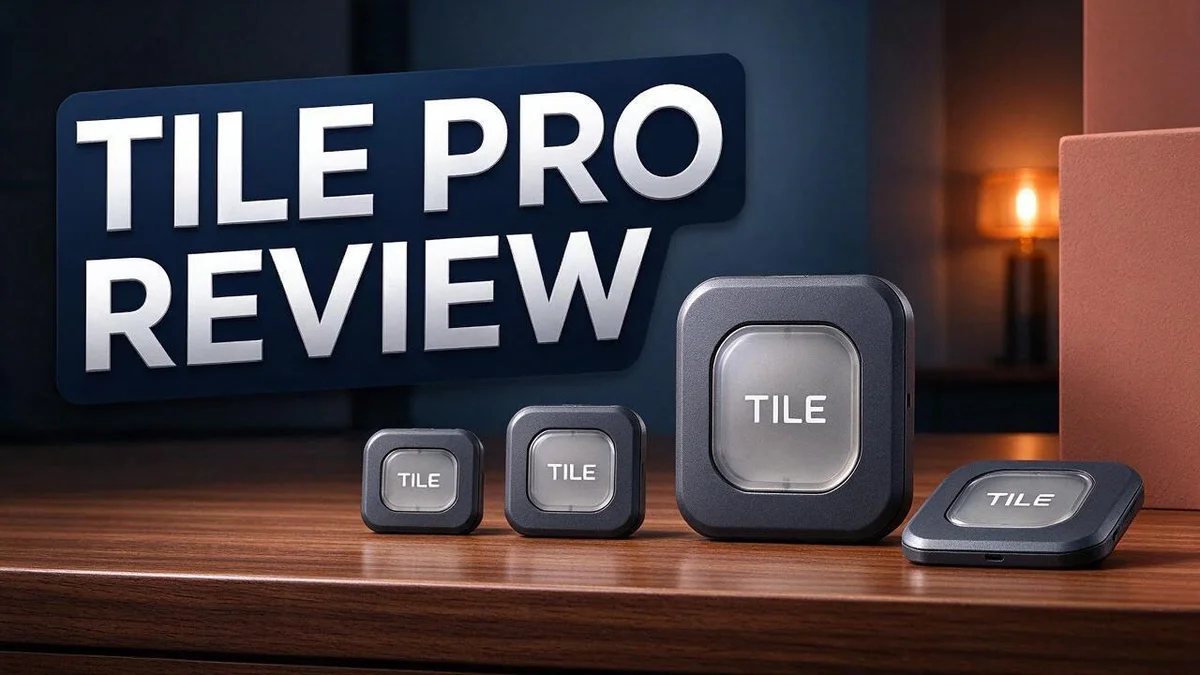
Tile Pro Review 2026: Range, Durability, and Is It Worth It?
Losing your keys can ruin a busy morning. A small tracker can help you find them fast. The Tile Pro is a popular choice for this job.
It offers the longest Bluetooth range in the Tile lineup. Reports show it reaches about 400 feet. Its alarm is also one of the loudest. You can hear it even when your phone is silenced.
The tracker works with iOS and Android. It also includes an SOS alert for emergencies.
There are some downsides, too. The battery lasts up to one year, while other Tile models can last longer. Full features require Tile Premium.
In this review, we will test the Tile Pro’s range, battery, and key features. We will also compare it with rivals like Apple AirTag and Chipolo.
In a Nutshell
- Loud alarm for quick finds: The Tile Pro offers one of the loudest alarms in the Tile lineup. Your keys can ring out from under a couch cushion or deep inside a bag.
- Discreet SOS alerts: The SOS feature sends a quiet emergency alert to your chosen contacts. This helps when you need help but cannot make a loud call.
- Phone finder for silent moments: Press the Tile button to ring your phone, even when it is silenced. You can find it fast without searching every pocket.
- Sturdy everyday build: The water-resistant plastic body is the most durable of all Tile trackers. It can handle rainy walks and rough handling in a busy bag.
- One unified map: Your Tiles and family members appear on the same screen. This makes it simple to check where everyone and everything is at a glance.
- Trade-offs to weigh: Full features require Tile Premium. The battery lasts up to one year, while other Tile models can run up to three years, and there is no rechargeable option.
Range and Connectivity


Last update on 2026-11-04 / Affiliate links / Images from Amazon Product Advertising API Some of the links on this website are affiliate links, which means that at no additional cost to you, I earn a commission if you click through and make a purchase. I only recommend products and services that I believe will add value to my readers. Thank you for your support!
Range decides whether a tracker helps you in daily life. The Tile Pro reaches up to about 400 feet under open conditions, according to a 2021 review. That distance covers most homes, yards, and parking areas.
Real world range often falls short of the spec sheet. Walls, metal objects, and crowded rooms all weaken the Bluetooth signal. Metal car bodies can block it almost completely. Expect shorter distances inside buildings than on an open street.
Think of the range as a search radius, not a guarantee. The Tile app shows the last known location when your item moves out of reach. This clue helps you narrow down where to look next.
Connectivity runs through the Tile app on your phone. Pair the tracker once during setup. After that, the app keeps watch in the background while Bluetooth stays on.
Location history adds another useful layer. The app stores seven days of location records for each Tile. You can check where your keys were spotted earlier in the week.
Range also affects the alarm. The Tile Pro rings from anywhere within Bluetooth reach. Follow the sound first, then use the app map to finish the search.
Outdoor trips need a different mindset. A tracker on a backpack or bike can travel far from home. Check the signal before you leave, because a tracker that connects to nothing cannot help you.
Your phone matters as much as the tracker. Live updates depend on your phone staying nearby. If you leave the house without your phone, the tracker cannot report its position to you.
Test the connection before you need it. Walk through your home and step into each room. Note where the signal drops. Knowing these weak spots saves time on a rushed morning.
Strong range makes the Tile Pro practical for everyday use. Pair that reach with a quick test, and the tracker becomes a dependable helper.
Alarm and Finding Features
Finding a lost item often takes more time than it should. The alarm and finding tools help you cut that search short.
Start with the map. Open the Tile app and check the last known location first. This tells you where to begin before you press anything.
Use the alarm as the final step. Once you are close, the sound guides you to the exact spot. Listen from different corners of the room to pinpoint the source.
Sound can bounce off walls and furniture. A lost wallet under a jacket may seem far away even when it sits right beside you. Move slowly and pause often.
Noisy spaces need extra care. A kitchen with a running dishwasher or a busy car park can hide the chime. Turn off background music and wait for quiet before you search.
Test the sound before you dig deeper. Ring the Tile from the app to hear where the chime seems strongest. If it sounds faint, check under cushions, behind couches, and inside bags.
Sometimes the item sits out of range. In that case, the alarm will not sound. Tile relies on other Tile users nearby to share location signals, so the map may still show a useful spot.
Try a quick test at home. Hide the tracker in a drawer, then ring it from the app. This shows how far the sound carries in your rooms. You will feel more confident on busy mornings.
Good habits make a real difference. Attach the Tile to the items you lose most often. Check the map each evening so you know where your items rest.
Walk the route you took that day. Retrace your steps through the hallway, kitchen, and car. Many lost items turn up within a few minutes of a second look.
Use the alarm with care in shared spaces. Coworkers and family members may not expect a sudden chime. A quick warning helps everyone stay calm.
Durability and Build
Durability decides whether a tracker survives real life. Keys, bags, and backpacks take a lot of daily wear. This section looks at how the Tile Pro holds up over time.
The plastic shell handles small knocks. Keys often hit tile floors, car doors, and kitchen counters. The shell is built to take these bumps in stride during normal use.
Water resistance helps on wet days. Keys often get soaked on rainy walks or stay in damp pockets. The water resistant body helps guard the internal parts from moisture.
The battery can be replaced. Many trackers stop working once their battery runs out. With the Tile Pro, you can swap the battery instead of replacing the whole unit.
Battery life sets the pace. The Tile Pro runs for up to one year on a single battery. That gives you a long stretch before the next change.
Other Tile models often last longer. Some reach up to three years on one battery. The Tile Pro trades some battery life for its strong range and loud alarm.
There is no rechargeable option. Some users wish for a charging port instead. Each battery change becomes a small task you must remember.
Plan battery changes early. Set a yearly reminder on your phone. A simple calendar note helps you avoid a silent tracker when you need it most.
Check the body after rough days. Look for loose parts or cracks around the edges. Quick checks keep your tracker ready for the next search.
Keep the speaker area clean. Dust and lint can build up over time. A soft brush keeps the sound clear and helps the alarm stay loud.
Choose a protective holder. A case or keyring cover absorbs friction from other items. This simple step reduces wear and extends the life of the tracker.
A tough tracker keeps working through bumps, rain, and busy days. You spend less time worrying about lost items. Good care and a smart battery plan help the Tile Pro stay useful for years.
Top 3 Alternatives
Apple AirTag

Last update on 2026-11-04 / Affiliate links / Images from Amazon Product Advertising API Some of the links on this website are affiliate links, which means that at no additional cost to you, I earn a commission if you click through and make a purchase. I only recommend products and services that I believe will add value to my readers. Thank you for your support!
Apple AirTag works with the Find My app on your iPhone. It is a great pick if you already use Apple devices. The tag connects to the large Find My network, so you can often locate lost items even when they are far away.
Samsung SmartTag2

Last update on 2026-11-04 / Affiliate links / Images from Amazon Product Advertising API Some of the links on this website are affiliate links, which means that at no additional cost to you, I earn a commission if you click through and make a purchase. I only recommend products and services that I believe will add value to my readers. Thank you for your support!
Samsung SmartTag2 pairs with SmartThings Find. It suits people who use Galaxy phones every day. Its built-in speaker helps you find nearby items fast. The tag also has a button that can trigger actions on your phone.
Chipolo POP

Last update on 2026-11-04 / Affiliate links / Images from Amazon Product Advertising API Some of the links on this website are affiliate links, which means that at no additional cost to you, I earn a commission if you click through and make a purchase. I only recommend products and services that I believe will add value to my readers. Thank you for your support!
Chipolo POP is a friendly and easy choice for many users. It works with both Apple’s Find My network and Google’s Find My Device network in many regions. Its loud speaker helps you hear where your keys or bag are hiding. It also comes in bright colors, so it is easy to spot.
Battery Life and Maintenance
A tracker only helps when it has power. Good battery care keeps your Tile Pro ready for the next lost item.
Write down the date you change the battery. Add a calendar reminder for ten months later. This gives you time to plan a swap before the charge fades.
Check the Tile app often for battery status. Open each tracker screen and look for the battery indicator. A quick glance takes only a few seconds.
Cold weather drains batteries faster. A tracker in a winter coat pocket may lose charge sooner. Keep a spare coin cell in a kitchen drawer for quick swaps.
Swap the battery with care. Open the back cover gently with your fingertips. Follow the sign inside the case for the correct direction. Never force the cover.
Wipe the contacts before you close the case. Dust and oil can block a clean connection. Press the back cover until it clicks into place.
Test the tracker after every swap. Open the Tile app and press the ring button. If the sound plays clearly, the new battery works well.
Frequent alarms use more power. Save the ring feature for real searches. This habit stretches each battery and keeps your tracker ready.
Watch for warning signs. A weak alarm or a slow response in the app can signal low power. Replace the battery soon after you notice these signs.
Store spare batteries in a cool dry place. Heat and moisture can shorten their shelf life. Label each pack with the install date.
Pair battery checks with a habit you already keep. Check the tracker when you change the clocks or clean out your bag. Small routines prevent big surprises.
Good habits protect your tracker and your peace of mind. A little care each month keeps the Tile Pro working when you need it most.
Tile Premium and the App Experience
Tile Premium adds extra power to the Tile app. Many people want to know what the upgrade really offers. This section explains the app experience in simple terms.
The app opens to a unified map. It shows your Tile trackers and your family members in one view. Parents can check on kids and belongings from the same screen.
The home screen is clean and easy to scan. Main tools sit in clear rows. New users can find what they need without much effort.
Location history reaches back seven days. You can see where a tracked item traveled over the past week. This helps when a bag goes missing after a busy day out.
The SOS alert gives you a quiet way to ask for help. You can send a discreet emergency signal without drawing attention. Keep this feature in mind when you walk alone at night.
The app also helps you find your phone. Press the Tile button, and your phone rings even when it is silenced. This small trick saves time at home or at the office.
Family sharing works best when everyone joins the same map. Each person sees the trackers you choose to share. Everyone stays informed without sending constant messages.
Full features need Tile Premium. Basic tracking tools remain available without it. Premium users unlock the complete set of app features, so check what you need first.
Notifications matter a lot. Turn them on so the app alerts you when you leave an item behind. A quick alert can stop a lost item before you reach the door.
Other brands like Apple AirTag, Chipolo, and Pebblebee also offer their own apps. Compare the map, history, and emergency tools side by side. Choose the option that matches your daily routine.
Tile Premium suits people who want more control. The app turns a small tracker into a full tracking system. Take a few minutes to explore the menus and learn each tool.
Pros and Cons
Pros
- Longest range among Tile models, so you can locate items farther away.
- Loudest alarm in the lineup, which helps in noisy rooms or under couch cushions.
- Helps you find lost items in a busy home or a crowded office.
- Works well for people who often misplace bags, remotes, or keys in public places.
Cons
- The loud alarm can startle people in quiet places like libraries.
- Signal range can drop behind thick walls or metal objects.
- Strong competition from Apple AirTag and Chipolo may sway buyers.
Who Should Buy It
The Tile Pro fits people who lose small items every week. It suits anyone who spends mornings searching for keys before work.
Parents with school-aged children may find it helpful. A tracker can sit inside a backpack or lunch bag. Kids also learn to check their gear before they leave home.
Outdoor lovers can also benefit from this tracker. Hikers, campers, and anglers often lose gear in tall grass. Clipping a tag onto a daypack makes dropped items easier to find.
Frequent travelers form another strong group. People who juggle luggage, passports, and carry-on bags gain extra peace of mind. A tag tucked into a suitcase pocket can help on busy airport days.
Gym-goers and commuters often leave bags in lockers or on trains. A tracker on a gym bag or laptop case can prevent a stressful search. Students who share dorm rooms may also appreciate the extra help.
Older adults who often misplace glasses or wallets may also like this model. Caregivers can help set it up. Family members can then check on items without making constant phone calls.
Some buyers should look elsewhere. A person who rarely leaves home may not need such a long range. Someone who only wants to track a garage tool chest may prefer a simpler option.
Shoppers who want a very slim tag for a wallet should compare sizes first. Checking the dimensions before buying saves time and avoids surprises.
Think about your daily routine first. Ask yourself where you lose things most often. Your answer will show whether this tracker fits your life.
Final Verdict
The Tile Pro earns a strong place on any shortlist of trackers. It suits people who want reach and volume above all else.
Our overall verdict is positive for the right owner. Its durability and range set it apart from the rest of the Tile lineup. Still, it is not the only choice on the shelf.
Think about battery habits before you buy. The model runs on a replaceable battery that lasts up to one year.
Other Tile models can last up to three years. Plan a yearly battery swap if you choose this one.
Full features require Tile Premium. Expect to use the paid plan if you want the complete experience.
Compare the competition before you commit. Apple AirTag, Chipolo, Pebblebee, moto tag, and SmartTag2 all compete hard.
Each brand offers a different strength. Match the features to your daily routine rather than chasing specs alone.
Think about where you will use it most. A busy office, a school bag, or a travel case each brings different needs.
Small trade offs can matter more than headline features. Weigh each detail before you decide.
Our final takeaway is simple. Choose the Tile Pro if you need maximum range and a loud alarm.
Pick a lighter tag if you only track items inside your home. A short range is enough for a small space.
Read the setup guide before you pair the tag. Test it right away and ring it from the app to confirm the alarm reaches you.
Your tracker only helps when it works at the moment you need it. Check the battery level every few months. Quick checks keep your items safe and easy to find.
A good tracker saves time, stress, and frustration. The Tile Pro gives you a strong option for that goal.
Frequently Asked Questions
Does the Tile Pro work with both iPhone and Android?
Yes, the Tile Pro works with both iOS and Android devices. You download the Tile app and pair the tracker in a few taps. This makes it a flexible pick for families with mixed phones.
How does the SOS button help in an emergency?
The SOS alert sends a discreet emergency signal to your trusted contacts. You can trigger it without drawing attention, which helps in tense moments. Add your contacts in the app before you need them.
Can I see where my Tile Pro was last seen?
Yes, the app keeps a 7-day location history for each tag. You can check past spots when an item goes missing. This helps you retrace your steps after a busy day out.
How long does the battery last, and can I replace it?
The battery lasts up to one year before it needs a swap. You can replace it yourself, so you do not need a new tag. Set a yearly calendar reminder so you never miss the change.
What should I do if my Tile Pro does not show up in the app?
Check that Bluetooth is on and the tag has power. Keep your phone within range and open the app again. Restart the app if the tag stays hidden, since a quick reset often fixes the issue.

Hi, my name is Lily you can say i am a gadget hunter at this point. Welcome to Gadget Gallery The Gallery of Gadget Reviews