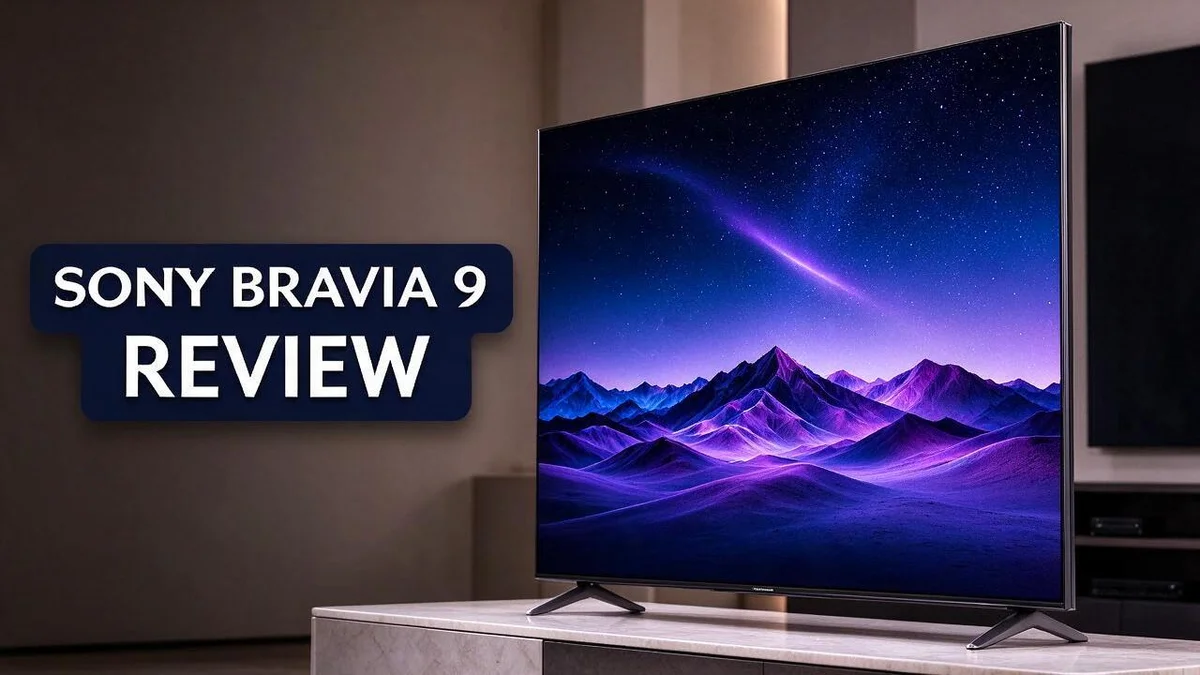
Sony Bravia 9 Review: Everything You Need to Know
Looking for a TV that makes every scene pop? The Sony Bravia 9 might be the one. It delivers a bright picture that stands out in any room.
This 65 inch model uses a 4K Mini LED QLED panel. It pairs that screen with Sony’s XR Processor. The result feels vivid and clear.
Here is what really stands out. The TV gets very bright and shows strong HDR detail.
Its screen handles reflections well, so daytime viewing stays comfortable. Local dimming also looks excellent in dark scenes.
Fast sports and action fans may notice some motion issues. Still, many viewers find the overall picture hard to beat.
In a Nutshell
-
Bright and bold HDR: This TV gets very bright, so sunny scenes and glowing highlights look lively. Dolby Vision and HDR10 support add extra depth to movies and shows. Colors stay rich even during fast, high contrast moments.
-
Gaming-ready setup: The TV handles 4K at 120 frames per second. VRR and ALLM features help console players enjoy smoother and more responsive gameplay. Fans of fast action games will notice the quick response.
-
Quick and smooth system: The operating system responds fast. Menus open quickly, and apps switch with very little waiting. This makes everyday use feel simple and easy.
-
Plenty of connections: Four HDMI ports make it simple to link a console, streaming box, and soundbar. Two USB ports, Wi-Fi, and Bluetooth add more ways to connect devices.
-
Newer model on the way: The Bravia 9 II uses RGB Mini LED technology. Buyers who want the latest technology can look at that successor too.
-
Strong rival lineup: Many shoppers compare this model with the Sony A95L, the LG G4, and the Samsung QN95D or S95D. Each rival offers a different picture style, so it helps to compare them side by side.
Picture Quality and HDR Performance


Last update on 2026-10-31 / Affiliate links / Images from Amazon Product Advertising API Some of the links on this website are affiliate links, which means that at no additional cost to you, I earn a commission if you click through and make a purchase. I only recommend products and services that I believe will add value to my readers. Thank you for your support!
The picture quality on the Sony Bravia 9 impresses from the first scene. The TV supports three major HDR formats: HDR10, Dolby Vision, and HLG. Most streaming and disc content works without any fuss.
Dolby Vision deserves special attention. This format carries scene by scene instructions. The TV reads those instructions and adjusts brightness and color to match the creator’s intent.
The XR Processor works behind the scenes. It handles the incoming signal and shapes how each frame looks. Subtle detail appears in textures, faces, and fine patterns.
Color accuracy is a strong point too. Standard dynamic range content looks natural and balanced. HDR material keeps its intended tones, so skin and landscapes appear true to life.
Dimming zones also matter a lot. Sources list counts from about 1500 to 2800. Exact numbers can vary by region, so check the spec sheet.
More zones give the panel finer control. Light can focus on bright objects while nearby areas stay balanced. This helps mixed scenes, such as a sunset sky above a dark city.
Picture mode choice makes a difference. Viewers should pick a mode that matches their room lighting. Bright rooms suit vivid settings, while dim rooms look better with calmer presets.
Good factory settings save time. Many owners can enjoy the picture right away. Small tweaks to brightness and contrast can still refine the look for personal taste.
Consistent results come from the panel and processor working together. The picture stays clean during movie nights and everyday channel surfing. Detail holds up well across different content types.
Movie fans get the most from this setup. Films shot in HDR show their full range of tones. Casual viewers still enjoy sharp, colorful images every day.
Overall, the picture quality earns high marks. HDR support, color accuracy, and fine dimming control combine well. Fans of cinematic detail will likely feel satisfied.
Local Dimming and Brightness
Local dimming works like a grid of tiny light switches. The panel splits its backlight into many zones. Each zone brightens or dims on its own.
This design matters most in mixed scenes. A bright moon can sit beside a deep black sky. The TV lights up one area and keeps the other area dark.
Blooming is the main thing to watch for. Bright objects on dark backgrounds can show a soft halo around their edges. Mini LED designs help limit this glow, but no LCD panel removes it fully.
Brightness works hand in hand with dimming. Strong peak brightness lets small highlights, like stars or street lamps, pop against the darkness. Those points look sharp and lifelike instead of faint.
Bright rooms gain the most from this pairing. Daylight can wash out a weaker screen. This set keeps shadow detail and color visible even when the curtains stay open.
Sports fans see a different side of this feature. Bright stadium lights sit beside dark stands, and the zones handle that contrast with care. Players stay clear against the crowd, so the action remains easy to follow.
Contrast is the key measure here. Rich blacks sit next to bright whites, and that gap creates depth. The more precise the zones, the cleaner that gap looks on screen.
Movie fans should test the dimming settings in the picture menu. Some options push the backlight harder for maximum punch. Others feel gentler on the eyes during long evenings. Try a favorite film in each mode before settling on one.
Night viewing gets a boost too. Subtle shadows in dim scenes stay clear. Gray haze stays low, so the image keeps its depth from start to finish.
Keep the backlight level in mind for eye comfort. A very high setting in a dark room can feel harsh over long sessions. Lower the level a little after sunset and the picture still looks rich.
Tip: Start with the mode that suits your room, then fine tune the backlight by eye. Small changes often make the biggest difference.
Motion Handling and Gaming
Gaming feels smooth on this screen. The panel refreshes at 120Hz, so motion looks clean in many games. Players also get variable refresh rate support. This feature matches the screen speed to the frame rate of the console.
Low input lag matters most in fast games. Auto low latency mode switches the TV into a quicker picture setting when a console connects. Players then respond faster to every onscreen move.
Motion handling is the weak spot here. Quick camera pans can leave some blur on the screen. Racing and shooter titles may show faint trails around fast objects. Players who focus on these games should test the motion settings first.
Picture settings shape the gaming feel. Game mode keeps processing light and quick. Some players enjoy a little extra smoothing in slower adventure titles. Others prefer the raw look with no added effects. Trying both options helps.
Extra processing can hurt clarity. Sharpness and noise reduction add steps to the image. Turning them down often keeps fast action cleaner. Small changes can make a big difference during competitive play.
Cables matter more than many people think. A 120Hz signal needs a cable that supports HDMI 2.1 bandwidth. An older cable may limit the frame rate. Check the console output settings too, so they match the TV.
Genre matters for the best results. Fighting games and first person shooters reward quick response. Slower story games feel fine with a lighter setup. Match the settings to the type of game you play most.
Sports fans get a mixed result. Fast balls and quick player moves may show some smear. Adjust the motion settings until the action looks crisp for each game.
Setup takes only a few minutes. Connect the console to an HDMI port and rename that input so it shows the console name. Switching between games and streaming becomes quick and easy.
Final tip for gamers. Turn on game mode first. Then check the motion and variable refresh options. Adjust each setting by eye until the picture feels smooth and clear.
Top 3 Alternatives
LG C5 OLED

Last update on 2026-10-31 / Affiliate links / Images from Amazon Product Advertising API Some of the links on this website are affiliate links, which means that at no additional cost to you, I earn a commission if you click through and make a purchase. I only recommend products and services that I believe will add value to my readers. Thank you for your support!
Want deep blacks and vivid colors? The LG C5 OLED delivers both. Each pixel lights up on its own, so dark scenes look rich and clean.
This set suits movies and gaming well. Its fast response time keeps action smooth. Viewers also get strong support for popular HDR formats.
Samsung S90D OLED

Last update on 2026-10-31 / Affiliate links / Images from Amazon Product Advertising API Some of the links on this website are affiliate links, which means that at no additional cost to you, I earn a commission if you click through and make a purchase. I only recommend products and services that I believe will add value to my readers. Thank you for your support!
Samsung brings its own take on OLED technology. The Samsung S90D OLED produces bright, punchy pictures with excellent contrast.
Glare control is a real highlight. The screen handles sunny rooms with ease. Colors also stay accurate when you watch from an angle.
TCL QM8K

Last update on 2026-10-31 / Affiliate links / Images from Amazon Product Advertising API Some of the links on this website are affiliate links, which means that at no additional cost to you, I earn a commission if you click through and make a purchase. I only recommend products and services that I believe will add value to my readers. Thank you for your support!
Need a screen that shines in a bright living room? The TCL QM8K is a strong pick. It uses Mini LED backlighting to reach high brightness levels.
It fits large spaces well. Contrast looks solid, and the picture stays lively during daytime viewing. Gamers will appreciate its smooth motion handling.
Each of these sets offers a great picture. Think about your room, your lighting, and how you watch. Then choose the one that fits your home best.
Smart Platform and Connectivity
The operating system feels quick and responsive. Menus open fast, and scrolling stays smooth. Everyday use feels simple for the whole family.
Speed matters more than many people expect. A slow menu can spoil movie night before the film even starts.
Wireless options keep the setup clean. The TV includes wireless internet and Bluetooth. You can connect a phone, a speaker, or a pair of headphones without extra clutter.
Bluetooth pairing takes only a few moments. Game controllers and audio gear can link without messy cables.
Four HDMI ports cover most living rooms. A game console, a streaming box, and an audio system can all connect at once. Fewer switches mean less hassle.
Two USB ports add another layer of flexibility. You can play photos or videos from a flash drive. Storage sticks also help when you need a quick file transfer.
Think about your current setup first. Many homes use a console, a streaming stick, and a soundbar. The Bravia 9 has enough ports for all three.
Plan the layout before mounting. Check where each cable must run. Wireless links can reduce the number of wires behind the stand.
A clean layout also makes upgrades easier. New devices can plug into an open port without rearranging the whole room.
Wireless gear also brings flexibility. You can move a speaker to another corner without new wires. This freedom suits renters and families who rearrange rooms often.
Software updates play a big role too. Updates can add new apps, fix bugs, and improve stability. Turn on automatic updates so the system stays current.
Good menu design also helps. Clear icons and quick search keep you from scrolling through long lists.
Guests find the setup easy too. A simple home screen means visitors can start a show without asking for help.
Test the connections on day one. Play a streaming app, pair a controller, and check each HDMI input. Quick tests catch problems early.
Keep a few labels on the cables as well. Clear labels save time when you swap a device.
Overall, the connections feel complete. The mix of wireless and wired options suits most homes. Smart features and simple ports make daily life easier.
Pros and Cons
Pros
- The anti-reflective screen keeps glare low in sunny rooms.
- HDR support covers HDR10, Dolby Vision, and HLG.
- Everyday shows look natural thanks to good SDR accuracy.
- The bright panel makes HDR highlights stand out.
Cons
- A newer Bravia 9 II with RGB Mini LED now exists.
- This model comes in only one size, 65 inches.
- OLED rivals like the Sony A95L offer deeper black levels.
Who Should Buy It
This TV suits people who want a large and bright screen for movies and shows. It fits best with viewers who watch HDR content often.
Movie fans will feel right at home. Films with strong contrast look striking here. Bright highlights pop, and dark scenes keep their detail.
First time buyers moving up from a small set will notice the jump. The step up in brightness and detail feels clear right away.
Sunny living rooms call for a screen that stays lively. This set keeps colors vivid even when daylight pours through the windows.
Sports and nature fans also gain a lot. Lush greens and bright skies look lively and natural on this panel.
Buyers who prefer LCD over OLED will find a strong choice. Some shoppers avoid OLED because of concerns about image retention over time.
Households with mixed viewing habits gain flexibility. One screen can handle cartoons, sports, and cinema nights without much fuss.
Home theater builders may also like the setup. Strong HDR support helps those who want a cinema style feel in the living room.
Casual gamers who play story rich titles may enjoy it too. Fast action fans may want to look at other options.
Who should look elsewhere? People who watch fast sports every day may need a different model. Motion lovers should compare options first.
Compact flats may feel crowded by a screen this large. Small rooms often work better with a smaller panel.
Shoppers should measure the wall first. Check the viewing distance too, since bigger screens work best from further back.
Think about how often you watch each day. Daily movie nights suit this set better than occasional channel surfing.
Ask yourself which features matter most. Picture quality, brightness, and daily ease should guide the final choice.
In short, this model fits viewers who want bright HDR and a sharp big screen. Think about your daily habits before you decide.
Final Verdict
The Sony Bravia 9 earns a strong place in our final verdict. It delivers bright, punchy pictures that make the most of HDR content.
Strong local dimming does much of the heavy lifting. Dark scenes gain real depth, and bright highlights stay clean. Viewers notice the difference fast during night scenes and space shots.
Picture quality is the main reason to buy. Mixed content looks consistent, from news broadcasts to big films. Colors stay accurate enough for daily viewing without constant tweaking.
Motion is the weak spot, and it matters. Fast pans and quick sports can blur more than some rivals allow. Gamers who chase the smoothest motion may feel this limit most.
Your priorities should guide the choice. If brightness and HDR punch matter most, this model stands out. If deep black levels and sharp motion matter more, another panel may serve you better.
Viewing distance shapes the experience too. Sit back far enough to take in the full frame. Very close seating can make bright highlights feel intense.
Daytime viewing also works well. Highlights stay visible when sunlight fills the room, so afternoon shows stay enjoyable.
Future proofing matters too. HDR content keeps growing across streaming services. A bright panel stays useful as more titles arrive.
Simple setup rewards patient owners. Take time with the picture settings. Small changes can bring out more detail in dark rooms.
Our overall take is simple. The Bravia 9 offers a strong picture for bright living rooms. It suits viewers who want a large, lively screen for everyday entertainment. The verdict stays positive, with one clear warning about motion.
Confidence grows with time. Most viewers adjust quickly and settle into a routine. The picture soon feels like home. Few sets make that switch this smooth, so trust your instincts.
Final recommendation: Watch it in person if you can. Compare it side by side with a rival at a store. Your own eyes will show whether this picture style fits your home.
Frequently Asked Questions
Does the Bravia 9 work well for gaming?
Yes, it supports 4K at 120fps with VRR and ALLM. These features help games run smoothly and respond quickly. Console players can enjoy a more fluid feel during fast action, especially with a modern console that supports these settings.
How many ports does it offer?
The set includes 4 HDMI ports and 2 USB ports. This layout fits a game console, a soundbar, and a streaming device without much trouble. Your connections stay organized, and you still have room to add more gear later.
How does it compare with rival TVs?
The Sony A95L and LG G4 both use OLED panels. The Samsung QN95D and S95D offer another strong option for buyers who want a bright, large screen. Try to see each model in person before you decide. A side by side view shows which picture style suits your room and your habits.
Does the operating system feel quick to use?
Yes, the system responds well to remote commands. Menus and apps open without long waits. This helps a lot when you switch between streaming services or check settings during a movie night.

Hi, my name is Lily you can say i am a gadget hunter at this point. Welcome to Gadget Gallery The Gallery of Gadget Reviews